
OCX(ActiveX COM) 控件测试容器(tstcon32) 失败 问题 解决
问题
- 在ForceControl|力控"组态开发环境"(32位)-复合组件-ActiveX容器,添加"DBGrid Control"控件,不正常,为空白,无属性、方法;
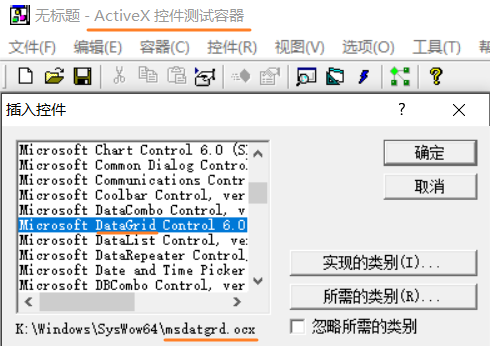
- 在tstcon32(ActiveX 控件测试容器)(32位)-容器-插入新控件|插入控件,失败,报错"未能创建控件"。
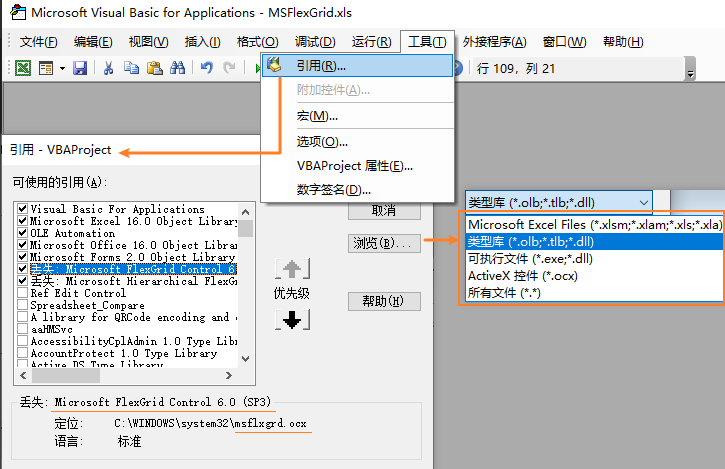
- 在Excel(64-bit)-开发工具-Visual Basic-Microsoft Visual Basic for Applications-工具-引用、附加控件,可以添加,但无法实例化控件。
测试好多OCX组件都存在此问题。
OCX控件
"DBGrid Control"控件对应
- "X:\Windows\SysWow64\msdatgrd.ocx"
- "Microsoft DataGrid Control 6.0 (SP6) (OLEDB)"
ActiveX 控件测试容器
Excel VBA 引用控件
解决
目前找到的3个核心
RegSvr32
使用RegSvr32注册。
-
需使用管理员权限运行,
-
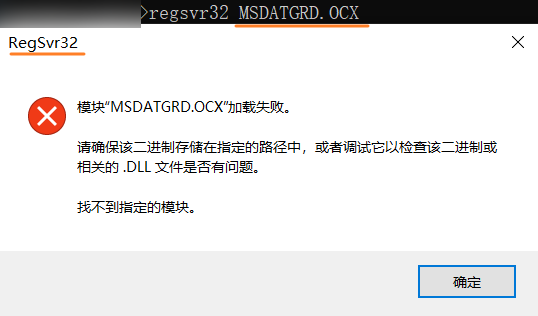
需指定OCX路径,包含".OCX"文件后缀。
-
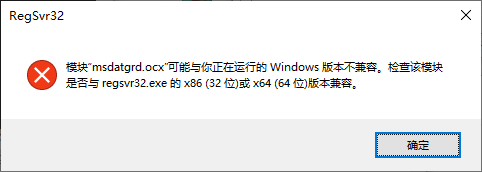
OCX区分32位、64位,需放到对应的系统文件夹"SysWOW64"、"system32"。
-
无需关注"RegSvr32.exe"的"system32"(64-bit)、"SysWOW64"(32-bit)版本。
参见:activex - How to register both the Win32 and x64 version of an OCX control on single computer - Stack Overflow、Using 32-bit or 64-bit ActiveX Components on x64 Windows – Chilkat Tech Notes
参考:
- 如何使用 Regsvr32 工具以及对 Regsvr32 错误消息进行疑难解答 - Microsoft 支持
- File System Redirector - Win32 apps | Microsoft Learn
否则报错:
- 路径问题:
![RegSvr32 - 模块 MSDATGRD.OCX (ActiveX) .DLL 加载失败 请确保该二进制存储在指定的路径中,或者调试它以检查该二进制或相关的.DLL文件是否有问题。找不到指定的模块.png]()
- x86 32位 x64位问题:
![RegSvr32 模块 ocx 与 Windows 版本不兼容 x86 32位 x64位]()
- 权限问题:
![RegSvr32 - 模块已加载 但对 DllRegisterServer 调用失败]()
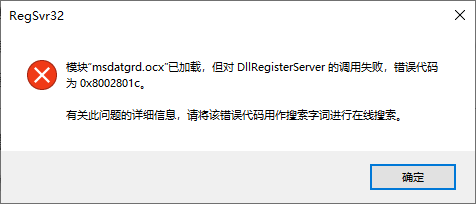
成功时: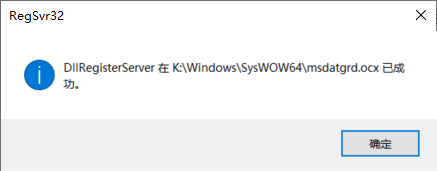
依赖检查
使用Dependencies - An open-source modern Dependency Walker检查,此处无依赖问题。
展开后第二级报缺少依赖,但最终不影响。
- "K:\Windows\SysWOW64\kernel32.dll" \ "ext-ms-win-oobe-query-l1-1-0.dll",
- "K:\Windows\SysWOW64\ole32.dll" \ "ext-ms-win32-subsystem-query-l1-1-0.dll"。
加载过程
使用Process Monitor - Sysinternals | Microsoft Learn检查,是License(vbctrls.reg)问题。
参见下面的[[License]]。
问题解决
相关尝试
仅作记录
OleViewDotNet
流程:
- 安装
tyranid/oleviewdotnet: A .net OLE/COM viewer and inspector to merge functionality of OleView and Test Container
PowerShell Gallery | OleViewDotNet 1.16 - 配置
允许执行策略
about_Execution_Policies - PowerShell | Microsoft Learn - 执行调用
- PowerShell-
Show-ComDatabase, - 文件系统-"Program Files\WindowsPowerShell\Modules\OleViewDotNet\1.16\OleViewDotNet.exe"
OS对VB6的支持
操作系统已支持,无需额外配置。
详情:Support Statement for Visual Basic 6.0 | Microsoft Learn-"VB6 Runtime Extended Files"
MSSTDFMT.DLL
对应"Microsoft Data Formatting Object Library",貌似为"msdatgrd.ocx"依赖库,对应"can not initialize data binding"问题,但不是此问题。
此处仅记录过程:
- vb.net - msstdfmt.dll 1.0.0 missing error - Stack Overflow
- Windows Cannot Initialize Data Bindings 问题的解决方法-CSDN博客
- RuntimePack V21.7.30
64位进程 32位组件
貌似64位进程可以运行32位组件,已经由ActiveX转换。
参见:ActiveX OCX on 64-bit Office-VBForums|
同名控件
- 显示的位置(system32)与文件系统'实际'位置(syswow64)不符。
- 文件系统中两个位置,Excel(64位)中生效的控件实际路径是"K:\Program Files\Microsoft Office\root\vfs\System\MSCOMCTL.OCX"(64位)
另一个"K:\Windows\SysWOW64\MSCOMCTL.OCX"为32位。
![Excel - Microsoft Visual Basic for Application(VBA) - 附加控件 system32-MSCOMCTL.OCX,ActiveX 控件测试容器 SysWow64,TreeView Control]()
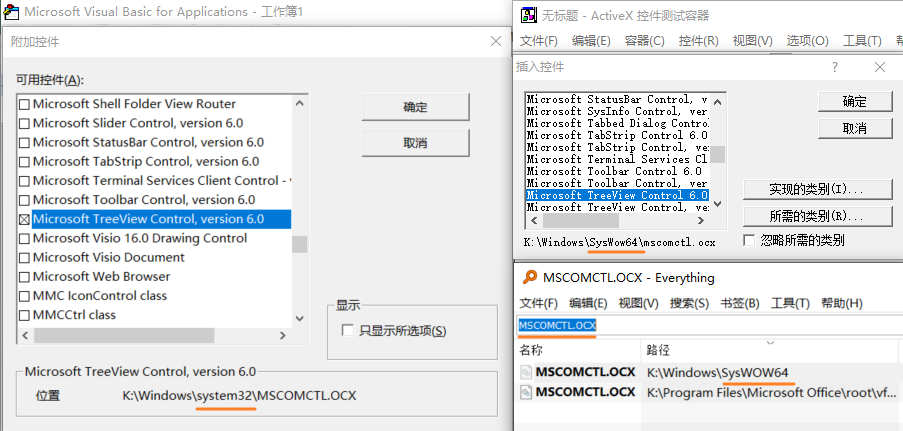
32位、64位检测
License
- [RESOLVED] Run-time error 429 - license info not found-VBForums
- Richtext Objects.. I need some help please? - AutoItX Help and Support - AutoIt Forums
- Home Budget-Slip System-VBForums
- VB.NET或C#报错:You must hava a license to use this ActiveX control. - JustXIII - 博客园
- VS2010中ActiveX控件"未能实例化activex控件 因为这需要设计时授权"解决办法 - 蒋鹿丸 - 博客园
运行时库runtime
非依赖问题,但仍尝试安装
- Microsoft Visual Basic Runtime 6.0 SP6
- Visual Basic 6.0 Service Pack 6 运行时扩展文件的累积更新汇总的说明 - Microsoft 支持
兼容性问题
做好以上几点,没有老旧兼容性问题。
- ActiveX OCX on 64-bit Office-VBForums|
- Problems using on old OCX ActiveX control in Visual Studio 2022. : r/visualbasic
- Old OCX file not reregistering on some windows 11 pc's : r/visualbasic
Win11 Smart App Control(SAC)
- Application Control for Windows | Microsoft Learn
- Old OCX file not reregistering on some windows 11 pc's : r/visualbasic

 浙公网安备 33010602011771号