
Lua IUP Plot 柱状图 示例
效果
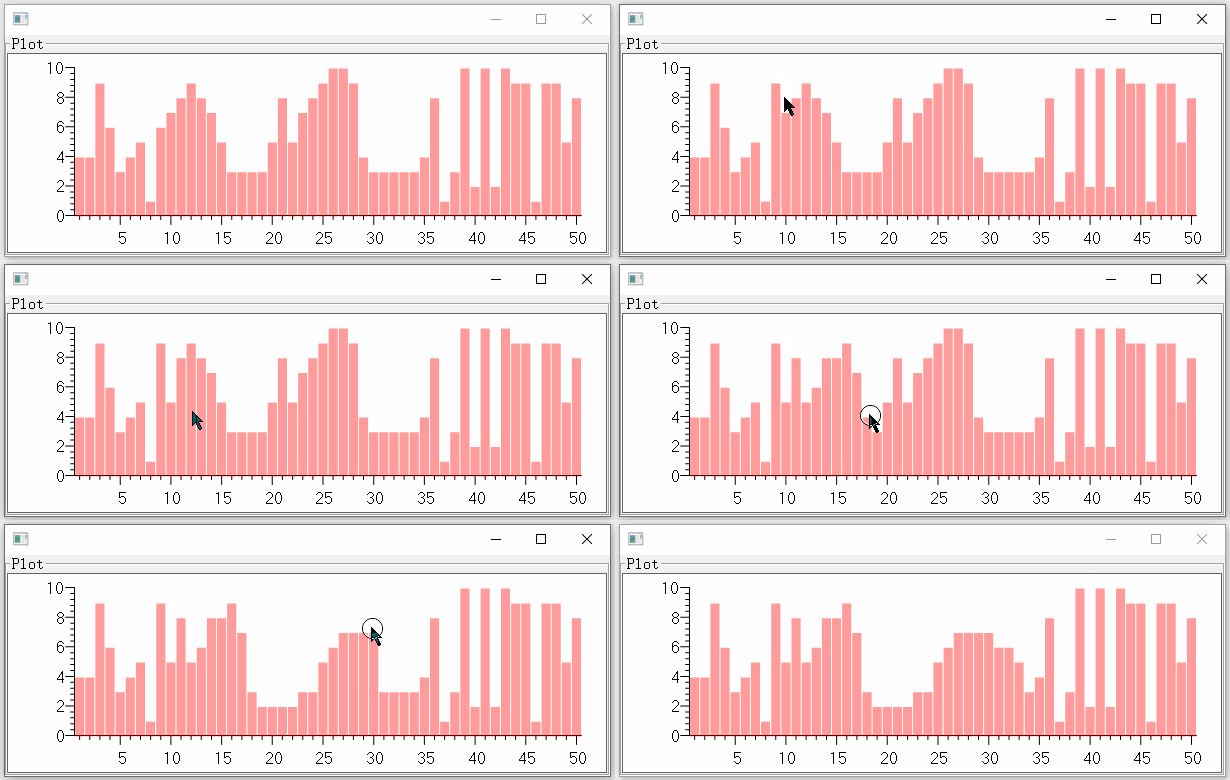
帮助文档笔记
自文档,描述Plot,非DEMO使用说明
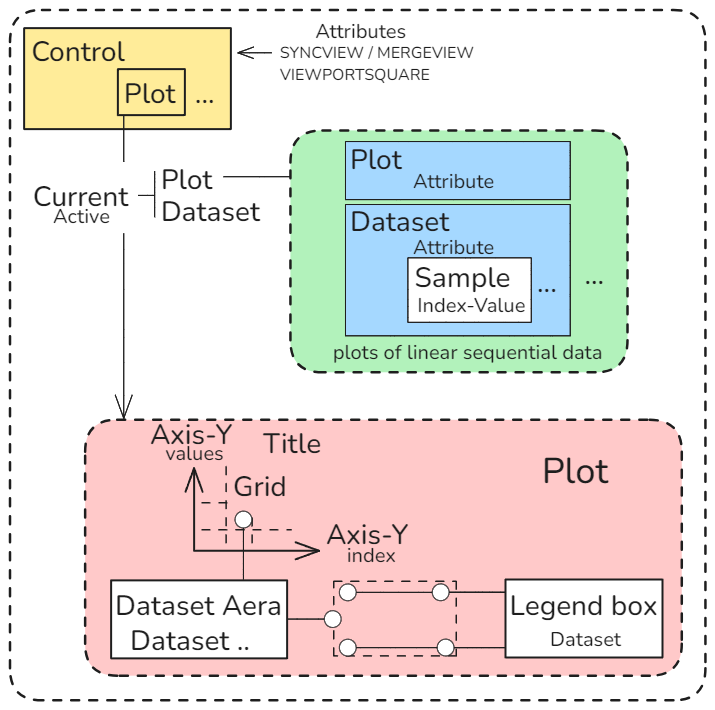
控件对象结构
Control DS DataSet Sample Index Value
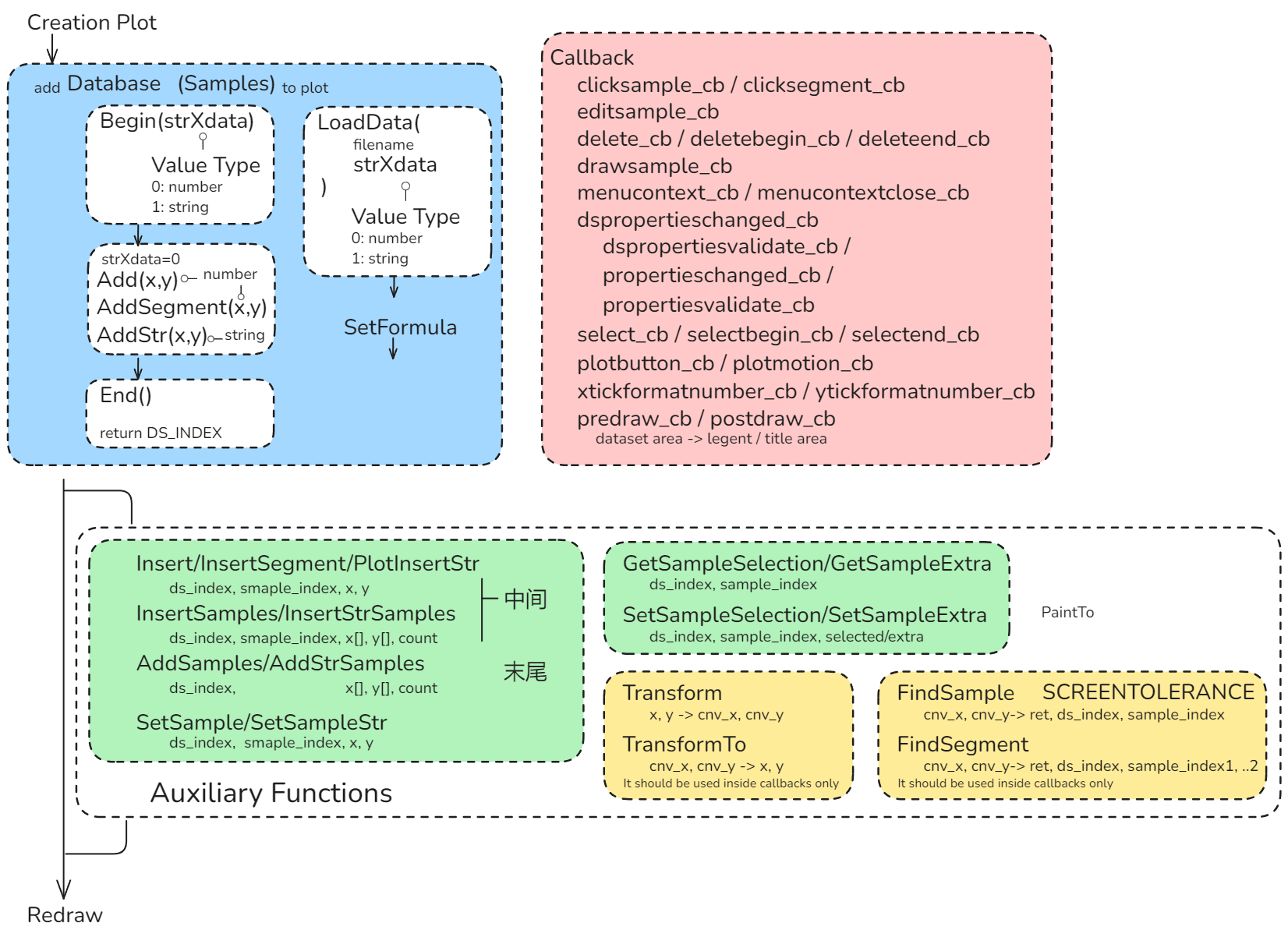
控件流程
Creation Auxiliary Callback Redraw
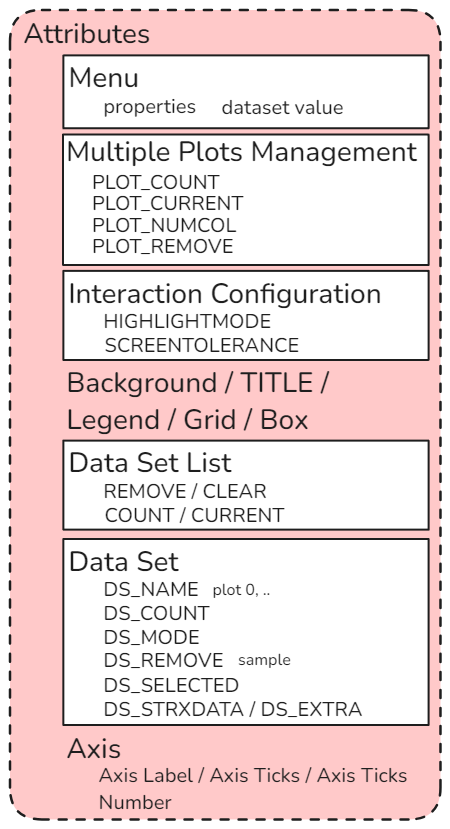
属性结构
控件内像素坐标与控件轴坐标值换算
Cnv Position AXS MARGIN PADDING
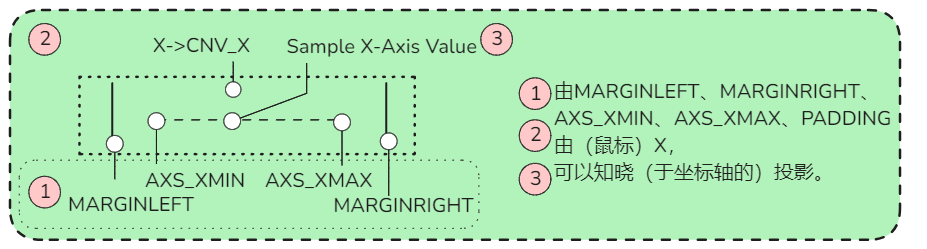
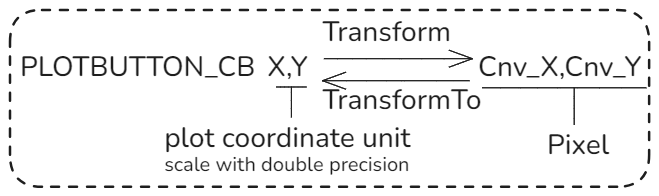
坐标转换:控件画布内部坐标与控件像素坐标
PLOTBUTTON_CB transform
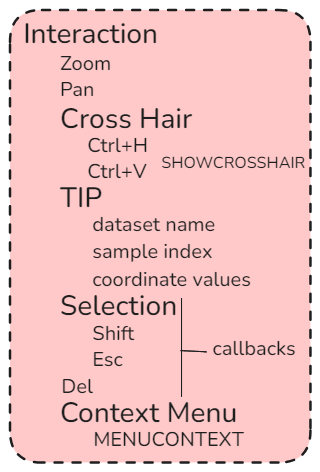
交互
Interaction
代码
local iup=require("iuplua")
require'IUP'
require("iuplua_plot")
require"iupluacontrols"
--	to import IupMatrixEx (to enable "Data Set Values..." dialog)
local Button_CB_Parse=require[[LuaLibs\IUP\Interaction\Button_CB_Parse]]

local _

local function Plot()
	local function Set_Axis_Value_By_Position()
		local function Read_Axis_Value()
			local function Read_Axis_Value_Core(Padding,Margin_On_Min_Side,AXS_Min,Pos_Value,AXS_Max,Margin_On_Max_Side,Width)
				--print("Read_Axis_Value_Core",Padding,Margin_On_Min_Side,AXS_Min,Pos_Value,AXS_Max,Margin_On_Max_Side,Width)
				if Pos_Value<=(Margin_On_Min_Side+Padding) or (Width-Margin_On_Max_Side-Padding)<=Pos_Value then
					return false
				end
				local Pos_Value_Offset_Based_On_AXS_Min=Pos_Value-Margin_On_Min_Side-Padding
				local Axis_Value=(Pos_Value_Offset_Based_On_AXS_Min)/(Width-Margin_On_Min_Side-Margin_On_Max_Side-Padding*2)*(AXS_Max+1-AXS_Min)+AXS_Min
				return Axis_Value
			end;_=Read_Axis_Value_Core
			function Read_Axis_Value(Plot,CNV_X,CNV_Y)
				local CNV_X,CNV_Y=tonumber(CNV_X),tonumber(CNV_Y)
				local Padding_Width,Padding_Height=string.match(Plot.PADDING,'(%d)x(%d)')
				local CNV_Width,CNV_Height=string.match(Plot.RASTERSIZE,'(%d+)x(%d+)')
				local Axis_X_Value=Read_Axis_Value_Core(tonumber(Padding_Width),tonumber(Plot.MARGINLEFT),tonumber(Plot.AXS_XMIN),CNV_X,tonumber(Plot.AXS_XMAX),tonumber(Plot.MARGINRIGHT),tonumber(CNV_Width))
				local Axis_Y_Value=Read_Axis_Value_Core(tonumber(Padding_Height),tonumber(Plot.MARGINBOTTOM),tonumber(Plot.AXS_YMIN),CNV_Y,tonumber(Plot.AXS_YMAX),tonumber(Plot.MARGINTOP),tonumber(CNV_Height))
				return Axis_X_Value,Axis_Y_Value
			end;_=Read_Axis_Value
		end;Read_Axis_Value()
		function Set_Axis_Value_By_Position(Plot,X,Y)
			local Cnv_X,Cnv_Y=Plot:Transform(X,Y)
			local Axis_X_Value,Axis_Y_Value=Read_Axis_Value(Plot,Cnv_X,Cnv_Y)
			if Axis_X_Value and Axis_Y_Value then
				Axis_X_Value,Axis_Y_Value=math.floor(Axis_X_Value),math.floor(Axis_Y_Value)
				--print("",Axis_X_Value,Axis_Y_Value)
				Plot:SetSample(Plot.CURRENT,Axis_X_Value-1,Axis_X_Value,Axis_Y_Value)
				Plot.REDRAW=nil
			end
		end;_=Set_Axis_Value_By_Position
	end;Set_Axis_Value_By_Position()
	function _()end
	Plot=iup.plot{EXPAND='YES',READONLY='YES',MINSIZE='x150',
		AXS_XARROW='NO',AXS_YARROW='NO',
		AUTOTICK='NO',AXS_XTICKMINORDIVISION='NO',
		AXS_XDISCRETE='YES',
		MENUITEMPROPERTIES='YES',
		EDITABLEVALUES='YES',
		--SCREENTOLERANCE=50,
		--	not work?
		AXS_YMIN=0,AXS_YMAX=10,AXS_YAUTOMIN='NO',AXS_YAUTOMAX='NO',
		size = "300x100",
		clicksample_cb=function(Plot,ds_index, sample_index, x, y, button)
			print("clicksample_cb",ds_index, sample_index, x, y, button)
		end,--clicksample_cb
		clicksegment_cb=function(Plot,ds_index, sample_index1, x1, y1, sample_index2, x2, y2, button)
			print("clicksegment_cb",ds_index, sample_index1, x1, y1, sample_index2, x2, y2, button)
		end,--clicksegment_cb
		editsample_cb=function(Plot,DS_Index,Sample_Index,X,Y)
			print("editsample_cb",DS_Index,Sample_Index,X,Y)
		end,--editsample_cb
		select_cb=function(Plot,ds_index, sample_index, x, y, selected)
			print("select_cb",ds_index, sample_index, x, y, selected)
		end,--select_cb
		selectbegin_cb=function(Plot)
			print("selectbegin_cb")
		end,--selectbegin_cb
		selectend_cb=function(Plot)
			print("selectend_cb")
		end,--selectend_cb
		plotbutton_cb=function(Plot,Button,Pressed,X,Y,Status)
			--print("plotbutton_cb",Button,Pressed,X,Y,Status)
			if 'test'
				and false
				then
				local Cnv_X,Cnv_Y=Plot:Transform(X,Y)
				--print("",Cnv_X,Cnv_Y)
				print("",Plot:FindSample(Cnv_X,Cnv_Y))
				print("",iup.PlotFindSegment(Plot,Cnv_X,Cnv_Y))
				--	貌似正常
		--		print("",Plot:FindSegment(Cnv_X,Cnv_Y))
				assert(not Plot.FindSegment)
				--	`FindSegment` not work
			end
			Set_Axis_Value_By_Position(Plot,X,Y)
		end,--plotbutton_cb
		plotmotion_cb=function(Plot,X,Y,Status)
			--print("plotmotion_cb",X,Y,Button_CB_Parse(nil,nil,nil,nil,Status))
			if Button_CB_Parse(nil,nil,nil,nil,Status)=='Button1' then
				Set_Axis_Value_By_Position(Plot,X,Y)
			end
		end,--plotmotion_cb
		dspropertieschanged=function(Plot,DS_Index)
			print("dspropertieschanged",DS_Index)
		end,--dspropertieschanged
		dspropertiesvalidate_cb=function(Plot,param_dialog,DS_Index)
			print("dspropertiesvalidate_cb",DS_Index)
		end,--dspropertiesvalidate_cb
		propertieschanged_cb=function(Plot)
			print("propertieschanged_cb")
		end,--propertieschanged_cb
		propertiesvalidate_cb=function(Plot,Name,Value)
			print("propertiesvalidate_cb",Name,Value)
		end,--propertiesvalidate_cb
	}
end;Plot()

local dialog=iup.dialog{
	iup.vbox{
		iup.frame{
			TITLE='Plot',
			Plot,
		},
	},
}

dialog:showxy(iup.CENTER, iup.CENTER)

math.randomseed(os.time())
do
	Plot:Begin(0)
	local Count=50
	for Index=1,Count do
		Plot[math.random(Count)>(Count//2) and 'Add' or 'AddSegment'](Plot,Index,math.random(10))
	end
	local DS_Index=Plot:End()
	print(DS_Index==tonumber(Plot.CURRENT))
	Plot.DS_MODE='BAR'
	Plot.DS_COLOR='255 0 0 100'
	Plot.REDRAW='YES'
end

iup.MainLoop()

 浙公网安备 33010602011771号