Contents
Introduction
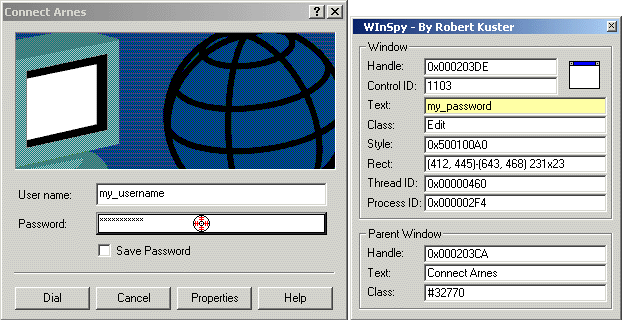
Several password spy tutorials have been posted to The Code Project, but all of them rely on Windows hooks. Is there any other way to make such a utility? Yes, there is. But first, let me review the problem briefly, just to make sure we're all on the same page.
To "read" the contents of any control - either belonging to your application or not - you generally send the WM_GETTEXT message to it. This also applies to edit controls, except in one special case. If the edit control belongs to another process and the ES_PASSWORD style is set, this approach fails. Only the process that "owns" the password control can get its contents via WM_GETTEXT. So, our problem reduces to the following: How to get
::SendMessage( hPwdEdit, WM_GETTEXT, nMaxChars, psBuffer );
executed in the address space of another process.
In general, there are three possibilities to solve this problem:
- Put your code into a DLL; then, map the DLL to the remote process via windows hooks.
- Put your code into a DLL and map the DLL to the remote process using the CreateRemoteThread & LoadLibrary technique.
- Instead of writing a separate DLL, copy your code to the remote process directly - via
WriteProcessMemory - and start its execution with CreateRemoteThread. A detailed description of this technique can be found here.
I. Windows Hooks
Demo applications: HookSpy and HookInjEx
The primary role of windows hooks is to monitor the message traffic of some thread. In general there are:
- Local hooks, where you monitor the message traffic of any thread belonging to your process.
- Remote hooks, which can be:
- thread-specific, to monitor the message traffic of a thread belonging to another process;
- system-wide, to monitor the message traffic for all threads currently running on the system.
If the hooked thread belongs to another process (cases 2a & 2b), your hook procedure must reside in a dynamic-link library (DLL). The system then maps the DLL containing the hook procedure into the address space of the hooked thread. Windows will map the entire DLL, not just the hook procedure. That is why Windows hooks can be used to inject code into another process's address space.
While I won't discuss hooks in this article further (take a look at the SetWindowHookEx API in MSDN for more details), let me give you two more hints that you won't find in the documentation, but might still be useful:
- After a successful call to
SetWindowsHookEx, the system maps the DLL into the address space of the hooked thread automatically, but not necessary immediately. Because windows hooks are all about messages, the DLL isn't really mapped until an adequate event happens. For example:
If you install a hook that monitors all nonqueued messages of some thread (WH_CALLWNDPROC), the DLL won't be mapped into the remote process until a message is actually sent to (some window of) the hooked thread. In other words, if UnhookWindowsHookEx is called before a message was sent to the hooked thread, the DLL will never be mapped into the remote process (although the call to SetWindowsHookEx itself succeeded). To force an immediate mapping, send an appropriate event to the concerned thread right after the call to SetWindowsHookEx.
The same is true for unmapping the DLL after calling UnhookWindowsHookEx. The DLL isn't really unmapped until an adequate event happens.
- When you install hooks, they can affect the overall system performance (especially system-wide hooks). However, you can easily overcome this shortcoming if you use thread-specific hooks solely as a DLL mapping mechanism, and not to trap messages. Consider the following code snippet:
BOOL APIENTRY DllMain( HANDLE hModule,
DWORD ul_reason_for_call,
LPVOID lpReserved )
{
if( ul_reason_for_call == DLL_PROCESS_ATTACH )
{
char lib_name[MAX_PATH];
::GetModuleFileName( hModule, lib_name, MAX_PATH );
::LoadLibrary( lib_name );
::UnhookWindowsHookEx( g_hHook );
}
return TRUE;
}
So, what happens? First we map the DLL to the remote process via Windows hooks. Then, right after the DLL has actually been mapped, we unhook it. Normally, the DLL would be unmapped now, too, as soon as the first message to the hooked thread would arrive. The dodgy thing is we prevent this unmapping by increasing the DLLs reference count via LoadLibrary.
The question that remains is: How to unload the DLL now, once we are finished? UnhookWindowsHookEx won't do it because we unhooked the thread already. You could do it this way:
- Install another hook, just before you want to unmap the DLL;
- Send a "special" message to the remote thread;
- Catch this message in your hook procedure; in response, call
FreeLibrary & UnhookWindowsHookEx.
Now, hooks are used only while mapping/unmapping the DLL to/from the remote process; there is no influence on the performance of the "hooked" thread in the meantime. Put anohter way: We get a DLL mapping mechanism that doesn't interfere the target process more than the LoadLibrary technique discussed below does (see Section II.). However, opposed to the LoadLibrary technique, this solution works on both: WinNT and Win9x.
But, when should one use this trick? Always when the DLL has to be present in the remote process for a longer period of time (i.e. if you subclass a control belonging to another process) and you want to interfere the target process as little as possible. I didn't use it in HookSpy because the DLL there is injected just for a moment - just long enough to get the password. I rather provided another example - HookInjEx - to demonstrate it. HookInjEx maps/unmaps a DLL into "explorer.exe", where it subclasses the Start button. More precisely: It swaps the left and right mouse clicks for the Start button.
You will find HookSpy and HookInjEx as well as their sources in the download package at the beginning of the article.
II. The CreateRemoteThread & LoadLibrary Technique
Demo application: LibSpy
In general, any process can load a DLL dynamically by using the LoadLibrary API. But, how do we force an external process to call this function? The answer is CreateRemoteThread.
Let's take a look at the declaration of the LoadLibrary and FreeLibrary APIs first:
HINSTANCE LoadLibrary(
LPCTSTR lpLibFileName );
BOOL FreeLibrary(
HMODULE hLibModule );
Now, compare them with the declaration of ThreadProc - the thread routine - passed to CreateRemoteThread:
DWORD WINAPI ThreadProc(
LPVOID lpParameter );
As you can see, all functions use the same calling convention and all accept a 32-bit parameter. Also, the size of the returned value is the same. In other words: We may pass a pointer to LoadLibrary/FreeLibrary as the thread routine to CreateRemoteThread.
However, there are two problems (see the description for CreateRemoteThread below):
- The
lpStartAddress parameter in CreateRemoteThread must represent the starting address of the thread routine in the remote process.
- If
lpParameter - the parameter passed to ThreadFunc - is interpreted as an ordinary 32-bit value (FreeLibrary interprets it as an HMODULE), everything is fine. However, if lpParameter is interpreted as a pointer (LoadLibraryA interprets it as a pointer to a char string), it must point to some data in the remote process.
The first problem is actually solved by itself. Both LoadLibrary and FreeLibray are functions residing in kernel32.dll. Because kernel32 is guaranteed to be present and at the same load address in every "normal" process (see Appendix A), the address of LoadLibrary/FreeLibray is the same in every process too. This ensures that a valid pointer is passed to the remote process.
The second problem is also easy to solve: Simply copy the DLL module name (needed by LoadLibrary) to the remote process via WriteProcessMemory.
So, to use the CreateRemoteThread & LoadLibrary technique, follow these steps:
- Retrieve a
HANDLE to the remote process (OpenProcess).
- Allocate memory for the DLL name in the remote process (
VirtualAllocEx).
- Write the DLL name, including full path, to the allocated memory (
WriteProcessMemory).
- Map your DLL to the remote process via
CreateRemoteThread & LoadLibrary.
- Wait until the remote thread terminates (
WaitForSingleObject); this is until the call to LoadLibrary returns. Put another way, the thread will terminate as soon as our DllMain (called with reason DLL_PROCESS_ATTACH) returns.
- Retrieve the exit code of the remote thread (
GetExitCodeThread). Note that this is the value returned by LoadLibrary, thus the base address (HMODULE) of our mapped DLL.
- Free the memory allocated in Step #2 (
VirtualFreeEx).
- Unload the DLL from the remote process via
CreateRemoteThread & FreeLibrary. Pass the HMODULE handle retreived in Step #6 to FreeLibrary (via lpParameter in CreateRemoteThread).
Note: If your injected DLL spawns any new threads, be sure they are all terminated before unloading it.
- Wait until the thread terminates (
WaitForSingleObject).
Also, don't forget to close all the handles once you are finished: To
both threads, created in Steps #4 and #8; and the handle to the remote
process, retrieved in Step #1.
Let's examine some parts of LibSpy's sources now, to see how the
above steps are implemented in reality. For the sake of simplicity,
error handling and unicode support are removed.
HANDLE hThread;
char szLibPath[_MAX_PATH]; void* pLibRemote; DWORD hLibModule; HMODULE hKernel32 = ::GetModuleHandle("Kernel32");
pLibRemote = ::VirtualAllocEx( hProcess, NULL, sizeof(szLibPath),
MEM_COMMIT, PAGE_READWRITE );
::WriteProcessMemory( hProcess, pLibRemote, (void*)szLibPath,
sizeof(szLibPath), NULL );
hThread = ::CreateRemoteThread( hProcess, NULL, 0,
(LPTHREAD_START_ROUTINE) ::GetProcAddress( hKernel32,
"LoadLibraryA" ),
pLibRemote, 0, NULL );
::WaitForSingleObject( hThread, INFINITE );
::GetExitCodeThread( hThread, &hLibModule );
::CloseHandle( hThread );
::VirtualFreeEx( hProcess, pLibRemote, sizeof(szLibPath), MEM_RELEASE );
Assume our SendMessage - the code that we actually wanted to inject - was placed in DllMain (DLL_PROCESS_ATTACH), so it has already been executed by now. Then, it is time to unload the DLL from the target process:
hThread = ::CreateRemoteThread( hProcess, NULL, 0,
(LPTHREAD_START_ROUTINE) ::GetProcAddress( hKernel32,
"FreeLibrary" ),
(void*)hLibModule, 0, NULL );
::WaitForSingleObject( hThread, INFINITE );
::CloseHandle( hThread );
Interprocess Communications
Until now, we only talked about how to inject the DLL to the remote process. However, in most situations the injected DLL will need to communicate with your original application in some way (recall that the DLL is mapped into some remote process now, not to our local application!). Take our Password Spy: The DLL has to know the handle to the control that actually contains the password. Obviously, this value can't be hardcoded into it at compile time. Similarly, once the DLL gets the password, it has to send it back to our application so we can display it appropriately.
Fortunately, there are many ways to deal with this situation: File Mapping, WM_COPYDATA, the Clipboard, and the sometimes very handy #pragma data_seg, to name just a few. I won't describe these techniques here because they are all well documented either in MSDN (see Interprocess Communications) or in other tutorials. Anyway, I used solely the #pragma data_seg in the LibSpy example.
You will find LibSpy and its sources in the download package at the beginning of the article.
III. The CreateRemoteThread & WriteProcessMemory Technique
Demo application: WinSpy
Another way to copy some code to another process's address space and then execute it in the context of this process involves the use of remote threads and the WriteProcessMemory API. Instead of writing a separate DLL, you copy the code to the remote process directly now - via WriteProcessMemory - and start its execution with CreateRemoteThread.
Let's take a look at the declaration of CreateRemoteThread first:
HANDLE CreateRemoteThread(
HANDLE hProcess, LPSECURITY_ATTRIBUTES lpThreadAttributes, DWORD dwStackSize, LPTHREAD_START_ROUTINE lpStartAddress, LPVOID lpParameter, DWORD dwCreationFlags, LPDWORD lpThreadId );
If you compare it to the declaration of CreateThread (MSDN), you will notice the following differences:
- The
hProcess parameter is additional in CreateRemoteThread. It is the handle to the process in which the thread is to be created.
- The
lpStartAddress parameter in CreateRemoteThread represents the starting address of the thread in the remote processes address space. The function must exist in the remote process, so we can't simply pass a pointer to the local ThreadFunc. We have to copy the code to the remote process first.
- Similarly, the data pointed to by
lpParameter must exist in the remote process, so we have to copy it there, too.
Now, we can summarize this technique in the following steps:
- Retrieve a
HANDLE to the remote process (OpenProces).
- Allocate memory in the remote process's address space for injected data (
VirtualAllocEx).
- Write a copy of the initialised
INJDATA structure to the allocated memory (WriteProcessMemory).
- Allocate memory in the remote process's address space for injected code.
- Write a copy of
ThreadFunc to the allocated memory.
- Start the remote copy of
ThreadFunc via CreateRemoteThread.
- Wait until the remote thread terminates (
WaitForSingleObject).
- Retrieve the result from the remote process (
ReadProcessMemory or GetExitCodeThread).
- Free the memory allocated in Steps #2 and #4 (
VirtualFreeEx).
- Close the handles retrieved in Steps #6 and #1 (
CloseHandle).
Additional caveats that ThreadFunc has to obey:
ThreadFunc should not call any functions besides those in kernel32.dll and user32.dll; only kernel32 and user32 are, if present (note that user32 isn't mapped into every Win32 process!), guaranteed to be at the same load address in both the local and the target process (see Appendix A). If you need functions from other libraries, pass the addresses of LoadLibrary and GetProcAddress to the injected code, and let it go and get the rest itself. You could also use GetModuleHandle instead of LoadLibrary, if for one or another reason the debatable DLL is already mapped into the target process.
Similarly, if you want to call your own subroutines from within ThreadFunc, copy each routine to the remote process individually and supply their addresses to ThreadFunc via INJDATA. - Don't use any static strings. Rather pass all strings to
ThreadFunc via INJDATA.
Why?
The compiler puts all static strings into the ".data" section of an
executable and only references (=pointers) remain in the code. Then, the
copy of ThreadFunc in the remote process would point to something that doesn't exist (at least not in its address space).
- Remove the /GZ compiler switch; it is set by default in debug builds (see Appendix B).
- Either declare
ThreadFunc and AfterThreadFunc as static or disable incremental linking (see Appendix C).
- There must be less than a page-worth (4 Kb) of local variables in
ThreadFunc (see Appendix D). Note that in debug builds some 10 bytes of the available 4 Kb are used for internal variables.
-
If you have a switch block with more than three case statements, either split it up like this:
switch( expression ) {
    case constant1: statement1; goto END;
    case constant2: statement2; goto END;
    case constant3: statement2; goto END;
}
switch( expression ) {
    case constant4: statement4; goto END;
    case constant5: statement5; goto END;
    case constant6: statement6; goto END;
}
END:
or modify it into an if-else if sequence (see Appendix E).
You will almost certainly crash the target process if you don't play by those rules. Just remember: Don't assume anything in the target process is at the same address as it is in your process (see Appendix F).
GetWindowTextRemote(A/W)
All the functionality you need to get the password from a "remote" edit control is encapsulated in GetWindowTextRemot(A/W):
int GetWindowTextRemoteA( HANDLE hProcess, HWND hWnd, LPSTR  lpString );
int GetWindowTextRemoteW( HANDLE hProcess, HWND hWnd, LPWSTR lpString );
Parameters
hProcess
- Handle to the process the edit control belongs to.
hWnd
- Handle to the edit control containing the password.
lpString
- Pointer to the buffer that is to receive the text.
Return Value
The return value is the number of characters copied.
Let's examine some parts of its sources now - especially the injected data and code - to see how GetWindowTextRemote works. Again, unicode support is removed for the sake of simplicity.
INJDATA
typedef LRESULT (WINAPI *SENDMESSAGE)(HWND,UINT,WPARAM,LPARAM);
typedef struct {
HWND hwnd; SENDMESSAGE fnSendMessage;
char psText[128]; } INJDATA;
INJDATA is the data structure being injected into the remote process. However, before doing so the structure's pointer to SendMessageA is initialised in our application. The dodgy thing here is that user32.dll is (if present!) always mapped to the same address in every process; thus, the address of SendMessageA is always the same, too. This ensures that a valid pointer is passed to the remote process.
ThreadFunc
static DWORD WINAPI ThreadFunc (INJDATA *pData)
{
pData->fnSendMessage( pData->hwnd, WM_GETTEXT, sizeof(pData->psText),
(LPARAM)pData->psText );
return 0;
}
static void AfterThreadFunc (void)
{
}
ThradFunc is the code executed by the remote thread. Point of interest:
- Note how
AfterThreadFunc is used to calculate the code size of ThreadFunc. In general this isn't the best idea, because the linker is free to change order of your functions (i.e. it could place ThreadFunc behind AfterThreadFunc). However, you can be pretty sure that in small projects, like our WinSpy is, the order of your functions will be preserved. If necessary, you could also use the /ORDER linker option to help you out; or yet better: Determine the size of ThreadFunc with a dissasembler.
How to Subclass a Remote Control With this Technique
Demo application: InjectEx
Let's explain something more complicated now: How to subclass a control belonging to another process with this technique?
First of all, note that you have to copy two functions to the remote process to accomplish this task:
ThreadFunc, which actually subclasses the control in the remote process via SetWindowLong, andNewProc, the new window procedure of the subclassed control.
However, the main problem is how to pass data to the remote NewProc. Because NewProc is a callback function and thus has to conform to specific guidelines, we can't simply pass a pointer to INJDATA to it as an argument. Fortunately, there are other ways to solve this problem (I found two), but all rely on the assembly language. So, when I tried to preserve the assembly for the appendixes until now, it won't go without it this time.
Solution 1
Observe the following picture:
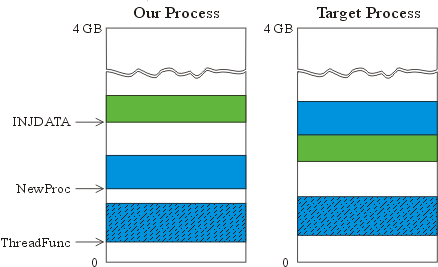
Note that INJDATA is placed immediately before NewProc in the remote process? This way NewProc knows the memory location of INJDATA in the remote processes address space at compile time. More precisely: It knows the address of INJDATA relative to its own location, but that's actually all we need. Now NewProc might look like this:
static LRESULT CALLBACK NewProc(
HWND hwnd, UINT uMsg, WPARAM wParam, LPARAM lParam ) {
INJDATA* pData = (INJDATA*) NewProc; pData--;
return pData->fnCallWindowProc( pData->fnOldProc,
hwnd,uMsg,wParam,lParam );
}
However, there is still a problem. Observe the first line:
INJDATA* pData = (INJDATA*) NewProc;
This way, a hardcoded value (the memory location of the original NewProc in our process) will be arranged to pData. That is not quite what we want: The memory location of the "current" copy of NewProc in the remote process, regardless of to what location it is (NewProc) actually moved. In other words, we would need some kind of a "this pointer."
While there is no way to solve this in C/C++, it can be done with inline assembly. Consider the modified NewProc:
static LRESULT CALLBACK NewProc(
HWND hwnd, UINT uMsg, WPARAM wParam, LPARAM lParam ) {
INJDATA* pData;
_asm {
call dummy
dummy:
pop ecx sub ecx, 9 mov pData, ecx
}
pData--;
return pData->fnCallWindowProc( pData->fnOldProc,
hwnd,uMsg,wParam,lParam );
}
So, what's going on? Virtually every processor has a special register that points to the memory location of the next instruction to be executed. That's the so-called instruction pointer, denoted EIP on 32-bit Intel and AMD processors. Because EIP is a special-purpose register, you can't access it programmatically as you can general purpose registers (EAX, EBX, etc). Put another way: There is no OpCode, with which you could address EIP and read or change its contents explicitly. However, EIP can still be changed (and is changed all the time) implicitly, by instructions such as JMP, CALL and RET. Let's, for example, explain how the subroutine CALL/RET mechanism works on 32-bit Intel and AMD processors:
When you call a subroutine (via CALL), the address of the subroutine is loaded into EIP. But, even before EIP is modified, its old value is automatically pushed onto the stack (for use later as a return instruction-pointer). At the end of a subroutine, the RET instruction automatically pops the top of the stack into EIP.
Now you know how EIP is modified via CALL and RET, but how to get its current value?
Well, remember that CALL
pushes EIP onto the stack? So, in order to get its current value call a
"dummy function" and pop the stack right thereafter. Let's explain the
whole trick at our compiled NewProc:
Address OpCode/Params Decoded instruction
--------------------------------------------------
:00401000 55 push ebp :00401001 8BEC mov ebp, esp
:00401003 51 push ecx
:00401004 E800000000 call 00401009 :00401009 59 pop ecx :0040100A 83E909 sub ecx, 00000009 :0040100D 894DFC mov [ebp-04], ecx :00401010 8B45FC mov eax, [ebp-04]
:00401013 83E814 sub eax, 00000014 .....
.....
:0040102D 8BE5 mov esp, ebp
:0040102F 5D pop ebp
:00401030 C21000 ret 0010
- A dummy function call; it just jumps to the next instruction and pushes EIP onto the stack.
- Pop the stack into ECX. ECX then holds EIP; this is exactly the address of the
"pop ECX" instruction as well.
- Note that the "distance" between the entry point of
NewProc and the "pop ECX" instruction is 9 bytes; thus, to calculate the address of NewProc, subtract 9 from ECX.
This way, NewProc can always calculate its own address, regardless of to what location it is actually moved! However, be aware that the distance between the entry point of NewProc and the "pop ECX" instruction might change as you change your compiler/linker options, and is thus different in release and debug builds, too. But, the point is that you still know the exact value at compile time:
- First, compile your function.
- Determine the correct distance with a disassembler.
- Finally, recompile with the correct distance.
That's the solution used in InjectEx. InjectEx, similarly as HookInjEx, swaps the left and right mouse clicks for the Start button.
Solution 2
Placing INJDATA right before NewProc in the remote processes address space isn't the only way to solve our problem. Consider the following variant of NewProc:
static LRESULT CALLBACK NewProc(
HWND hwnd, UINT uMsg, WPARAM wParam, LPARAM lParam ) {
INJDATA* pData = 0xA0B0C0D0;
return pData->fnCallWindowProc( pData->fnOldProc,
hwnd,uMsg,wParam,lParam );
}
Here, 0xA0B0C0D0 is just a placeholder for the real (absolute!) address of INJDATA in the remote processes address space. Recall that you can't know this address at compile time. However, you do know the location of INJDATA in the remote process right after the call to VirtualAllocEx (for INJDATA) is made.
Our NewProc could compile into something like this:
 Address   OpCode/Params     Decoded instruction
--------------------------------------------------
:00401000  55                push ebp
:00401001  8BEC              mov ebp, esp
:00401003  C745FCD0C0B0A0    mov [ebp-04], A0B0C0D0
:0040100A  ...
....
....
:0040102D  8BE5              mov esp, ebp
:0040102F  5D                pop ebp
:00401030  C21000            ret 0010
Thus, its compiled code (in hexadecimal) would be: 558BECC745FCD0C0B0A0......8BE55DC21000.
Now, you would proceed as follows:
- Copy
INJDATA, ThreadFunc and NewProc to the target process.
- Change the code of
NewProc, so that pData holds the real address of INJDATA.
For example, let's say the address of INJDATA (the value returned by VirtualAllocEx) in the target process is 0x008a0000. Then you modify the code of NewProc as follows:
558BECC745FCD0C0B0A0......8BE55DC21000 |
<- original NewProc 1 |
558BECC745FC00008A00......8BE55DC21000 |
<- modified NewProc with real address of INJDATA |
Put another way: You replace the dummy value A0B0C0D0 with the real address of INJDATA. 2
- Start execution of the remote
ThreadFunc, which in turn subclasses the control in the remote process.
¹ One might wonder why the addresses
A0B0C0D0 and
008a0000
in the compiled code appear in reverse order. It's because Intel and
AMD processors use the little-endian notation for to represent their
(multi-byte) data. In other words: The low-order byte of a number is
stored in memory at the lowest address, and the high-order byte at the
highest address.
Imagine the word UNIX stored in four bytes. In
big-endian systems, it would be stored as UNIX. In little-endian
systems, it would be stored as XINU.
² Some (bad) cracks modify the code of an executable
in a similar way. However, once loaded into memory, a program can't
change its own code (the code resides in the ".text" section of an
executable, which is write protected). Still we could modify our remote NewProc, because it was previously copied to a peace of memory with PAGE_EXECUTE_READWRITE permission.
When to use the CreateRemoteThread & WriteProcessMemory technique
The CreateRemoteThread & WriteProcessMemory technique of code
injection is, when compared to the other methods, more flexible in that
you don't need an additional DLL. Unfortunately, it is also more
complicated and riskier than the other methods. You can (and most
probably will) easily crash the remote process, as soon as something is
wrong with your ThreadFunc (see Appendix F). Because debugging a remote ThreadFunc
can also be a nightmare, you should use this technique only when
injecting at most a few instructions. To inject a larger peace of code,
use one of the methods discussed in Sections II and I.
Again, WinSpy and InjectEx, as well as their sources, can be found in the download package at the beginning of the article.
Some Final Words
At the end, let's summarize some facts we didn't mention so far:
| |
OS |
Processes |
| I. Hooks |
Win9x and WinNT |
only processes that link with USER32.DLL1 |
| II. CreateRemoteThread & LoadLibrary |
WinNT only2 |
all processes3, including system services4 |
| III. CreateRemoteThread & WriteProcessMemory |
WinNT only |
all processes, including system services |
- Obviously you can't hook a thread that has no message queue. Also,
SetWindowsHookEx wont work with system services, even if they link against USER32.DLL.
- There is no
CreateRemoteThread nor VirtualAllocEx on Win9x. (Actually, they can be emulated on Win9x, too; but that's a story for yet another day.)
- All processes = All Win32 processes + csrss.exe
Native applications (smss.exe, os2ss.exe, autochk.exe, etc) don't use Win32 APIs, and thus don't link against kernel32.dll
either. The only exception is csrss.exe, the Win32 subsystem itself.
It's a native application but some of its libraries (~winsrv.dll)
require Win32 DLLs, including kernel32.dll.
- If you want to inject code into system services (lsass.exe,
services.exe, winlogon.exe, and so on) or into csrss.exe, set the
privileges of your process to "SeDebugPrivilege" (
AdjustTokenPrivileges) before opening a handle to the remote process (OpenProcess).
That's almost it. There is just one more thing that you should bear
in mind: Your injected code can, especially if something is wrong with
it, easily pull the target process down to oblivion with it. Just
remember: Power comes with responsibility!
Because many examples in this article were about passwords, you might find it interesting to read the article Super Password Spy++,
written by Zhefu Zhang, too. There he explains how to get the passwords
out of an Internet Explorer password field. More. He even shows you how
to protect your password controls against such attacks.
Last note: The only reward someone gets for writing and publishing an
article is the feedback he gets, so, if you found it useful simply drop
in a comment or vote for it ( ).
But even more importantly: Let me know if something is wrong or buggy,
if you think something could be done better, or that something is still
left unclear.
).
But even more importantly: Let me know if something is wrong or buggy,
if you think something could be done better, or that something is still
left unclear.
Acknowledgments
First, thanks to my readers at CodeGuru, where this *text* was
initially published. It is mainly because of your questions, that the
article grew from its initial 1200 words to what it is today: An 6000
word "animal." However, if there is someone that especially deserves to
be singled out, then it is Rado Picha. Parts of the article greatly
benefited from his suggestions and explanations to me. Last, but not
least, thanks to Susan Moore for helping me through that minefield
called the English language, and making my article more readable.
A) Why are kernel32.dll and user32.dll always mapped to the same address?
My presumption: Because Microsoft programmers thought that it could be a useful speed optimization. Let's explain why.
In general, an executable is composed of several sections, including a ".reloc" section.
When the linker creates an EXE or DLL file, it makes an assumption
about where the file will be mapped into memory. That's the so-called
assumed/preferred load/base address. All the absolute addresses in the
image are based on this linker assumed load address. If for whatever
reason the image isn't loaded at this address, the PE - portable
executable - loader has to fix all the absolute addresses in the image.
That is where the ".reloc" section comes in: It contains a list of all
the places in the image, where the difference between the linker assumed
load address and the actual load address needs to be factored in
(anyway, note that most of the instructions produced by the compiler use
some kind of relative addressing; as a result, there are not as many
relocations as you might think). If, on the other side, the loader is
able to load the image at the linkers preferred base address, the
".reloc" section is completely ignored.
But, how do
kernel32.dll,
user32.dll and their load addresses fit into the story? Because every Win32 application needs
kernel32.dll, and most of them need
user32.dll, too, you can improve the load time of all executables by always mapping them (
kernel32 and
user32) to their preferred bases. Then the loader must never fix any (absolute) addresses in
kernel32.dll and
user32.dll.
Let's close out this discussion with the following example:
Set the image base of some App.exe to KERNEL32's (/base:"0x77e80000") or to USER32's (/base:"0x77e10000") preferred base. If App.exe doesn't import from USER32, just LoadLibrary it. Then compile App.exe and try to run it. An error box pops up ("Illegal System DLL Relocation") and App.exe fails to load.
Why? When creating a process, the loader on Win 2000, Win XP and Win 2003 checks if kernel32.dll and user32.dll (their names are hardcoded into the loader) are mapped at their preferred bases; if not, a hard error is raised. In WinNT 4 ole32.dll was also checked. In WinNT 3.51 and lower such checks were not present, so kernel32.dll and user32.dll could be anywhere. Anyway, the only module that is always at its base is ntdll.dll. The loader doesn't check it, but if ntdll.dll is not at its base, the process just can't be created.
To summarize, on WinNT 4 and higher:
- DLLs, that are always mapped to their bases: kernel32.dll, user32.dll and ntdll.dll.
- DLLs that are present in every Win32 application (+ csrss.exe): kernel32.dll and ntdll.dll.
- The only DLL that is present in every process, even in native applications: ntdll.dll.
B) The /GZ compiler switch
In Debug builds, the /GZ compiler feature is turned on by
default. You can use it to catch some errors (see the documentation for
details). But what does it mean to our executable?
When /GZ is turned on, the compiler will add some additional code to
every function residing in the executable, including a function call
(added at the very end of every function) that verifies the ESP stack
pointer hasn't changed through our function. But wait, a function call
is added to ThreadFunc? That's the road to disaster. Now the remote copy of ThreadFunc will call a function that doesn't exist in the remote process (at least not at the same address).
C) Static functions Vs. Incremental linking
Incremental linking is used to shorten the linking time when
building your applications. The difference between normally and
incrementally linked executables is that in incrementally linked ones
each function call goes through an extra
JMP instruction emitted by the linker (an exception to this rule are functions declared as static!). These
JMPs allow the linker to move the functions around in memory without updating all the
CALL instructions that reference the function. But it's exactly this
JMP that causes problems too: now
ThreadFunc and
AfterThreadFunc will point to the
JMP instructions instead to the real code. So, when calculating the size of
ThreadFuncthis way:
const int cbCodeSize = ((LPBYTE) AfterThreadFunc - (LPBYTE) ThreadFunc);
you will actually calculate the "distance" between the
JMPs that point to
ThreadFunc and
AfterThreadFunc respectively (usually they will appear one right after the other; but don't count on this). Now suppose our
ThreadFunc is at address
004014C0 and the accompanying
JMP instruction at
00401020.
:00401020 jmp 004014C0
...
:004014C0 push EBP :004014C1 mov EBP, ESP
...
Then
WriteProcessMemory( .., &ThreadFunc, cbCodeSize, ..);
will copy the
"JMP 004014C0" instruction (and all instructions in the range of
cbCodeSize that follow it) to the remote process - not the real
ThreadFunc. The first thing the remote thread will execute will be a
"JMP 004014C0". Well, it will also be among its last instructions - not only to the remote thread, but to the whole process.
However, there is an exception to this JMP instruction "rule." If a function is declared as static, it will be called directly, even if linked incrementally. That's why Rule #4 says to declare ThreadFunc and AfterThreadFunc as static or disable incremental linking. (Some other aspects of incremental linking can be found in the article "Remove Fatty Deposits from Your Applications Using Our 32-bit Liposuction Tools" by Matt Pietrek)
D) Why can my ThreadFunc have only 4k of local variables?
Local variables are always stored on the stack. If a function has, say, 256 bytes of local variables, the stack pointer is decreased by 256 when entering the function (more precisely, in the functions prologue). The following function:
void Dummy(void) {
    BYTE var[256];
    var[0] = 0;
    var[1] = 1;
    var[255] = 255;
}
could, for instance, compile into something like this:
:00401000 push ebp
:00401001 mov ebp, esp
:00401003 sub esp, 00000100 :00401006 mov byte ptr [esp], 00 :0040100A mov byte ptr [esp+01], 01 :0040100F mov byte ptr [esp+FF], FF :00401017 mov esp, ebp :00401019 pop ebp
:0040101A ret
Note how the stack pointer (ESP) was changed in the above example? But what is different if a function needs more than 4 Kb for its local variables? Well, then the stack pointer isn't changed directly. Rather, another function (a stack probe) is called, which in turn changes it appropriately. But it's exactly this additional function call that makes our ThreadFunc "corrupt," because its remote copy would call something that's not there.
Let's see what the documentation says about stack probes and the /Gs compiler option:
"The /Gssizeoption is an advanced feature with which you can control stack probes. A stack probe is a sequence of code that the compiler inserts into every function call. When activated, a stack probe reaches benignly into memory by the amount of space required to store the associated function's local variables.
If a function requires more than size stack space for local variables, its stack probe is activated. The default value of size is the size of one page (4 Kb for 80x86 processors). This value allows a carefully tuned interaction between an application for Win32 and the Windows NT virtual-memory manager to increase the amount of memory committed to the program stack at run time."
I'm sure one or another wondered about the above statement: "...a stack probe reaches benignly into memory...". Those compiler options (their descriptions!) are sometimes really irritating, at least until you look under the hood and see what's going on. If, for instance, a function needs 12 Kb storage for its local variables, the memory on the stack would be "allocated" (more precisely: committed) this way:
sub esp, 0x1000 test [esp], eax sub esp, 0x1000 test [esp], eax sub esp, 0x1000
test [esp], eax
Note how the stack pointer is changed in 4 Kb steps now and, more importantly, how the bottom of the stack is "touched" (via test) after each step. This ensures the page containing the bottom of the stack is being committed, before "allocating" (committing) another page.
After reading ..
"Each new thread receives its own stack space, consisting of both committed and reserved memory. By default, each thread uses 1 Mb of reserved memory, and one page of committed memory. The system will commit one page block from the reserved stack memory as needed." (see MSDN CreateThread > dwStackSize > "Thread Stack Size").
.. it should also be clear why the documentation about /Gs says that you get with stack probes a carefully tuned interaction between your application and the Windows NT virtual-memory manager.
Now back to our ThreadFunc and 4 Kb limit:
Although
you could prevent calls to the stack probe routine with /Gs, the
documentation warns you about doing so. Further, the documentation says
you can turn stack probes on or off by using the #pragma check_stack directive. However, it seems this pragma
doesn't affect stack probes at all (either the documentation is buggy,
or I am missing some other facts?). Anyway, recall that the CreateRemoteThread & WriteProcessMemory technique
should be used only when injecting small peaces of code, so your local
variables should rarely *consume* more than a few bytes and thus not get
even close to the 4 Kb limit.
E) Why should I split up my switch block with more than three case statements?
Again, it is easiest to explain it with an example. Consider the following function:
int Dummy( int arg1 )
{
    int ret =0;

    switch( arg1 ) {
    case 1: ret = 1; break;
    case 2: ret = 2; break;
    case 3: ret = 3; break;
    case 4: ret = 0xA0B0; break;
    }
    return ret;
}
It would compile into something like this:
Address OpCode/Params Decoded instruction
--------------------------------------------------
:00401000 8B4C2404 mov ecx, dword ptr [esp+04]
:00401004 33C0 xor eax, eax :00401006 49 dec ecx :00401007 83F903 cmp ecx, 00000003
:0040100A 771E ja 0040102A
:0040100C FF248D2C104000 jmp dword ptr [4*ecx+0040102C]
:00401013 B801000000 mov eax, 00000001 :00401018 C3 ret
:00401019 B802000000 mov eax, 00000002 :0040101E C3 ret
:0040101F B803000000 mov eax, 00000003 :00401024 C3 ret
:00401025 B8B0A00000 mov eax, 0000A0B0 :0040102A C3 ret
:0040102B 90 nop
:0040102C 13104000 DWORD 00401013 :00401030 19104000 DWORD 00401019 :00401034 1F104000 DWORD 0040101F :00401038 25104000 DWORD 00401025
Note how the switch-case was implemented?
Rather than examining every single case statement separately, an address table is created. Then, we jump to the right case
by simply calculating the offset into the address table. If you think
for a moment, this really is an improvement. Imagine you had a switch with 50 case statements. Without the above trick, you had to execute 50 CMP and JMP instructions to get to the last case. With the address table, on the contrary, you can jump to any case by a single table look-up. In terms of computer algorithms and time complexity: We replace an O(2n) algorithm by an O(5) one, where:
- O denotes the worst-case time complexity.
- We assume five instructions are neccessary to calculate the offset,
do the table look-up, and finally jump to the appropriate address.
Now, one might think the above was possible only because the case
constants were carefully chosen to be consecutive (1,2,3,4).
Fortunately, it turns out the same solution can be applied to most
real-world examples, only the offset calculation becomes somewhat more
complicated. But there are two exceptions, though:
- if there are three or less
case statements or
- if the
case constants are completely unrelated to each other (i.e. "case 1", "case 13", "case 50", and "case 1000")
then the resulting code does it the long way by examining every single case constant separately, with the CMP and JMP instructions. In other words, then the resulting code is essentially the same as if you had an ordinary if-else if sequence.
Point of interest: If you ever wondered for what reason only a constant-expression can accompany a case
statement, then you know why by now. In order to create the address
table, this value obviously has to be known at compile time.
Now back to the problem!
Notice the JMP instruction at address 0040100C? Let's see what Intel's documentation says about the hex opcode FF:
Opcode    Instruction    Description
FF /4     JMP r/m32      Jump near, absolute indirect,
                         address given in r/m32
Oops, the debatable JMP uses some kind of absolute addressing? In other words, one of its operands (0040102C in our case) represents an absolute address. Need I say more? Now, the remote ThreadFunc would blindly think the address table for its switch is at 0040102C, JMP to a wrong place, and thus effectively crash the remote process.
F) Why does the remote process crash, anyway?
When your remote process crashes, it will always be for one of the following reasons:
- You referenced a string inside of
ThreadFunc that doesn't exist.
- One or more instructions in
ThreadFunc use absolute addressing (see Appendix E for an example).
ThreadFunc calls a function that doesn't exist (the call could be added by the compiler/linker). When you will look at ThreadFuncin dissasembler in this case you will see something like this:
:004014C0 push EBP :004014C1 mov EBP, ESP
...
:004014C5 call 0041550 ...
:00401502 ret
If the debatable CALL was added by the compiler (because some "forbidden" switch, such as /GZ, was turned on), it will be located either somewhere at the beginning or near the end of ThreadFunc.
In any case, you can't be careful enough with the CreateRemoteThread & WriteProcessMemory technique. Especially watch for your compiler/linker options. They could easily add something to your ThreadFunc.
Appendices
References:
- Load Your 32-bit DLL into Another Process's Address Space Using INJLIB by Jeffrey Richter. MSJ May, 1994
- HOWTO: Subclass a Window in Windows 95; Microsoft Knowledge Base Article - 125680
- Tutorial 24: Windows Hooks by Iczelion
- CreateRemoteThread by Felix Kasza
- API hooking revealed by Ivo Ivanov
- Peering Inside the PE: A Tour of the Win32 Portable Executable File Format by Matt Pietrek, March 1994
- Intel Architecture Software Developer's Manual, Volume 2: Instruction Set Reference
Article History
- July 25, 2003: Article published
- August 19, 2003: Applied only some minor formatting changes
 Prize winner in Competition "MFC/C++ Jun 2003"


 浙公网安备 33010602011771号