
2023数据采集与融合技术作业二
第二次作业
作业1:
要求:在中国气象网( http://www.weather.com.cn )给定城市集的7日天气预报,并保存在数据库。
代码及图片:
代码显示如下:
from bs4 import BeautifulSoup
from bs4 import UnicodeDammit
import urllib.request
import sqlite3


class WeatherDB:
    def openDB(self):
        self.con = sqlite3.connect("weathers.db")
        self.cursor = self.con.cursor()
        try:
            self.cursor.execute(
                "create table weathers (wCity varchar(16),wDate varchar(16),wWeather varchar(64),wTemp varchar(32),constraint pk_weather primary key (wCity,wDate))")
        except:
            self.cursor.execute("delete from weathers")

    def closeDB(self):
        self.con.commit()
        self.con.close()

    def insert(self, city, date, weather, temp):
        try:
            self.cursor.execute("insert into weathers (wCity,wDate,wWeather,wTemp) values (?,?,?,?)",
                                (city, date, weather, temp))
        except Exception as err:
            print(err)

    def show(self):
        self.cursor.execute("select * from weathers")
        rows = self.cursor.fetchall()
        print("%-16s%-16s%-32s%-16s" % ("city", "date", "weather", "temp"))
        for row in rows:
            print("%-16s%-16s%-32s%-16s" % (row[0], row[1], row[2], row[3]))


class WeatherForecast:
    def __init__(self):
        self.headers = {
            "User-Agent": "Mozilla/5.0 (Windows; U; Windows NT 6.0 x64; en-US; rv:1.9pre) Gecko/2008072421 Minefield/3.0.2pre"}
        self.cityCode = {"北京": "101010100", "上海": "101020100", "广州": "101280101", "深圳": "101280601"}

    def forecastCity(self, city):
        if city not in self.cityCode.keys():
            print(city + " code cannot be found")
            return

        url = "http://www.weather.com.cn/weather/" + self.cityCode[city] + ".shtml"
        try:
            req = urllib.request.Request(url, headers=self.headers)
            data = urllib.request.urlopen(req)
            data = data.read()
            dammit = UnicodeDammit(data, ["utf-8", "gbk"])
            data = dammit.unicode_markup
            soup = BeautifulSoup(data, "lxml")
            lis = soup.select("ul[class='t clearfix'] li")

            for li in lis:
                try:
                    date = li.select('h1')[0].text
                    weather = li.select('p[class="wea"]')[0].text
                    temp = li.select('p[class="tem"] span')[0].text + "/" + li.select('p[class="tem"] i')[0].text
                    print(city, date, weather, temp)
                    self.db.insert(city, date, weather, temp)
                except Exception as err:
                    print(err)
        except Exception as err:
            print(err)

    def process(self, cities):
        self.db = WeatherDB()
        self.db.openDB()
        for city in cities:
            self.forecastCity(city)
        # self.db.show()
        self.db.closeDB()


ws = WeatherForecast()
ws.process(["北京", "上海", "广州", "深圳"])
print("completed")
保存在数据库中,用Navicate进行可视化
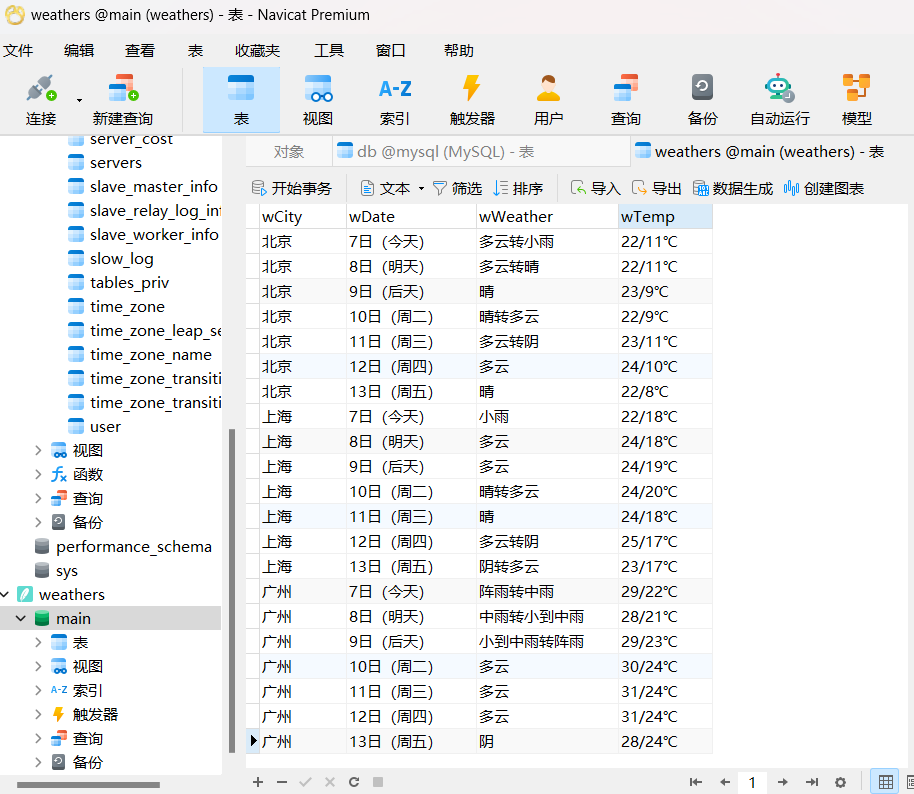
心得体会:通过对书本上的例题进行复现,利用bs4库爬取网站数据,使用sqlite3把数据放在数据库中,加深了对bs4库的理解,对sqlite3有了初步了解,为解决接下来两道题目打下了基础。
作业2:
要求:用 requests 和 BeautifulSoup 库方法定向爬取股票相关信息,并存储在数据库中。
代码及图片:
import requests
import json
import pandas as pd
import sqlite3
from prettytable import PrettyTable

# 获取股票数据
page = input("请输入要查看的页码:")
url = "http://24.push2.eastmoney.com/api/qt/clist/get?cb=jQuery112403744690670833004_1696661077897&pn=" + str(
    page) + "&pz=20&po=1&np=1&ut=bd1d9ddb04089700cf9c27f6f7426281&fltt=2&invt=2&wbp2u=|0|0|0|web&fid=f3&fs=m:0+t:6,m:0+t:80,m:1+t:2,m:1+t:23,m:0+t:81+s:2048&fields=f1,f2,f3,f4,f5,f6,f7,f8,f9,f10,f12,f13,f14,f15,f16,f17,f18,f20,f21,f23,f24,f25,f22,f11,f62,f128,f136,f115,f152&_=1696661077898"
response = requests.get(url)
data = response.text
json_data = json.loads(data[data.find('(') + 1:data.rfind(')')])
stock_data = json_data['data']['diff']

# 转化为DataFrame
df = pd.DataFrame(stock_data)
df = df[["f12", "f14", "f2", "f3", "f4", "f5", "f6", "f7", "f15", "f16", "f17"]]
df.columns = ["股票代码", "股票名称", "最新价", "涨跌幅", "涨跌额", "成交量(手)(元)", "成交额", "振幅(%)", "最高", "最低", "今开"]

# 创建数据库连接并数据库文件
conn = sqlite3.connect('stock_data.db')
cursor = conn.cursor()

# 创建表格(如果不存在)
cursor.execute('''CREATE TABLE IF NOT EXISTS stocks
                  (股票代码 TEXT, 股票名称 TEXT, 最新价 REAL, 涨跌幅 REAL, 涨跌额 REAL, 成交量 TEXT, 成交额 TEXT, 振幅 TEXT, 最高 REAL, 最低 REAL, 今开 REAL)''')

# 将DataFrame中的数据逐行插入数据库
for _, row in df.iterrows():
    cursor.execute("INSERT INTO stocks (股票代码, 股票名称, 最新价, 涨跌幅, 涨跌额, 成交量, 成交额, 振幅, 最高, 最低, 今开) VALUES (?, ?, ?, ?, ?, ?, ?, ?, ?, ?, ?)",
                   (row["股票代码"], row["股票名称"], row["最新价"], row["涨跌幅"], row["涨跌额"], row["成交量(手)(元)"], row["成交额"], row["振幅(%)"], row["最高"], row["最低"], row["今开"]))

# 提交更改并关闭连接
conn.commit()
conn.close()

# 打印表格
table = PrettyTable()
table.field_names = df.columns
for _, row in df.iterrows():
    table.add_row(row.values)
print(table)
保存在数据库中,并使用Navicate进行可视化
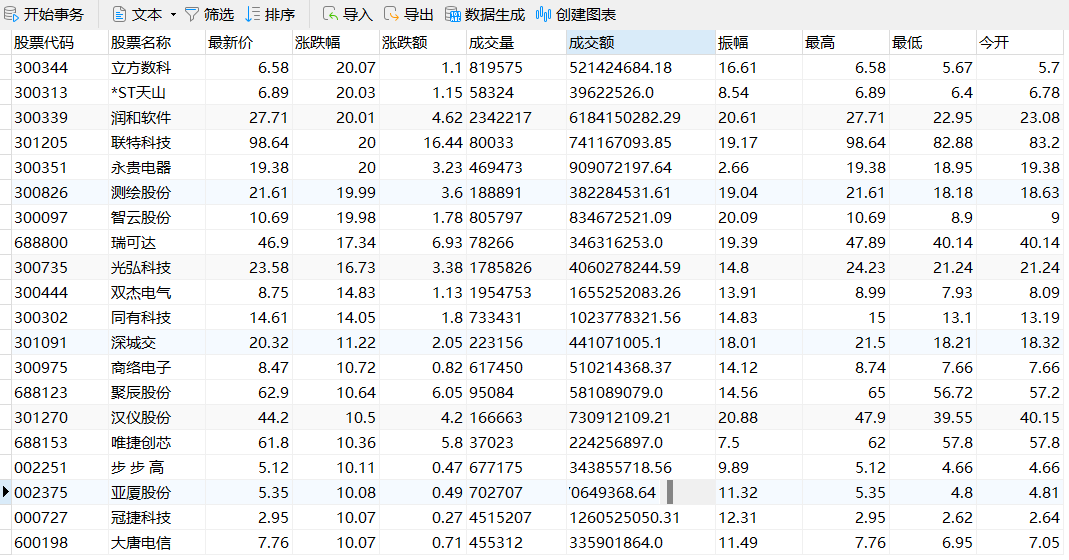
展示了爬取第一页的结果,可以通过输入不同页码查看不同页数的数据
心得体会:加深了对requests的理解,了解了有时候爬取出来的数据不能直接用,用将其进行数据格式的转换,转换为可被我们使用的数据形式。
作业3
要求:爬取中国大学 2021 主榜
( https://www.shanghairanking.cn/rankings/bcur/2021 )所有院校信
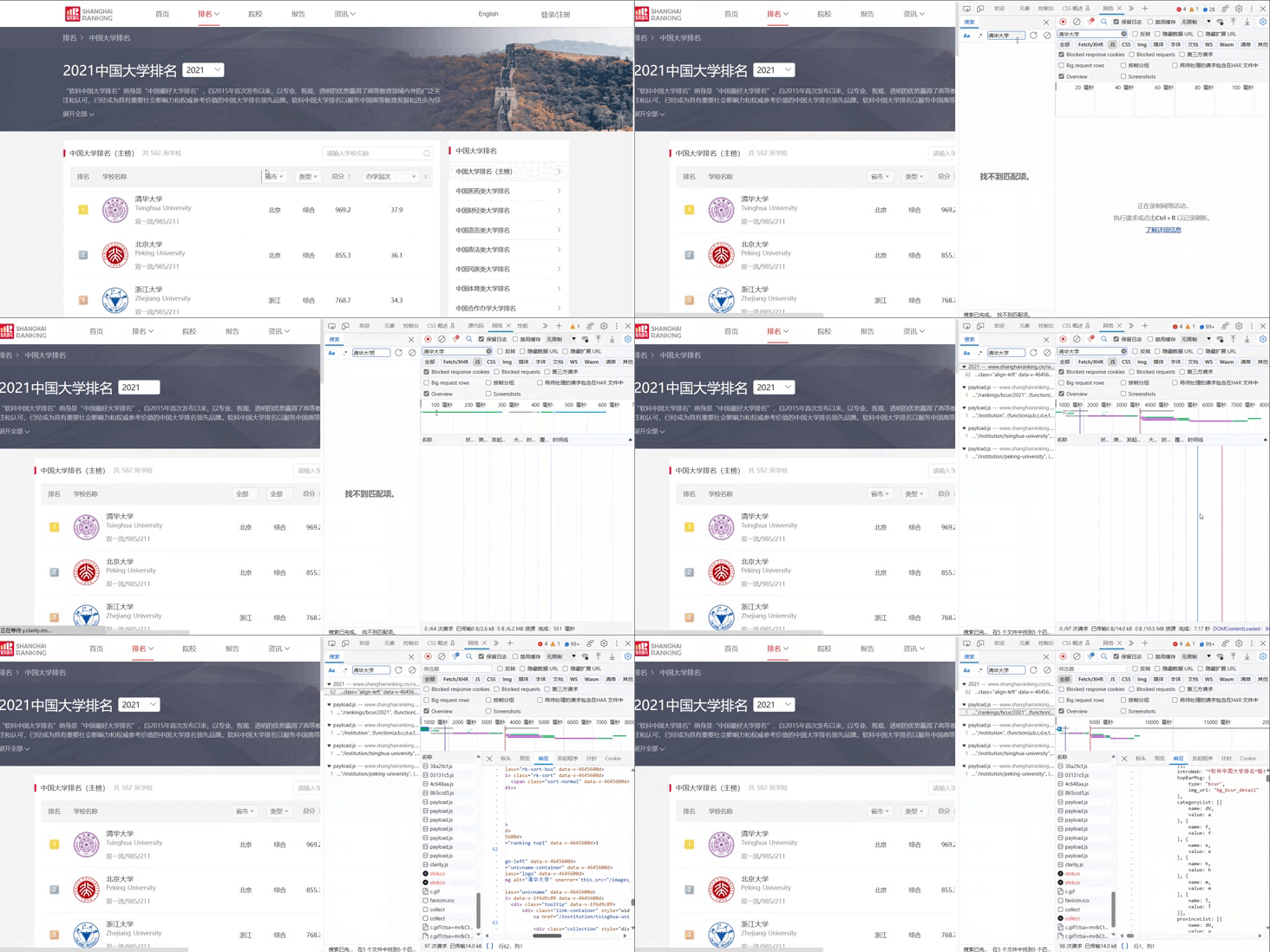
息,并存储在数据库中,同时将浏览器 F12 调试分析的过程录制 Gif 加
入至博客中。
使用F12抓包的gif图片
代码及图片:
import requests
import re
import pandas as pd
import sqlite3

url = 'https://www.shanghairanking.cn/_nuxt/static/1695811954/rankings/bcur/2021/payload.js'

# 发送HTTP请求并获取响应
response = requests.get(url)
response.encoding = response.apparent_encoding

start_index = response.text.find("o") + 3
end_index = response.text.find(")")
key_list = response.text[start_index:end_index].split(',')

start_index_1 = response.text.rfind("}") + 1
end_index_1 = response.text.rfind(")") - 2
value_list = response.text[start_index_1:end_index_1].split(',')
mapper = dict(zip(key_list, value_list))

# 使用正则表达式匹配学校名称和总分
name = re.findall(r'univNameCn:"(.*?)",', response.text)
score = re.findall(r',score:(.*?),', response.text)

province_new = []
province = re.findall(r'province:(.*?),', response.text)
for item in province:
    province_new.append(mapper[item])

category_new = []
category = re.findall(r'univCategory:(.*?),', response.text)
for item in category:
    category_new.append(mapper[item])

# 创建Pandas DataFrame
df = pd.DataFrame({'学校': name, '省市': province_new, '类型': category_new, '总分': score})

# 添加排名列
df['排名'] = df.index + 1

# 创建数据库连接
conn = sqlite3.connect('university_data.db')

# 创建表格(如果不存在)
cursor = conn.cursor()
cursor.execute('''CREATE TABLE IF NOT EXISTS universities
                  (学校 TEXT, 省市 TEXT, 类型 TEXT, 总分 REAL, 排名 INTEGER)''')

# 将DataFrame中的数据逐行插入数据库
for _, row in df.iterrows():
    cursor.execute("INSERT INTO universities (学校, 省市, 类型, 总分, 排名) VALUES (?, ?, ?, ?, ?)",
                   (row["学校"], row["省市"], row["类型"], row["总分"], row["排名"]))

# 提交更改并关闭连接
conn.commit()
conn.close()

# 打印DataFrame
pd.set_option('display.max_columns', None)  # 显示所有列
pd.set_option('display.expand_frame_repr', False)  # 不自动换行
pd.set_option('display.max_rows', None)  # 显示所有行
print(df)
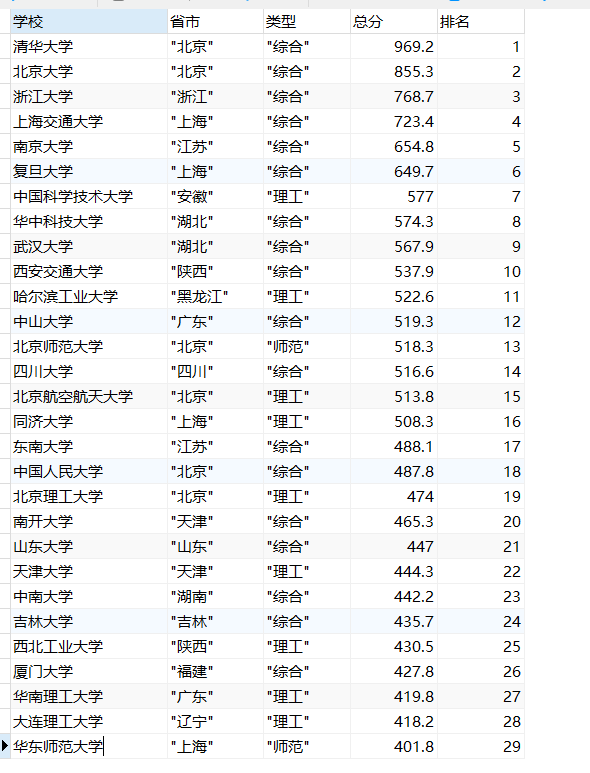
将爬取出的数据放进数据库中,使用navicate进行可视化(截取了部分结果,已经成功爬取了所有结果)

 浙公网安备 33010602011771号