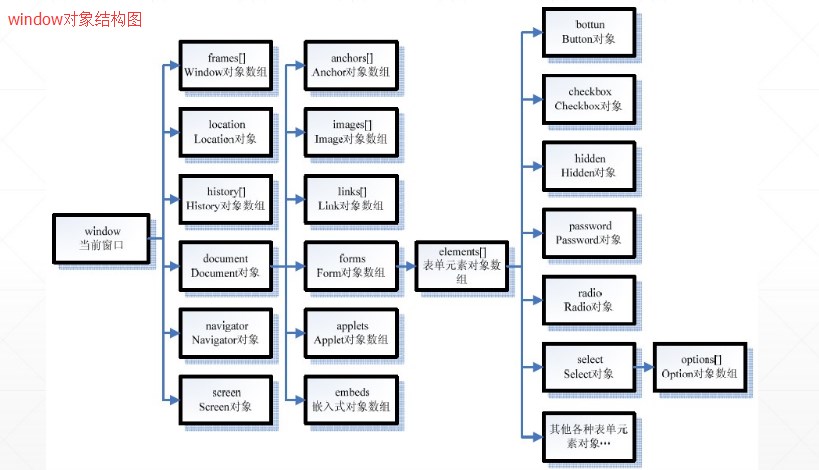
1、 内置对象
js特征基于对象:
  js中所有的都是对象  js的代码依赖于浏览器中创建好的内置对象
  浏览器加载页面时 就创建好了这些对象  js的代码直接使用即可
主要学习的内置对象:window/location/history/document
- DHTML :dynamic hyper text markup language
dhtml:html+css+js
ajax:dhtml+ActiveXObject对象
html提供标签 封装数据
css通过属性 控制样式
js通过逻辑 实现动态效果
学习内置对象:需要看DHTML的api
2 、window:窗口
<script  type="text/javascript">
    /*
	window:对整个窗口的封装
		window可以省略
	方法:
		 1 弹出框:
			 vTextData = window.prompt( [sMessage] [, sDefaultValue]):弹出参数数据 并且有输入框
			 bConfirmed = window.confirm( [sMessage]):弹出参数数据  有确定和取消按钮 并返回选择
			 window.alert( [sMessage]):弹出参数数据  只有确定按钮

		 2 延迟执行
			iTimerID = window.setInterval(vCode, iMilliSeconds)
			iTimerID = window.setTimeout(vCode, iMilliSeconds);等待iMilliSeconds毫秒胡执行vCode代码
			window.clearTimeout(iTimeoutID)
			window.clearInterval(iTimeoutID)
		3  关闭和开启页面
                          window.close()
			  oNewWindow = window.open( [sURL] [, sName] [, sFeatures] [, bReplace])
                          window.open("Sample.htm",null,"height=200,width=400,status=yes,toolbar=no,menubar=no,location=no");
		4   移动
                          window.moveBy(iX, iY)
			 window.moveTo(iX, iY)
*/
 var id1,id2;
function testWindow(){
                 /*
						alert("alert弹出框");
						var b1=window.confirm("你成年了吗?");
						document.write("b1="+b1+"<br/>");
						var  age=window.prompt("你几岁了?",18);
						document.write("age="+age+"<br/>");
					*/

    //var id1=setTimeout("alert(11);",3000);
    //id1=setTimeout(test01,3000);//等待3000毫秒后执行方法test01
    //id2=setInterval(test01,3000); //每隔3000毫秒执行一次方法test01

}
testWindow();
function test01(){
    var i=1,j=2;
    alert(i+"+"+j+"="+(i+j));
}
function testClearTimeout(){
    window.clearTimeout(id1);//取消id1对应的延迟执行操作
}
function testClearInterval(){
    window.clearInterval(id2);//取消id2对应的循环延迟执行操作
}

</script>
<input  type="button" value="测试clearTimeout" onclick="testClearTimeout();"/><br/>
    <input  type="button" value="测试clearInterval" onclick="testClearInterval();"/><br/>
        <input  type="button" value="测试open" onclick="testOpen();"/><br/>
            <script type="text/javascript">
                function testOpen(){
                window.open("ab.html",null,"height=200,width=400,status=yes,toolbar=yes,menubar=yes,location=yes");
            }
</script>
<input  type="button" value="关闭当前页面" onclick="testClose();"/><br/>
    <script type="text/javascript">
        function testClose(){
        window.close();
    }
</script>
<input  type="button" value="测试moveTo" onclick="testMoveTo();"/><br/>
    <script type="text/javascript">
        function testMoveTo(){
        //window.moveTo(300,300);
        alert(window.screenLeft+"::"+window.screenTop);
        for(var i=0;i<=100;i++){
            window.moveTo(300,300);
            window.moveTo(300,400);
            window.moveTo(400,400);
            window.moveTo(400,300);
        }
    }
</script>
<input  type="button" value="测试moveBy" onclick="testMoveBy();"/><br/>
    <script type="text/javascript">
        function testMoveBy(){
        //window.moveBy(30,30);
        for(var i=0;i<=100;i++){
            window.moveBy(100,0);
            window.moveBy(0,100);
            window.moveBy(-100,0);
            window.moveBy(0,-100);
        }
    }
</script>
<html> <!--html是根标签:所有标签都是其子标签-->
     <head><!--头标签:对当前html文件进行统一的属性设置-->
	        <title>广告</title>
			<meta http-equiv="Content-Type" content="text/html;charset=utf-8">
	 </head>
	 <body>
             <font color="red" size="7">我是流氓广告!</font>
			 <input  type="button" value="关闭当前页面" onclick="testClose();"/><br/>
			 <script type="text/javascript">
		        function testClose(){
				     window.close();
				}
		     </script>
	 </body>
<html>
3、history历史记录
<a href="javascript:history.go(-1);">后退一步</a><br/>
<a href="javascript:history.back(-1);">后退一步</a><br/>
4、location地址栏
<input  type="button" value="测试location" onclick="testLocation();"/><br/>
    <script type="text/javascript">
        function testLocation(){
        //属性
        document.write("location.href="+location.href+"<br/>");//地址栏的url
        document.write("location.host="+location.host+"<br/>");//主机ip:端口
        document.write("location.port="+location.port+"<br/>");//主机端口
        document.write("location.search="+location.search+"<br/>");//请求参数
        document.write("location.hostname="+location.hostname+"<br/>");//主机ip
        //location.href="http://www.baidu.com";//设置地址栏的url
        window.setTimeout("location.reload();",3000);
        //方法
        //location.reload();//重新加载当前页面
    }
</script>
5、document文档对象
5.1、获取
<html> <!--html是根标签:所有标签都是其子标签-->
     <head><!--头标签:对当前html文件进行统一的属性设置-->
	        <title>document</title>
			<meta http-equiv="Content-Type" content="text/html;charset=utf-8">
			<style  type="text/css">
				div{
				   width:350px;
				   height:100px;
				   border:1px solid blue;
				   margin:20px;
				   padding:10px;
				}
				.cla1{
				   background:#aaaaaa;
				}
				.cla2{
				   background:#6699cc;
				}
			</style>
	 </head>
	 <body>
	         <div id="div01">
			       <font>div0101010</font>
			 </div>
			 <div id="div02" class="cla1">
			       <font color="red">div0101010222</font>
			 </div>
			 <div id="div03" class="cla1">
			       div010101033333
			 </div>
			 爱好:足球<input type="checkbox" name="enjoy" value="zq"  > |
				  篮球<input type="checkbox" name="enjoy" value="lq"> |
				  排球<input type="checkbox" name="enjoy" value="pq"> |
				  台球<input type="checkbox" name="enjoy" value="tq"><br/>
			名字:<input type="text" value="呵呵" name="sname"/>	<br/>
			 <input  type="button" value="测试获取" onclick="testGet();"/><br/>
			 <script type="text/javascript">
			    //获取:
				//document对象的方法
					//getElementById 根据id获取一个标签
					//getElementsByName 根据组件的name属性获取标签集合
					//getElementsByTagName 根据标签名获取标签集合


				//属性:
				//checked属性:判断或者获取  是否被选中
				//value属性:获取和设置组件的值
				//innerText属性:获取和设置标签中的文本
				//innerHTML属性:获取和设置标签之间的html代码
				//className属性:获取和设置class值

		        function testGet(){
				      //根据id获取
				      var oDiv=document.getElementById("div01");
					  //document.write("oDiv="+oDiv);//oDiv=[object HTMLDivElement]

					  //根据标签名获取
					  var collDiv=document.getElementsByTagName("div");
					  //alert(collDiv);//[object HTMLCollection]
					  for(var  i=0;i<collDiv.length;i++){
						  //alert("collDiv["+i+"]="+collDiv[i]);
					  }

					  //获取所有的name="enjoy"
					  var collEnjoy=document.getElementsByName("enjoy");
					  for(var  i=0;i<collEnjoy.length;i++){
					      //获取checked属性
						  //alert("collEnjoy["+i+"]="+collEnjoy[i]+"::checked="+collEnjoy[i].checked);
						  //collEnjoy[i].checked=true;//设置
					  }
					  //设置value属性和获取
					  var oText=document.getElementsByName("sname")[0];
					  //alert(oText.value);//获取value值
					  oText.value="老王";//设置value值

					  //获取和设置文本内容
					  for(var  i=0;i<collDiv.length;i++){
						  //alert("collDiv["+i+"].innerText="+collDiv[i].innerText);
						  //alert("collDiv["+i+"].innerHTML="+collDiv[i].innerHTML);
						  //collDiv[i].innerText="div"+i;
						  //collDiv[i].innerHTML="<a href='#'>"+collDiv[i].innerHTML+"</a>";
					  }

					  //获取和设置class
					   for(var  i=0;i<collDiv.length;i++){
						  alert("collDiv["+i+"].className="+collDiv[i].className);//获取class
						  if(!collDiv[i].className){
						      collDiv[i].className="cla2";//设置class
						  }
					  }
				}
				//1 在div中显示当前时间:距离10.1 倒计时
				//2 抽奖
		     </script>
	 </body>
<html>
5.2、添加
<div id="div02" class="cla1" title="title2">
    div
<font color="red" id="font01">font0101010222</font>
</div>
<div id="div03" class="cla1" title="title3">
    div010101033333
</div>
<input  type="button" value="测试document的添加" onclick="testCreate2();"/><br/>
<!--
添加:
    1 oElement = document.createElement(sTag) 创建标签对象
    2 oElement = object.appendChild(oNode) 把参数标签添加到当前标签下 作为子标签
       返回值是添加的子标签
    3 添加和设置文本内容:innerText/innerHTML
    4 添加和修改属性:setAttribute(attrName,attrValue);
-->
    <script  type="text/javascript">
        function testCreate1(){
        //1 添加一个span标签:在div02中
        // 创建span标签
        var oSpan=document.createElement("span");
        //设置文本内容
        oSpan.innerText="我的新来的";
        //oSpan.className="cla2";//设置class属性
        oSpan.setAttribute("class","cla2");//添加属性
        //获取div02
        var oDiv2=document.getElementById("div02");
        //把oSpan添加到oDiv2中
        alert(oDiv2.appendChild(oSpan));
    }
function testCreate2(){
    //获取div02
    var oDiv2=document.getElementById("div02");
    oDiv2.innerHTML=oDiv2.innerHTML+("<span class='cla2'>我是新来的</span>");
}
</script>
5.3、删除
<div id="div02" class="cla1" title="title2">
    div
<font color="red" id="font01">font0101010222</font>
</div>
<div id="div03" class="cla1" title="title3">
    div010101033333
</div>
<input  type="button" value="测试document的删除" onclick="testDelete();"/><br/>
<!--
删除:
    1:oRemove = object.removeChild(oNode):父标签删除参数子标签:返回值是删除的子不标签
    2:bSuccess = object.removeAttribute(sName):删除属性
-->
    <script  type="text/javascript">
        function testDelete(){
        //删除:font01
        //获取font01
        var oFont=document.getElementById("font01");
        //var oFu=oFont.parentNode;//获取父标签
        //alert(oFu.removeChild(oFont));//删除子标签
        //oFont.parentNode.removeChile(oFont);

        //删除文本内容
        //oFont.innerText="";

        //删除属性
        //oFont.removeAttribute("color");
        oFont.setAttribute("color","");
    }
</script>
6、练习
6.1、倒计时练习
<html> <!--html是根标签:所有标签都是其子标签-->
     <head><!--头标签:对当前html文件进行统一的属性设置-->
	        <title>练习倒计时和抽奖</title>
			<meta http-equiv="Content-Type" content="text/html;charset=utf-8">
			<style  type="text/css">
				div{
				   border:1px solid blue;
				   padding:10px;
				   margin:10px auto;
				   font-size:24px;
				}
				#div0{
				   width:800px;
				   height:300px;
				}
				#div_time,#div_djs{
				   width:700px;
				   height:100px;
				}
			</style>
	 </head>
	 <body>
	        <!--
			   创建页面步骤:
			   1 html 标签封装数据
			   2 css style样式
			   3 注册事件:
			   4 js代码
			-->

            <div id="div0">
			   <div  id="div_time"></div>
			   <div  id="div_djs"></div>
			</div>
			<script  type="text/javascript">
			     //文档记载成功给两个div设置文本内容
				 window.onload=function(){
				   //每隔1000毫秒 给div设置一次文本内容
				    window.setInterval(setDivTime,1000);
					window.setInterval(setDivDjs,1000);
				 }
				 function setDivTime(){
				     //获取div_time
					 var oTime=document.getElementById("div_time");
					 var  dateStr=new Date().toLocaleString();
					 oTime.innerHTML=dateStr.fontcolor("red").bold();
				 }
				 function setDivDjs(){
				     //获取div_djs
					 var oDjs=document.getElementById("div_djs");
					 var date1=new Date();
					 var date2=new Date(2021,10-1,1);
					 //获取差距
					 var cha=date2.getTime()-date1.getTime();
					 var hours=parseInt(cha/1000/3600);
					 var minutes=parseInt(cha/1000/60%60);
					 var seconds=parseInt(cha/1000%60);
					 var  chaStr="距离10.1还有"+hours+"时"+minutes+"分"+seconds+"秒";
					 oDjs.innerHTML=chaStr.fontcolor("blue").bold();
				 }
			</script>
	 </body>
<html>
6.2、抽奖
<html> <!--html是根标签:所有标签都是其子标签-->
     <head><!--头标签:对当前html文件进行统一的属性设置-->
	        <title>document</title>
			<meta http-equiv="Content-Type" content="text/html;charset=utf-8">
			<style  type="text/css">
			    table{
				    width:800px;
					margin:10px auto;
					/*border:1px solid blue;*/
					border-collapse:collapse;
				}
				table td,table th{
				    border:1px solid blue;
					padding:10px;
				}
				div{
				   width:350px;
				   height:100px;
				   border:1px solid blue;
				   margin:20px;
				   padding:10px;
				}
				.cla1{
				   background:#aaaaaa;
				}
				.cla2{
				   background:#6699cc;
				}
				.cla3{
				   background:#cc3399;
				}
			</style>
	 </head>
	 <body>
	         <div id="div01" class="cla1" style="font-size:28px;color:blue;" title="title1">
			       <font id="font01" color="red">div0101010</font>
				   <font id="font02" color="blue">div0102</font>
				   <font id="font03" color="yellow">div0103</font>
				   <span>span11</span>
			 </div>
			 <div id="div02" class="cla1" title="title2">
			       <font color="red">div0101010222</font>
			 </div>
			 <div id="div03" class="cla1" title="title3">
			       div010101033333
			 </div>
			 爱好:足球<input type="checkbox" name="enjoy" value="zq"  > |
				  篮球<input type="checkbox" name="enjoy" value="lq"> |
				  排球<input type="checkbox" name="enjoy" value="pq"> |
				  台球<input type="checkbox" name="enjoy" value="tq"><br/>
			名字:<input type="text" value="呵呵" name="sname"/>	<br/>
			 <input  type="button" value="测试获取" onclick="testGet();"/><br/>
			 <script type="text/javascript">
                //dom解析:document object model:文档对象模型
				//         把文档本身及其中的所有元素封装为对象 这些有关系的对象组成dom树
				//Node:所有元素的父接口
				//   Element:标签
				//   Attribute:属性
				//   Text:文本
				//   Document:文档
				//   Comment: 注释


			    //获取:
				//document对象的方法
					//getElementById 根据id获取一个标签
					//getElementsByName 根据组件的name属性获取标签集合
					//getElementsByTagName 根据标签名获取标签集合
				//node对象的方法
				    //getElementsByTagName:获取所有指定名字的子标签


				//属性:
				//checked属性:判断或者获取  是否被选中
				//value属性:获取和设置组件的值
				//innerText属性:获取和设置标签中的文本
				//innerHTML属性:获取和设置标签之间的html代码
				//className属性:获取和设置class值

				//操作标签属性
				//[ oColl = ] object.attributes
				//vAttrValue = object.getAttribute(sAttrName)
				//bSuccess = object.removeAttribute(sName)
				//object.setAttribute(sName, vValue)
				//Attr.name  设置或者获取属性对象的名字
				//Attr.value  设置或者获取属性对象的值


				//获取父子关系的对象
				//[ oColl = ] object.childNodes:获取子标签和文本对象
				//[ oColl = ] object.children:获取子标签
				//bChildNodes = object.hasChildNodes()
				//[ oElement = ] object.parentNode

				//node的属性
				//nodeName,nodeValue,nodeType

		        function testGet(){
				      //根据id获取
				      var oDiv=document.getElementById("div01");
					  //document.write("oDiv="+oDiv);//oDiv=[object HTMLDivElement]

					  //根据标签名获取
					  var collDiv=document.getElementsByTagName("div");
					  //alert(collDiv);//[object HTMLCollection]
					  for(var  i=0;i<collDiv.length;i++){
						  //alert("collDiv["+i+"]="+collDiv[i]);
					  }

					  //获取所有的name="enjoy"
					  var collEnjoy=document.getElementsByName("enjoy");
					  for(var  i=0;i<collEnjoy.length;i++){
					      //获取checked属性
						  //alert("collEnjoy["+i+"]="+collEnjoy[i]+"::checked="+collEnjoy[i].checked);
						  //collEnjoy[i].checked=true;//设置
					  }
					  //设置value属性和获取
					  var oText=document.getElementsByName("sname")[0];
					  //alert(oText.value);//获取value值
					  oText.value="老王";//设置value值

					  //获取和设置文本内容
					  for(var  i=0;i<collDiv.length;i++){
						  //alert("collDiv["+i+"].innerText="+collDiv[i].innerText);
						  //alert("collDiv["+i+"].innerHTML="+collDiv[i].innerHTML);
						  //collDiv[i].innerText="div"+i;
						  //collDiv[i].innerHTML="<a href='#'>"+collDiv[i].innerHTML+"</a>";
					  }

					  //获取和设置class
					   for(var  i=0;i<collDiv.length;i++){
						  //alert("collDiv["+i+"].className="+collDiv[i].className);//获取class
						  if(!collDiv[i].className){
						      collDiv[i].className="cla2";//设置class
						  }
					  }


                      for(var  i=0;i<collDiv.length;i++){
						   //获取每个div的所有的属性
						   collAtr=collDiv[i].attributes;
						   //遍历集合属性
						   for(var  j=0;j<collAtr.length;j++){
						        //alert(i+":::"+collAtr[j].name+"="+collAtr[j].value);
						   }
						   //alert(i+":::id="+collDiv[i].getAttribute("id"));//获取属性值
						   collDiv[i].setAttribute("class","cla3");//设置属性
					  }

					  //获取font01的父标签
					  var oFont=document.getElementById("font01");
					  var oParent=oFont.parentNode;
					  //alert("oParent="+oParent);

					  //获取div01的所有子标签的文本内容
					  var oDiv=document.getElementById("div01");
					  var collZi1=oDiv.children;
					  for(var i=0;i<collZi1.length;i++){
					      //alert(collZi1[i]+"::::"+collZi1[i].innerText);
					  }
					  var collZi2=oDiv.childNodes;
					  for(var i=0;i<collZi2.length;i++){
					      //alert(collZi2[i]+"::::"+collZi2[i].innerText);
					  }

					  //获取div01的所有的font子标签
					   var oDiv=document.getElementById("div01");
					   var collFont=oDiv.getElementsByTagName("font");
					   for(var i=0;i<collFont.length;i++){
					         alert(collFont[i]+"::::"+collFont[i].innerText);
					   }

				}
				//1 在div中显示当前时间:距离10.1 倒计时
				//2 抽奖
		     </script>

			 <input  type="button" value="测试遍历当前页面" onclick="testShow();"/><br/>
			 <script type="text/javascript">
			      function testShow(){
				          show(document,1);
						  document.write(message);
				  }
				  var message="";
				  function show(node,n){
				      //当前节点的信息
				      message+=n+"::"+node.nodeName+"::"+node.nodeType+":::"+node.innerText+"<br/>";
					  //获取所有属性
					  var collAttr=node.attributes;
					  for(var i=0;collAttr!=null&&i<collAttr.length;i++){
					       message+=n+"::属性:"+collAttr[i].name+"::"+collAttr[i].value+"<br/>";
					  }
					  //获取子标签
					  var collZis=node.children;
					  for(var i=0;collZis!=null&&i<collZis.length;i++){
					       show(collZis[i],n+1);
					  }
				  }
			 </script>
	 </body>
<html>


 浙公网安备 33010602011771号