

54Vue脚手架__配置代理
Vue脚手架__配置代理
1.前端后端交互
- xhr(XMLHttpRequest)
- JQuery	(80% dom, 20% 周边操作)
- axios		(轻量, 1/4JQuery)
- fetch		(两层promise)
1.1XMLHttpRequest
xhr = new XMLHttpRequest()
xhr.open(method, url, async, username, password);
xhr.send(body);
1.2JQuery
$.get(URL,callback);
$("button").click(function(){
    $.get("url", function(data, status){
        alert("数据: " + data + "\n状态: " + status);
    });
});

//$.get(URL[,data][,callback][,dataType])
$.post(URL,callback);
$("button").click(function(){
    $.post(
       	"url",	//URL
       	{name:"name", url:"path"}, //data
    	function(data, status){	/callback
            alert("数据:" + data + "状态:"+ status);
    	},
        'json' //dataType
    );
});
// $.post(URL[,data][,callback][,dataType])
$.ajax({url:'url', method:'post', data:'data', datatype:'json', sucess:'callback'... })
$("button").click(function(){
    $.ajax({
        url:"url",
        method:'POST',
        data:'data',
        datatype:'JSON'
        success:function(result){
             console.log(result)
    	}
    });
});
1.3axios
axios.get('http://localhost:5000/students').then(
    response => {
	console.log('sucess:', response.data)
    },
    error => {
    	console.1og("fail", error.message)
    }
}

let data = {"age":"12","name":"aaa"};
axios.post('http://localhost:5000/students', data).then(
    response=>{
        console.log('sucess:', response.data)
	},
    error => {
    	console.1og("fail", error.message)
    }
)
1.4fetch
fetch 比较致命的就是二层的promise封装。
- get
fetch('http://localhost:5000/students').then(
    res=>res.json()
).then(
    res=>{
        console.log(res)
    }
)
- post
fetch('http://localhost:5000/students',{
    body:{name:"redskaber",age:20},
    method:"POST",
    headers:{
        'Content-Type':'application/x-www-form-urlencoded' //用url编码形式处理数据
    }
}).then(
    res => res.text()
).then(
    res => console.log(res)
)

// body:"name=redskaber&&age=20", //第二种请求数据的方法json
// 'Content-Type':'application/json' //第二种请求头编写方式json
2.跨域请求问题
2.1cors跨站资源共享
后端服务器配置:
Access-Control-Allow-Origin:'www.example.com'
Access-Control-Expose-Headers:'api'
Access-Control-Allow-Methods: GET, POST, PUT
Access-Control-Allow-Headers: X-Custom-Header
Access-Control-Allow-Credentials: true
Access-Control-Max-Age: 1728000
2.2JSONP
巧妙的运用script标签,使用属性src,加载get获取跨站资源。(不能使用除get外的请求)
<script>
	function JsonpGet(){
        let element = document.createElement('script')
	let father = document.getElementById('jsonp')
        element.src = 'www.example.com'
	father.appendChild(element)
    }
</script>
2.3Vue代理
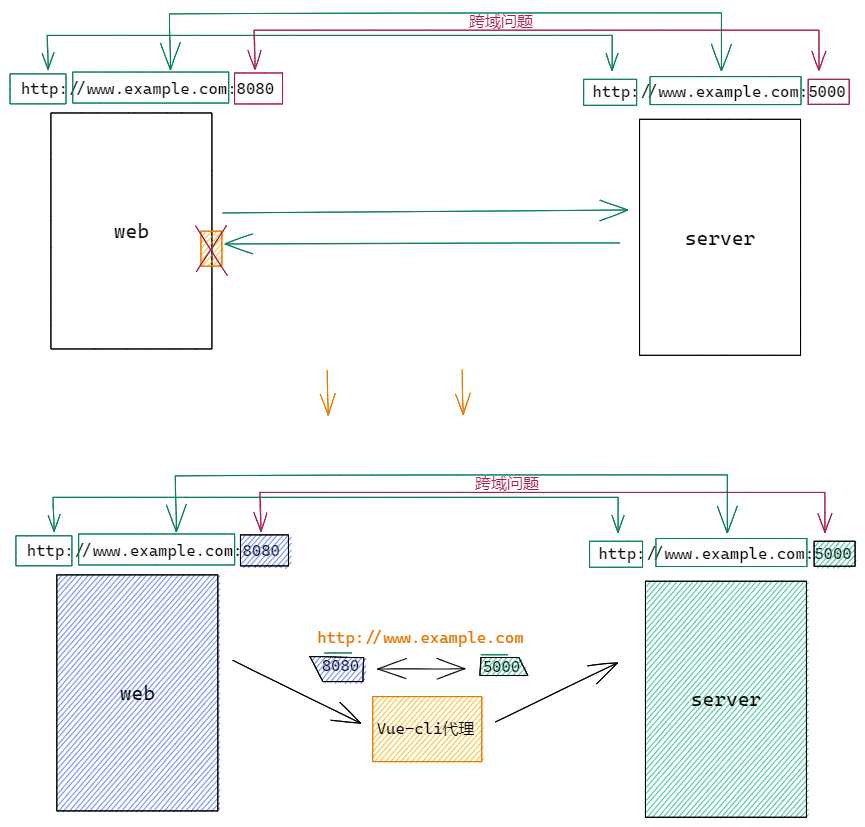
2.3.1 方法一 单代理请求
在vue.config.js中添加如下配置:
module.exports = {
  devServer: {
    proxy: 'http://localhost:5000'
  }
}
说明:
1.优点: 配置简单,请求资源时直接发给前端(8080)即可。
2.缺点: 不能配置多个代理,不能灵活的控制请求是否走代理。
3.工作方式: 若按照上述配置代理,当请求了前端不存在的资源时,那么该请求会转发给服务器(优先匹配前端资源)
2.3.2 方法二 多代理请求
编写vue.config.js配置具体代理规则:
module.exports = {
  devServer: {
    proxy: {
      '/api': {	//匹配所有以'/api'开头的请求路径
          target: 'www.example.com:5000',		//代理目标的基础路径
          ws: true,
          changeOrigin: true
      },
      '/foo': {	//匹配所有以'/foo'开头的请求路径
          target: 'www.example.com:5001'		//代理目标的基础路径
      },
        ......
    }
  }
}

/*
    changeOrigin设置为true时,服务器收到的请求头中的host为: localhost:5000
    changeOrigin设置为false时,服务器收到的请求头中的host为: localhost:8080
    changeOrigin默认值为true
*/
说明:
-
优点: 可以配置多个代理,且可以灵活的控制请求是否走代理。
-
缺点: 配置略微繁琐,请求资源时必须加前缀。
3.配置注意事项
- web: 8080
- vue-cli: 8080 (负责与web) / 5000(负责与server)
- server: 5000
3.1单代理请求
Vue.config.js
// Vue-cli 代理
devServer: {
	proxy: 'http://localhost:5000'    // 只能单一的代理一个服务器
}
index.vue
methods:{
    getStudentInfo(){
        axios.get('http://localhost:8080/students').then(
            response => console.log(response.data),
            error => console.log(error.message)
        )
    }
}
// 注意:这里的URL后缀port不是5000而是8080
// 原因上面的图解释了,这里再说一下:
// 	- web:8080<--->vue-cli:8080<--类映射-->vue-cli:5000<--->server:5000
//本质上是将数据发送到vue-cli(代理|8080|跨站问题),通过代理发送到server。
3.2多代理请求
Vue.config.js
devServer: {
	proxy: {
      	'/api': {
        	target: 'http://localhost:5000',
        	ws: true,
        	changeOrigin: true,
        	pathRewrite: { "^/api": '' }
        },
        ......
   },
}
// pathRewrite: { "^/api": '' }; 这是替换掉url中的前缀部分;十分重要。不然,代理将会将数据发送给带有前缀的;
index.vue
methods:{
    getStudentInfo(){
        axios.get('http://localhost:8080/api/students').then(
            response => console.log(response.data),
            error => console.log(error.message)
        )
    }
}

 浙公网安备 33010602011771号