绑定样式
总结
绑定样式:
    1.class样式
        写法:class="xxx"xxx可以是字符串、对象、数组。
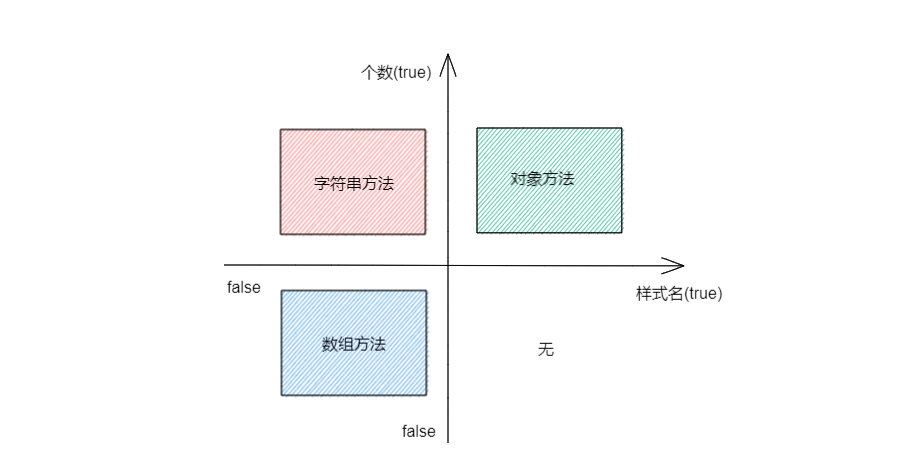
            字符串写法适用于: 类名不确定,要动态获取。
            对象写法适用于: 要绑定多个样式,个数不确定,名字也不确定。
            数组写法适用于: 要绑定多个样式,个数确定,名字也确定,但不确定用不用。
    2. style样式
        :style="{fontsize: xxx}"其中xxx是动态值。: style="[a,b]"其中a、b是样式对象。


                个数(true)   |
                            |
                字符串方法   |  对象方法
                            |
              ———————————————————————>
                            |            样式名(true)
                数组方法     |
                            |
                            |
        内联式:
            style="XXX"
            1. 对象方法
            2. 数组方法

            注意: XXX 中是必须存在原始css中的,多个单词组成的“-”去除变成后单词大写。
| 样式名 |
个数 |
动态 |
推荐方法 |
| false |
true |
true |
字符串方法 |
| false |
false |
true |
数组方法 |
| true |
true |
true |
对象方法 |
实例
<head>
    <meta charset="UTF-8">
    <meta http-equiv="X-UA-Compatible" content="IE=edge">
    <meta name="viewport" content="width=device-width, initial-scale=1.0">
    <title>1绑定样式</title>
    <script src="../js/vue.js"></script>
    <style>
        div{
            margin:10px 0;
        }
        .basic{
            height: 100px;
            width: 200px;
            border: 1px solid rgba(0, 0, 0, 0.418) ;
        }
        .bgd1{
            background-color:aqua;
        }
        .bgd2{
            background-color:bisque;
        }
        .bgd3{
            background-color:blueviolet;
        }
        .style1{
            font-size:24px;
            font-family: 楷体;
            font-weight: bolder;
        }
        .style2{
            border: 4px solid rgba(0, 0, 0, 0.589)
        }
        .style3{
            border-radius: 10px;
        }
    </style>
</head>
<body>

    <div id="root">
        <!-- 第一种: 样式名称不确定,数量确定,动态执行 (字符串方法) -->
        <div class="basic" :class="bgdStr" @click="changeBgd">
            <span>{{name}}</span>
        </div>
        <!-- 第二种: 样式名称不确定,数量不确定,动态执行 (数组方法) -->
        <div class="basic" :class="styleArr">
            <span>{{name}}</span>
            <span>{{i}}</span>
            <div>
                <button @click="pushStyle">pushStyle</button>
                <button @click="shiftStyle">shiftStyle</button>
            </div>
        </div>
        <!-- 第三种: 样式名称确定,数量确定,动态执行 (对象方法) -->
        <div class="basic" :class="styleObj" @click="objUse">
            <span>{{name}}</span>
        </div>


        <!-- 了解: -->
        <!-- 第四种: 内联式,动态执行 (对象方法) -->
        <div class="basic" :style="styleObj2">
            <span>{{name}}</span>
        </div>
        <!-- 第五种: 内联式,动态执行 (数组方法) -->
        <div class="basic" :style="styleArr2">
            <span>{{name}}</span>
        </div>
    </div>


<script>
    Vue.config.productionTip = false;
    const vm = new Vue({
        el:'#root',
        data:{
            name:'redskaber',
            bgdStr:'bgd1',
            styleArr:[],
            i:0,
            styleObj:{
                style1:false,
                style2:false,
                style3:false
            },
            styleObj2:{
                fontSize:'30px',
                color:'#000000',
                backgroundColor:'#ddd'
            },
            styleArr2:[
                {
                    fontSize:'30px',
                    color:'#000000',
                    backgroundColor:'#ddd'
                },
                {
                    borderRadius:"10px",
                }
            ]
        },
        methods:{
            changeBgd(){
                let arr = ["bgd1","bgd2","bgd3"]
                let index = Math.floor(Math.random()*3)
                this.bgdStr = arr[index];
                console.log(this.bgdStr)
            },
            pushStyle(){
                let arr = ["style1","style2","style3"]
                if (this.i in [0,1,2,-1,-2,-3]){
                    this.styleArr.push(arr[this.i])
                }
                this.i++
            },
            shiftStyle(){
                let arr = ["style1","style2","style3"]
                if (this.i in [0,1,2,-1,-2,-3]){
                    this.styleArr.shift()
                }
                this.i--
            },
            objUse(){
                this.styleObj.style1=true;
                this.styleObj.style2=true;
                this.styleObj.style3=true;
            }

        }
    });
</script>
</body>



 浙公网安备 33010602011771号