
Prolog 🦉 | Basic Syntax
 Prolog Basic Syntax including facts, rules, queries etc
1. Run Prolog
- file name:
test.pl - go to the location of the
test.plin terminal - input
swipl - input
[test].(remember '.') - do sth
- if you want to halt the file, input
halt
- e.g.
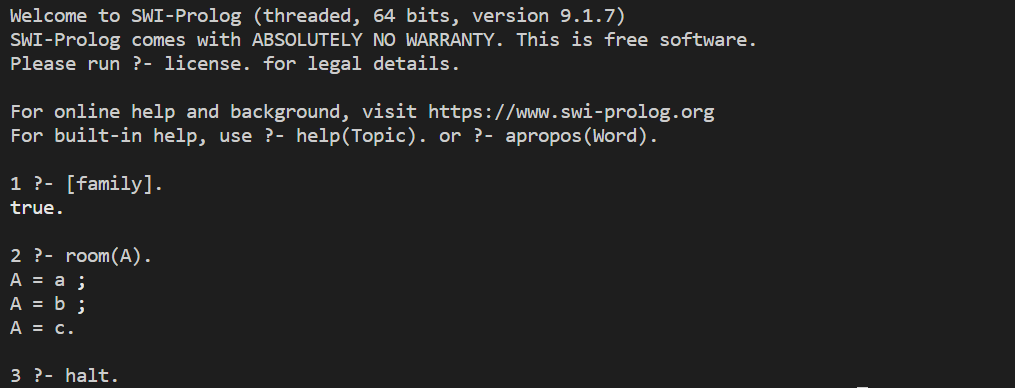
2. Facts
- comment: type '%':
% This is the syntax for comments - facts
- fact:
pred(arg1, arg2, ..., argn). - arg: integer, atom, string begin with lower letter etc
- variable: item begin with '_' or UPPER LETTER, structure etc
- e.g.
father('David', 'John').    % remember '.' at the end
room(a).
- fact:
3. Simple Query
-
?-: the prompt for the interpreter -
query: type
pred(something)- if exist answer, return the answer; if you want more answer, type
; - e.g.
room(a).
room(b).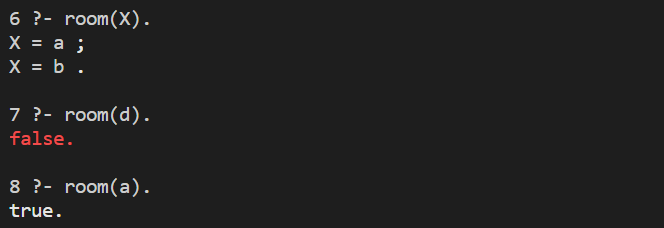
- if exist answer, return the answer; if you want more answer, type
-
query principle inside
- prolog will match user's target to find the answer; when input
;, it will redo (release the variable first and start the search from the last token) - prolog's target has four ports to control the processes
- call: find the clause
- exit: target matched successfully, mark the success clause, and bind the variable
- redo: release the variable first and start the search from the last token
- fail: can not find more success clause
- prolog will match user's target to find the answer; when input
-
debug: input
debug -
trace: input
trace- e.g.
room(a).
room(b).
room(c).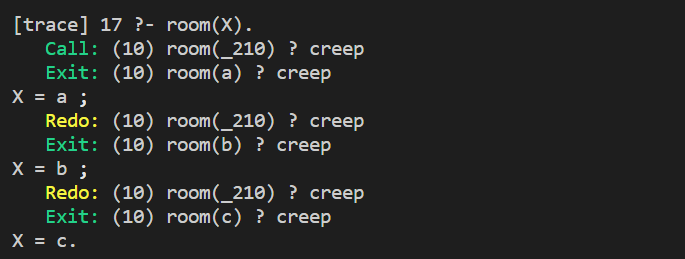
- e.g.
4. Hybrid Query
-
hybrid query: input more query like:
location(apple, kitchen).
location(trash, kitchen).
edible(apple).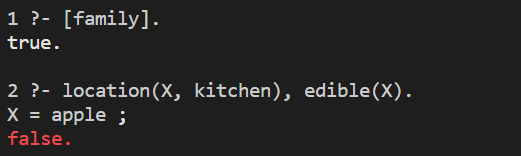
-
some interval predicate
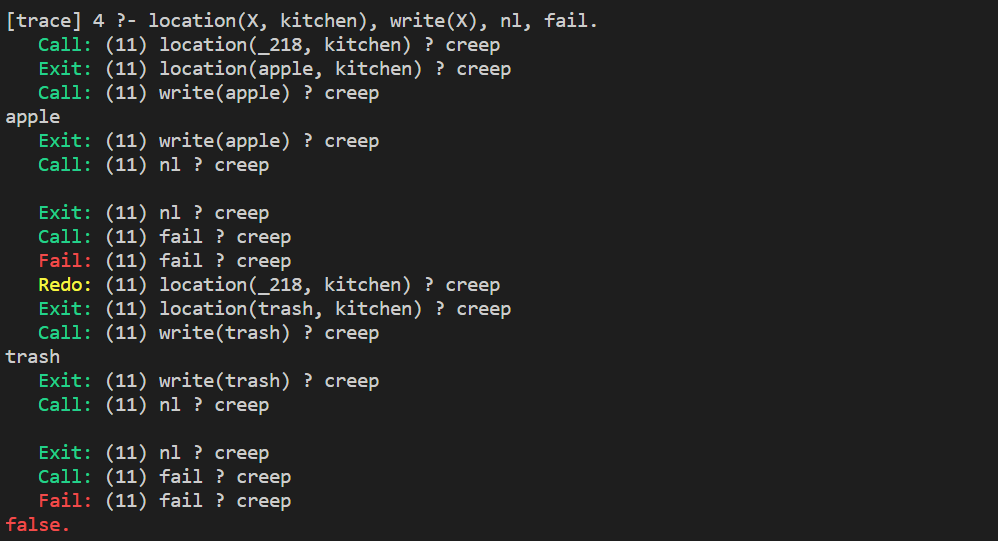
write(1 arg): print some stringnl: print an entertab(1 arg: n): print n\space
- e.g.

here is the trace
5. Rules
-
rule:
head :- body,headis predicate,:-means "if",bodyis target- e.g.
location(apple, kitchen).
location(trash, kitchen).
edible(apple).

where_food(X, Y) :- location(X, Y), edible(X).
result:

-
append more rules: we can append more rules to define a predicate
- e.g.
location(apple, kitchen).
location(burger, kitchen).
location(trash, kitchen).
edible(apple).
yummy(burger).
where_food(X, Y) :- location(X, Y), edible(X).
where_food(X, Y) :- location(X, Y), yummy(X).
-
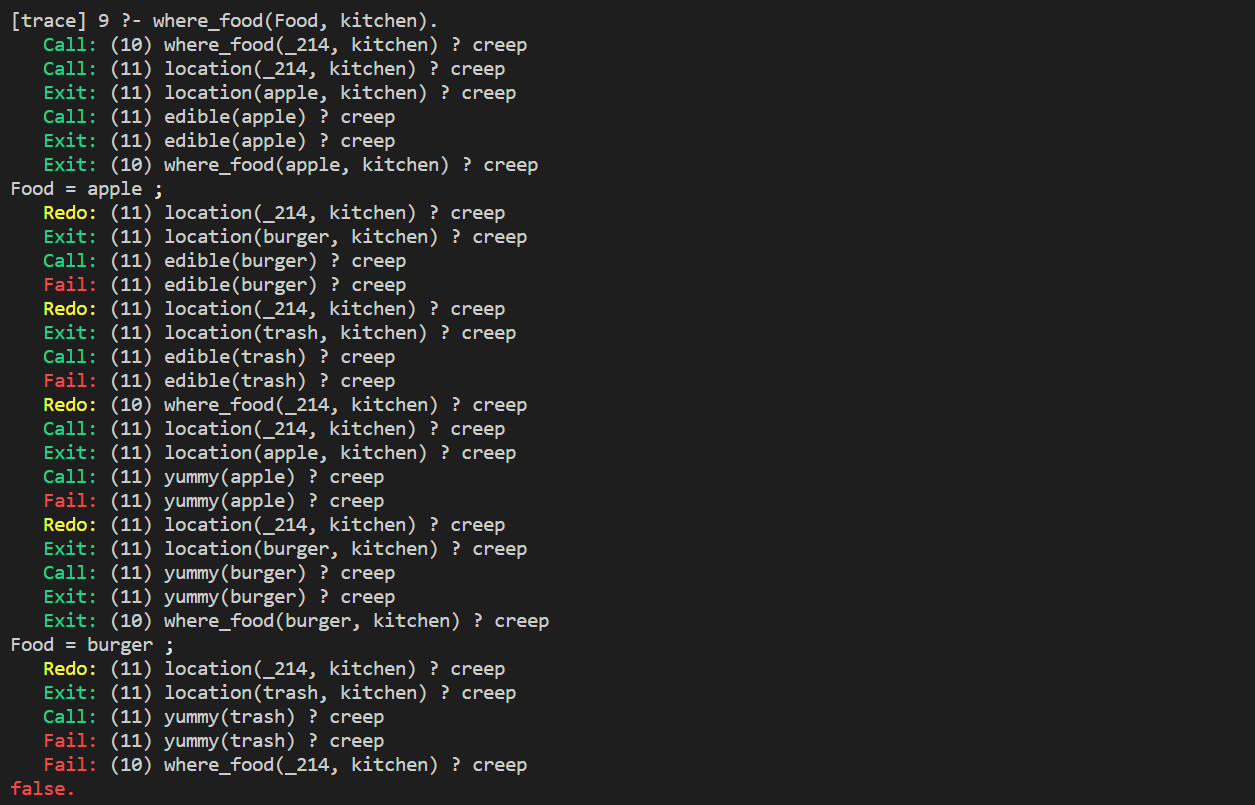
rules basic principle: in fact rules are multiple layers of query. we can see the trace of last instance:
6. Arithmetic
-
math expression:
X is expression

-
operation
+, -, *, />, <, >=, =<
-
use in rules
- e.g.
c_to_f(C, F) :- F is C * 9 / 5 + 32.
7. Data Management
-
asserta&assertasserta(X): it will append X to the beginning of the dynamic databaseassert(X): it will append X to the end of the dynamic databasedynamic pred/arg_size: if you want to useasserta&assert, please typedynamic pred/arg_sizeto run at the front of the program, which allowspredcan be modified dynamically
- e.g.
fruit(apple).
fruit(watermelon).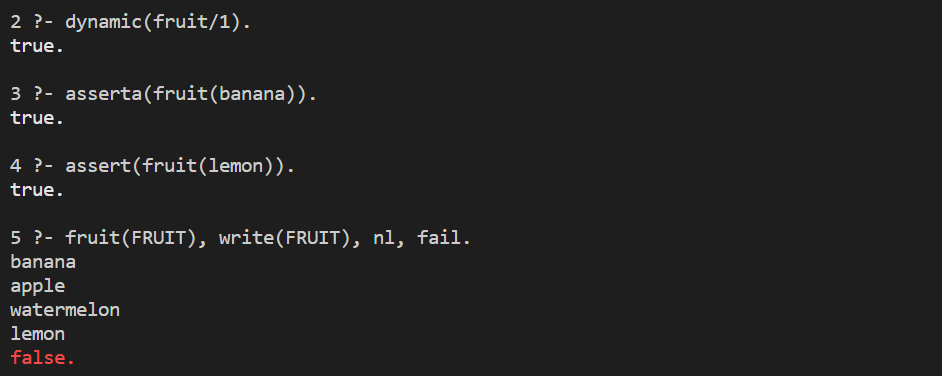
-
retract(X): removeXfrom dynamic database(rememberdynamic)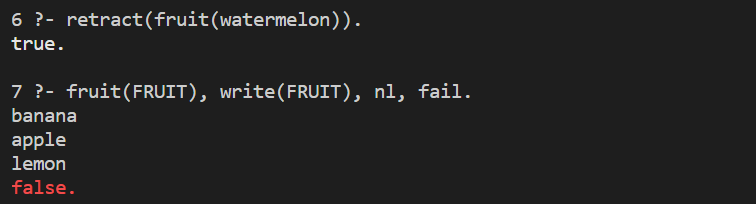
-
use in rules
fruit(apple).
fruit(watermelon).
fruit(tomato).

is_fruit(X) :- fruit(X).
is_fruit(X) :- write('NO FRUIT NOW!'), nl, fail.

remove(X) :- retract(fruit(X)).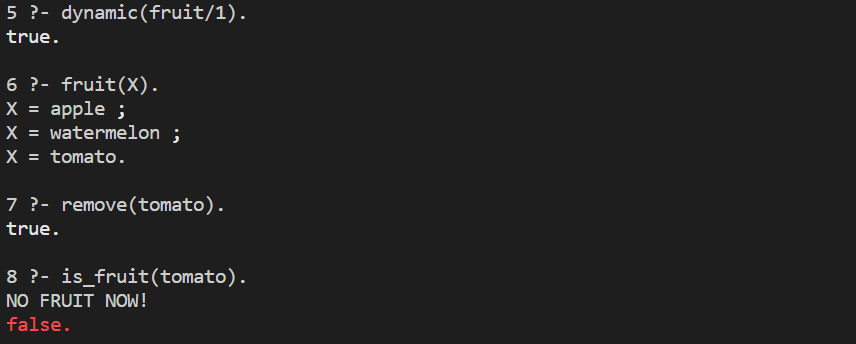
8. Recursion
-
recursion:
- e.g.
location(envelope, desk).
location(stamp, envelope).
location(key, envelope).

is_contained_in(T1, T2) :- location(T1, T2).
is_contained_in(T1, T2) :- location(X, T2), is_contained_in(T1, X).
- e.g.
-
recursion basic principle
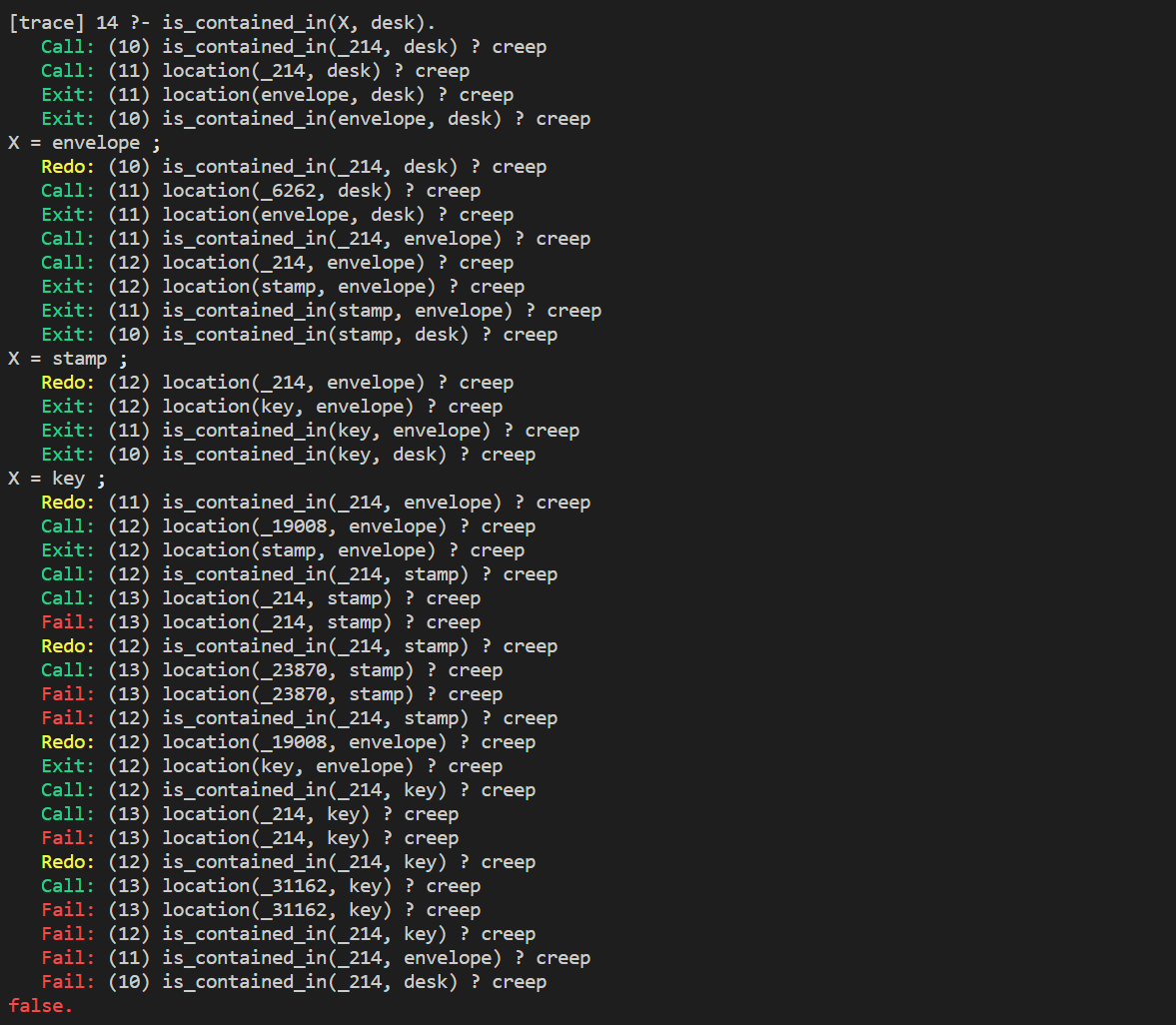
-
Which is faster?
is_contained_in(T1,T2):- location(X,T2), is_contained_in(T1,X).is_contained_in(T1,T2):- location(T1,X), is_contained_in(X,T2).
- if we ask
is_contained_in(X, desk),1.is faster!
9. Unification
-
unification
- variable & any items
- original item & original item(atom or integer): when they equal
- structure & structure: when each corresponding parameter of two structures can be associated
-
= (arg1, arg2)orarg1 = arg2-
notice:
=is Unification -
e.g.

-
variable unification


-
if the values of the variables conflict in both bindings, it will fail

-
anonymous variable
_: it will not bind any values
-
-
difference between unification and math expression: unification will not compute, but
iswill do
10. Data Structure
-
structure:
functor(arg1, arg2, ...)% object(name, color, size, amount) location(object(candle, red, small, 1), kitchen). location(object(apple, red, small, 1), kitchen). location(object(apple, green, small, 1), kitchen). location(object(table, blue, big, 50), kitchen).
-
nested structure
location(object(table, blue, dimension(1, 2, 3), 50), kitchen).
11. List
-
List:
[obj1, obj2, ...] -
empty list:
[]ornil% loc_list(nil, hall). loc_list([], hall). loc_list([apple, banana, orange], kitchen).
-
head and tail
-
[a|[b, c, d]] = [a, b, c, d],ais head,[b ,c ,d]is tail. we use|to divide them, behind|is a list
-
we can use
|at other place
-
nilcan not match[H|T], which can be used in recursion bounds checking
-
list basic principle:
'[|]'(head, tail) = (head | tail), in fact|is a predicate; we can usedisplay()to see it.
-
-
member(obj, list)-
we can use
memberto seeobjis in the list or not.
-
memberbasic principlemember(H, [H | T]). % in head ? member(X, [H | T]) :- member(X, T). % in tail ?
-
-
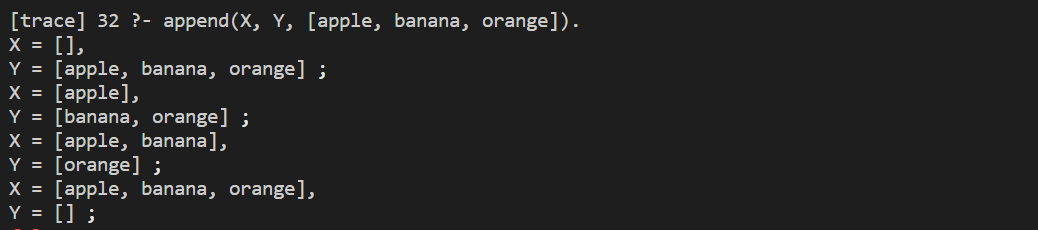
append(list1, list2, dest)-
connect
list1andlist2to be a new listdest
-
appendbasic principleappend([], X, X). append([H | T1], X, [H | T2]) :- append(T1, X, T2).see how to split a list
-
-
findall(result, target, result_list): find all elements intargetmode and store them inresult_listinresultmodefruit(apple). fruit(banana).
12. Operator
-
math operator

-
operator
- infix:
3 + 10 - prefix:
-13 - postfix:
8 factorial
- infix:
-
operator precedence
- precedence value: 1 ~ 1200
- value smaller, priority bigger
op(value, fix, name_of_operator)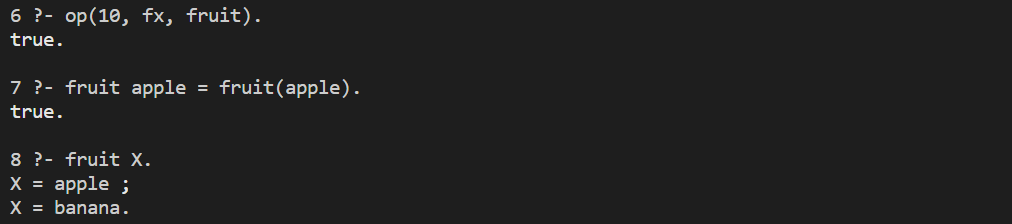
fix nametrait Infix xfxnon-associative Infix xfyright to left Infix yfxleft to right Prefix fxnon-associative Prefix fyleft to right Postfix xfnon-associative Postfix yfright to left -
:operatorobj(apple, size: small, color: red).
13. Cut
-
cut
!: add!in the rule will cut the searchfruit(apple). fruit(banana). fruit(orange). cut_test1(X) :- fruit(X). cut_test1('last clause'). cut_test2(X):- fruit(X), ! . cut_test2('last clause').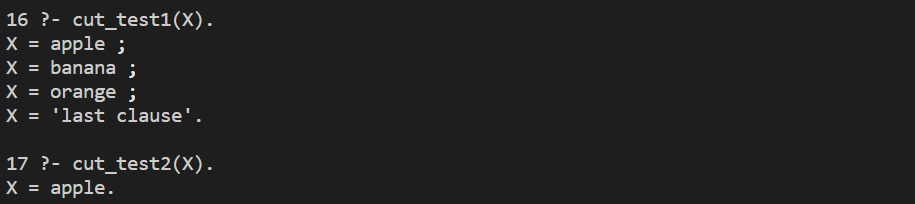
-
!suppresses the traceback of the left target, while the target to its right is unaffectedcut_test3(X, Y) :- fruit(X), ! , fruit(Y).
-
not(X): negateXbool value

-
notbasic principlenot(X) :- call(X), !, fail. not(X).
14. Process Control
-
repeat: always succeed, provide an infinite number of choice points -
how to create a endless loop:
command_loop :- repeat, fail. -
loop: read in a simple command and echoed on the screen until the user enters
endcommand_loop :- repeat, write('Enter command (end to exit): '), read(X), write(X), nl, X = end.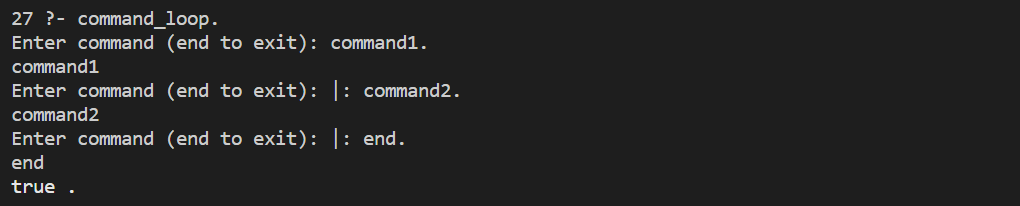
-
Tail Recursion
- Tail Resursion: using recursion to repeat; its form is a recursive statement at the end of the function, and the computation of each layer does not need to use the return information of the next layer so that a good Prolog interpreter does not need to rely on a stack
- e.g.
factorial(number, 1, answer)->answer := number!
5! = 120;factorial(1, F, F). factorial(N, T, F) :- N > 1, NEXT_T is N * T, NEXT_N is N - 1, factorial(NEXT_N, NEXT_T, F).

15. Natural Language
-
And Proof: first find out all the possible breakdown of a sentence, then test whether each part of breakdown is legal
-
Diff Table: including two tables: full table and remainder table, which can be used as two arguments of the predicate; we use
-to connect two tables to make it easier to read, in the form ofX - Y- e.g.
sentence(S) :-
    nounphrase(S - S1),
    verbphrase(S1 - []).

noun([dog|X] - X).
noun([cat|X] - X).
noun([mouse|X] - X).
verb([ate|X] - X).
verb([chase|X] - X).

adjective([big|X] - X).
adjective([brown|X] - X).
adjective([lazy|X] - X).

determiner([the|X] - X).
determiner([a|X] - X).

nounphrase(NP - X):-
    determiner(NP - S1),
    nounexpression(S1 - X).

nounphrase(NP - X):-
    nounexpression(NP - X).

nounexpression(NE - X):-
    noun(NE - X).

nounexpression(NE - X):-
    adjective(NE - S1),
    nounexpression(S1 - X).   % recursively deal with any number of adj.

verbphrase(VP - X):-
    verb(VP - S1),
    nounphrase(S1 - X).
- e.g.
-
Definite Clause Grammar -- DCG
- DCG: Diff tables are often used in Prolog, so many Prolog versions have good support for diff tables. This syntax is called DCG, and it looks very similar to a normal Prolog clause, except that
:-is replaced by-->, which is translated by Prolog into the normal difference table pred --> arg=pred([arg|X], X)- using DCG, the first part of the last instance can be:
sentence --> nounphrase, verbphrase.

% noun([dog|X] - X).
noun --> [dog].
- DCG: Diff tables are often used in Prolog, so many Prolog versions have good support for diff tables. This syntax is called DCG, and it looks very similar to a normal Prolog clause, except that
-
=..: change a predicate to a list


 浙公网安备 33010602011771号