1: 概述
thymeleaf是一个跟 Velocity、FreeMarker 类似的模板引擎,和以前学的jsp相近,但性能上无疑是比jsp好。
参考文档官方文档:https://www.thymeleaf.org/doc/tutorials/2.1/usingthymeleaf.html#what-is-thymeleaf
本文环境:win10,jdk1.8, idea2018, maven3.5.4, springboot1.5.19,
2:引入依赖
pom.xml 中加入thymeleaf依赖
1     <dependency>
2       <groupId>org.springframework.boot</groupId>
3       <artifactId>spring-boot-starter-thymeleaf</artifactId>
4     </dependency>
springboot1.4版本之后,也可以使用thymeleaf3来提高效率,与thymeleaf3匹配的是thymeleaf layout2 :
1   <properties>
2     <project.build.sourceEncoding>UTF-8</project.build.sourceEncoding>
3     <thymeleaf.version>3.0.0.RELEASE</thymeleaf.version>
4     <thymeleaf-layout-dialect.version>2.0.0</thymeleaf-layout-dialect.version>
5   </properties>
因为在默认配置下,thymeleaf对html的内容要求很严格,比如<meta charset=”UTF-8″ />,所以可能会造成一些不便
可选择更改application配置文件 spring.thymeleaf.mode=HTML
或者修改配置 spring.thymeleaf.mode=LEGACYHTML5 并搭配额外的NekoHTML
1 <dependency>
2        <groupId>net.sourceforge.nekohtml</groupId>
3        <artifactId>nekohtml</artifactId>
4        <version>1.9.22</version>
5 </dependency>
然后创建html文件
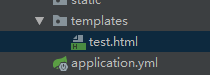
在<html>标签中添加 xmlns:th="http://www.thymeleaf.org" ,引入名称空间,
<!DOCTYPE html>
<html lang="en" xmlns:th="http://www.thymeleaf.org">
<head>
    <meta charset="UTF-8">
    <title></title>
</head>
<body>
</body>
</html>
3:表达式语法
 1 public class User {
 2     private Integer id;
 3     private String name;
 4     private Byte age;
 5     private Boolean sex;
 6     private Set<String> hobbys;
 7     private Object other;
 8
 9     //getter和setter
10 }
 1     @RequestMapping("/test")
 2     public String test(Map<String, Object> map){
 3         User user = new User();
 4         user.setId(1);
 5         user.setName("Adam");
 6         user.setAge((byte) 20);
 7         user.setSex(true);
 8         user.addHobby("A");
 9         user.addHobby("C");
10         user.addHobby("D");
11         map.put("user", user);
12         return "test";
13     }
3.1:简单表达式
${...} 变量表达式
*{...} 选择变量表达式
#{...} 消息表达式
@{...} 链接url表达式
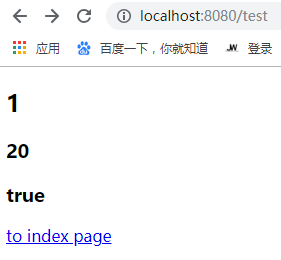
1 <!--/*@thymesVar id="name" type="java.lang.String"*/-->
2 <h2 th:text="${user.id}"></h2>
3 <div th:object="${user}">
4     <h3 th:text="*{age}"></h3>
5     <h3 th:text="*{sex}"></h3>
6 </div>
7
8 <a th:href="@{/index.html}">to index page</a>
消息表达式 用于从消息源中提取消息内容实现国际化。 详解:https://blog.csdn.net/skyupward/article/details/54987618

变量表达式和星号表达式:
1 <div th:object="${user}">
2     <h3 th:text="*{age}"></h3>
3     <h3 th:text="*{sex}"></h3>
4 </div>
等价于:
1 <div>
2     <h3 th:text="${user.age}"></h3>
3     <h3 th:text="${user.sex}"></h3>
4 </div>
两者也可混合使用:
1 <div th:object="${user}">
2     <h3 th:text="${user.age}"></h3>
3     <h3 th:text="*{sex}"></h3>
4 </div>
3.2:字面量
'one text','another one!',... 字符串
0,34,3.0,12.3,... 数值
true false 布尔类型
null 空指针
3.3:字符串操作
+ 字符串连接
|The name is ${name}| 字符串替换
3.4:算数运算
+-*/% 二元运算符
- 单目运算符
3.5:布尔
and, or 二元操作符
!, not 一元运算符
3.6:比较运算
> , < , >= , <= ,== , != (gt , lt , ge , le, eq, ne)
3.7:条件运算
(if) ? (then)
(if) ? (then) : (else)
(value) ?:(defaultvalue)
3.8:th:*
th:text, th:utext 改变当前元素里面的文本内容;
th:(任意html属性) 替换原生属性的值;
th:insert,th:replace 片段包含,如同 jsp:include
th:each 遍历,如同c:forEach
th:if , th:unless, th:switch, th:case 条件判断, c:id
th:object, th:with 变量声明, c:set
th:attr,th:attrprepend, th:attrappend 任意属性修改
th:value, th:href, th:src...... 修改指定属性默认值
......
一些小示例:
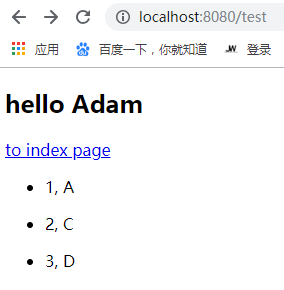
 1  <!--字符串-->
 2  <h2 th:text="|hello ${user.name}|"></h2>
 3  <!--条件判断-->
 4  <a th:if="${user.id != null}" th:href="@{/index}">to index page</a>
 5  <a th:unless="${user.other == null}" th:href="@{/other}">to other page</a>
 6  <!--遍历-->
 7  <!--/*@thymesVar id="hobbys" type="java.util.Set"*/-->
 8  <ul>
 9      <li th:each="hobby,iterStat : ${user.hobbys}" th:text="|${iterStat.index+1}, ${hobby} |"></li>
10  </ul>
iterStat是状态变量,属性有:
index:当前迭代对象的 index(从0开始计算)
count: 当前迭代对象的 index(从1开始计算)
size:被迭代对象的大小
current:当前迭代变量
even/odd:布尔值,当前循环是否是偶数/奇数(从0开始计算)
first:布尔值,当前循环是否是第一个
last:布尔值,当前循环是否是最后一个
暂时到此,

 浙公网安备 33010602011771号