
C#使用Deploy远程自动发布项目
远程连接到服务器
通过PowerShell远程连接到服务器这一步是比较难的。
因为他要在服务器和本机做一定的配置才可以实现
首先在服务器里面
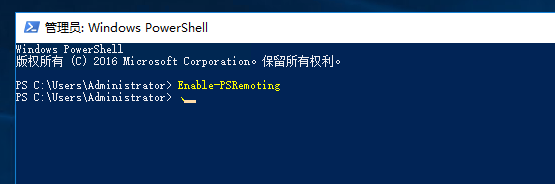
通过PowerShell运行Enable-PSRemoting
来开启可以使用PowerShell远程连接
然后打开PowerShell远程连接对应的防火墙端口
开启防火墙"Windows 远程管理“项,端口:5985
本地查询是否能连接:
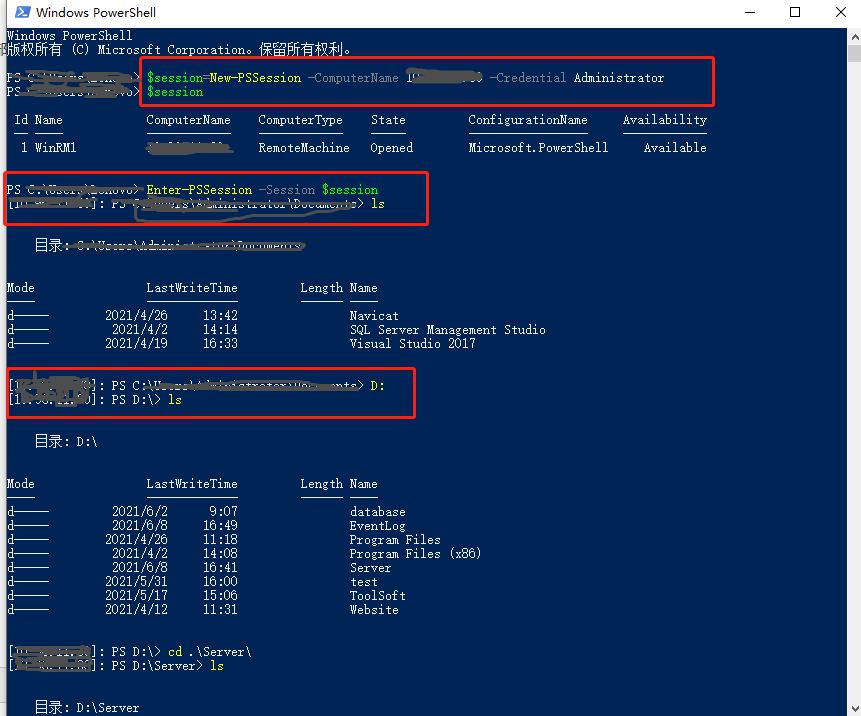
最后执行

内容如下:
Write-Host 'Build Starting' -ForegroundColor Yellow
$CurPath=(Resolve-Path .).Path
$OutputPath=$CurPath+"\bin\publish\"
Remove-Item -Path $OutputPath -Force -Recurse
Invoke-Command -ScriptBlock {param($o) dotnet publish -o $o -c "Release" --no-self-contained -v m --nologo "06.Giant.Api.csproj"} -ArgumentList $OutputPath
Write-Host 'Build Completed' -ForegroundColor Green
Write-Host 'Compress Starting' -ForegroundColor Yellow
$CurDateString=Get-Date -Format "yyyyMMddHHmmss"
$ZIPFileName="WMSAPI"+$CurDateString+".zip"
$ZIPFilePath=$CurPath+"\"+$ZIPFileName
$CompressPath=$OutputPath+"*"
Compress-Archive -Path $CompressPath -DestinationPath $ZIPFilePath
Write-Host 'Compress Completed' -ForegroundColor Green
Write-Host 'Deploy Starting' -ForegroundColor Yellow
#$User = "WDeployAdmin"
#$Password = Read-Host -Prompt "Please enter the server password" -AsSecureString
#Write-Host 'Start connecting to the server' -ForegroundColor Yellow
#$Credential = New-Object -TypeName System.Management.Automation.PSCredential -ArgumentList $User, $Password
$Session = New-PSSession -ComputerName 114.115.162.100 -Credential Administrator
$Session
Write-Host 'Successfully connected to the server' -ForegroundColor Green
$RemotePath="D:\Publish\"
$RemoteDestinationPath=$RemotePath+"WMSAPI\"
$RemoteZipPath=$RemotePath+$ZIPFileName
Write-Host 'Stop the AppPool' -ForegroundColor Yellow
Invoke-Command -Session $Session -ScriptBlock {Stop-WebAppPool -Name "WMSAPI"}
#Invoke-Command -Session $Session -ScriptBlock {Stop-Service -Name "W3SVC"}
#Invoke-Command -Session $Session -ScriptBlock {Stop-IISSite -Name "WMSDI" -Confirm:$False}
#Invoke-Command -Session $Session -ScriptBlock {iisreset}
while((Invoke-Command -Session $Session -ScriptBlock {Get-WebAppPoolState -Name "WMSAPI"}).Value -ne "Stopped")
{
Write-Host 'Waiting Stop the AppPool' -ForegroundColor Yellow
Start-Sleep -Seconds 1
}
Invoke-Command -Session $Session -ScriptBlock {Get-WebAppPoolState -Name "WMSAPI"}
Write-Host 'Start copy files to the server' -ForegroundColor Yellow
Copy-Item $ZIPFilePath -Destination $RemotePath -ToSession $Session
Write-Host 'Start Expand files on the server' -ForegroundColor Yellow
Invoke-Command -Session $Session -ScriptBlock {param($p) Remove-Item -Path $p -Recurse -Force} -ArgumentList $RemoteDestinationPath
Invoke-Command -Session $Session -ScriptBlock {param($p,$dp) Expand-Archive -Path $p -DestinationPath $dp} -ArgumentList $RemoteZipPath,$RemoteDestinationPath
Write-Host 'Restart the AppPool' -ForegroundColor Yellow
Invoke-Command -Session $Session -ScriptBlock {Start-WebAppPool -Name "WMSAPI"}
#Invoke-Command -Session $Session -ScriptBlock {Start-Service -Name "W3SVC"}
#Invoke-Command -Session $Session -ScriptBlock {Start-IISSite -Name "WMSDI"}
Write-Host 'Disconnected from server' -ForegroundColor Yellow
Disconnect-PSSession -Session $Session
Remove-Item -Path $ZIPFilePath
Write-Host 'Deploy Completed' -ForegroundColor Green

 浙公网安备 33010602011771号