===============================
【说明】在ubuntu下没有使用成功;
需要下载软件:
【方法1】下载源码
下载地址:http://ftp.gnu.org/gnu/indent/
安装方法查看:
linux安装软件的几种方法
tar.gz源代码包安装方式:
1、找到相应的软件包,比如soft.tar.gz,下载到本机某个目录;
2、打开一个终端,su -成root用户;
3、cd soft.tar.gz所在的目录;
4、tar -xzvf soft.tar.gz //一般会生成一个soft目录
5、cd soft
6、./configure
7、make
8、make install
【方法2】安装
# apt-get install indent
========================
【使用方法】
indent -bs /work/_01_test_debug/_02_c/_01_hello.c
============================


Linux系统里 提高了一个软件: indent,   这个软件自动帮你实现代码风格,比VC6.0 还容易多了。
        比如 编写的源文件:lottery.c
  在终端里输入:  indent  lottery.c   和   indent  -kr  lottery.c   两种风格, 试试看就知道 只是有一点不同而已。
   我们多数写程序的人可能都是学的Kernighan & Ritchie代码风格


indent -kr -cli4 -nut -bl4 -bli0 <filename>

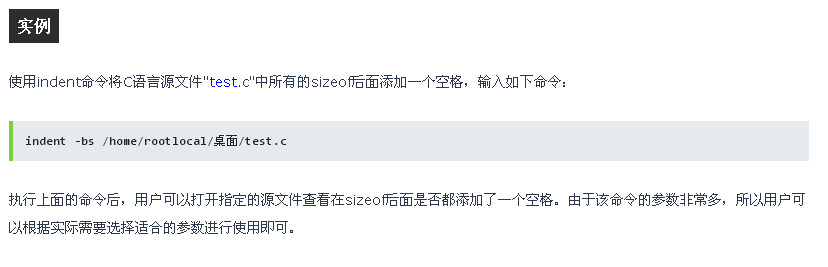
indent -bs /home/rootlocal/桌面/test.c

来自: http://man.linuxde.net/indent
===============================================
indent命令
转载自:http://man.linuxde.net/indent
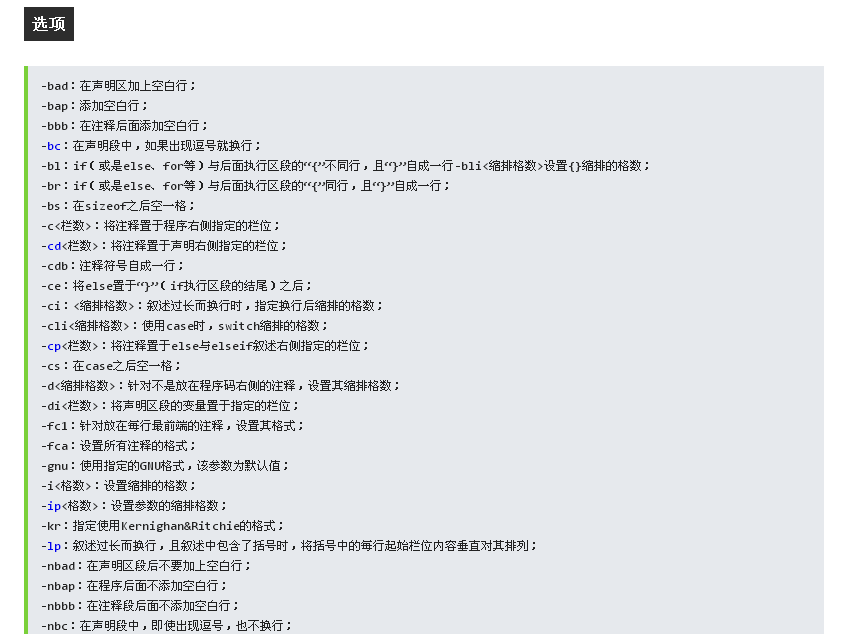
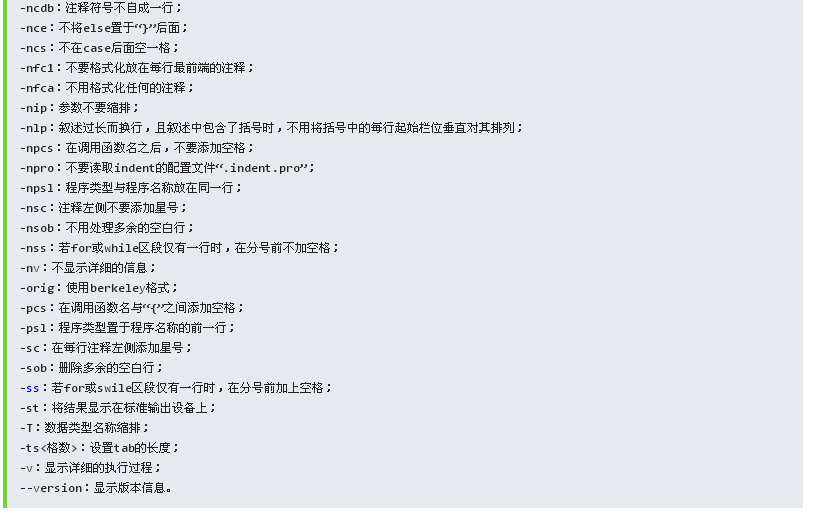
1 indent(选项)(源文件) 或 indent(选项)(源文件)(-o 目标文件)
【转贴】用 indent 进行代码格式化
2009-03-27 12:01
indent 常用的参数设置
以前的用法:indent -kr -cli4 -i4 -nut <filename>
改进的用法:indent -kr -cli4 -nut -bl4 -bli0 <filename>
注释:
-kr, Use Kernighan & Ritchie coding style.
-cli4, specifies the number of spaces that case labels should be indented to the right of the containing switch statement.
-nut, 不使用空格。
-bl4, 大括号内的缩进,这里为4个 空格。
-bli0, “if”语句后大括号的缩进,一般设为“0”。
indent工具参数
indent是一个常用的Linux的C代码格式化工具,但是参数太多,很 难记忆,目前发现一组参数,可以格式化为我常用的代码格式。
-bad -bap -bbb -bbo -nbc -bl -bli0 -bls -c33 -cd33 -ncdb -ncdw -nce -cli0 -cp33 -cs -d0 -nbfda -nfc1 -nfca -hnl -ip5 -l75 -lp -pcs -nprs -saf -sai -saw -nsc -nsob -nss -i4 -ts4 -ut
保存在~/.indent.pro,就是默认的indent参数了。
3.5. 用 indent 进行代码格式化
一个范例,胜过前言万语。用 indent 格式化代码,再从格式化前后的格式变化, 来学习格式化规范。
可以用不同的参数调用 indent,
-
What is Indent
The `indent' program can be used to make code easier to read. It can also convert from one style. of writing C to another.
-
Download
Current Version: GNU indent 2.2.7。 Download : ftp.gnu.org/gnu/indent/indent-2.2.7.tar.gz
我们参照GNU,Kernighan & Ritchie,Berkeley风格,制定了自己风格:
-
indent命令参数:
-bad -bap -bbb -bbo -nbc -bl -bli0 -bls -c33 -cd33 -ncdb -ncdw -nce -cli0 -cp33 -cs -d0 -nbfda -di2 -nfc1 -nfca -hnl -ip5 -l75 -lp -pcs -nprs -psl -saf -sai -saw -nsc -nsob -nss -i4 -ts4 -ut
-
indent配置文件
如上参数可写入用户目录下的文件:".indent.pro",作为运行indent的确 省参数。
-
indent配置说明
表 1. Indent代码格式化说明
| 使用的indent参数 | 值 | 含义 |
|---|
| --blank-lines-after-declarations |
bad |
变量声明后加空行 |
| --blank-lines-after-procedures |
bap |
函数结束后加空行 |
| --blank-lines-before-block-comments |
bbb |
块注释前加空行 |
| --break-before-boolean-operator |
bbo |
较长的行,在逻辑运算符前分行 |
| --blank-lines-after-commas |
nbc |
变量声明中,逗号分隔的变量不分行 |
| --braces-after-if-line |
bl |
"if"和"{"分做两行 |
| --brace-indent 0 |
bli0 |
"{"不继续缩进 |
| --braces-after-struct-decl-line |
bls |
定义结构,"struct"和"{"分行 |
| --comment-indentationn |
c33 |
语句后注释开始于行33 |
| --declaration-comment-columnn |
cd33 |
变量声明后注释开始于行33 |
| --comment-delimiters-on-blank-lines |
ncdb |
不将单行注释变为块注释 |
| --cuddle-do-while |
ncdw |
"do --- while"的"while"和其前面的"}"另起一行 |
| --cuddle-else |
nce |
"else"和其前面的"}" 另起一行 |
| --case-indentation 0 |
cli0 |
switch中的case语句所进0个空格 |
| --else-endif-columnn |
cp33 |
#else, #endif后面的注释开始于行33 |
| --space-after-cast |
cs |
在类型转换后面加空格 |
| --line-comments-indentation n |
d0 |
单行注释(不从1列开始的),不向左缩进 |
| --break-function-decl-args |
nbfda |
关闭:函数的参数一个一行 |
| --declaration-indentationn |
di2 |
变量声明,变量开始于2行,即不必对齐 |
| --format-first-column-comments |
nfc1 |
不格式化起于第一行的注释 |
| --format-all-comments |
nfca |
不开启全部格式化注释的开关 |
| --honour-newlines |
hnl |
Prefer to break long lines at the position of newlines in the input. |
| --indent-leveln |
i4 |
设置缩进多少字符,如果为tab的整数倍,用tab来缩进,否则用 空格填充。 |
| --parameter-indentationn |
ip5 |
旧风格的函数定义中参数说明缩进5个空格 |
| --line-length 75 |
l75 |
非注释行最长75 |
| --continue-at-parentheses |
lp |
续行从上一行出现的括号开始 |
| --space-after-procedure-calls |
pcs |
函数和"("之间插入一个空格 |
| --space-after-parentheses |
nprs |
在"("后")"前不插入空格 |
| --procnames-start-lines |
psl |
将函数名和返回类型放在两行定义 |
| --space-after-for |
saf |
for后面有空格 |
| --space-after-if |
sai |
if后面有空格 |
| --space-after-while |
saw |
while后面有空格 |
| --start-left-side-of-comments |
nsc |
不在生成的块注释中加* |
| --swallow-optional-blank-lines |
nsob |
不去掉可添加的空行 |
| --space-special-semicolon |
nss |
一行的for或while语句,在";"前不加空。 |
| --tab-size |
ts4 |
一个tab为4个空格(要能整除"-in") |
| --use-tabs |
ut |
使用tab来缩进
|
|

 浙公网安备 33010602011771号