
EF Core如何输出日志到Visual Studio的输出窗口
我们在使用EF Core的时候,很多时候需要在Visual Studio的输出窗口中知道EF Core在后台生成的SQL语句是什么,这个需求可以通过自定义EF Core的ILoggerFactory和ILogger类来实现:
首先定义一个实现了ILogger接口的类EFLogger,主要目的是将EF Core生成的Log信息输出到Visual Studio的输出窗口:
using Microsoft.Extensions.Logging;
using System;
using System.Diagnostics;

namespace WebCore.Utils
{
    public class EFLogger : ILogger
    {
        protected string categoryName;

        public EFLogger(string categoryName)
        {
            this.categoryName = categoryName;
        }

        public IDisposable BeginScope<TState>(TState state)
        {
            return null;
        }

        public bool IsEnabled(LogLevel logLevel)
        {
            return true;
        }

        public void Log<TState>(LogLevel logLevel, EventId eventId, TState state, Exception exception, Func<TState, Exception, string> formatter)
        {
            //通过Debugger.Log方法来将EF Core生成的Log信息输出到Visual Studio的输出窗口
            Debugger.Log(0, categoryName, "=============================== EF Core log started ===============================\r\n");
            Debugger.Log(0, categoryName, formatter(state,exception)+"\r\n");
            Debugger.Log(0, categoryName, "=============================== EF Core log finished ===============================\r\n");
        }
    }
}
如果使用的是.NET 8.0及以后的版本,使用下面的代码来构造EFLogger类:
using Microsoft.Extensions.Logging;
using System.Diagnostics;

namespace WebCore.Utils
{
    public class EFLogger : ILogger
    {
        protected string categoryName;

        public EFLogger(string categoryName)
        {
            this.categoryName = categoryName;
        }

        public IDisposable? BeginScope<TState>(TState state) where TState : notnull
        {
            return null;
        }

        public bool IsEnabled(LogLevel logLevel)
        {
            return true;
        }

        public void Log<TState>(LogLevel logLevel, EventId eventId, TState state, Exception? exception, Func<TState, Exception?, string> formatter)
        {
            //通过Debugger.Log方法来将EF Core生成的Log信息输出到Visual Studio的输出窗口
            Debugger.Log(0, categoryName, "=============================== EF Core log started ===============================\r\n");
            Debugger.Log(0, categoryName, formatter(state, exception) + "\r\n");
            Debugger.Log(0, categoryName, "=============================== EF Core log finished ===============================\r\n");
        }
    }
}
然后定义一个实现了ILoggerFactory接口的类EFLoggerFactory,用于创建上面定义的EFLogger类的实例:
using Microsoft.Extensions.Logging;

namespace WebCore.Utils
{
    public class EFLoggerFactory : ILoggerFactory
    {
        public void AddProvider(ILoggerProvider provider)
        {
        }

        public ILogger CreateLogger(string categoryName)
        {
            return new EFLogger(categoryName);//创建EFLogger类的实例
        }

        public void Dispose()
        {

        }
    }
}
最后在DbContext的OnConfiguring方法中,调用optionsBuilder.UseLoggerFactory来将EFLoggerFactory类的实例注入给EF Core,这样所有DbContext的Log信息,都会由EFLogger类输出到Visual Studio的输出窗口了。
using System;
using Microsoft.EntityFrameworkCore;
using Microsoft.EntityFrameworkCore.Metadata;
using WebCore.Utils;

namespace WebCore.Entities
{
    public partial class TestDBContext : DbContext
    {
        public TestDBContext()
        {
            this.Database.SetCommandTimeout(0);//设置SqlCommand永不超时
        }

        public TestDBContext(DbContextOptions<TestDBContext> options)
            : base(options)
        {
        }

        public virtual DbSet<Person> Person { get; set; }

        protected override void OnConfiguring(DbContextOptionsBuilder optionsBuilder)
        {
            if (!optionsBuilder.IsConfigured)
            {
                optionsBuilder.UseLoggerFactory(new EFLoggerFactory());//将EFLoggerFactory类的实例注入给EF Core,这样所有DbContext的Log信息,都会由EFLogger类输出到Visual Studio的输出窗口了
                optionsBuilder.UseSqlServer("Server=localhost;User Id=sa;Password=1qaz!QAZ;Database=TestDB");
            }
        }

        protected override void OnModelCreating(ModelBuilder modelBuilder)
        {
            //省略代码...
        }
    }
}
注意OnConfiguring这个方法是virtual的,所以我们也可以选择在DbContext的子类中来重写这个方法,在子类的OnConfiguring中注入EFLoggerFactory类的实例到DbContext。
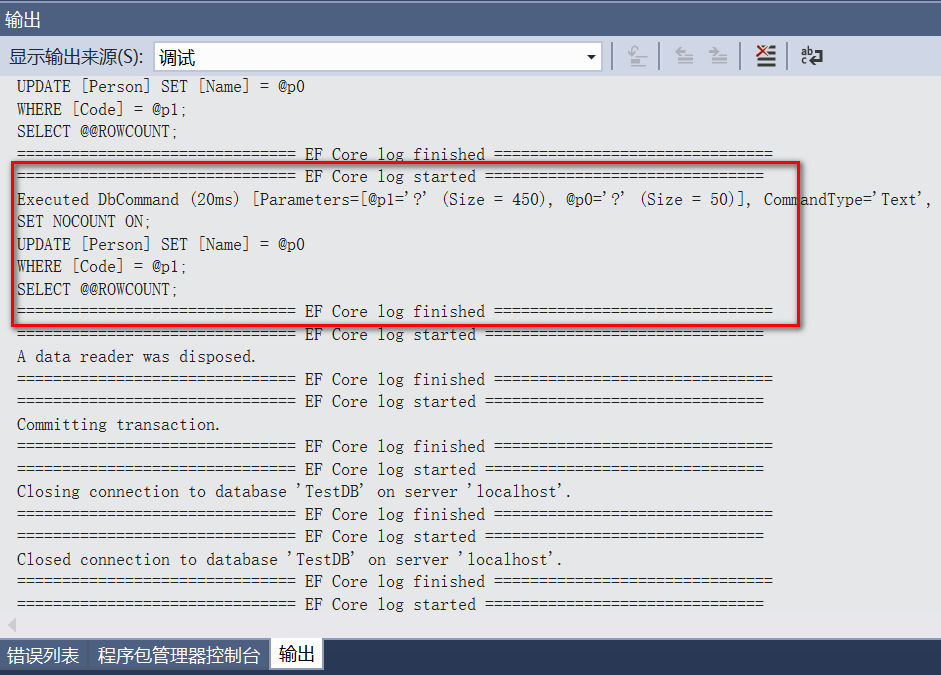
最后我们来看看EF Core日志输出的效果,还是很规整的,最重要的是我们可以实时的得到EF Core在后台生成的SQL语句:

 浙公网安备 33010602011771号