

Docker docker-compose.yml for sonarqube deployment
How to build it:
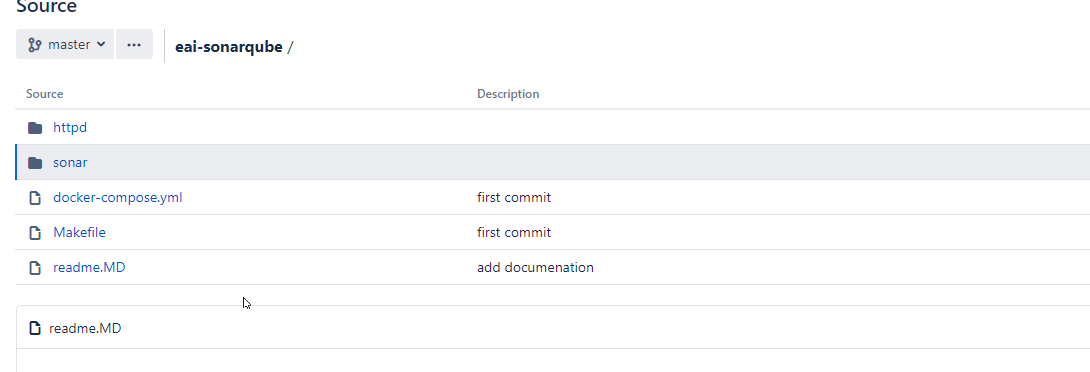
- Download this project and navigate to the root directory.
- Use make command, you should able to see the below output:
[root@si0vmc0973 eaisonar]# make
Buiding image httpd
make[1]: Entering directory `/opt/eaisonar/httpd'
docker build -t eaihttpd:2.4 .
Sending build context to Docker daemon 74.75 kB
Step 1/7 : FROM httpd:2.4
 ---> ef1dc54703e2
Step 2/7 : WORKDIR /usr/local/apache2
 ---> Using cache
 ---> 929fdb2f3583
Step 3/7 : ADD httpd.conf conf/httpd.conf
 ---> Using cache
 ---> 196b37a1a981
Step 4/7 : ADD httpd-ssl.conf conf/extra/httpd-ssl.conf
 ---> Using cache
 ---> 27816469e477
Step 5/7 : ADD httpd-vhosts.conf conf/extra/httpd-vhosts.conf
 ---> Using cache
 ---> 27320db04542
Step 6/7 : ADD si0vmc0973.pem conf/si0vmc0973.pem
 ---> Using cache
 ---> 7c675fe9b09d
Step 7/7 : ADD BOSCH-CA-DE_bin.cer conf/BOSCH-CA-DE_bin.cer
 ---> Using cache
 ---> 1f55221b2066
Successfully built 1f55221b2066
make[1]: Leaving directory `/opt/eaisonar/httpd'
Buiding image sonar
make[1]: Entering directory `/opt/eaisonar/sonar'
docker build -t eaisonarqube:5.6.7 .
Sending build context to Docker daemon 96.45 MB
Step 1/19 : FROM sonarqube:5.6.7
 ---> b0dd7b431856
Step 2/19 : EXPOSE 9567
 ---> Using cache
 ---> 16ce0d345d47
Step 3/19 : ENV TZ Europe/Berlin
 ---> Using cache
 ---> fad10a4da3c5
Step 4/19 : USER root
 ---> Using cache
 ---> 7b20b69618a5
Step 5/19 : RUN rm /etc/localtime && ln -snf /usr/share/zoneinfo/$TZ /etc/localtime && echo $TZ > /etc/timezone
 ---> Using cache
 ---> d66a6e0a15a8
Step 6/19 : ARG HTTP_PROXY
 ---> Using cache
 ---> 39e37b12b96f
Step 7/19 : ARG HTTPS_PROXY
 ---> Using cache
 ---> 9910a2ceb73e
Step 8/19 : ARG NO_PROXY=alertmanager,prometheus,*.bosch.com,10.142.18.42,127.0.0.1
 ---> Using cache
 ---> 9473576f20d3
Step 9/19 : ENV HTTP_PROXY "${HTTP_PROXY}"
 ---> Using cache
 ---> 6e53ad869d8c
Step 10/19 : ENV HTTPS_PROXY "${HTTP_PROXY}"
 ---> Using cache
 ---> 3488089f9e70
Step 11/19 : ENV NO_PROXY "${NO_PROXY}"
 ---> Using cache
 ---> f672f79a4fcd
Step 12/19 : ENV http_proxy "${HTTP_PROXY}"
 ---> Using cache
 ---> 1aed44145cad
Step 13/19 : ENV https_proxy "${HTTP_PROXY}"
 ---> Using cache
 ---> befb88131027
Step 14/19 : ENV no_proxy "${NO_PROXY}"
 ---> Using cache
 ---> f00042617526
Step 15/19 : WORKDIR /opt/sonarqube/
 ---> Using cache
 ---> 901ef2f1654a
Step 16/19 : ADD sonar-plugin-bosch-webmethods-1.0.0.jar extensions/plugins/sonar-plugin-bosch-webmethods-1.0.0.jar
 ---> Using cache
 ---> e02c6642f7cc
Step 17/19 : ADD sonar-httph-plugin-1.0.0.jar extensions/plugins/sonar-httph-plugin-1.0.0.jar
 ---> Using cache
 ---> 5ccab33be91a
Step 18/19 : ADD run.sh bin/run.sh
 ---> Using cache
 ---> 279c37b51d81
Step 19/19 : ADD sonar.properties conf/sonar.properties
 ---> Using cache
 ---> 5ade1cec6750
Successfully built 5ade1cec6750
make[1]: Leaving directory `/opt/eaisonar/sonar'
- if you can see two buit successfully, then use command 'docker-compose up [-d]'
[root@si0vmc0973 eaisonar]# docker-compose up -d
eaihttpd is up-to-date
eaisonarqube is up-to-date
if you are able to see the message above, Congratulation!
docker-compose.yml
version: '2.2'

services:

  eai-sonarqube:
    hostname: eai-sonarqube
    container_name: eaisonarqube
    image: eaisonarqube:5.6.7
    extra_hosts:
    - "localhost:127.0.0.1"
    ports:
    - "9567:9567"
    volumes:
    - sonarqube_data:/opt/sonarqube/logs/:rw
    networks:
    - sonarnet
    restart: unless-stopped

  eai-httpd:
    hostname: eai-httpd
    container_name: eaihttpd
    image: eaihttpd:2.4
    volumes:
    - httpd_data:/usr/local/apache2/logs/:rw
    ports:
    - "8999:8999"
    - "80:80"
    networks:
    - sonarnet
    restart: unless-stopped


networks:
  sonarnet:
    driver: bridge

volumes:
  sonarqube_data:
    driver: local
    driver_opts:
      type: 'none'
      o: 'bind'
      device: '/var/logs/docker/sonarqube'
  httpd_data:
    driver: local
    driver_opts:
      type: 'none'
      o: 'bind'
      device: '/var/logs/docker/httpd'
Makefile
SUBDIR_TARGETS= httpd sonar

.PHONY: all $(SUBDIR_TARGETS)

all: $(SUBDIR_TARGETS)

$(SUBDIR_TARGETS): %:
	@echo "Buiding image $@"
	@(cd $@ && make)
Makefile
all:
	docker build -t eaisonarqube:5.6.7 .
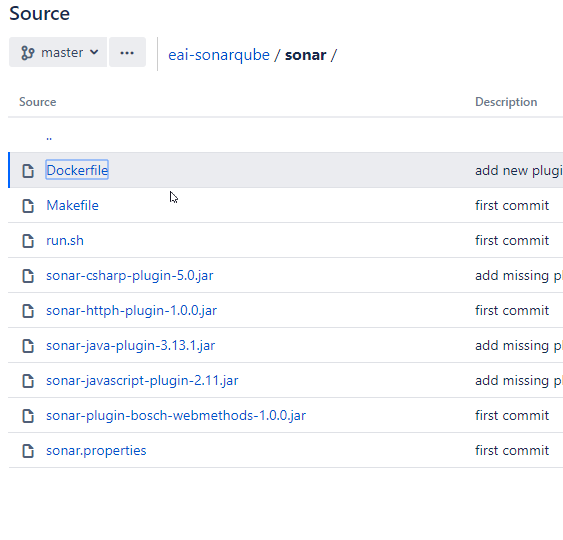
Dockerfile for SonarQube
FROM sonarqube:5.6.7

EXPOSE 9567

ENV     TZ=Europe/Berlin
USER    root
RUN     rm /etc/localtime && ln -snf /usr/share/zoneinfo/$TZ /etc/localtime && echo $TZ > /etc/timezone

ARG     HTTP_PROXY
ARG     HTTPS_PROXY
ARG     NO_PROXY=alertmanager,prometheus,*.bosch.com,10.142.18.42,127.0.0.1

ENV     HTTP_PROXY "${HTTP_PROXY}"
ENV     HTTPS_PROXY "${HTTP_PROXY}"
ENV     NO_PROXY "${NO_PROXY}"
ENV     http_proxy "${HTTP_PROXY}"
ENV     https_proxy "${HTTP_PROXY}"
ENV     no_proxy "${NO_PROXY}"

WORKDIR /opt/sonarqube/

#RUN chgrp -R root * && chown -R root *
ADD sonar-plugin-bosch-webmethods-1.0.0.jar extensions/plugins/sonar-plugin-bosch-webmethods-1.0.0.jar
ADD sonar-httph-plugin-1.0.0.jar extensions/plugins/sonar-httph-plugin-1.0.0.jar
ADD sonar-javascript-plugin-2.11.jar extensions/plugins/sonar-javascript-plugin-2.11.jar
ADD sonar-java-plugin-3.13.1.jar extensions/plugins/sonar-java-plugin-3.13.1.jar
ADD run.sh bin/run.sh
ADD sonar.properties conf/sonar.properties
httpd
Makefile
all:
	docker build -t eaihttpd:2.4 .
Dockerfile for httpd
FROM httpd:2.4

WORKDIR /usr/local/apache2

ADD httpd.conf conf/httpd.conf
ADD httpd-ssl.conf conf/extra/httpd-ssl.conf
ADD httpd-vhosts.conf conf/extra/httpd-vhosts.conf
ADD XXX.pem conf/XXXX.pem
#ADD XXXXX.de.bosch.com.crt conf/XXX.de.bosch.com.crt
ADD XXX-CA-DE_bin.cer conf/XXXX-CA-DE_bin.cer

 浙公网安备 33010602011771号