
Java日期和时间
一、JDK8之前
1、System类中的currentTimeMillis( )。返回当前时间与1970年1月1日0时0点0分0秒之间以毫秒为单位的时间差。
 @Test
    public void test1(){
        long millis = System.currentTimeMillis();
        System.out.println(millis);//1621559394675
    }
2、java.util.Date类
|-------java.sql.Date类
(1)、两个构造器的使用
构造器一:Date()创建当前时间对应的Date对象。
构造器二:Date(long l)创建指定毫秒数的时间对象。
(2)、两个方法的使用
toString()输出年月日时分秒。
getTime()获取Date对象对应的毫秒数。(时间戳)
(3)、java.sql.Date对应数据库中的日期类型的变量。
将java.util.Date转化为java.sql.Date对象。(详见下方代码)
 @Test
    public void test2(){
        //创建一个当前时间的Date对象
        Date date = new Date();
        System.out.println(date.toString());//Fri May 21 09:16:28 CST 2021
        System.out.println(date.getTime());//1621559788700

        //创建指定毫秒数的Date对象。
        Date date1 = new Date(1621559788700L);
        System.out.println(date1);//Fri May 21 09:16:28 CST 2021

        //创建java.sql.Date对象
        java.sql.Date date2 = new java.sql.Date(1621559788700L);
        System.out.println(date2);//2021-05-21

        //如何将java.util.Date对象转换成java.sql.Date对象
        //方式一:
        Date date3 = new java.sql.Date(1621559788700L);
        java.sql.Date date4 = (java.sql.Date) date3;
        //方式二
        Date date5 = new Date(1621559788700L);
        java.sql.Date date6 = new java.sql.Date(date5.getTime());

    }
3、java.text.SimpleDateFormat:对日期Date类的格式化和解析
(1)、两个操作
格式化:Date对象-------->字符串
解析:格式化的逆过程 字符串------->Date对象
(2)、SimpleDateFormat实例化方式
两个构造器
 @Test
    public void test1() throws ParseException {
        //实例化SimpleDateFormat
        SimpleDateFormat simpleDateFormat = new SimpleDateFormat();

        //格式化:Date对象-------->字符串
        Date date = new Date();
        System.out.println(date);//Sat May 22 09:42:25 CST 2021

        String str = simpleDateFormat.format(date);
        System.out.println(str);//21-5-22 上午9:42

        //解析:格式化的逆过程    字符串------->Date对象
        String str1 = "21-5-22 上午9:42";
        Date date1 = simpleDateFormat.parse(str1);
        System.out.println(date1);//Sat May 22 09:42:00 CST 2021

        //*******************************************************
        //按指定方式格式化   调用带参构造器
        SimpleDateFormat sdf = new SimpleDateFormat("yyyy-MM-dd hh:mm:ss");
        String str3 = sdf.format(date);
        System.out.println(str3);//2021-05-22 10:52:39

        Date parse = sdf.parse(str3);//传入字字符串必须满足指定格式
        System.out.println(parse);//2021-05-22 10:52:39

    }
4、Calendar日历类(抽象类)的使用
(1)、实例化
方式一:调用其静态方法 instance()。
方式二:创建其子类(GregorianCalendar)对象。
(2)、方法
 @Test
    public void test() {
        //实例化
        // 方式一:调用其静态方法 instance()。
        Calendar calendar = Calendar.getInstance();
        System.out.println(calendar.getClass());//class java.util.GregorianCalendar
        //方式二:创建其子类(GregorianCalendar)对象。
        //GregorianCalendar gregorianCalendar = new GregorianCalendar();

        //************************************************
        //常用方法
        //get()
        int day = calendar.get(Calendar.DAY_OF_MONTH);
        System.out.println(day);//22
        System.out.println(calendar.get(Calendar.DAY_OF_YEAR));//142
        //set()
        calendar.set(Calendar.DAY_OF_YEAR,22);
        System.out.println(calendar.get(Calendar.MONTH));
        //add()
        calendar.add(Calendar.DAY_OF_YEAR,55);
        System.out.println(calendar.get(Calendar.MONTH));
        //getTime()
        Date date = calendar.getTime();
        System.out.println(date);//Thu Mar 18 11:30:07 CST 2021
        //setTime()
        calendar.setTime(new Date());
    }
二、JDK8中新日期时间API
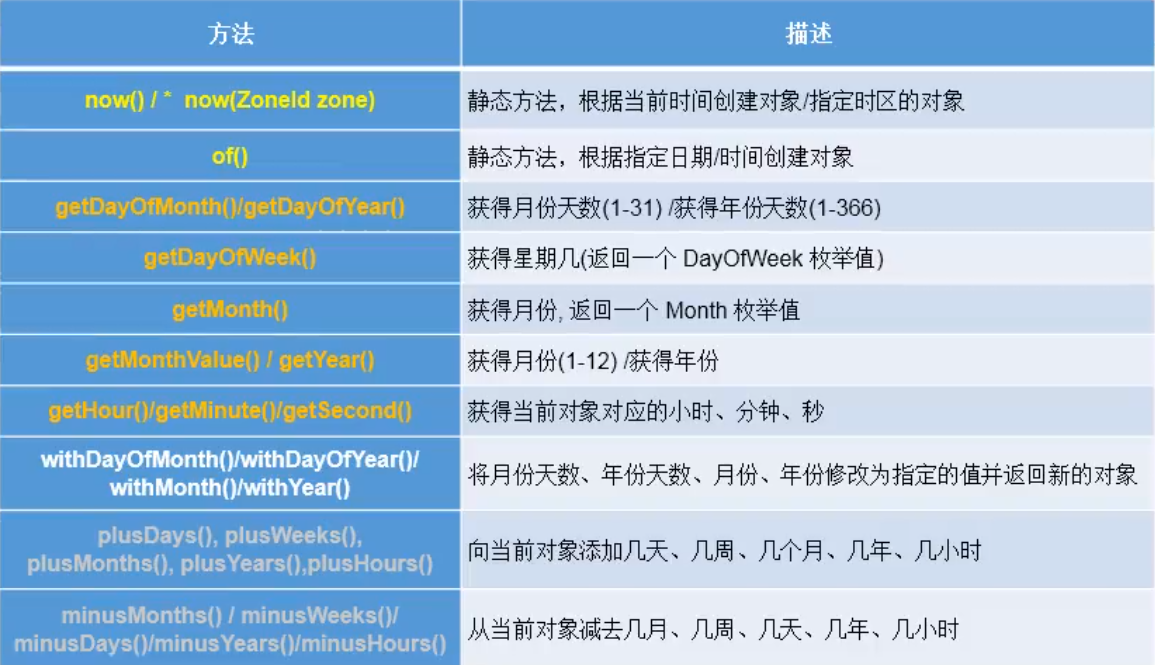
1、LocalDate、LocalTime、LocalDateTime的使用
说明:LocalDateTime相对于其他二者使用频率要高。
2、类似于Calendar
@Test
    public void test1() {

        //实例化
        //方式一:now()
        LocalDate localDate = LocalDate.now();
        LocalTime localTime = LocalTime.now();
        LocalDateTime localDateTime = LocalDateTime.now();

        System.out.println(localDate);//2021-05-22
        System.out.println(localTime);//12:14:01.159
        System.out.println(localDateTime);//2021-05-22T12:14:01.159

        //方式二:of() 设置指定的年月日时分秒。没有偏移量
        LocalDateTime localDateTime1 = LocalDateTime.of(2020,5,20,5,20,0);
        System.out.println(localDateTime1); //2020-05-20T05:20

        //getXxx()
        //获取相关属性
        System.out.println(localDateTime1.getDayOfMonth());
        System.out.println(localDateTime1.getHour());
        System.out.println(localDateTime1.getMonth());
        System.out.println(localDateTime1.getMonthValue());
        System.out.println(localDateTime1.getMinute());
        System.out.println(localDateTime1.getDayOfYear());

        //withXxx()设置相关属性
        //体现不可变性
        LocalDateTime localDateTime2 = localDateTime.withDayOfMonth(8);
        System.out.println(localDateTime);
        System.out.println(localDateTime2);


        //plusXxx()给相关属性增加值
        LocalDateTime localDateTime3 = localDateTime.plusMonths(3);
        System.out.println(localDateTime);//2021-05-22T14:43:34.381
        System.out.println(localDateTime3);//2021-08-22T14:43:34.381
    }
3、Instant的使用
@Test
    public void test() {
        //通过now()方法获取实例
        //默认为中时区的时间
        Instant instant = Instant.now();
        System.out.println(instant);//2021-05-22T07:09:08.914Z

        //添加时间偏移量
        OffsetDateTime offsetDateTime = instant.atOffset(ZoneOffset.ofHours(8));
        System.out.println(offsetDateTime);//2021-05-22T15:09:08.914+08:00

        //获取毫秒数
        long milli = instant.toEpochMilli();
        System.out.println(milli);

        //通过毫秒数创建Instant
        Instant instant1 = Instant.ofEpochMilli(1621667497963L);
        System.out.println(instant1);
    }
4、DateTimeFormatter:格式化或解析日期时间 类似于SimpleDateFormat。
 @Test
    public void test2(){

        //方式一:预定义的标准格式。如:ISO_DATE、ISO_OFFSET_DATE、ISO_LOCAL_DATE、ISO_LOCAL_TIME等
        DateTimeFormatter dateTimeFormatter = DateTimeFormatter.ISO_LOCAL_TIME;
        LocalDateTime now = LocalDateTime.now();
        //格式化  日期---->字符串
        String format = dateTimeFormatter.format(now);
        System.out.println(now);//2021-05-22T15:23:31.492
        System.out.println(format);//15:23:31.492

        //解析   字符串--->日期
        TemporalAccessor parse = dateTimeFormatter.parse("15:23:31.492");
        System.out.println(parse);//{},ISO resolved to 15:23:31.492


        //方式二:本地化相关的格式  1 、ofLocalizedDateTime(选择FormatStyle类中的常量)
        DateTimeFormatter formatter = DateTimeFormatter.ofLocalizedDateTime(FormatStyle.LONG);
        //格式化
        String format1 = formatter.format(now);
        System.out.println(format1);//2021年5月22日 下午03时30分40秒
            //2、ofLocalizedDate(选择FormatStyle类中的常量)
        DateTimeFormatter formatter1 = DateTimeFormatter.ofLocalizedDate(FormatStyle.LONG);
        String format2 = formatter1.format(now);
        System.out.println(format2);//2021年5月22日

        //方式三:自定义的格式
        DateTimeFormatter formatter2 = DateTimeFormatter.ofPattern("yyyy-MM-dd hh:mm:ss");
        String format3 = formatter2.format(now);
        System.out.println(format3);//2021-05-22 03:39:06

        //解析
        TemporalAccessor parse1 = formatter2.parse("2021-05-22 03:39:06");
        System.out.println(parse1);//{NanoOfSecond=0, MinuteOfHour=39, MicroOfSecond=0, SecondOfMinute=6, MilliOfSecond=0, HourOfAmPm=3},ISO resolved to 2021-05-22

    }

 浙公网安备 33010602011771号