
通过http文件服务快速访问Windows电脑的文件小工具
软件下载地址:https://xyweb.lanzout.com/iVRYb2urezaj
利用Caddy程序的Windows版命令实现。
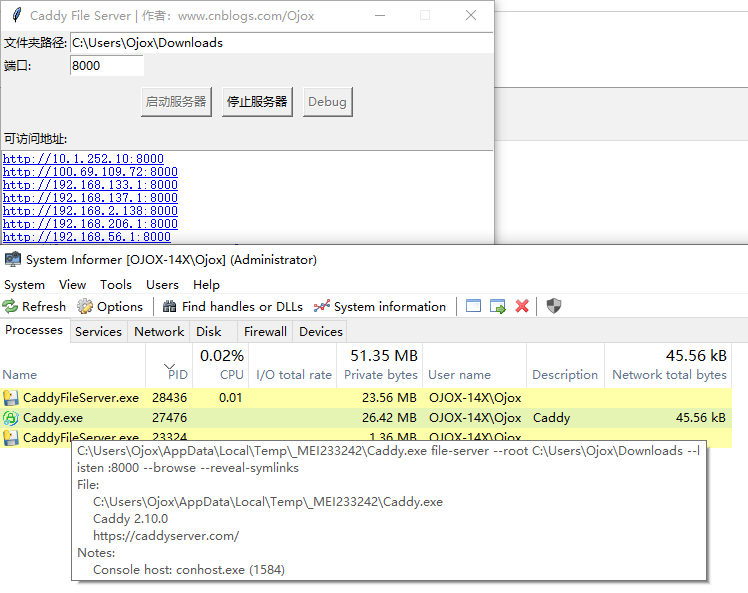
import tkinter as tk
from tkinter import messagebox
import subprocess
import socket
import threading
import os
import sys
import webbrowser

class CaddyGUI:
    def __init__(self, root):
        self.root = root
        self.root.title('Caddy File Server | 作者:www.cnblogs.com/Ojox')
        self.root.resizable(False, False)  # 禁用窗口大小调整
        self.server_running = False  # 添加服务器运行状态标志
        self.debug_mode = False  # 添加debug模式状态标志
        self.debug_window = None  # 添加debug窗口引用
        self.root.protocol("WM_DELETE_WINDOW", self.on_closing)  # 设置窗口关闭事件处理

        # 设置默认值
        default_path = os.path.join(os.path.expanduser('~'), 'Downloads')
        default_port = '8000'

        tk.Label(root, text='文件夹路径:').grid(row=0, column=0, sticky=tk.W)
        self.root_path_entry = tk.Entry(root, width=60)
        self.root_path_entry.insert(0, default_path)
        self.root_path_entry.grid(row=0, column=1, sticky=tk.W)

        tk.Label(root, text='端口:').grid(row=1, column=0, sticky=tk.W)
        self.port_entry = tk.Entry(root, width=10)
        self.port_entry.insert(0, default_port)
        self.port_entry.grid(row=1, column=1, sticky=tk.W)

        # 创建按钮容器框架并居中显示
        button_frame = tk.Frame(root)
        button_frame.grid(row=2, column=0, columnspan=2, pady=10)

        # 创建按钮并保存引用
        self.start_button = tk.Button(button_frame, text='启动服务器', command=self.start_server)
        self.stop_button = tk.Button(button_frame, text='停止服务器', command=self.stop_server)
        self.debug_button = tk.Button(button_frame, text='Debug', command=self.toggle_debug)

        # 设置按钮初始状态
        self.start_button.pack(side=tk.LEFT, padx=5)
        self.stop_button.pack(side=tk.LEFT, padx=5)
        self.debug_button.pack(side=tk.LEFT, padx=5)
        self.stop_button['state'] = 'disabled'  # 初始状态下停止按钮不可用

        self.ip_label = tk.Label(root, text='可访问地址:')
        self.ip_label.grid(row=3, column=0, sticky=tk.W)
        self.ip_text = tk.Text(root, width=50, height=2)
        self.ip_text.grid(row=4, column=0, columnspan=2, sticky=tk.W+tk.E)  # 修改为第4行并跨两列

        # 配置Text小部件的标签绑定
        self.ip_text.tag_configure('link', foreground='blue', underline=True)
        self.ip_text.tag_bind('link', '<Button-1>', self.open_url)
        self.ip_text.tag_bind('link', '<Enter>', lambda e: self.ip_text.configure(cursor='hand2'))
        self.ip_text.tag_bind('link', '<Leave>', lambda e: self.ip_text.configure(cursor=''))

    def toggle_debug(self):
        if self.server_running:
            messagebox.showwarning('警告', '服务运行时无法切换Debug模式!')
            return

        self.debug_mode = not self.debug_mode
        self.debug_button.config(relief='sunken' if self.debug_mode else 'raised')

        if self.debug_mode:
            # 创建新的调试窗口
            if not self.debug_window:
                self.debug_window = tk.Toplevel(self.root)
                self.debug_window.title('Debug输出 | 作者:www.cnblogs.com/Ojox | 免费作品,免费使用 | 2025年4月28日19:09:49')
                self.debug_window.geometry('800x600')

                # 创建文本框和滚动条
                self.debug_text = tk.Text(self.debug_window, width=80, height=30)
                self.debug_text.pack(side=tk.LEFT, fill=tk.BOTH, expand=True)

                debug_scroll = tk.Scrollbar(self.debug_window, command=self.debug_text.yview)
                debug_scroll.pack(side=tk.RIGHT, fill=tk.Y)

                self.debug_text.configure(yscrollcommand=debug_scroll.set)

                # 设置窗口关闭事件
                self.debug_window.protocol("WM_DELETE_WINDOW", self.close_debug_window)
            else:
                self.debug_window.deiconify()
        else:
            # 隐藏调试窗口
            if self.debug_window:
                self.debug_window.withdraw()

    def close_debug_window(self):
        """处理调试窗口的关闭事件"""
        self.debug_mode = False
        self.debug_button.config(relief='raised')
        self.debug_window.withdraw()

    def update_cmd_display(self, text):
        if self.debug_mode and self.debug_window:
            # 在调试窗口显示输出
            self.debug_text.insert(tk.END, text + '\n')
            self.debug_text.see(tk.END)

    def output_reader(self, pipe, callback):
        """从管道中读取输出并通过回调函数更新到GUI"""
        for line in iter(pipe.readline, b''):
            self.root.after(0, callback, line.decode().strip())
        pipe.close()

    def start_server(self):
        root_path = self.root_path_entry.get()
        port = self.port_entry.get()
        try:
            # 获取程序运行时目录
            base_path = os.path.dirname(os.path.abspath(sys.argv[0]))

            # 新增资源路径判断逻辑
            if getattr(sys, 'frozen', False):
                # 打包后的资源路径
                base_path = sys._MEIPASS

            caddy_path = os.path.join(base_path, 'Caddy.exe')
            cmd = [caddy_path, 'file-server', '--root', root_path, '--listen', f':{port}', '--browse', '--reveal-symlinks']
            if self.debug_mode:
                cmd.append('--debug')
            # 创建进程并捕获输出
            self.process = subprocess.Popen(
                cmd,
                stdout=subprocess.PIPE,
                stderr=subprocess.PIPE,
                bufsize=1,
                universal_newlines=False,
            creationflags=subprocess.CREATE_NO_WINDOW,  # 新增标志
            startupinfo=subprocess.STARTUPINFO(         # 新增启动配置
                dwFlags=subprocess.STARTF_USESHOWWINDOW,
                wShowWindow=subprocess.SW_HIDE
            )
            )

            # 启动输出读取线程
            threading.Thread(target=self.output_reader, args=(self.process.stdout, self.update_cmd_display), daemon=True).start()
            threading.Thread(target=self.output_reader, args=(self.process.stderr, self.update_cmd_display), daemon=True).start()
            self.update_ips(port)
            # 更新按钮状态和服务器运行状态
            self.start_button['state'] = 'disabled'
            self.stop_button['state'] = 'normal'
            self.debug_button['state'] = 'disabled'
            self.server_running = True
        except Exception as e:
            messagebox.showerror('错误', str(e))

    def stop_server(self):
        try:
            self.process.terminate()
            # 更新按钮状态和服务器运行状态
            self.start_button['state'] = 'normal'
            self.stop_button['state'] = 'disabled'
            self.debug_button['state'] = 'normal'
            self.server_running = False
            # 清空地址显示
            self.ip_text.delete(1.0, tk.END)
            # 清空调试窗口内容
            if self.debug_window:
                self.debug_text.delete(1.0, tk.END)
        except Exception as e:
            messagebox.showerror('错误', str(e))

    def on_closing(self):
        """处理窗口关闭事件"""
        if self.server_running:
            messagebox.showwarning('警告', '请先停止服务器再关闭窗口!不然会存在进程残留。')
            return
        self.root.destroy()

    def update_ips(self, port):
        hostname = socket.gethostname()
        # 获取所有网络接口的IP地址
        ips = socket.getaddrinfo(hostname, None)
        unique_ips = set()

        # 收集所有唯一的IP地址
        for ip in ips:
            if ip[0] in (socket.AF_INET, socket.AF_INET6):  # 只处理IPv4和IPv6地址
                addr = ip[4][0]
                if addr not in unique_ips:
                    unique_ips.add(addr)

        # 清空并更新显示
        self.ip_text.delete(1.0, tk.END)
        self.ip_text.config(height=len(unique_ips))  # 根据实际地址数量调整高度

        # 分别显示IPv4和IPv6地址
        ipv4_addrs = [ip for ip in unique_ips if ':' not in ip]  # IPv4地址不包含冒号
        ipv6_addrs = [ip for ip in unique_ips if ':' in ip]

        # 先显示IPv4地址
        for addr in sorted(ipv4_addrs):
            url = f'http://{addr}:{port}'
            self.ip_text.insert(tk.END, url + '\n', 'link')

        # 再显示IPv6地址
        for addr in sorted(ipv6_addrs):
            url = f'http://[{addr}]:{port}'
            self.ip_text.insert(tk.END, url + '\n', 'link')  # IPv6地址需要用方括号括起来

    def open_url(self, event):
        # 获取点击位置的行号
        index = self.ip_text.index(f"@{event.x},{event.y}")
        line = self.ip_text.get(f"{index} linestart", f"{index} lineend")
        if line.strip():
            webbrowser.open(line.strip())

if __name__ == '__main__':
    root = tk.Tk()
    app = CaddyGUI(root)
    root.mainloop()
本文来自博客园,作者:Ojox,转载请注明原文链接:https://www.cnblogs.com/Ojox/p/18852355

 浙公网安备 33010602011771号