
使用EF6的migrate.exe实现外部程序执行迁移
一、参考资料
1、使用migrate.exe https://docs.microsoft.com/zh-cn/ef/ef6/modeling/code-first/migrations/migrate-exe#common-problems
2、C#调用Exe程序示例(https://www.cnblogs.com/BookCode/p/5329890.html)
二、使用的框架版本
EF6.2.0 .NET Framework4.5.2 SQL Server2012
三、项目结构
1、包含实体(Blog,Post)和数据库上下文(BloggingContext)的类库(BlogDB)
2、调用migrate.exe执行EF外部迁移的控制台应用程序(MakeMigrateExe)
注意点:(1)两个项目都安装了EF6.2.0;(2)在MakeMigrateExe中引用BlogDB和migrate.exe。
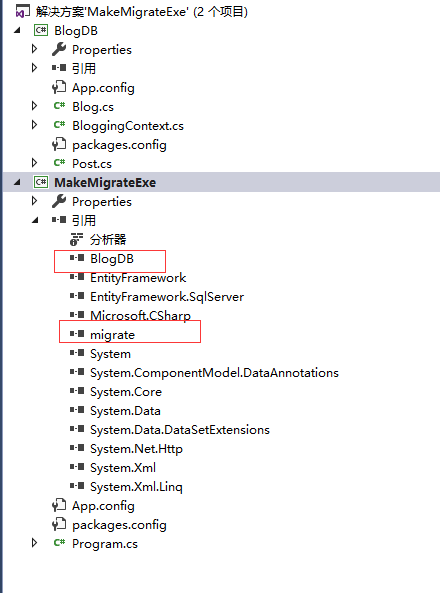
四、上码
1、首先在程序包管理器控制台对类库项目BlogDB执行迁移
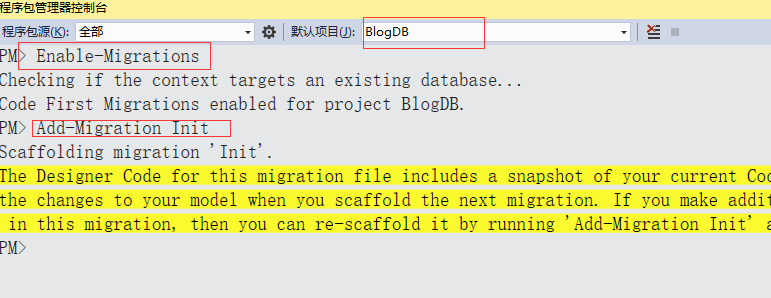
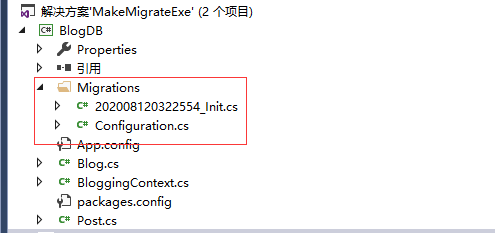
2、编写MakeMigrateExe中的代码
 1 using System;
 2 using System.Collections.Generic;
 3 using System.Diagnostics;
 4 using System.IO;
 5 using System.Linq;
 6 using System.Text;
 7 using System.Threading.Tasks;
 8
 9 namespace MakeMigrateExe
10 {
11     class Program
12     {
13         static void Main(string[] args)
14         {
15
16             using (Process process = new Process())
17             {
18                 process.StartInfo.FileName = Path.Combine(Environment.CurrentDirectory, "migrate.exe");
19                 process.StartInfo.Arguments = " BlogDB.dll  /connectionString=\"data source=192.168.223.2;initial catalog=Blogging;persist security info=True;user id=sa;password=5n3EM3nABr0nJM;MultipleActiveResultSets=True;App=EntityFramework \"  /connectionProviderName=\"System.Data.SqlClient\"";
20
21                 process.StartInfo.RedirectStandardOutput = true;
22                 process.StartInfo.UseShellExecute = false;
23
24                 process.Start();
25                 process.WaitForExit();
26              while (!process.StandardOutput.EndOfStream)
27                 {
28                     string line = process.StandardOutput.ReadLine();
29                     Console.WriteLine(line);
30                 }
31
32                 Console.ReadKey();
33
34             }
35         }
36     }
37 }
执行结果:

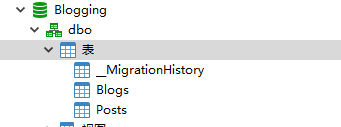
注意点:
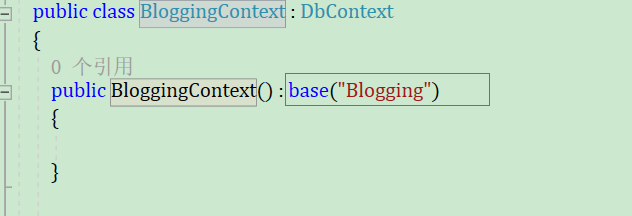
1、数据库上下文(BloggingContext)中,如下图所示,我一开始写的是base("name=Blogging"),
结果执行代码的时候报错:“ERROR: No connection string named 'Blogging' could be found in the application config file.”,
具体原因我还不知道,后面知道了再补上(各位有知道的,希望可以写在评论区,谢谢)

 浙公网安备 33010602011771号