


菜鸟学C#的第一天 -- 工具使用(参考链接:https://docs.microsoft.com/zh-cn/visualstudio/get-started/csharp/?view=vs-2019)
1、C#环境安装
通用工具 Visual Studio, 新建-> 项目 -> 控制台应用.net Core -> HelloWord
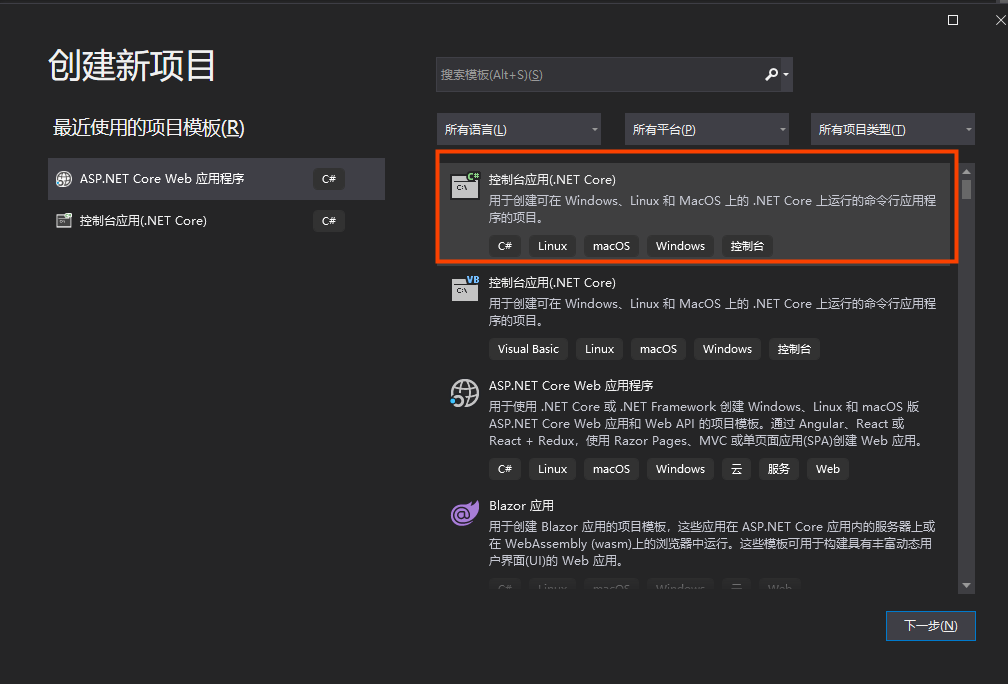
将打印行hello world替换成下面的计算内容,执行程序会出现窗口提示输入数值并给出计算结果。
using System;

namespace MyFirstApp
{
    class Program
    {
    static void main(string[] args)
    {
       Console.WriteLine("Hello Word!");
    }
}
using System;

namespace MyFirstApp {
    class Program {
        static void main(string[] args) {
            float a = 42;
            float b = 119;
            float c = a + b;
            console.writeline(c);
            console.readkey();

            float num1 = 0;
            float num2 = 0;
            console.writeline("console myfirstapp in c#\r");
            console.writeline("------------------------\n");

            console.writeline("type a number, an then press enter");
            num1 = convert.toint32(console.readline());

            console.writeline("type a number, an then press enter");
            num2 = convert.toint32(console.readline());

            console.writeline("choose an option from the following list");
            console.writeline("\ta - add");
            console.writeline("\ts - subtract");
            console.writeline("\tm - multiply");
            console.writeline("\td - divide");

            switch (console.readline()) {
                case "a":
                    console.writeline($ "your result: {num1} + {num2} = " + (num1 + num2));
                    break;
                case "s":
                    console.writeline($ "your result: {num1} - {num2} = " + (num1 - num2));
                    break;
                case "m":
                    console.writeline($ "your result: {num1} * {num2} = " + (num1 * num2));
                    break;
                case "d":
                    while (num2 == 0) {
                        console.writeline("enter a non-zero divisor: ");
                        num2 = convert.toint32(console.readline());
                    }
                    console.writeline($ "your result: {num1} / {num2} = " + (num1 / num2));
                    break;
            }
            console.write("press any key to close the myfirstapp console app...");
            console.readkey();
        }
    }
}
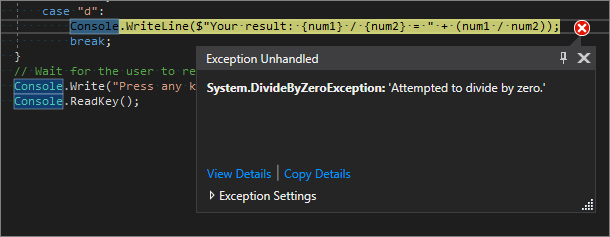
备注:如果出现报错,会在程序中提示,如除数 != 0, 如果没有判断就执行的话,会提示
using System;

namespace Calculator
{
    class Calculator
    {
        public static double DoOperation(double num1, double num2, string op)
        {
            double result = double.NaN; // Default value is "not-a-number" which we use if an operation, such as division, could result in an error.

            // Use a switch statement to do the math.
            switch (op)
            {
                case "a":
                    result = num1 + num2;
                    break;
                case "s":
                    result = num1 - num2;
                    break;
                case "m":
                    result = num1 * num2;
                    break;
                case "d":
                    // Ask the user to enter a non-zero divisor.
                    if (num2 != 0)
                    {
                        result = num1 / num2;
                    }
                    break;
                // Return text for an incorrect option entry.
                default:
                    break;
            }
            return result;
        }
    }

    class Program
    {
        static void Main(string[] args)
        {
            bool endApp = false;
            // Display title as the C# console calculator app.
            Console.WriteLine("Console Calculator in C#\r");
            Console.WriteLine("------------------------\n");

            while (!endApp)
            {
                // Declare variables and set to empty.
                string numInput1 = "";
                string numInput2 = "";
                double result = 0;

                // Ask the user to type the first number.
                Console.Write("Type a number, and then press Enter: ");
                numInput1 = Console.ReadLine();

                double cleanNum1 = 0;
                while (!double.TryParse(numInput1, out cleanNum1))
                {
                    Console.Write("This is not valid input. Please enter an integer value: ");
                    numInput1 = Console.ReadLine();
                }

                // Ask the user to type the second number.
                Console.Write("Type another number, and then press Enter: ");
                numInput2 = Console.ReadLine();

                double cleanNum2 = 0;
                while (!double.TryParse(numInput2, out cleanNum2))
                {
                    Console.Write("This is not valid input. Please enter an integer value: ");
                    numInput2 = Console.ReadLine();
                }

                // Ask the user to choose an operator.
                Console.WriteLine("Choose an operator from the following list:");
                Console.WriteLine("\ta - Add");
                Console.WriteLine("\ts - Subtract");
                Console.WriteLine("\tm - Multiply");
                Console.WriteLine("\td - Divide");
                Console.Write("Your option? ");

                string op = Console.ReadLine();

                try
                {
                    result = Calculator.DoOperation(cleanNum1, cleanNum2, op);
                    if (double.IsNaN(result))
                    {
                        Console.WriteLine("This operation will result in a mathematical error.\n");
                    }
                    else Console.WriteLine("Your result: {0:0.##}\n", result);
                }
                catch (Exception e)
                {
                    Console.WriteLine("Oh no! An exception occurred trying to do the math.\n - Details: " + e.Message);
                }

                Console.WriteLine("------------------------\n");

                // Wait for the user to respond before closing.
                Console.Write("Press 'n' and Enter to close the app, or press any other key and Enter to continue: ");
                if (Console.ReadLine() == "n") endApp = true;

                Console.WriteLine("\n"); // Friendly linespacing.
            }
            return;
        }
    }
}

 浙公网安备 33010602011771号