


Filter实现自动登录
Filter实现自动登录
1.涉及到的文件
- java 类:User MyFilter LoginServlet
- JSP页面:login index
2.功能说明
用户访问login页面登录后,会跳转至index页面。用户下次直接访问index页面,会保持用户的登录状态。
3.代码及流程图
-
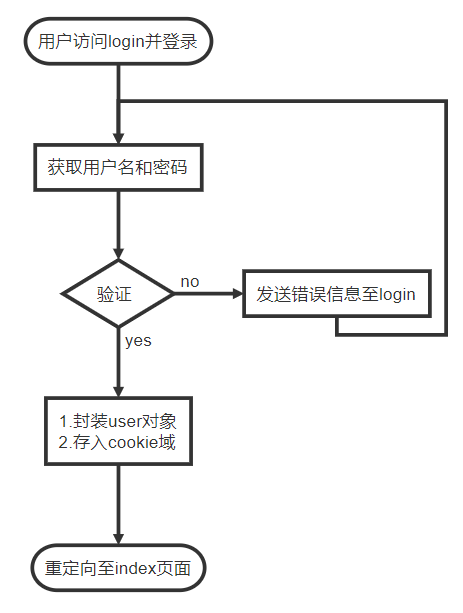
LoginServlet的功能流程图
-
主要代码
protected void doPost(HttpServletRequest req, HttpServletResponse resp) throws ServletException, IOException {
            String username = req.getParameter("username");
            String password = req.getParameter("password");
            if ("NatsuKaze".equals(username) && "1".equals(password)) {
                ApplicationContext app = WebApplicationContextUtils.getWebApplicationContext(req.getServletContext());
                User user = (User) app.getBean("user");
                user.setUsername(username);
                user.setPassword(password);
                req.getSession().setAttribute("user", user);
                Cookie cookie = new Cookie("autoLogin",username+"-"+password);
                cookie.setMaxAge(60*60);
                cookie.setPath(req.getContextPath());
                resp.addCookie(cookie);
                resp.sendRedirect(req.getContextPath()+"/jsp/success.jsp ");
            }else {
                req.setAttribute("error","名称或密码错误!");
                req.getRequestDispatcher("/jsp/login.jsp").forward(req,resp);
            }
    }
-
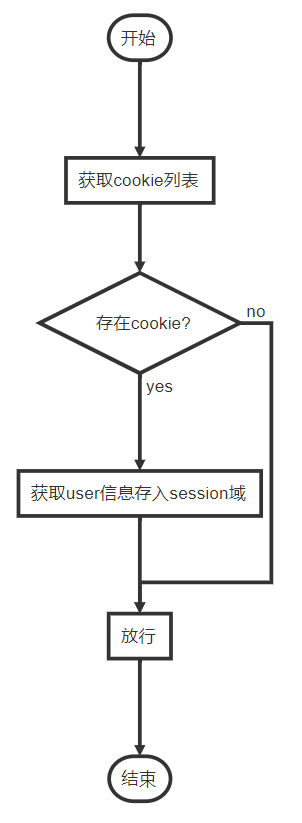
MyFilter功能流程图
-
主要代码
public void doFilter(ServletRequest servletRequest, ServletResponse servletResponse, FilterChain filterChain) throws IOException, ServletException {
        HttpServletRequest req = (HttpServletRequest) servletRequest;
        HttpServletResponse resp = (HttpServletResponse) servletResponse;
        Cookie[] cookies = req.getCookies();
        String autoLogin = null;
        for (int i = 0; cookies!=null&&i<cookies.length; i++) {
            if("autoLogin".equals(cookies[i].getName())){
                autoLogin = cookies[i].getValue();
                break;
            }
        }
        if(autoLogin!=null){
            String[] parts = autoLogin.split("-");
            String username = parts[0];
            String password = parts[1];
            if("NatsuKaze".equals(username)&&("1").equals(password)){
                User user = new User();
                user.setUsername(username);
                user.setPassword(password);
                req.getSession().setAttribute("user",user);
            }
        }
        filterChain.doFilter(req,servletResponse);
    }
- login.jsp页面代码
<html>
<head>
<title>登录</title>
</head>
<body>
<form action="${pageContext.request.contextPath}/LoginServlet" method="post">
名称:<input type="text" name="username">${error}<br/>
密码:<input type="password" name="password"><br/><br/>
<input type="submit" value="登录">
</form>
</body>
</html>
- index.jsp页面代码
<html>
<head>
    <title>Success!!</title>
</head>
<body>
    <h1>Success!!</h1>
    <h5>Welcome ${sessionScope.user.username}</h5>
</body>
</html>

 浙公网安备 33010602011771号