


适合经常搭建虚拟机新环境的脚本
1、配置iso文件开机连接。
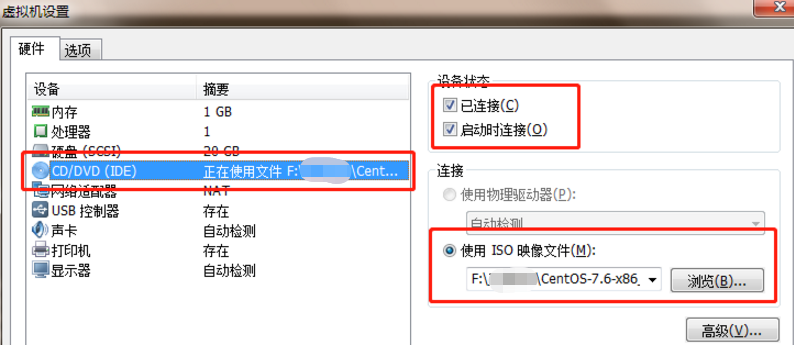
2、在系统中创建一个shell脚本文件写入以下命令。
2.1、创建shell脚本文件。
touch initialConditions.sh
2.2、在脚本文件中加入以下命令(根据自己的需求选择)。
#!/bin/bash
#启动网卡
ls /etc/sysconfig/network-scripts/ | grep 'ifcfg-' | grep -v 'lo' | xargs find /etc/sysconfig/network-scripts/ -name | xargs sed -i s/ONBOOT=no/ONBOOT=yes/g
systemctl restart network
#配置yum本地源
mount /dev/cdrom /mnt
#添加此行要确保虚拟机的ISO文件能够开机连接,否则系统重启会报错。
echo '/dev/cdrom /mnt iso9660 defaults 0 0' >> /etc/fstab
echo '[local]' > /etc/yum.repos.d/local.repo
echo 'name=local' >> /etc/yum.repos.d/local.repo
echo 'baseurl=file:///mnt' >> /etc/yum.repos.d/local.repo
echo 'enabled=1' >> /etc/yum.repos.d/local.repo
echo 'gpgcheck=0' >> /etc/yum.repos.d/local.repo
#可以根据自己的需求设置yum安装的软件包
yum -y install vim wget lrzsz unzip telnet
#关闭防火墙
systemctl stop firewalld
systemctl disable firewalld
#关闭selinux
setenforce 0
find /etc/selinux -name config | xargs sed -i s/SELINUX=enforcing/SELINUX=disabled/g
3、执行脚本
sh initialConditions.sh

 浙公网安备 33010602011771号