
CustomPropertyDrawer
Unity3D CustomPropertyDrawer 自定义属性绘制器
api文档
- 该文档中的
EditorGUI.BeginProperty()和EditorGUI.EndProperty(),不好用- 参考案例:
- 直接看Unity中你感兴趣的渲染方式的实现方式:
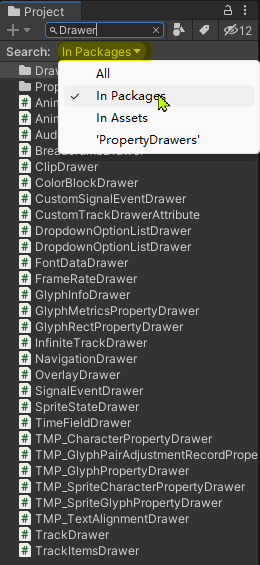
Packages/com.unity.ugui/Editor/UI/PropertyDrawers/...FontDataDrawerSpriteStateDrawerColorBlockDrawerNavigationDrawer- 也可以直接在
Project视图搜索Drawer,搜索范围选择In Packagers
![Serach Drawer In Project]()
- 直接看Unity中你感兴趣的渲染方式的实现方式:
- 参考案例:
需要做的事
绘制
- 可以做的事:
- 美化 / 简化 显示效果
- 根绝枚举值, 差异化显示
- 加一些 按钮 / Toggle 进行快捷操作
重写GetPropertyHeight 返回真正的高度
- 不要忘记标题占了1行
- 考虑展开 / 收缩 的情况, 返回不同的高度,
- 收缩时,高度=
EditorGUIUtility.singleLineHeight - 展开时,高度=(1 + 标题以外所有内容的行数) x
EditorGUIUtility.singleLineHeight+EditorGUIUtility.standardVerticalSpacingx (所有行数-1)
- 收缩时,高度=
基本常识:
OnGUI(Rect position, SerializedProperty property, GUIContent label)中position是这个变量的起始位置property是这个变量的SerializedProperty对象- 通过这个对象,可以获取到变量的值
property.FindPropertyRelative(paramName).(intValue / stringValue / vector3Value / enumValueIndex / ...) lable.text是变量名称
- 通过这个对象,可以获取到变量的值
- 默认每行高度是:
EditorGUIUtility.singleLineHeight - 默认行间距是:
EditorGUIUtility.standardVerticalSpacing - 想要缩进/反缩进 1个单位, 可以使用:
EditorGUI.indentLevel++和EditorGUI.indentLevel-- - 对于不需要自定义渲染方式的字段 使用
EditorGUI.PropertyField执行默认的渲染方案, - 所有要绘制的内容,推荐使用
EditorGUI类, 而不是GUI类 EditorGUI类的方法, 会自动处理缩进的问题GUI类的方法, 不会自动处理缩进的问题- 比如
GUI.Button(rect, "↑")),不受缩进的影响,所有要额外把rect.x加上缩进的距离35比较合适
- 比如
- 有些效果只有
PropertyFiled才可以实现,比如,鼠标滑过名称,修改变量的值;
小技巧
- 绘制展开 / 折叠按钮
- 使用
EditorGUI.Foldout->if (foldout = EditorGUI.Foldout(rect, foldout,$"{label.text} 更多内容:{}")
- 标题行除了显示变量名称以外, 其实可以显示更多信息, 以便在没有展开的情况下就可以把 关键信息 显示到标题行的标题后面
- 使用
- 💡 瞬间计算出高度: 直接在绘制结束时, 使用
rect.y - position.y即可!!! - 获取当前字段从属的脚本所依附的对象
(property.serializedObject.targetObject as Component).gameObject - 获取当前
property对应的字段的原始数据对象fieldInfo.GetValue(property.serializedObject.targetObject)- 如果当前对象是以
Array/List出现, 那么这个方法获取到的是Array/List对象,而不是单个对象,从property.PropertyPath就可以看出其路径 fieldInfo: The reflection FieldInfo for the member this property represents.
- 如果当前对象是以
⚠️ 注意:
- 必须十分清除, 自己的绘制方案, 占用了多少高度, 否则会出现绘制不全的情况
- 绘制时
- 关于
layout周边的方法- 在
EditorGUI.BeginProperty()和EditorGUI.EndProperty包裹的范围里,不可以使用layout相关的方法, 否则会报错:ArgumentException: Getting control 1's position in a group with only 1 controls when doing repaint - 在
EditorGUI.BeginProperty()外面, 执行layout相关的方法, 不生效不显示
- 在
- 在
OnGUI中使用
- 关于
简单举例
[Serializable]
public class RotaAtAxisData
{
    public Transform self;

    public Vector3 axis = Vector3.up;
    public float angleTotal;
    public float duration = 1;
    public Space space = Space.World;
}
默认显示如下:
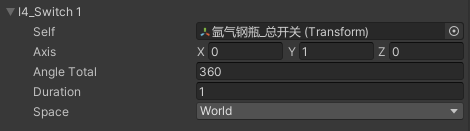
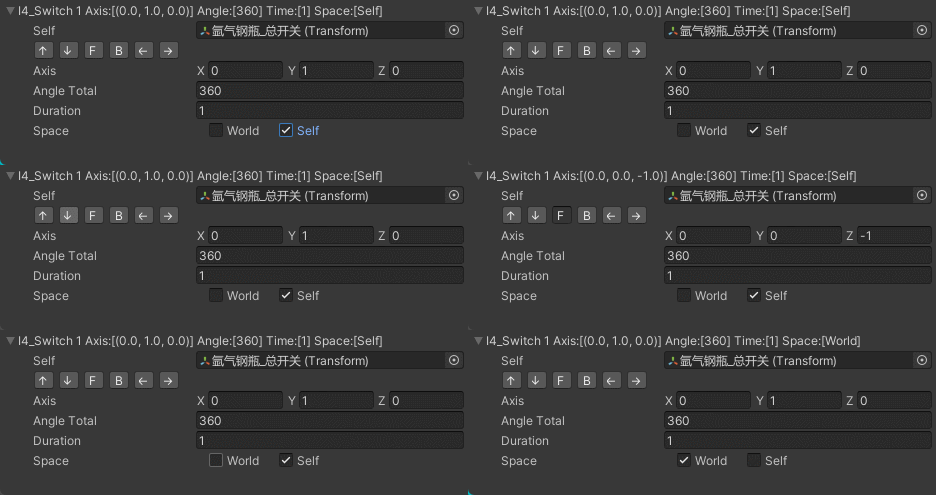
重写后↓↓↓↓↓↓↓↓↓↓↓↓↓↓↓↓↓↓↓如下:
-
变量名字后面直接把关键信息,显示在变量名称后面,即便不展开,也可以看到关键信息
-
允许点击按钮,直接选择6个标准轴向作为旋转轴
-
使用2个
Toggle来渲染space,要选择Space.World/Space.Self时,直接点就行,下拉框需要点2次,不方便 -
Bug:
- 当视图过于小时,
Axis的XYZ会被挤到下一行,导致覆盖下一行内容,这个问题暂时没有解决方案
- 当视图过于小时,
-
完整代码如下:
using System;
using System.Collections;
using UnityEngine;
using UnityEditor;

namespace BaseToolsForUnity
{
    /// <summary>
    /// RotaAtAxisData 检视视图个性化渲染器<br/>
    /// </summary>
    [CustomPropertyDrawer(typeof(TransformTween.RotaAtAxisData))]
    public class RotaAtAxisDataDrawer : PropertyDrawer
    {
        // 自身的所有变量
        private SerializedProperty self;
        private SerializedProperty axis;
        private SerializedProperty angleTotal;
        private SerializedProperty duration;
        private SerializedProperty space;

        private float axisButtonWidth = 20;
        private float axisButtonSpaceHor = 5;
        private float spaceToggleWidth = 70;

        /// <summary>
        /// 总高度 <br/>
        /// 直接在 OnGUI 中绘制结束时,计算整绘制所占用的高度!!!<br/>
        /// 默认值,不宜太小,否则一开始点展开的按钮都点不住<br/>
        /// </summary>
        private float heightTotal = 30;

        /// <summary>
        /// <see langword="true"/>:展开<br/>
        /// </summary>
        private bool foldout = false;

        private void Init(SerializedProperty property)
        {
            self = property.FindPropertyRelative("self");
            axis = property.FindPropertyRelative("axis");
            angleTotal = property.FindPropertyRelative("angleTotal");
            duration = property.FindPropertyRelative("duration");
            space = property.FindPropertyRelative("space");
        }


        public override void OnGUI(Rect position, SerializedProperty property, GUIContent label)
        {
            Init(property);

            var rect = position;
            rect.height = EditorGUIUtility.singleLineHeight;

            // 折叠 / 展开 (附加关键信息到标题行后面)
            if (foldout = EditorGUI.Foldout(rect, foldout, EditorGUIUtility.TrTextContent($"{label.text} Axis:[{axis.vector3Value}] Angle:[{angleTotal.floatValue}] Time:[{duration.floatValue}] Space:[{((Space)space.enumValueIndex)}]")))
            {
                //// 绘制标题
                //EditorGUI.LabelField(rect, $"{label.text}({typeof(TransformTween.RotaAtAxisData).Name})");

                // 开始缩进 // 开始绘制内部的字段
                ++EditorGUI.indentLevel;

                // 绘制 self 字段
                rect.y += rect.height;
                rect.y += EditorGUIUtility.standardVerticalSpacing;
                EditorGUI.PropertyField(rect, self);

                rect.y += rect.height;
                rect.y += EditorGUIUtility.standardVerticalSpacing;

                #region 绘制 轴向选择 按钮 到1行
                var rectBackUp = rect;
                rect.x = 35;
                rect.width = axisButtonWidth;
                if (GUI.Button(rect, "↑"))
                {
                    axis.vector3Value = Vector3.up;
                }

                rect.x += rect.width;
                rect.x += axisButtonSpaceHor;
                if (GUI.Button(rect, "↓"))
                {
                    axis.vector3Value = Vector3.down;
                }

                rect.x += rect.width;
                rect.x += axisButtonSpaceHor;
                if (GUI.Button(rect, "F"))
                {
                    axis.vector3Value = Vector3.forward;
                }

                rect.x += rect.width;
                rect.x += axisButtonSpaceHor;
                if (GUI.Button(rect, "B"))
                {
                    axis.vector3Value = Vector3.back;
                }

                rect.x += rect.width;
                rect.x += axisButtonSpaceHor;
                if (GUI.Button(rect, "←"))
                {
                    axis.vector3Value = Vector3.left;
                }

                rect.x += rect.width;
                rect.x += axisButtonSpaceHor;
                if (GUI.Button(rect, "→"))
                {
                    axis.vector3Value = Vector3.right;
                }
                // 恢复 rect
                rect = rectBackUp;
                #endregion


                rect.y += rect.height;
                rect.y += EditorGUIUtility.standardVerticalSpacing;
                EditorGUI.PropertyField(rect, axis);

                // 绘制要旋转的总角度
                rect.y += rect.height;
                rect.y += EditorGUIUtility.standardVerticalSpacing;
                EditorGUI.PropertyField(rect, angleTotal);

                // 绘制动画时间
                rect.y += rect.height;
                rect.y += EditorGUIUtility.standardVerticalSpacing;
                EditorGUI.PropertyField(rect, duration);

                // 绘制空间类型
                rect.y += rect.height;
                rect.y += EditorGUIUtility.standardVerticalSpacing;
                // 绘制空间类型的 名称
                EditorGUI.LabelField(rect, $"{space.displayName}");

                // 绘制空间类型 世界空间
                rect.width = spaceToggleWidth;
                rect.x += EditorGUIUtility.labelWidth;
                var isWorld = EditorGUI.ToggleLeft(rect, Space.World.ToString(), (Space)space.enumValueIndex == Space.World);
                space.enumValueIndex = isWorld ? (int)Space.World : (int)Space.Self;

                // 绘制空间类型 自身空间
                rect.x += spaceToggleWidth;
                var isLocal = EditorGUI.ToggleLeft(rect, Space.Self.ToString(), (Space)space.enumValueIndex == Space.Self);
                space.enumValueIndex = !isLocal ? (int)Space.World : (int)Space.Self;

                // 结束缩进 // 结束绘制内部的字段
                --EditorGUI.indentLevel;

                // 多加1行作为备用
                rect.y += EditorGUIUtility.singleLineHeight;

                // 计算总高度
                heightTotal = Math.Abs(rect.y - position.y);

            }
        }

        /// <summary>
        /// 重写 GetPropertyHeight 方法
        /// </summary>
        /// <param name="property"></param>
        /// <param name="label"></param>
        /// <returns></returns>
        public override float GetPropertyHeight(SerializedProperty property, GUIContent label)
        {
            // 折叠状态
            if (!foldout)
            {
                return EditorGUIUtility.singleLineHeight;
            }

            return heightTotal;
        }

    }

}

 浙公网安备 33010602011771号