
安装及设置xrdp
------------------------------------------------------
touch ~/installXrdp.sh
cat > ~/installXrdp.sh <<EOF#!/bin/bashecho "root:root123"|chpasswdsed -i "s,PermitRootLogin.*,PermitRootLogin yes,g" /etc/ssh/sshd_configservice ssh restartcp /etc/apt/sources.list /etc/apt/sources.list_orised -i "s,us.archive.ubuntu.com,cn.archive.ubuntu.com,g" /etc/apt/sources.list apt-get updateapt-get -y upgrade apt-get install -y xrdp vnc4server xubuntu-desktop apt-get cleanecho "xfce4-session" >~/.xsessionservice xrdp restartEOFchmod +x ~/installXrdp.sh~/installXrdp.sh--------------------------------------
在/etc/xrdp/xrdp.ini追加以下内容,使得断开连接后再次重连时还能进入之前的桌面环境
参考地址 http://c-nergy.be/blog/?p=4471
----------------------------
[xrdp8]name=Reconnectlib=libvnc.sousername=askpassword=askip=127.0.0.1port=5910-------------------------------
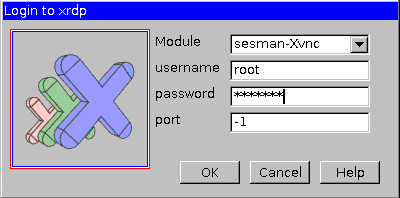
首次连接是选择sesman-Xvnc
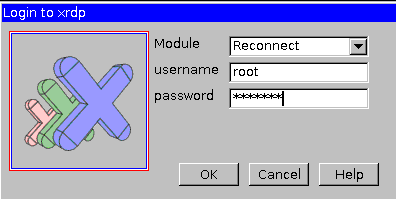
后续连接时选择Reconnet即可访问之前的界面
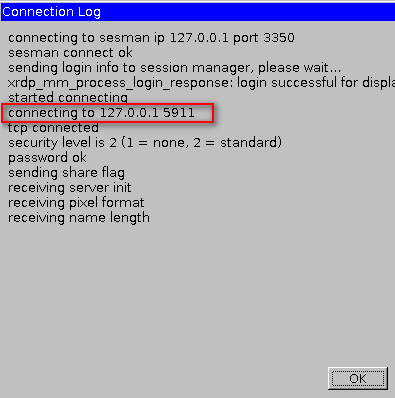
也可以在首次登陆时记录一下端口号(无需修改/etc/xrdp/xrdp.ini文件)
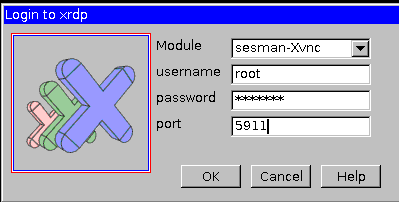
后续访问是仍然选择 sesman-Xvnc,但端口号填写之前记录的那个端口
其他:
安装必要组件
-----------------------------
apt-get install -y vim openssh-serverapt-get install language-pack-zh-hans #最好在界面中操作,系统设置-语言支持apt-get clean安装谷歌输入法
----------------------------
apt-get install -y fcitx-googlepinyin apt-get clean-----------------------------
问题!:

原因:在远程的情况下,重启xrdp
service xrdp restart
导致,xrdp-sesman被迫停止。
tail -n 100 /var/log/xrdp-sesman.log

3350端口停止监听,
netstat -tulanp |grep 3350
手动,启动xrdp-sesman 即可。
http://xdwqs.blog.51cto.com/4758880/1789274

 浙公网安备 33010602011771号