

Hibernate初试
hibernate框架是什么
hibernate是一款orm框架,它对JDBC进行了非常轻量级的对象封装,它将POJO与数据库表建立映射关系,是一个全自动的orm框架,hibernate可以自动生成SQL语句,自动执行,使得Java程序员可以随心所欲的使用对象编程思维来操纵数据库。 Hibernate可以应用在任何使用JDBC的场合,既可以在Java的客户端程序使用,也可以在Servlet/JSP的Web应用中使用。
hibernate的好处:
操作数据库的时候,可以以面向对象的方式来完成,不需要书写SQL语句
orm: object relation mapping对象关系映射
orm分3级:
hibernate属于3级:完全面向对象操作数据库
mybatis属于2级
dbutils属于1级
hibernate框架的搭建
1、导包
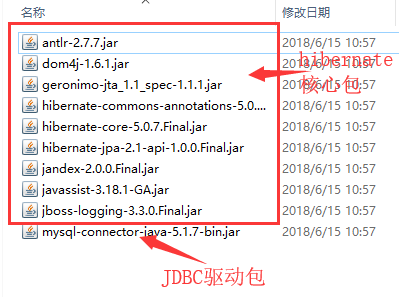
使用hibernate框架需要先导入一系列的jar包,包括 hibernate的核心包跟 JDBC驱动包
在lib目录下导入下列包:
2、创建数据库,创建表
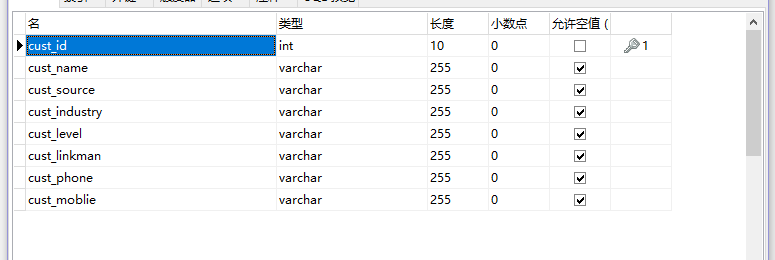
虽然hibernate可以自动建表,但是仍然建议自己手动建表
3、创建实体类
创建与数据库表列名相对应的javabean类
package com.jinxin.hibernate;

public class Customer {
	private Long cust_id;

	private String cust_name;
	private String cust_source;
	private String cust_industry;
	private String cust_level;
	private String cust_linkman;
	private String cust_phone;
	private String cust_moblie;
	public Long getCust_id() {
		return cust_id;
	}
	public void setCust_id(Long cust_id) {
		this.cust_id = cust_id;
	}
	public String getCust_name() {
		return cust_name;
	}
	public void setCust_name(String cust_name) {
		this.cust_name = cust_name;
	}
	public String getCust_source() {
		return cust_source;
	}
	public void setCust_source(String cust_source) {
		this.cust_source = cust_source;
	}
	public String getCust_industry() {
		return cust_industry;
	}
	public void setCust_industry(String cust_industry) {
		this.cust_industry = cust_industry;
	}
	public String getCust_level() {
		return cust_level;
	}
	public void setCust_level(String cust_level) {
		this.cust_level = cust_level;
	}
	public String getCust_linkman() {
		return cust_linkman;
	}
	public void setCust_linkman(String cust_linkman) {
		this.cust_linkman = cust_linkman;
	}
	public String getCust_phone() {
		return cust_phone;
	}
	public void setCust_phone(String cust_phone) {
		this.cust_phone = cust_phone;
	}
	public String getCust_moblie() {
		return cust_moblie;
	}
	public void setCust_moblie(String cust_moblie) {
		this.cust_moblie = cust_moblie;
	}
	@Override
	public String toString() {
		return "Customer [cust_id=" + cust_id + ", cust_name=" + cust_name + "]";
	}
}
3、书写orm元数据
在与javabean类同一目录下建立 Customer.hbm.xml 文件,在文件中书写orm元数据
导入约束
<!DOCTYPE hibernate-mapping PUBLIC
    "-//Hibernate/Hibernate Mapping DTD 3.0//EN"
    "http://www.hibernate.org/dtd/hibernate-mapping-3.0.dtd">
配置表与实体类的关系
<id name="cust_id">
    <!-- generate:主键生成的策略 -->
    <generator class="native"></generator>
</id>
<property name="cust_name" column="</property>
<property name="cust_source" column="cust_source"></property>
<property name="cust_industry" column="cust_industry"></property>
<property name="cust_level" column="cust_level"></property>
<property name="cust_linkman" column="cust_linkman"></property>
<property name="cust_phone" column="cust_phone"></property>
<property name="cust_moblie" column="cust_moblie"></property>
完整的内容
<?xml version="1.0" encoding="UTF-8"?>
<!DOCTYPE hibernate-mapping PUBLIC
    "-//Hibernate/Hibernate Mapping DTD 3.0//EN"
    "http://www.hibernate.org/dtd/hibernate-mapping-3.0.dtd">

    <!-- 配置表与实体对象(javabean类)的关系 -->
    <!--
    	当配置包名后,后面凡是需要书写完整类名的地方只需要直接书写类名即可,
    	不必要在书写完整的包名和类名
    -->
    <hibernate-mapping package="com.jinxin.hibernate">
    	<!--
    	    class标签:配置实体(即javabean类)与表的对应关系
    	    name: 与表对应的javabean类名
    	    table: 数据库表名
    	 -->
    	<class name="Customer" table="cst_customer">
    		<!--
    			id标签:配置主键映射的属性
    			name: 填写主键对应的属性名(即javabean类中的字段名)
    		 	column(非必填): 填写表中的主键列名    默认值:列名会使用属性名
    		 	type(非必填): 填写列(属性)的类型,hibernate会自动检测实体的属性类型。
    		     		  	每个类型有三种填法:java类型 | hibernate类型 | 数据库类型  (注意:最好是让hibernate自动检测,不必要自己设置类型)
    		    not-null(非必填): 配置该属性(列)是否不能为空,默认值:false
    		    length(非必填): 配置数据库列的长度,默认值:使用数据库该类型的最大值
    		 -->
    		<id name="cust_id">
    			<!-- generate:主键生成的策略 -->
    			<generator class="native"></generator>
    		</id>

    		<!--
    			property标签:除了主键列之外的普通属性的映射
    			name: 填写主键对应的属性名(即javabean类中的字段名)
    		 	column(非必填): 填写表中的主键列名    默认值:列名会使用属性名
    		 	type(非必填): 填写列(属性)的类型,hibernate会自动检测实体的属性类型。
    		     		  	每个类型有三种填法:java类型 | hibernate类型 | 数据库类型  (注意:最好是让hibernate自动检测,不必要自己设置类型)
    		    not-null(非必填): 配置该属性(列)是否不能为空,默认值:false
    		    length(非必填): 配置数据库列的长度,默认值:使用数据库该类型的最大值
    		 -->
    		<property name="cust_name" column="cust_name">
    			<!-- 设置列的类型(用数据库的类型设置),一般不推荐设置 -->
    			<!--  <column name="cust_name" sql-type="varchar"></column>-->
    		</property>
    		<property name="cust_source" column="cust_source"></property>
    		<property name="cust_industry" column="cust_industry"></property>
    		<property name="cust_level" column="cust_level"></property>
    		<property name="cust_linkman" column="cust_linkman"></property>
    		<property name="cust_phone" column="cust_phone"></property>
    		<property name="cust_moblie" column="cust_moblie"></property>
    	</class>
    </hibernate-mapping>
4、书写主配置文件
在src目录新建 hibernate.cfg.xml 文件,在文件中书写主配置,包括JDBC加载驱动类,数据库连接的URL,连接数据库的用户名,连接数据库的用户名密码,数据库方言,映射orm元数据
<?xml version="1.0" encoding="UTF-8"?>
<!DOCTYPE hibernate-configuration PUBLIC
	"-//Hibernate/Hibernate Configuration DTD 3.0//EN"
	"http://www.hibernate.org/dtd/hibernate-configuration-3.0.dtd">
	<hibernate-configuration>
		<session-factory>
			<!--
				# hibernate.dialect org.hibernate.dialect.MySQLDialect
				# hibernate.dialect org.hibernate.dialect.MySQLInnoDBDialect
				# hibernate.dialect org.hibernate.dialect.MySQLMyISAMDialect
				# hibernate.connection.driver_class com.mysql.jdbc.Driver
				# hibernate.connection.url jdbc:mysql:///test
				# hibernate.connection.username gavin
				# hibernate.connection.password
			-->
			<!-- 数据驱动 -->
			<property name="hibernate.connection.driver_class">com.mysql.jdbc.Driver</property>
			<!-- 数据库URL -->
			<!-- ///表示: //localhost:3306/  -->
			<property name="hibernate.connection.url">jdbc:mysql:///1806</property>
			<!-- 连接数据库的用户名 -->
			<property name="hibernate.connection.username">root</property>
			<!-- 数据库连接密码 -->
			<property name="hibernate.connection.password">123</property>
			<!--
				数据方言:
				 不同的数据中,sql语句略有区别,指定方言可以让hiberante框架在生成sql语句时,针对数据库的方言生成.
				 sql99标准:DDL:定义语言  库表的增删该查
				 		  DCL:控制语言 事务 权限
				 		  DML:操作语言  增删该查
				注意事项: mysql在选择方言时,选择最短的方言.hibernate.dialect org.hibernate.dialect.MySQLDialect
			-->
			<property name="hibernate.dialect">org.hibernate.dialect.MySQLDialect</property>

			<!--
				# hibernate.show_sql true
				# hibernate.format_sql true
			-->
			<!-- 将hibernate生成的sql语句打印到控制台 -->
			<property name="hibernate.show_sql">true</property>
			<!-- 格式化生成的sql语句,不格式化会生成一列答打印-->
			<property name="hibernate.format_sql">true</property>

			<!--
				## auto schema export 自动导出表结构.自动建表

				# hibernate.hbm2ddl.auto create-drop   自动建表,每次框架运行结束都会将所有表删除.(开发环境中测试使用)
				# hibernate.hbm2ddl.auto create    自动建表,每次框架运行都会创建新的表。以前的表将会被覆盖。表数据会丢失.(开发环境中测试使用)
				# hibernate.hbm2ddl.auto update    (推荐使用) 自动生成表.如果已经存在不会在生成。如果表有变动,自动更新表.(自动更新表不会删除任何数据)
				# hibernate.hbm2ddl.auto validate   校验。不自动生成表.每次启动校验数据库中表是否正确
			-->
			<property name="hibernate.hbm2ddl.auto">update</property>

			<!-- 引入orm元数据,填写src下的路径 -->
			<mapping resource="com/jinxin/hibernate/Customer.hbm.xml"/>
		</session-factory>
	</hibernate-configuration>
5、测试
新建一个测试类 Demo.java,往数据库插入一条数据
package com.jinxin.test.a_hello;

import org.hibernate.Session;
import org.hibernate.SessionFactory;
import org.hibernate.Transaction;
import org.hibernate.cfg.Configuration;
import org.junit.Test;

import com.jinxin.hibernate.Customer;

// 测试Hibernate框架
public class Demo {
	@Test
	public void fun1(){
		Configuration conf = new Configuration().configure();

		SessionFactory sessionFactory = conf.buildSessionFactory();
		Session session = sessionFactory.openSession();

		Transaction tx = session.beginTransaction();
		//----------------------------------------------------------
                 // 两条横线里面的是对数据库进行操作的内容,譬如这里是想数据库添加一条数据
			Customer c = new Customer();
			c.setCust_name("scarlett");
			session.save(c);//执行保存
		//----------------------------------------------------------
		tx.commit();
		session.close();
		sessionFactory.close();


	}


}
当程序运行后会在控制台打印对应放入SQL语句,比如这里是

这是数据库中对应的表中也插入了相应的数据


 浙公网安备 33010602011771号