
IO流
什么是IO流
流可以看成一堆的数据的运动。输入流可以看成是你从数据源文件读取数据,输出流是将你的数据写到另一个数据文件中。
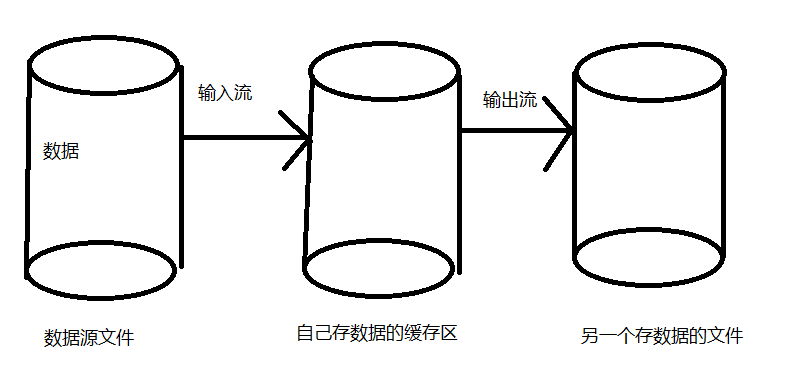
所以,判断要用输入流还是输出流,可以根据你是要把数据读取过来还是写出去来判断。
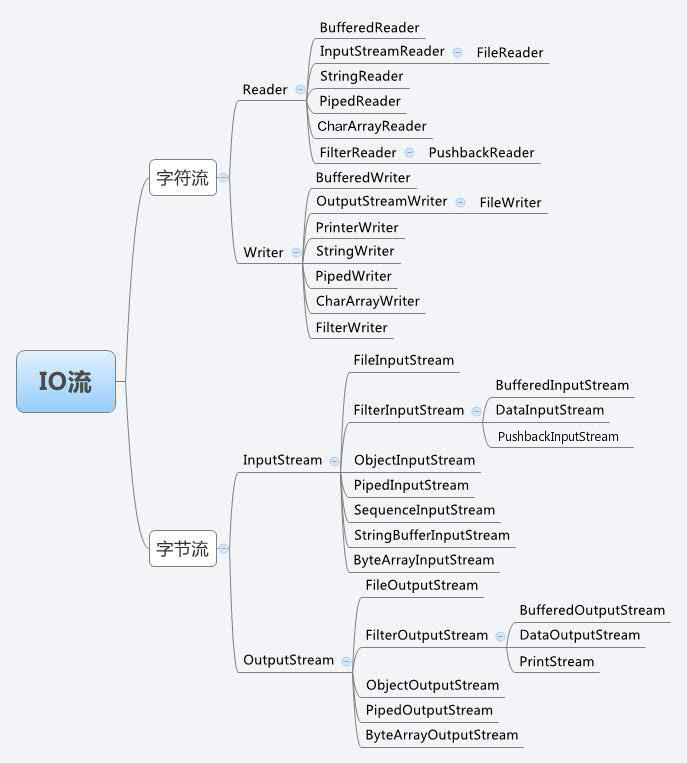
流图继承图:
流的编写格式
由于流对象用完是要关闭的,不然会占资源,有因为流经常要捕获异常,所以,流的关闭放在finally里
public class TestIO1 {
    public static void main(String[] args) {
        FileInputStream fileInputStream = null;
        try {
            fileInputStream = new FileInputStream("f:/a.txt");
            StringBuilder stringBuilder = new StringBuilder();
            int temp = 0;
            //当temp=-1时,表示已经到了文件结尾
            while ((temp = fileInputStream.read()) != -1) {
                stringBuilder.append(((char) temp));
            }
            System.out.println(stringBuilder);
        } catch (FileNotFoundException e) {
            e.printStackTrace();
        } catch (IOException e) {
            e.printStackTrace();
        }finally {
            try {
                //写在finally里,保证了即使是遇到异常流也会关闭
                fileInputStream.close();
            } catch (IOException e) {
                e.printStackTrace();
            }
        }
    }
}
四大IO抽象类
1. InputStream
InputStream是抽象类,是字节输入流的所有类的父类。数据的读取要依靠它的子类来实现,数据的单位为字节。
常用方法:
- int read();读取一个字节的数据,并把字节的值作为int类型的返回值,如未读出字节则返回-1。
- void close():关闭输入流对象,释放资源。
2. OutputStream
OutputStream是抽象类,是字节输出流的所有类的父类。数据的输入要依靠它的子类来实现,数据的单位为字节。
常用方法:
- void write(int n):向目的地写入一个字节。
- void close():关闭输出流对象,释放资源。
3. Reader
Reader用来读取的字符流抽象类,数据单元为字符。
常用方法:
- int read():读取一个字符的数据,并把字符的值作为int类型的返回值,如未读出字符则返回-1。
- void close():关闭输入流对象,释放资源。
4. Writer
Writer用来写出的字符流抽象类,数据单元为字符。
常用方法:
- void writer(int n):向输出流中写入一个字符。
- void close():关闭输出流对象,释放资源。
基流类
1. 字节流类
字节流是以字节为单位获取数据,命名以Stream结尾的流一般是字节流。
FileInputStream、FileOutputStream
//FileInputStream
public class TestIO1 {
    public static void main(String[] args) {
        FileInputStream fileInputStream = null;
        try {
            fileInputStream = new FileInputStream("f:/a.txt");
            StringBuilder stringBuilder = new StringBuilder();
            int temp = 0;
            //当temp=-1时,表示已经到了文件结尾
            while ((temp = fileInputStream.read()) != -1) {
                stringBuilder.append(((char) temp));
            }
            System.out.println(stringBuilder);
        } catch (FileNotFoundException e) {
            e.printStackTrace();
        } catch (IOException e) {
            e.printStackTrace();
        }finally {
            try {
                //写在finally里,保证了即使是遇到异常流也会关闭
                fileInputStream.close();
            } catch (IOException e) {
                e.printStackTrace();
            }
        }
    }
}
ByteArrayInputStream、ByteArrayOutputStream
public class TestIO3 {
    public static void main(String[] args) {
        //将字符串转变成字节数组
        byte[] b = "asdfghjkl".getBytes();
        fun(b);
    }
    public static void fun(byte[] b) {
        ByteArrayInputStream byteArrayInputStream = null;
        StringBuilder stringBuilder = new StringBuilder();
        int temp = 0;
        //用来白痴读取到的字节数
        int num = 0;
        try {
            byteArrayInputStream = new ByteArrayInputStream(b);
            while ((temp = byteArrayInputStream.read()) != -1) {
                stringBuilder.append((char) temp);
                num++;
            }
            System.out.println(stringBuilder);
            System.out.println("读取到的字节数:" + num);
        } finally {
            try {
                byteArrayInputStream.close();
            } catch (IOException e) {
                e.printStackTrace();
            }
        }
    }
}
2. 字符流类
字符流是以字符为单位获取数据,命名上以Reader/writer结尾的流一般是字符流。
FileReader、FileWriter
public class TestIO04 {
    public static void main(String[] args) {
        FileReader fileReader = null;
        FileWriter fileWriter = null;
        int len = 0;
        //缓冲用的字符数组
        char[] buffer = new char[1024];
        //边读边写
        try {
            fileReader = new FileReader("f:/a.txt");
            fileWriter = new FileWriter("f:/b.txt");
            while ((len = fileReader.read(buffer)) != -1) {
                fileWriter.write(buffer, 0, len);
            }
        } catch (IOException e) {
            e.printStackTrace();
        } finally {
            try {
                if (fileWriter != null) {
                    fileWriter.close();
                }
            } catch (IOException e) {
                e.printStackTrace();
            }
            try {
                if (fileReader != null) {
                    fileReader.close();
                }
            } catch (IOException e) {
                e.printStackTrace();
            }
        }
    }
}
包装流类
包装流又称为处理流,创建对象时只要传入对应的基流对象就好。
1. 字节包装流类
BufferedInputStream、BufferedOutputStream(缓冲流)
这个流作用是增加缓冲,大大提高读写文本文件的效率
public class TestIO1 {
    public static void main(String[] args) {
        FileInputStream fileInputStream = null;
        BufferedInputStream bufferedInputStream = null;
        try {
            fileInputStream = new FileInputStream("f:/a.txt");
            bufferedInputStream = new BufferedInputStream(fileInputStream);//直接在实例化时将字节基流作为参数放进去就好
            StringBuilder stringBuilder = new StringBuilder();
            int temp = 0;
            //当temp=-1时,表示已经到了文件结尾
            while ((temp = bufferedInputStream.read()) != -1) {//后面就直接用缓冲流对象就行了
                stringBuilder.append(((char) temp));
            }
            System.out.println(stringBuilder);
        } catch (FileNotFoundException e) {
            e.printStackTrace();
        } catch (IOException e) {
            e.printStackTrace();
        } finally {
            try {
                if (bufferedInputStream != null) {
                    bufferedInputStream.close();
                }
            } catch (IOException e) {
                e.printStackTrace();
            }
            try {
                //写在finally里,保证了即使是遇到异常流也会关闭
                fileInputStream.close();
            } catch (IOException e) {
                e.printStackTrace();
            }
        }
    }
}
DataInputStream、DataOutputStream(数据流)
数据流是以“基本数据类型与字符串类型”作为数据源。
数据流提供了可以存取与机器无关的所有Java基础类型数据(如:int、double、String等)方法。
public class TestIO06 {
    public static void main(String[] args) {
        FileInputStream fileInputStream = null;
        FileOutputStream fileOutputStream = null;
        DataInputStream dataInputStream = null;
        DataOutputStream dataOutputStream = null;
        try {
            fileOutputStream = new FileOutputStream("f:/a.txt");
            fileInputStream = new FileInputStream("f:/a.txt");
            //用数据流来对基流进行包装
            dataOutputStream = new DataOutputStream(fileOutputStream);
            dataInputStream = new DataInputStream(fileInputStream);
            //用数据流特有的基础类型数据方法将数据写入文件
            dataOutputStream.writeChar('a');
            dataOutputStream.writeInt(1);
            dataOutputStream.writeDouble(1.1);
            dataOutputStream.writeBoolean(true);
            dataOutputStream.writeUTF("你好世界");
            dataOutputStream.flush();//刷新缓冲区,将流中的数据写入到文件中
            //读取数据,要与写入的顺序一样
            System.out.println(dataInputStream.readChar());
            System.out.println(dataInputStream.readInt());
            System.out.println(dataInputStream.readDouble());
            System.out.println(dataInputStream.readBoolean());
            System.out.println(dataInputStream.readUTF());
        } catch (FileNotFoundException e) {
            e.printStackTrace();
        } catch (IOException e) {
            e.printStackTrace();
        } finally {
            try {
                if (dataInputStream != null) {
                    dataInputStream.close();
                }

            } catch (IOException e) {
                e.printStackTrace();
            }
            try {
                if (dataOutputStream != null) {
                    dataOutputStream.close();
                }
            } catch (IOException e) {
                e.printStackTrace();
            }
            try {
                if (fileInputStream != null) {
                    fileInputStream.close();
                }
            } catch (IOException e) {
                e.printStackTrace();
            }
            try {
                if (fileOutputStream != null) {
                    fileOutputStream.close();
                }
            } catch (IOException e) {
                e.printStackTrace();
            }
        }
    }
}
ObjectInputStream、ObjectOutputStream(对象流)和序列化、反序列化
对象流是以”对象“为数据源,对”对象“进行序列化和反序列化操作
序列化、反序列化实现:
1.要序列化对象,那个对象所属的类要继承Serializable接口
public class TestIO07 {
    public static void main(String[] args) {
        FileInputStream fileInputStream=null;
        FileOutputStream fileOutputStream=null;
        ObjectInputStream objectInputStream=null;
        ObjectOutputStream objectOutputStream=null;
        try {
            //实例化一个对象
            Studnet studnet=new Studnet("法外狂徒张三",99);
            //序列化
            fileOutputStream = new FileOutputStream("f:/a.txt");
            objectOutputStream = new ObjectOutputStream(fileOutputStream);
            objectOutputStream.writeObject(studnet);
            objectOutputStream.flush();
            //反序列化
            fileInputStream = new FileInputStream("f:/a.txt");
            objectInputStream = new ObjectInputStream(fileInputStream);
            Studnet studnet1=(Studnet) objectInputStream.readObject();
            System.out.println(studnet1);
        } catch (FileNotFoundException e) {
            e.printStackTrace();
        } catch (IOException e) {
            e.printStackTrace();
        } catch (ClassNotFoundException e) {
            e.printStackTrace();
        }finally {
            try {
                if (objectInputStream!=null){
                    objectInputStream.close();
                }
            } catch (IOException e) {
                e.printStackTrace();
            }
            try {
                if (fileInputStream!=null){
                    fileInputStream.close();
                }
            } catch (IOException e) {
                e.printStackTrace();
            }
            try {
                if(objectOutputStream!=null){
                    objectOutputStream.close();
                }
            } catch (IOException e) {
                e.printStackTrace();
            }
            try {
                if(fileOutputStream!=null){
                    fileOutputStream.close();
                }
            } catch (IOException e) {
                e.printStackTrace();
            }
        }
    }
}

class Studnet implements Serializable {
    //添加序列化ID,它决定着是否能够成功反序列化
    private static final long serialVersionUID = 1L;
    String name;
    int age;
    public Studnet(String name,int age){
        this.name=name;
        this.age=age;
    }

    @Override
    public String toString() {
        return "Studnet{" +
                "name='" + name + '\'' +
                ", age=" + age +
                '}';
    }
}
InputStreamReader、OutputStreamWriter(字节->字符)
转流是用来将字节流转化为字符流的。
System.in是字节流对象,是键盘输入的,正常要按行接收用户的输入,就需要用到BufferedReader特有的readLine()。但,BufferedReader要传入的是Reader对象,这时就需要用转换流来解决了。
public class TestIO08 {
    public static void main(String[] args) {
        BufferedReader bufferedReader = null;
        BufferedWriter bufferedWriter = null;
        try {
            bufferedReader = new BufferedReader(new InputStreamReader(System.in));
            bufferedWriter = new BufferedWriter(new OutputStreamWriter(System.out));
            //使用字符输入和输出流
            String str = bufferedReader.readLine();
            //一直读取,直到用户输入end为止
            while (!"end".equals(str)) {
                //输出到控制台
                bufferedWriter.write(str);
                bufferedWriter.newLine();//换行
                //再继续读取
                str = bufferedReader.readLine();
            }
        } catch (IOException e) {
            e.printStackTrace();
        } finally {
            try {
                if (bufferedWriter != null) {
                    bufferedWriter.close();
                }
            } catch (IOException e) {
                e.printStackTrace();
            }
            try {
                if (bufferedReader != null) {
                    bufferedReader.close();
                }
            } catch (IOException e) {
                e.printStackTrace();
            }
        }
    }
}
2. 字符包装流类
BufferedReader、BufferedWriter
public class TestIO05 {
    public static void main(String[] args) {
        File src = new File("f:/a.txt");
        BufferedReader reader = null;
        try {
            reader = new BufferedReader(new FileReader(src));//将输入字符基流传入
            String line = null;
            while ((line = reader.readLine()) != null) {
                System.out.println(line);
            }

        } catch (FileNotFoundException e) {
            e.printStackTrace();
        } catch (IOException e) {
            e.printStackTrace();
        } finally {
            try {
                if (null != reader) {
                    reader.close();
                }
            } catch (IOException e) {
                e.printStackTrace();
            }
        }
    }
}
扩展
1. 简化关闭流的编写
在try后面加一个括号(),IO对象实例化时可以写在括号里,如果有多个用分号“;”隔开,这样就不用在finally里关闭流了。
示例:
public class TestIO07 {
    public static void main(String[] args) {
        try(FileOutputStream fileOutputStream = new FileOutputStream("f:/a.txt");
            ObjectOutputStream objectOutputStream = new ObjectOutputStream(fileOutputStream);
            FileInputStream fileInputStream = new FileInputStream("f:/a.txt");
            ObjectInputStream objectInputStream = new ObjectInputStream(fileInputStream)) {
            //实例化一个对象
            Studnet studnet=new Studnet("法外狂徒张三",99);
            //序列化
            objectOutputStream.writeObject(studnet);
            objectOutputStream.flush();
            //反序列化
            Studnet studnet1=(Studnet) objectInputStream.readObject();
            System.out.println(studnet1);
        }catch (IOException e) {
            e.printStackTrace();
        } catch (ClassNotFoundException e) {
            e.printStackTrace();
        }
    }
}
class Studnet implements Serializable {
    //添加序列化ID,它决定着是否能够成功反序列化
    private static final long serialVersionUID = 1L;
    String name;
    int age;
    public Studnet(String name,int age){
        this.name=name;
        this.age=age;
    }

    @Override
    public String toString() {
        return "Studnet{" +
                "name='" + name + '\'' +
                ", age=" + age +
                '}';
    }
}
2. FileUtils工具类
FileUtils工具类是别人已经将常用的文件操作方法写好了,封装在一起的工具类。我们只需要调用里面的方法,传入方法所需的参数就可以很简单的进行文件的操作了,不用自己编写。
我们想要使用这个工具类要先下载相应的Jar包
下载后导入jar包的方法
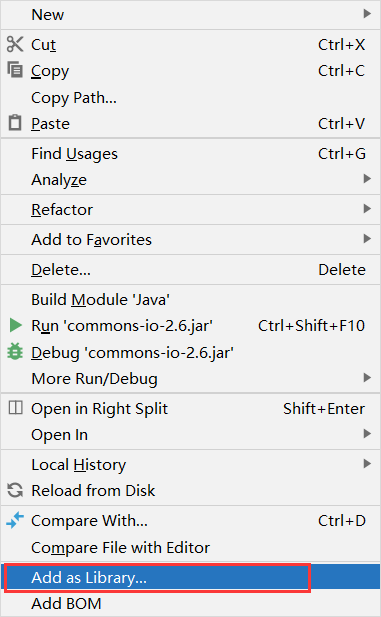
- 在java项目里创一个lib文件夹,将jar包复制粘贴进去
- 然后,点击它按右键在Add as Library那里点击即可使用。

 浙公网安备 33010602011771号