
多线程详解
线程
1.什么是线程
一条线程指的是进程中一个单一顺序的控制流,一个进程中可以并发多个线程,每条线程并行执行不同的任务。
2.线程的状态和生命周期
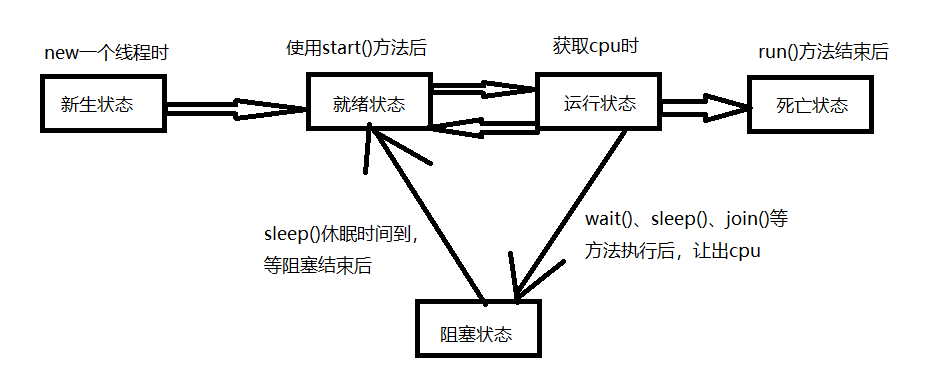
线程有五个状态:新生状态、就绪状态、运行状态、阻塞状态、死亡状态
3.线程的常用方法
- public void start()
使该线程开始执行;Java 虚拟机调用该线程的 run 方法。 - public void run()
如果该线程是使用独立的 Runnable 运行对象构造的,则调用该 Runnable 对象的 run 方法;否则,该方法不执行任何操作并返回。 - public final void setName(String name)
改变线程名称,使之与参数 name 相同。 - public final void setPriority(int priority)
更改线程的优先级。 - public final void setDaemon(boolean on)
将该线程标记为守护线程(true)或用户线程(false)。 - public final void join(long millisec)
等待该线程终止的时间最长为 millis 毫秒。 - public final boolean isAlive()
测试线程是否处于活动状态。
Thread类的静态方法:
- public static void yield()
暂停当前正在执行的线程对象,并执行其他线程。 - public static void sleep(long millisec)
在指定的毫秒数内让当前正在执行的线程休眠(暂停执行),此操作受到系统计时器和调度程序精度和准确性的影响。 - public static Thread currentThread()
返回对当前正在执行的线程对象的引用。
怎么实现多线程
1.通过继承Thread类实现
public class TestThread extends Thread{//1.继承Thread类
    public static void main(String[] args) {
        TestThread testThread=new TestThread();//3.实例化自定义的线程类对象
        testThread.start();//4.调用star()方法开启线程
    }
    @Override
    public void run() {//2.编写run方法
        for (int i = 0; i < 10; i++) {
            System.out.println("线程第"+i);
        }
    }
}
2.通过Runnable接口实现多线程
public class TestThread implements Runnable {//1.继承Runnable接口
    public static void main(String[] args) {
        TestThread thread=new TestThread();//3.实例化自定义的线程类对象
        Thread thread1=new Thread(thread);//4.实例化Thread类对象,把自定义的线程类对象扔进去
        thread1.start();//5.调用实例化的Thread类对象的star()方法
    }
    @Override
    public void run() {//2.编写run方法
        for (int i = 0; i < 10; i++) {
            System.out.println("线程第"+i);
        }
    }
}
3.通过Callable接口实现
public class TestCallable implements Callable<Boolean> {//1.继承Callable接口
    @Override
    public Boolean call() throws Exception {//2.重写call()方法
        System.out.println(Thread.currentThread().getName());
        return true;
    }
    public static void main(String[] args) throws ExecutionException, InterruptedException {
        TestCallable testCallable = new TestCallable();//3.实例化自定义的线程接口

        // 4.使用线程池类创建执行服务
        ExecutorService ser = Executors.newFixedThreadPool(1);

        // 5.提交执行
        Future<Boolean> future = ser.submit(testCallable);

        // 6.获取结果
        Boolean ThreadReturn = future.get();
        System.out.println(ThreadReturn);

        //7.关闭线程
        ser.shutdown();
    }
}
4.三种创建线程对比
- 采用实现 Runnable、Callable 接口的方式创建多线程时,线程类只是实现了 Runnable 接口或 Callable 接口,还可以继承其他类。
- Callable接口实际上是属于Executor框架中的功能类,Callable接口与Runnable接口的功能类似,但提供了比Runnable更加强大的功能。
- Callable可以在任务结束的时候提供一个返回值,Runnable无法提供这个功能
- Callable的call方法分可以抛出异常,而Runnable的run方法不能抛出异常。
- 使用继承 Thread 类的方式创建多线程时,编写简单,如果需要访问当前线程,则无需使用 Thread.currentThread() 方法,直接使用 this 即可获得当前线程。
线程的同步
线程同步是指多个线程对同一个资源进行操作的过程。
但,由于是多个线程对资源同时的操作,容易导致资源的数据出现问题,因此为了解决这个问题,有了锁。
实现锁的方法是使用关键字synchronized,它有synchronized方法和synhronized块,用来锁住资源。而,加锁容易出现死锁,从而要避免死锁。
1.synchronized方法
synchronized方法:
public class UnSafeBuyTicket {
	public static void main(String[] args) {
		BuyTicket buyTicket = new BuyTicket();
		new Thread(buyTicket,"我").start();
		new Thread(buyTicket,"你").start();
		new Thread(buyTicket,"他").start();
	}
}

class BuyTicket implements Runnable{

	private  int ticket = 10;
	boolean flag = true;  // 外部停止方式

	@Override
	public void run() {
		while (flag){
			try {
				buy();
			} catch (InterruptedException e) {
				e.printStackTrace();
			}
		}
	}

	// synchronized 同步方法,锁的是this即buyTicket对象也就是资源了
	private synchronized void buy() throws InterruptedException {
		if (ticket<=0){
			flag = false;
			return;
		}
		Thread.sleep(1000);
		System.out.println(Thread.currentThread().getName()+"->"+ticket--);
	}
}
2.synchronized块
synchronized块:
public class UnSafeBuyTicket {
	public static void main(String[] args) {
		BuyTicket buyTicket = new BuyTicket();
		new Thread(buyTicket,"我").start();
		new Thread(buyTicket,"你").start();
		new Thread(buyTicket,"他").start();
	}
}

class BuyTicket implements Runnable{

	private  int ticket = 10;
	boolean flag = true;  // 外部停止方式

	@Override
	public void run() {
		while (flag){
			try {
				buy();
			} catch (InterruptedException e) {
				e.printStackTrace();
			}
		}
	}

	// synchronized 同步块,锁的是this即buyTicket对象也就是资源了
	private void buy() throws InterruptedException {
		synchronized (this) {
			if (ticket <= 0) {
				flag = false;
				return;
			}
			Thread.sleep(1000);
			System.out.println(Thread.currentThread().getName() + "->" + ticket--);
		}
	}
}
死锁
1.什么是死锁
当有两个或以上的线程需同时拥有两个或多个资源才能完全运行,可这其中的一些资源被其他线程占用,双方都在等待对方释放资源,而陷入的无限制等待就是死锁。
2.怎么解决死锁
死锁示例:
class Lipstick{}//口红类
class Mirror{}//镜子类
class MakeUp extends Thread{//化妆类
    int flag;
    String girl;
    static Lipstick lipstick = new Lipstick();
    static Mirror mirror = new Mirror();

    public MakeUp(int flag,String girl){
        this.flag = flag;
        this.girl = girl;
    }
    void doMakeUP(){//化妆方法
        if (flag == 1){
            //线程要同时拿到口红和镜子,造成死锁
            synchronized (lipstick){//得到口红锁
                System.out.println(girl + "拿着口红");
                try {
                    Thread.sleep(1000);
                } catch (InterruptedException e) {
                    e.printStackTrace();
                }

                synchronized (mirror){//得到镜子锁
                    System.out.println(girl + "拿着镜子");
                }
            }
        } else {
            synchronized (mirror){//得到口红锁
                System.out.println(girl + "拿着镜子");
                try {
                    Thread.sleep(1000);
                } catch (InterruptedException e) {
                    e.printStackTrace();
                }

                synchronized (lipstick){//得到镜子锁
                    System.out.println(girl + "拿着口红");
                }
            }
        }
    }

    @Override
    public void run() {
        doMakeUP();
    }
}

public class TestDeadLock {
    public static void main(String[] args) {
        MakeUp m1 = new MakeUp(1,"小天使");
        MakeUp m2 = new MakeUp(0,"小熊猫");
        m1.start();
        m2.start();
    }
}
死锁解决示例:
class Lipstick{}//口红类
class Mirror{}//镜子类
class MakeUp extends Thread{//化妆类
    int flag;
    String girl;
    static Lipstick lipstick = new Lipstick();
    static Mirror mirror = new Mirror();

    public MakeUp(int flag,String girl){
        this.flag = flag;
        this.girl = girl;
    }
    void doMakeUP(){//化妆方法
        //将同意synchronize代码块里的锁拿出来,也就是线程先拿到的资源先用,用完释放该资源,再去拿第二个资源
        if (flag == 1){
            synchronized (lipstick){//得到口红锁
                System.out.println(girl + "拿着口红");
                try {
                    Thread.sleep(1000);
                } catch (InterruptedException e) {
                    e.printStackTrace();
                }
            }
            synchronized (mirror){//得到镜子锁
                System.out.println(girl + "拿着镜子");
            }
        } else {
            synchronized (mirror){//得到口红锁
                System.out.println(girl + "拿着镜子");
                try {
                    Thread.sleep(1000);
                } catch (InterruptedException e) {
                    e.printStackTrace();
                }
            }
            synchronized (lipstick){//得到镜子锁
                System.out.println(girl + "拿着口红");
            }
        }
    }

    @Override
    public void run() {
        doMakeUP();
    }
}

public class TestDeadLock {
    public static void main(String[] args) {
        MakeUp m1 = new MakeUp(1,"小天使");
        MakeUp m2 = new MakeUp(0,"小熊猫");
        m1.start();
        m2.start();
    }
}
3.死锁的四个必要条件
- 互斥: 某个资源一次只允许一个线程使用,即该资源一旦分配给某个线程,其他线程就不能再访问,直到该进程访问结束。
- 占有与等待: 一个线程本身占有资源(一种或多种),同时还需要其他资源,正在等待其他线程释放该资源。
- 不可抢占: 别的线程已经占有了某项资源,其他线程无法访问。
- 循环等待: 一个进程链,其每个线程都占有下一个进程所需的至少一种资源,从而形成循环的等待。
解决死锁时只要解决其中一个就能够解决死锁。
线程协作(生产者消费者模式)
线程在使用时有时会出现多个线程相互协作的情况,这就是线程的并发。
线程的并发有两个方式:
- 利用wait()、notify()、notifyAll()方法来实现
- 通过Condition接口
1. 利用wait()、notify()、notifyAll()
public class TestProduceConsume {
    public static void main(String[] args) {
        SynContainer synContainer = new SynContainer();//缓冲区
        Produce produce = new Produce(synContainer);//生产者
        Consume consume = new Consume(synContainer);//消费者
        produce.start();
        consume.start();
    }
}

class Chicken{//鸡肉
    int id;
    public Chicken(int id){
        this.id=id;
    }
}

class SynContainer{
    Chicken[] chickens = new Chicken[10];//容器
    int index = 0;//计数器

    //生产方法
    public synchronized void push(Chicken chicken){
        while (index == chickens.length){//满了,停止生产
            try {
                this.wait();
            } catch (InterruptedException e) {
                e.printStackTrace();
            }
        }

        //唤醒消费线程
        this.notify();

        chickens[index]=chicken;
        index++;
    }

    //消费方法
    public synchronized Chicken pop(){
        while (index == 0){//容器没有食物了,停止消费
            try {
                this.wait();
            } catch (InterruptedException e) {
                e.printStackTrace();
            }
        }
        //唤醒生产线程
        this.notify();
        index--;
        return chickens[index];
    }
}

//生产者线程
class Produce extends Thread{
    SynContainer synContainer=null;

    public Produce(SynContainer synContainer){
        this.synContainer=synContainer;
    }

    @Override
    public void run() {
        for (int i = 0; i < 10; i++) {
            System.out.println("生产鸡肉:"+(i+1));
            Chicken chicke = new Chicken(i);
            synContainer.push(chicke);
        }

    }
}

//消费者线程
class Consume extends Thread{
    SynContainer synContainer = null;

    public Consume(SynContainer synContainer){
        this.synContainer = synContainer;
    }

    @Override
    public void run() {
        for (int i = 0; i < 10; i++) {
            Chicken chicken = synContainer.pop();
            System.out.println("消费鸡肉:"+(i+1));
        }
    }
}
2.信号灯法
public class TestProduceConsume2 {
    public static void main(String[] args) {
        TV tv = new TV();
        Player player = new Player(tv);
        Watcher watcher = new Watcher(tv);
        player.start();
        watcher.start();
    }
}

//生产者   演员
class Player extends  Thread{
    TV tv;
    public Player(TV tv){
        this.tv = tv;
    }

    @Override
    public void run() {
        for (int i = 0; i < 20; i++) {
            if(i%2==0){
                this.tv.play("快乐大本营");
            }else {
                this.tv.play("广告");
            }
        }
    }
}
//消费者   观众
class Watcher extends Thread{
    TV tv;
    public Watcher(TV tv){
        this.tv = tv;
    }

    @Override
    public void run() {
        for (int i = 0; i < 20; i++) {
            this.tv.watch();
        }

    }
}

//产品    节目
class TV{
    //演员表演,观众等待 T
    //观众观看,演员等待 F
    String voice;//节目
    boolean flag = true;//信号灯

    //表演
    public synchronized void play(String voice){
        if (!flag){
            try {
                this.wait();
            } catch (InterruptedException e) {
                e.printStackTrace();
            }
        }

        System.out.println("演员表演了:" + voice);
        //通知观众观看
        this.notify();
        this.voice = voice;
        this.flag = !this.flag;
    }

    //观看
    public synchronized void watch(){
        if (flag){
            try {
                this.wait();
            } catch (InterruptedException e) {
                e.printStackTrace();
            }
        }
        System.out.println("观众观看了:"+voice);
        //通知演员表演
        this.notify();
        this.flag = !this.flag;

    }

}
线程联合
线程联合就是在一个线程进行半路时,把cpu让给另一个线程,另一个线程执行完后,原本的线程继续执行,可以利用join()方法。
public class TestThreadState {
    public static void main(String[] args) {
        Thread father = new Thread(new Father());
        father.start();
    }
}
class Father implements Runnable{
    @Override
    public void run() {
        System.out.println("爸爸让儿子去买水果");
        Thread son = new Thread(new Son());
        son.start();
        System.out.println("爸爸等儿子买水果回来");
        try {
            son.join();
        } catch (InterruptedException e) {
            e.printStackTrace();
            System.out.println("爸爸出门去找儿子");
            System.exit(1);
        }
        System.out.println("爸爸接过水果,把零钱给了儿子");
    }
}
class Son implements Runnable{
    @Override
    public void run() {
        System.out.println("儿子出去买水果");
        System.out.println("儿子买水果需要10分钟");
        for (int i = 0; i < 10; i++) {
            System.out.println("第" + (i+1) + "分钟");
            try {
                Thread.sleep(1000);
            } catch (InterruptedException e) {
                e.printStackTrace();
            }
        }
        System.out.println("儿子买完水果回来了");
    }
}
线程池
JDK5.0起提供了线程池相关的API:ExecutorService和Executors
ExecutorService:线程池接口。常见子类ThreadPoolExecutor
- void execute(Runnable command):执行任务/命令,没有返回值,一般用来执行Runnable
Future submit(Callable task):执行任务,有返回值,一般用来执行Callable - void shutdown():关闭连接池
Executors:工具类、线程池的工厂类,用于创建并返回不同类型 的线程池
public class TestThreadPool {
    public static void main(String[] args) {
        //1.创建线程池
        //newFixedThreadPool 参数为线程池的大小
        ExecutorService executorService = Executors.newFixedThreadPool(10);

        //2.启动线程
        executorService.execute(new MyThread());
        executorService.execute(new MyThread());
        executorService.execute(new MyThread());

        //3.关闭连接
        executorService.shutdown();
    }
}

class MyThread implements Runnable{
    @Override
    public void run() {
        for (int i = 0; i < 10; i++) {
            System.out.println(Thread.currentThread().getName());
        }
    }
}
任务定时调度
可以通过Timer和Timetask类实现定时启动某个线程
- java.util.Timer类的作用类似闹钟,可以定时或者每隔一段时间触发一次线程
- java.util.TimerTask类是一个抽象类,实现了Runnable接口,具备多线程的能力
public class TestTimerThread {
    public static void main(String[] args) {
        MyTimerThread myTimerThread = new MyTimerThread();
        Timer timer = new Timer();
        //3秒后执行myTimerThread线程
        timer.schedule(myTimerThread,3000);

        //指定时间myTimerThread执行线程
//        GregorianCalendar gregorianCalendar = new GregorianCalendar(2021,9,8,52,0);
//        timer.schedule(myTimerThread,gregorianCalendar.getTime());
    }
}
class MyTimerThread extends TimerTask{
    @Override
    public void run() {
        for (int i = 0; i < 10; i++) {
            System.out.println("任务1:" + i);
        }
    }
}

 浙公网安备 33010602011771号