![]()
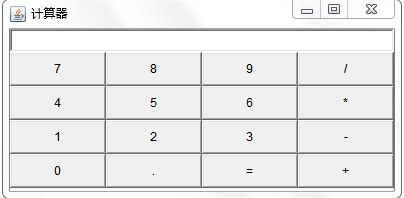
package 第七次实训;

import java.awt.*;

import javax.swing.*;

public class 计算器 {
    JFrame f;
    JPanel p;
    JButton[] b;
    JTextField t;
    String title[]= {"7","8","9","/","4","5","6","*","1","2","3","-","0",".","=","+"};
    GridLayout q1;
    public 计算器() {
        f=new JFrame("计算机");
        p=new JPanel();
        b=new JButton[16];
        t=new JTextField(10);
        for(int i=0;i<16;i++) {
            b[i]=new JButton(title[i]);
            p.add(b[i]);
        }
        //已设置完循环
        q1=new GridLayout(4,4);
        p.setLayout(q1);
        f.add(t,BorderLayout.NORTH);
        f.add(p,BorderLayout.CENTER);
        f.setVisible(true);
        f.setSize(400,300);
    }
    public static void main(String args[]) {
        new 计算器();
    }


}
![]()
 1 package 第七次实训;
 2
 3 import java.awt.BorderLayout;
 4 import java.awt.Color;
 5 import java.awt.event.ActionEvent;
 6 import java.awt.event.ActionListener;
 7
 8 import javax.swing.*;
 9
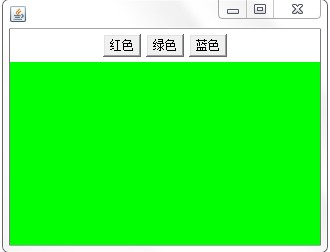
10 public class 改变窗口颜色 implements ActionListener {//创建接口
11     JFrame f;
12     JPanel p1,p2;
13     JButton b1,b2,b3;
14     public 改变窗口颜色() {
15         f=new JFrame("点击按钮改变背景颜色");
16         p1=new JPanel();
17         p2=new JPanel();
18         b1=new JButton("绿色");
19         b1.addActionListener(this);//加监听
20         b2=new JButton("蓝色");
21         b2.addActionListener(this);//加监听
22         b3=new JButton("灰色");
23         b3.addActionListener(this);//加监听
24         p2.setBackground(Color.pink);
25         p1.add(b1);
26         p1.add(b2);
27         p1.add(b3);
28         f.add(p1,BorderLayout.NORTH);
29         f.add(p2,BorderLayout.CENTER);
30         f.setSize(400,300);
31         f.setVisible(true);
32     }
33     public static void main(String args[]) {
34         new 改变窗口颜色();
35     }
36     @Override
37     public void actionPerformed(ActionEvent e) {
38         // TODO 自动生成的方法存根
39        if(e.getSource()==b1) {
40            p2.setBackground(Color.green);
41        }
42        else if(e.getSource()==b2) {
43            p2.setBackground(Color.cyan);
44        }
45        else if(e.getSource()==b3) {
46            p2.setBackground(Color.darkGray);
47        }
48     }
49
50
51
52 }

 浙公网安备 33010602011771号