
LInux下安装Mysql
一、查看Linux下的mysql的具体信息
[root@centos home]# rpm -qa | grep mysql
mysql-libs-5.1.73-3.el6_5.x86_64
二、卸载Linux下默认的mysql
[root@centos home]# rpm -e --nodeps mysql-libs-5.1.73-3.el6_5.x86_64
三、通过yum等命令安装mysql
[root@centos home]# yum list | grep mysql
apr-util-mysql.x86_64                      1.3.9-3.el6_0.1               base
bacula-director-mysql.x86_64               5.0.0-13.el6                  base
bacula-storage-mysql.x86_64                5.0.0-13.el6                  base
dovecot-mysql.x86_64                       1:2.0.9-22.el6_10.1           updates
freeradius-mysql.x86_64                    2.2.6-7.el6_9                 base
libdbi-dbd-mysql.x86_64                    0.8.3-5.1.el6                 base
mod_auth_mysql.x86_64                      1:3.0.0-11.el6_0.1            base
mysql.x86_64                               5.1.73-8.el6_8                base
mysql-bench.x86_64                         5.1.73-8.el6_8                base
mysql-connector-java.noarch                1:5.1.17-6.el6                base
mysql-connector-odbc.x86_64                5.1.5r1144-7.el6              base
mysql-devel.i686                           5.1.73-8.el6_8                base
mysql-devel.x86_64                         5.1.73-8.el6_8                base
mysql-embedded.i686                        5.1.73-8.el6_8                base
mysql-embedded.x86_64                      5.1.73-8.el6_8                base
mysql-embedded-devel.i686                  5.1.73-8.el6_8                base
mysql-embedded-devel.x86_64                5.1.73-8.el6_8                base
mysql-libs.i686                            5.1.73-8.el6_8                base
mysql-libs.x86_64                          5.1.73-8.el6_8                base
mysql-server.x86_64                        5.1.73-8.el6_8                base
mysql-test.x86_64                          5.1.73-8.el6_8                base
pcp-pmda-mysql.x86_64                      3.10.9-9.el6                  base
php-mysql.x86_64                           5.3.3-50.el6_10               updates
qt-mysql.i686                              1:4.6.2-28.el6_5              base
qt-mysql.x86_64                            1:4.6.2-28.el6_5              base
rsyslog-mysql.x86_64                       5.8.10-12.el6                 base
rsyslog7-mysql.x86_64                      7.4.10-7.el6                  base
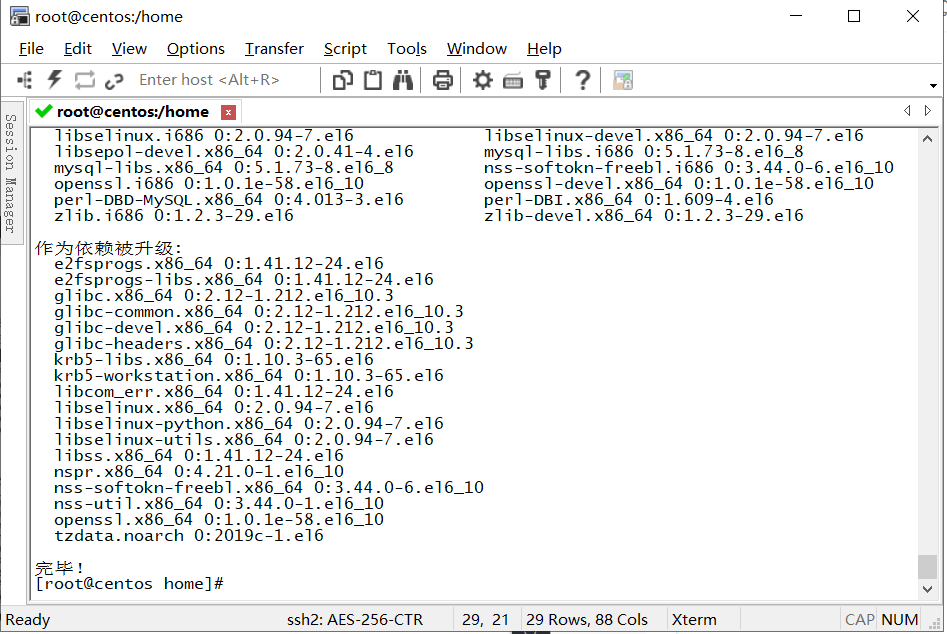
[root@centos home]# yum -y install mysql.x86_64 mysql-devel.i686 mysql-server.x86_64
四、检查mysql是否安装
[root@centos home]# rpm -qi mysql-server
Name        : mysql-server                 Relocations: (not relocatable)
Version     : 5.1.73                            Vendor: CentOS
Release     : 8.el6_8                       Build Date: 2017年01月27日 星期五 06时25分43秒
Install Date: 2020年02月23日 星期日 11时11分22秒      Build Host: c1bm.rdu2.centos.org
Group       : Applications/Databases        Source RPM: mysql-5.1.73-8.el6_8.src.rpm
Size        : 25884131                         License: GPLv2 with exceptions
Signature   : RSA/SHA1, 2017年01月27日 星期五 06时35分28秒, Key ID 0946fca2c105b9de
Packager    : CentOS BuildSystem <http://bugs.centos.org>
URL         : http://www.mysql.com
Summary     : The MySQL server and related files
Description :
MySQL is a multi-user, multi-threaded SQL database server. MySQL is a
client/server implementation consisting of a server daemon (mysqld)
and many different client programs and libraries. This package contains
the MySQL server and some accompanying files and directories.
五、启动mysql服务
[root@centos home]# service mysqld start
初始化 MySQL 数据库: WARNING: The host 'centos' could not be looked up with resolveip.
This probably means that your libc libraries are not 100 % compatible
with this binary MySQL version. The MySQL daemon, mysqld, should work
normally with the exception that host name resolving will not work.
This means that you should use IP addresses instead of hostnames
when specifying MySQL privileges !
Installing MySQL system tables...
OK
Filling help tables...
OK

To start mysqld at boot time you have to copy
support-files/mysql.server to the right place for your system

PLEASE REMEMBER TO SET A PASSWORD FOR THE MySQL root USER !
To do so, start the server, then issue the following commands:

/usr/bin/mysqladmin -u root password 'new-password'
/usr/bin/mysqladmin -u root -h centos password 'new-password'

Alternatively you can run:
/usr/bin/mysql_secure_installation

which will also give you the option of removing the test
databases and anonymous user created by default.  This is
strongly recommended for production servers.

See the manual for more instructions.

You can start the MySQL daemon with:
cd /usr ; /usr/bin/mysqld_safe &

You can test the MySQL daemon with mysql-test-run.pl
cd /usr/mysql-test ; perl mysql-test-run.pl

Please report any problems with the /usr/bin/mysqlbug script!

                                                           [确定]
正在启动 mysqld:                                            [确定]
六、查看mysql表
mysql> show databases;
+--------------------+
| Database           |
+--------------------+
| information_schema |
| mysql              |
| test               |
+--------------------+
3 rows in set (0.00 sec)

mysql> use mysql;
Reading table information for completion of table and column names
You can turn off this feature to get a quicker startup with -A

Database changed
mysql> show tables;
+---------------------------+
| Tables_in_mysql           |
+---------------------------+
| columns_priv              |
| db                        |
| event                     |
| func                      |
| general_log               |
| help_category             |
| help_keyword              |
| help_relation             |
| help_topic                |
| host                      |
| ndb_binlog_index          |
| plugin                    |
| proc                      |
| procs_priv                |
| servers                   |
| slow_log                  |
| tables_priv               |
| time_zone                 |
| time_zone_leap_second     |
| time_zone_name            |
| time_zone_transition      |
| time_zone_transition_type |
| user                      |
+---------------------------+
23 rows in set (0.00 sec)

mysql> exit
Bye
七、设置mysql用户名和密码,并登陆
[root@centos ~]# mysqladmin -u root password 123456    // 用户名为 root ,密码为123456
[root@centos ~]# mysql -uroot -p123456            // 用户下登陆
Welcome to the MySQL monitor.  Commands end with ; or \g.
Your MySQL connection id is 6
Server version: 5.1.73 Source distribution

Copyright (c) 2000, 2013, Oracle and/or its affiliates. All rights reserved.

Oracle is a registered trademark of Oracle Corporation and/or its
affiliates. Other names may be trademarks of their respective
owners.

Type 'help;' or '\h' for help. Type '\c' to clear the current input statement.

mysql>

 浙公网安备 33010602011771号