

iOS开发——之基本Bug问题集合(持续更新~~~)
1.UITableView
*** Assertion failure in -[UITableView _configureCellForDisplay:forIndexPath:], /SourceCache/UIKit_Sim/UIKit-3347.44.2/UITableView.m
//返回的cell为空
//解决:检查返回cell,返回一个不为空的cell
2.CoreData
.*** Terminating app due to uncaught exception 'NSInvalidArgumentException', reason: 'An instance of NSFetchedResultsController requires a non-nil fetchRequest and managedObjectContext
问题: 其中一个参数为nil
解决方法:检测每个参数
3. 真机调试
摘要 Ineligible Devices 不被识别的设备
此问题大致分为几种:
1、设备不可用,出现Ineligible Devices,如下图:
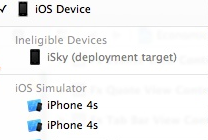
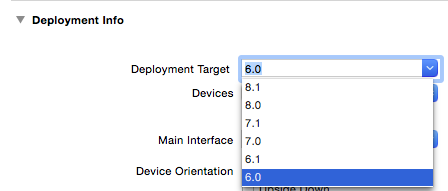
此错误因为 Xcode的Deployment Target 大于设备的,选择和设备一样 或者 低于设备的。如下图:
2、Ineligible Devices --》unavailable
3、Ineligible Devices --》os version
出现这个两个说明 你该更新Xcode了 ,如果Xcode更新不了,说明你该跟新OS系统了
4.Xcode 错误- Could not launch app - No such file or directory Error.
蛋疼的一个XCode bug,基本上应该不是工程本身问题。
解决方法:
1、拔掉设备,删除之前Build的内容
2、退出Xcode,不是关闭窗口
3、删除那个/Users/XXX/Library/Developer/Xcode/DerivedData/XXX-grgrmtzqajhyqgghabyjttajwbsm文件夹
4、启动XCode连接设备,现在应该OK了
5.Xcode 错误- could not inspect the application package.
//1.有和系统冲突命名的文件或文件夹
解决:1.改文件或文件夹名。2.clean工程 3.用Option 到Product下Clean
6.Cell拖线错误:could not insert new outlet connection:counld not find any information for the class named。
//1.target未选
//2.deviceDriver问题
解决:clean,不行则删除deviceDriver下内容
6.CoreData: error: Illegal attempt to save to a file that was never opened. "This NSPersistentStoreCoordinator has no persistent stores (unknown). It cannot perform a save operation.". No last error recorded.
7.Invalid asset name supplied
无效的图片资源文件

 浙公网安备 33010602011771号
addPersistentStoreWithType:configuration:URL:options:error:? You have to add a persistent store before you can save data to it. – Tom Harrington Oct 26 '15 at 16:51