
set集合
set是一个无序且不重复的元素集合
s1=set()

difference()生成一个新的集合
difference.update()更新自己
intersection 取交集
intersection.update()
pop()
symmetric_difference

访问速度快,天生解决了重复问题
练习:寻找差异
|
1
2
3
4
5
6
7
8
9
10
11
12
13
14
15
16
17
|
# 数据库中原有old_dict = { "#1":{ 'hostname':c1, 'cpu_count': 2, 'mem_capicity': 80 }, "#2":{ 'hostname':c1, 'cpu_count': 2, 'mem_capicity': 80 } "#3":{ 'hostname':c1, 'cpu_count': 2, 'mem_capicity': 80 }} # cmdb 新汇报的数据new_dict = { "#1":{ 'hostname':c1, 'cpu_count': 2, 'mem_capicity': 800 }, "#3":{ 'hostname':c1, 'cpu_count': 2, 'mem_capicity': 80 } "#4":{ 'hostname':c2, 'cpu_count': 2, 'mem_capicity': 80 }} 需要删除:?需要新建:?需要更新:? 注意:无需考虑内部元素是否改变,只要原来存在,新汇报也存在 |
 1 c1="liu"
 2 c2="hong"
 3 old_dict = {
 4     "#1": {'hostname': c1, 'cpu_count': 2, 'mem_capicity': 80},
 5     "#2": {'hostname': c1, 'cpu_count': 2, 'mem_capicity': 80},
 6     "#3": {'hostname': c1, 'cpu_count': 2, 'mem_capicity': 80},
 7 }
 8
 9 # cmdb 新汇报的数据
10 new_dict = {
11     "#1": {'hostname': c1, 'cpu_count': 2, 'mem_capicity': 800},
12     "#3": {'hostname': c1, 'cpu_count': 2, 'mem_capicity': 80},
13     "#4": {'hostname': c2, 'cpu_count': 2, 'mem_capicity': 80}
14 }
15 old_set_dict=set(old_dict.keys())
16 new_set_dict=set(new_dict.keys())
#交集
17 intersection_data=old_set_dict.intersection(new_set_dict)
18 print('更新的数据%s'%intersection_data)
19 #差集
20 del_data=old_set_dict.difference(intersection_data)
21 print('删除的数据%s'%del_data)
#差集
22 add_data=new_set_dict.difference(old_set_dict)
23 print('新加的数据%s'%add_data)
缺点:
字典是无序的 不能知道元素类型
collections系列
一、计数器(counter)
Counter是对字典类型的补充,用于追踪值的出现次数。
ps:具备字典的所有功能 + 自己的功能
counter(dict) 包含原有的dict功能 加上counter 的功能
import collections
collections.Counter

orderdDict是对字典类型的补充,他记住了字典元素添加的顺序

move_to_end()
pop('k2') 有返回值
popitem()最后一个
setdefault('k3','v1')
dic.update('k1':'v111','k3':'v32') 改值
三、默认字典(defaultdict)
defaultdict是对字典的类型的补充,他默认给字典的值设置了一个类型。
dic=collections.defaultdict(list)

  dic={}
    for i in all_list:
        if i >66:
            if "k1" in dic.keys():
                dic['k1'].append(i)
            else:
                dic['k1']=[i,]
        elif i<=66:
            if "k2" in dic.keys():
                dic['k2'].append(i)
            else:
                dic['k2']=[i,]   # 因为我们想要 dic={"k1":[11,22,33,44]}
from collections import defaultdict
all_list=[11,22,33,44,55,66,77,88,99,90,]

my_dict=defaultdict(list)
for value in values:
  for value>66:
    my_dict['k1'].append(value)
  else:
    my_dict['k2'].append(value)
四、可命名元组(namedtuple)
根据nametuple可以创建一个包含tuple所有功能以及其他功能的类型。,需要自己创建类
import collections
Mytuple = collections.namedtuple('Mytuple',['x', 'y', 'z']) 
五、双向队列(deque) put get
一个线程安全的双向队列
 deque
deque注:既然有双向队列,也有单项队列(先进先出 FIFO )
Queue.Queue

深浅拷贝
对于 数字 和 字符串 而言,赋值、浅拷贝和深拷贝无意义,因为其永远
import copy
copy.copy() 浅拷贝
copy.deepcopy() 深拷贝
= 赋值
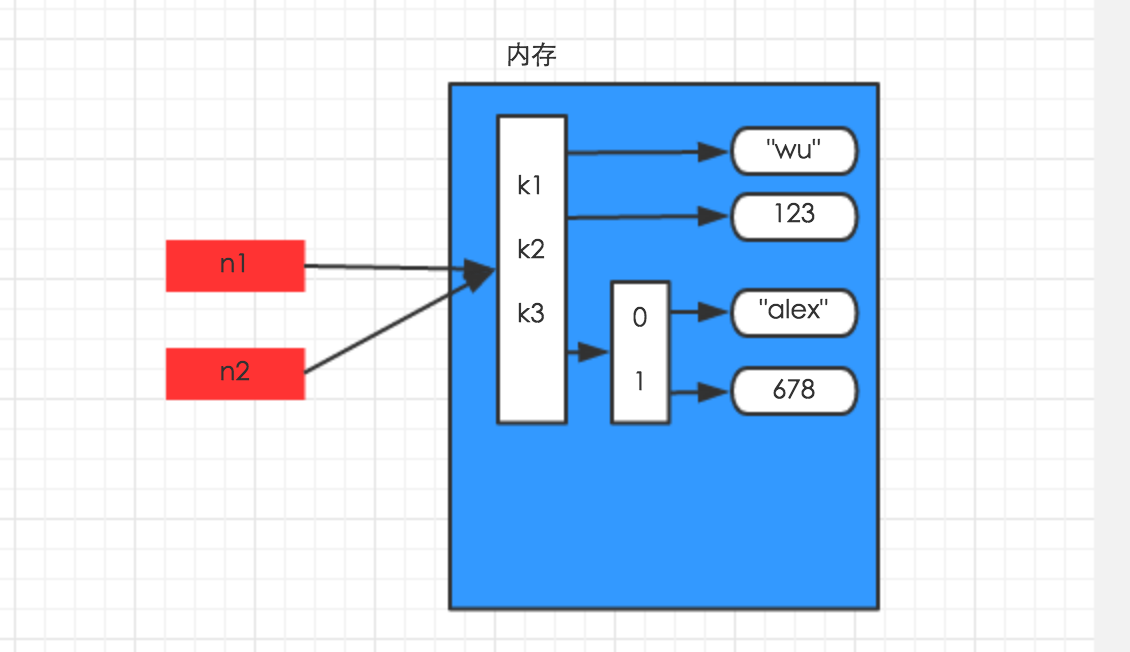
对于字典、元祖、列表 而言,进行赋值、浅拷贝和深拷贝时,其内存地址的变化是不同的。
赋值,只是创建一个变量,该变量指向原来内存地址,如:
|
1
2
3
|
n1 = {"k1": "wu", "k2": 123, "k3": ["alex", 456]}n2 = n1 |
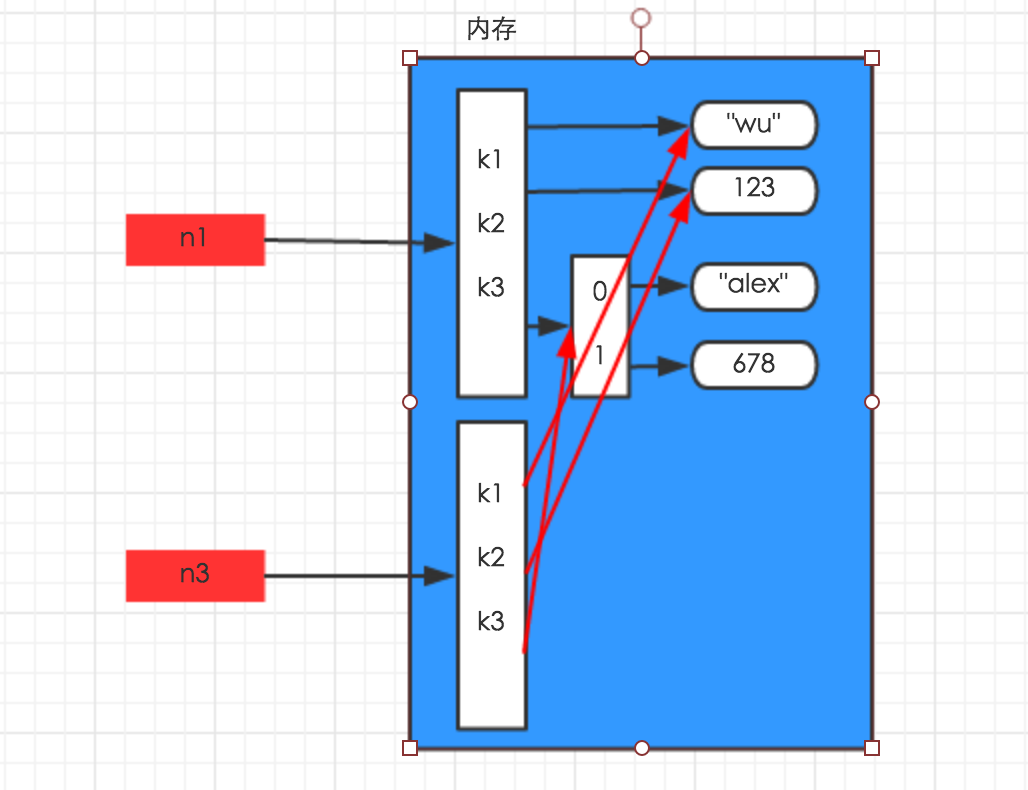
浅拷贝,在内存中只额外创建第一层数据
|
1
2
3
4
5
|
import copyn1 = {"k1": "wu", "k2": 123, "k3": ["alex", 456]}n3 = copy.copy(n1) |
深拷贝,在内存中将所有的数据重新创建一份(排除最后一层,即:python内部对字符串和数字的优化)
|
1
2
3
4
5
|
import copyn1 = {"k1": "wu", "k2": 123, "k3": ["alex", 456]}n4 = copy.deepcopy(n1) |
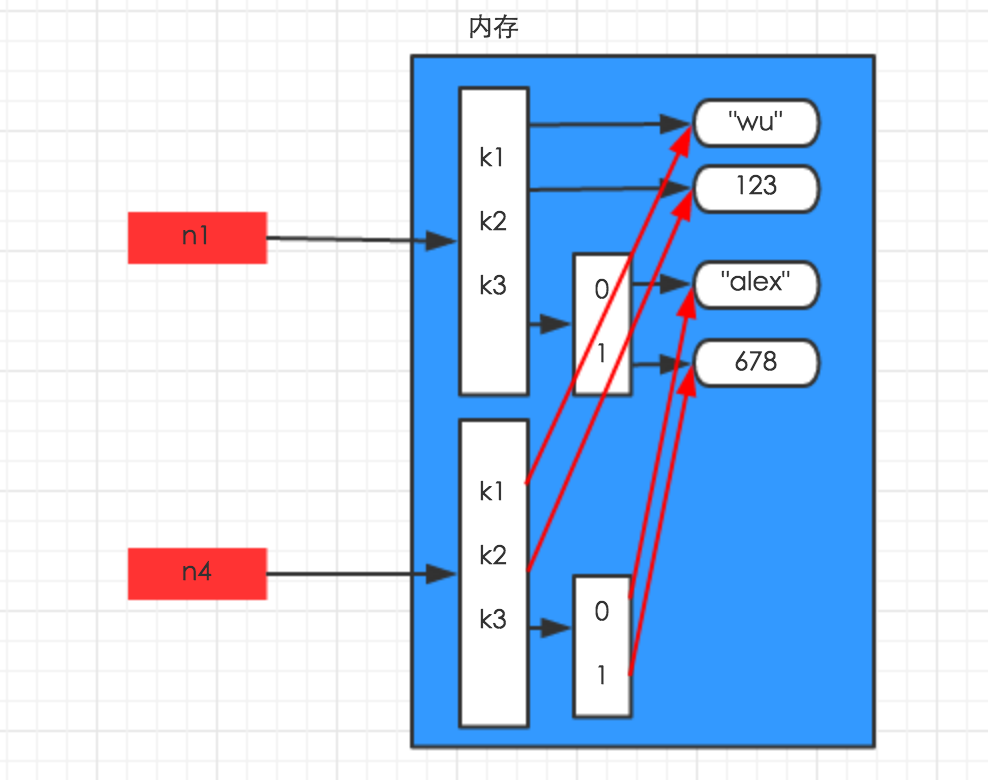
浅拷贝 第一层 深拷贝 全部
深拷贝重新开辟一个内存
代码写工整
http://www.cnblogs.com/wupeiqi/articles/5133343.html 看文档
函数
def 代表函数 也代表 不调用 python 不执行里面的代码
没有return 返回None
形参def mail(user)
实参 mail(123232@qq.com)
断点调试
一个* 把传入参数变成元组
'''def show(*arg):
    print(arg,type(arg))

show(12,3,4,23,4)
'''

两个** 把传入参数变成字典

def show(**arg):
    print(arg, type(arg))

show(n1=32,n2='ew',n3=444)

def show(*args,**kwargs):
    print(args,type(args))
    print(kwargs,type(kwargs))

show(11,22,3,4,3,n1=23,n3=44)

def show(*args,**kwargs):
    print(args,type(args))
    print(kwargs,type(kwargs))

#show(11,22,3,4,3,n1=23,n3=44)
l=[11,22,33,44]
o={'wewe':123,'34':23232}

show(l,o)

show(*l,**o)

想要传递个虚参需要指定 * **

format 传递参数 修改字符串
s1="{0} is {1}"
result=s1.format('ssd','2b')
print(result)


简单的函数表达式
lambda
func = lambda a: a+1
创建了形式参数 a

内置函数
all() 传入一个参数(列表) 需要所有是真 返回才是真

any() 只要传入 一个为真 ,就返回真
chr()数字转换成字符
ord()字符转换成数字
dir()显示 内置函数
enumerate()
一、map
遍历序列,对序列中每个元素进行操作,最终获取新的序列。

li = [11, 22, 33]

new_list = map(lambda a: a + 100, li)
li = [11, 22, 33]
sl = [1, 2, 3]
new_list = map(lambda a, b: a + b, li, sl)
二、filter
对于序列中的元素进行筛选,最终获取符合条件的序列

li = [11, 22, 33]

new_list = filter(lambda arg: arg > 22, li)    为Ture 才返回
操作文件时,一般需要经历如下步骤:
- 打开文件
- 操作文件
一、打开文件
|
1
|
文件句柄 = file('文件路径', '模式') |
注:python中打开文件有两种方式,即:open(...) 和 file(...) ,本质上前者在内部会调用后者来进行文件操作,推荐使用 open。
打开文件时,需要指定文件路径和以何等方式打开文件,打开后,即可获取该文件句柄,日后通过此文件句柄对该文件操作。
打开文件的模式有:
- r,只读模式(默认)。
- w,只写模式。【不可读;不存在则创建;存在则删除内容;】
- a,追加模式。【可读; 不存在则创建;存在则只追加内容;】
"+" 表示可以同时读写某个文件
- r+,可读写文件。【可读;可写;可追加】
- w+,写读
- a+,同a
"U"表示在读取时,可以将 \r \n \r\n自动转换成 \n (与 r 或 r+ 模式同使用)
- rU
- r+U
"b"表示处理二进制文件(如:FTP发送上传ISO镜像文件,linux可忽略,windows处理二进制文件时需标注)
- rb
- wb
- ab
tell() 查看当前指针位置
seek() 指定当前指针位置
truncate() 切开后面的不要了 只要前面的 保存在原文件
#filter第一个参数为空,将获取原来序列


作业:修改一个配置文件,添加 删除 和更新
global
        log 127.0.0.1 local2
        daemon
        maxconn 256
        log 127.0.0.1 local2 info
defaults
        log global
        mode http
        timeout connect 5000ms
        timeout client 50000ms
        timeout server 50000ms
        option  dontlognull

listen stats :8888
        stats enable
        stats uri       /admin
        stats auth      admin:1234

frontend oldboy.org
        bind 0.0.0.0:80
        option httplog
        option httpclose
        option  forwardfor
        log global
        acl www hdr_reg(host) -i www.oldboy.org
        use_backend www.oldboy.org if www

backend www.oldboy.org
        server 100.1.7.9 100.1.7.9 weight 20 maxconn 3000
需要
1、查
    输入:www.oldboy.org
    获取当前backend下的所有记录

2、新建
    输入:
        arg = {
            'bakend': 'www.oldboy.org',
            'record':{
                'server': '100.1.7.9',
                'weight': 20,
                'maxconn': 30
            }
        }

3、删除
    输入:
        arg = {
            'bakend': 'www.oldboy.org',
            'record':{
                'server': '100.1.7.9',
                'weight': 20,
                'maxconn': 30
            }
        }
先从源文件中取出要查的配置以及他的详细内容
def fetch(backend):
    backend_title = "backend %s"% backend
    record_list =[]
    with open('config.log') as read_file:
        flag = False
        #确定有那些配置头
        head=("frontend","backend","listen","global","defaults")
        for line in read_file:
            line =line.strip()
            if line == backend_title:
                flag=True
                continue
            if line.startswith(head) and flag:
                flag = False
                print(line)
                break
            if flag and line:
                record_list.append(line)
    return record_list

 浙公网安备 33010602011771号