
day5-subprocess模块
概述
在运维的工作中,经常需要和操作系统的命令做交互,我们如何用python去跟操作系统之间做交互呢?下面就来说说我们今天需要学习的模块:subprocess。
产生背景
我们在没有subprocess这个模块的时候,怎么去和操作系统做交互的呢?下面我们先说说这三个模块:os.system()、os.popen()、commands。
1.os.system()
用法:调用操作系统命令,只返回命令的执行状态(0:成功,非0:失败),不返回命令的执行结果。
>>> import os
>>> os.system("ls -l")
total 0
drwx------@ 46 huwei  staff  1564  7 26 23:54 Desktop
drwx------@  4 huwei  staff   136  6 28 01:22 Documents
drwx------+ 53 huwei  staff  1802  7 19 22:33 Downloads
drwx------@ 59 huwei  staff  2006  6 29 21:17 Library
drwx------+  3 huwei  staff   102  6 17 19:46 Movies
drwx------+  3 huwei  staff   102  6 17 19:46 Music
drwx------+  4 huwei  staff   136  6 17 19:49 Pictures
drwxr-xr-x+  5 huwei  staff   170  6 17 19:46 Public
drwxr-xr-x   4 huwei  staff   136  6 21 13:59 PycharmProjects
drwxr-xr-x   5 huwei  staff   170  7 13 00:19 test
0  #返回命令执行状态
>>> res = os.system("ls -l")
total 0
drwx------@ 46 huwei  staff  1564  7 26 23:54 Desktop
drwx------@  4 huwei  staff   136  6 28 01:22 Documents
drwx------+ 53 huwei  staff  1802  7 19 22:33 Downloads
drwx------@ 59 huwei  staff  2006  6 29 21:17 Library
drwx------+  3 huwei  staff   102  6 17 19:46 Movies
drwx------+  3 huwei  staff   102  6 17 19:46 Music
drwx------+  4 huwei  staff   136  6 17 19:49 Pictures
drwxr-xr-x+  5 huwei  staff   170  6 17 19:46 Public
drwxr-xr-x   4 huwei  staff   136  6 21 13:59 PycharmProjects
drwxr-xr-x   5 huwei  staff   170  7 13 00:19 test
>>> res
0   #0表示:执行成功
>>> res = os.system("lsdcwdf")
sh: lsdcwdf: command not found
>>> res
32512  #非0表示:执行失败
2.os.popen()
用法:调用操作系统命令,只返回命令执行结果,不返回命令执行状态
>>> import os
>>> os.popen("ls -l")
<os._wrap_close object at 0x101116908> #默认返回内存地址
>>> res = os.popen("ls -l")
>>> a = res.read()  #打印返回结果
>>> print(a)
total 0
drwx------@ 46 huwei  staff  1564  7 26 23:54 Desktop
drwx------@  4 huwei  staff   136  6 28 01:22 Documents
drwx------+ 53 huwei  staff  1802  7 19 22:33 Downloads
drwx------@ 59 huwei  staff  2006  6 29 21:17 Library
drwx------+  3 huwei  staff   102  6 17 19:46 Movies
drwx------+  3 huwei  staff   102  6 17 19:46 Music
drwx------+  4 huwei  staff   136  6 17 19:49 Pictures
drwxr-xr-x+  5 huwei  staff   170  6 17 19:46 Public
drwxr-xr-x   4 huwei  staff   136  6 21 13:59 PycharmProjects
drwxr-xr-x   5 huwei  staff   170  7 13 00:19 test
解析:执行popen()不是直接返回命令的执行结果,而是需要read一下,这是因为popen相当于打开了一个文件,它把结果存到文件中,只不过它是相当于存在内存中了,但是你好像打开文件的样子去取一样。
3.commands模块
用法:如果想既想保存命令执行结果,又想保存命令执行状态,那么在Python 2.7中有个commands模块,且该模块只支持Linux系统,不过在Python 3.5之后就没有这个用法了。
>>> import commands  导入模块
>>> commands.getstatusoutput("ls -l")  #以元组的形式返回
(0, 'total 0\ndrwx------@ 46 huwei  staff  1564  7 26 23:54 Desktop\ndrwx------@  4 huwei  staff   136  6 28 01:22 Documents\ndrwx------+ 53 huwei  staff  1802  7 19 22:33 Downloads\ndrwx------@ 59 huwei  staff  2006  6 29 21:17 Library\ndrwx------+  3 huwei  staff   102  6 17 19:46 Movies\ndrwx------+  3 huwei  staff   102  6 17 19:46 Music\ndrwx------+  4 huwei  staff   136  6 17 19:49 Pictures\ndrwxr-xr-x+  5 huwei  staff   170  6 17 19:46 Public\ndrwxr-xr-x   4 huwei  staff   136  6 21 13:59 PycharmProjects\ndrwxr-xr-x   5 huwei  staff   170  7 13 00:19 test')
>>> res = commands.getstatusoutput("ls -l")
>>> res[0]
0               #返回的命令执行状态
>>> res[1]   #返回的命令执行结果
'total 0\ndrwx------@ 46 huwei  staff  1564  7 26 23:54 Desktop\ndrwx------@  4 huwei  staff   136  6 28 01:22 Documents\ndrwx------+ 53 huwei  staff  1802  7 19 22:33 Downloads\ndrwx------@ 59 huwei  staff  2006  6 29 21:17 Library\ndrwx------+  3 huwei  staff   102  6 17 19:46 Movies\ndrwx------+  3 huwei  staff   102  6 17 19:46 Music\ndrwx------+  4 huwei  staff   136  6 17 19:49 Pictures\ndrwxr-xr-x+  5 huwei  staff   170  6 17 19:46 Public\ndrwxr-xr-x   4 huwei  staff   136  6 21 13:59 PycharmProjects\ndrwxr-xr-x   5 huwei  staff   170  7 13 00:19 test'
>>> print(res[1])
total 0
drwx------@ 46 huwei  staff  1564  7 26 23:54 Desktop
drwx------@  4 huwei  staff   136  6 28 01:22 Documents
drwx------+ 53 huwei  staff  1802  7 19 22:33 Downloads
drwx------@ 59 huwei  staff  2006  6 29 21:17 Library
drwx------+  3 huwei  staff   102  6 17 19:46 Movies
drwx------+  3 huwei  staff   102  6 17 19:46 Music
drwx------+  4 huwei  staff   136  6 17 19:49 Pictures
drwxr-xr-x+  5 huwei  staff   170  6 17 19:46 Public
drwxr-xr-x   4 huwei  staff   136  6 21 13:59 PycharmProjects
drwxr-xr-x   5 huwei  staff   170  7 13 00:19 test
subprocess模块
这个模块打算替换以下模块的功能:
os.system #调用系统命令
os.spawn* #产生一个新进程取执行命令
所以在Python 3.5之后,subprocess模块能够帮助我们实现既想保存命令执行结果,又想保存命令的执行状态,下面我们就来看看该模块的具体用法:
1.subprocess.run()
用法:返回命令执行结果,且该命令只支持Python 3.5b版本之后
>>> import subprocess
>>> subprocess.run(["df","-h"])  #解析传入参数的列表
Filesystem                                 Size   Used  Avail Capacity iused      ifree %iused  Mounted on
/dev/disk1                                233Gi   39Gi  193Gi    17%  792426 4294174853    0%   /
devfs                                     183Ki  183Ki    0Bi   100%     632          0  100%   /dev
map -hosts                                  0Bi    0Bi    0Bi   100%       0          0  100%   /net
map auto_home                               0Bi    0Bi    0Bi   100%       0          0  100%   /home
/Users/huwei/Downloads/Fantastical 2.app  233Gi   37Gi  196Gi    16%  790977 4294176302    0%   /private/var/folders/1y/z_lsdnxn73g0rvpxj99kf11h0000gn/T/AppTranslocation/E3115EFA-6D8A-4F19-8873-800D9F60F9AD
CompletedProcess(args=['df', '-h'], returncode=0)

#需要交给Linux shell自己解析,则传入命令字符串,shell=True
>>> subprocess.run("df -h |grep huwei",shell=True) /Users/huwei/Downloads/Fantastical 2.app  233Gi   37Gi  196Gi    16%  790977 4294176302    0%   /private/var/folders/1y/z_lsdnxn73g0rvpxj99kf11h0000gn/T/AppTranslocation/E3115EFA-6D8A-4F19-8873-800D9F60F9AD
CompletedProcess(args='df -h |grep huwei', returncode=0)
解析:
1.执行的命令需要让python去解释执行这个命令,执行的命令以及参数,需要以列表的形式传入。
2.但是如果需要交给Linux shell环境去解析的,这传入命令的字符串,并且声明shell=True即可。
2.subprocess.call()
用法:执行命令,返回命令执行状态,0 或者 非0
>>>import subprocess
>>> subprocess.call(["ls","-l"])
total 0
drwx------@ 46 huwei  staff  1564  7 26 23:54 Desktop
drwx------@  4 huwei  staff   136  6 28 01:22 Documents
drwx------+ 53 huwei  staff  1802  7 19 22:33 Downloads
drwx------@ 59 huwei  staff  2006  6 29 21:17 Library
drwx------+  3 huwei  staff   102  6 17 19:46 Movies
drwx------+  3 huwei  staff   102  6 17 19:46 Music
drwx------+  4 huwei  staff   136  6 17 19:49 Pictures
drwxr-xr-x+  5 huwei  staff   170  6 17 19:46 Public
drwxr-xr-x   4 huwei  staff   136  6 21 13:59 PycharmProjects
drwxr-xr-x   5 huwei  staff   170  7 13 00:19 test
0
>>> a = subprocess.call(["ls","-l"])
total 0
drwx------@ 46 huwei  staff  1564  7 26 23:54 Desktop
drwx------@  4 huwei  staff   136  6 28 01:22 Documents
drwx------+ 53 huwei  staff  1802  7 19 22:33 Downloads
drwx------@ 59 huwei  staff  2006  6 29 21:17 Library
drwx------+  3 huwei  staff   102  6 17 19:46 Movies
drwx------+  3 huwei  staff   102  6 17 19:46 Music
drwx------+  4 huwei  staff   136  6 17 19:49 Pictures
drwxr-xr-x+  5 huwei  staff   170  6 17 19:46 Public
drwxr-xr-x   4 huwei  staff   136  6 21 13:59 PycharmProjects
drwxr-xr-x   5 huwei  staff   170  7 13 00:19 test
>>> a
0   #返回命令的执行状态
3.subprocess.check_call()
用法:执行命令,如果命令结果为0,就正常返回,否则抛出异常
>>> subprocess.check_call(["ls","-l"])
total 0
drwx------@ 46 huwei  staff  1564  7 26 23:54 Desktop
drwx------@  4 huwei  staff   136  6 28 01:22 Documents
drwx------+ 53 huwei  staff  1802  7 19 22:33 Downloads
drwx------@ 59 huwei  staff  2006  6 29 21:17 Library
drwx------+  3 huwei  staff   102  6 17 19:46 Movies
drwx------+  3 huwei  staff   102  6 17 19:46 Music
drwx------+  4 huwei  staff   136  6 17 19:49 Pictures
drwxr-xr-x+  5 huwei  staff   170  6 17 19:46 Public
drwxr-xr-x   4 huwei  staff   136  6 21 13:59 PycharmProjects
drwxr-xr-x   5 huwei  staff   170  7 13 00:19 test
0
>>>a = subprocess.check_call(["ls","-l"])
0

>>> subprocess.check_call(["ls2","-l"])
Traceback (most recent call last):
  File "<stdin>", line 1, in <module>
  File "/Library/Frameworks/Python.framework/Versions/3.5/lib/python3.5/subprocess.py", line 576, in check_call
    retcode = call(*popenargs, **kwargs)
  File "/Library/Frameworks/Python.framework/Versions/3.5/lib/python3.5/subprocess.py", line 557, in call
    with Popen(*popenargs, **kwargs) as p:
  File "/Library/Frameworks/Python.framework/Versions/3.5/lib/python3.5/subprocess.py", line 947, in __init__
    restore_signals, start_new_session)
  File "/Library/Frameworks/Python.framework/Versions/3.5/lib/python3.5/subprocess.py", line 1551, in _execute_child
    raise child_exception_type(errno_num, err_msg)
FileNotFoundError: [Errno 2] No such file or directory: 'ls2'
4.subprocess.getstatusoutput()
用法:接收字符串格式命令,返回元组形式,第1个元素是执行状态,第2个是命令结果
>>>import subprocess
>>> subprocess.getstatusoutput("ls -l")
(0, 'total 0\ndrwx------@ 46 huwei  staff  1564  7 26 23:54 )
#  执行状态   , 执行结果
5.subprocess.getoutput()
用法:接收字符串格式命令,并返回结果
>>> subprocess.getoutput("ls -l")
'total 0\ndrwx------@ 46 huwei  staff  1564  7 26 23:54 #返回执行结果
6.subprocess.check_output()
用法:执行命令,并返回结果,注意是返回结果,不是打印,下例结果返回给res
>>> res = subprocess.check_output(["ls","-l"])
>>> res
b'total 0\ndrwx------@ 46 huwei  staff  1564  7 26 23:54   #是以bytes类型返回的
subprocess.Popen()
上面那些方法,底层都是封装的subprocess.Popen,下面我们来看看Popen方法:
1.stdout
用法:标准输出
>>> res = subprocess.Popen("ls -l",shell=True,stdout=subprocess.PIPE)  #需要管道标准输出
>>> res.stdout.read()  #标准输出
b'total 0\ndrwx------@ 46 huwei  staff  1564  7 26 23:54 Desktop\ndrwx------@  4 huwei  staff   136  6 28 01:22 Documents\ndrwx------+ 53 huwei  staff  1802  7 19 22:33 Downloads\ndrwx------@ 59 huwei  staff  2006  6 29 21:17 Library\ndrwx------+  3 huwei  staff   102  6 17 19:46 Movies\ndrwx------+  3 huwei  staff   102  6 17 19:46 Music\ndrwx------+  4 huwei  staff   136  6 17 19:49 Pictures\ndrwxr-xr-x+  5 huwei  staff   170  6 17 19:46 Public\ndrwxr-xr-x   4 huwei  staff   136  6 21 13:59 PycharmProjects\ndrwxr-xr-x   5 huwei  staff   170  7 13 00:19 test\n'
>>> obj.stdout.close()
Traceback (most recent call last):
  File "<stdin>", line 1, in <module>
NameError: name 'obj' is not defined
>>> res.stdout.close()  #关闭标准输出
>>> res.stdout.read()
Traceback (most recent call last):
  File "<stdin>", line 1, in <module>
ValueError: read of closed file
2.stdin
用法:标准输入
>>> obj = subprocess.Popen([b"python3.5"],stdout=subprocess.PIPE,stdin=subprocess.
>>> obj.stdin.write(b"print('dick')") #标准输入
13
>>> obj.stdin.close()  #关闭标准输入
怎么样才能将输入的数据读出来呢?
>>> out_put = obj.stdout.read()   #标准输出
>>> out_put   #输出的数据
b'dick\n'
>>> obj.stdout.close()  #关闭标准输出
>>> out_put_err = obj.stderr.read()  #输出错误
>>> out_put_err  #为空
b''
>>> obj.stderr.close()   #关闭输出错误
3.stderr
用法:标准错误
>>> res = subprocess.Popen("lsffdew -l",shell=True,stdout=subprocess.PIPE,stderr=subprocess.PIPE)
>>> res.stderr.read()    #标准输出错误
b'/bin/sh: lsffdew: command not found\n'
>>> res.stderr.close()   #关闭启动程序的标准错误
>>> res.stderr.read()
Traceback (most recent call last):
  File "<stdin>", line 1, in <module>
ValueError: read of closed file
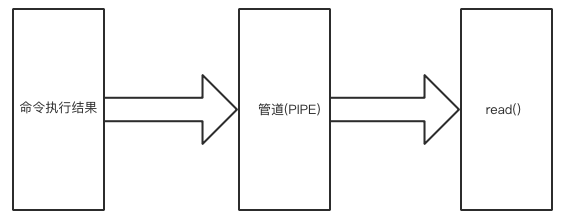
注意:上面的命令格式为什么都需要加PIPE,其实它是将执行命令的结果数据存入管道(PIPE),再通过read()读出来。
4.poll()
用法:定时检查命令有没有执行完毕,执行完毕返回0,没有完毕返回None
>>> import subprocess
>>> res = subprocess.Popen("sleep 20;echo 'hello'",shell=True,stdout=subprocess.PIPE,stderr=subprocess.PIPE)
>>> res.stdout.read()

                           #命令执行过程。。。。。

b'hello\n'
>>>

#在命令执行过程中,我们可以使用以下命令判断
>>> print(res.poll())
None        # None表示未执行完毕
>>> print(res.poll())
0             #0 表示执行完毕
5.wait()
用法:等待命令执行完成,并返回结果状态
>>> import subprocess
>>> res = subprocess.Popen("sleep 20;echo 'hello'",shell=True,stdout=subprocess.PIPE,stderr=subprocess.PIPE)
>>> res.wait()

        #命令执行过程。。。。。

0
6.terminate()
用法:杀掉所启动的进程
>>> import subprocess
>>> res = subprocess.Popen("sleep 20;echo 'hello'",shell=True,stdout=subprocess.PIPE,stderr=subprocess.PIPE)
>>> res.terminate()  #杀掉启动的进程
>>> res.stdout.read()  #杀掉后,标准输出为空
b''
7.communicate()
用法: 执行的过程传数据
>>> res = subprocess.Popen([b"python"],stdout=subprocess.PIPE,stdin=subprocess.PIPE,stderr=subprocess.PIPE)

>>> res.stdin.write(b"print 'dick'") #标准输入
12
>>> out_error_list = res.communicate(timeout=10)
>>> print(out_error_list)   #输入的结果
(b'dick\n', b'')
8.pid
用法:获取当前执行子shell程序的进程号
>>> import subprocess
>>> res = subprocess.Popen("sleep 20;echo 'hello'",shell=True,stdout=subprocess.PIPE,stdin=subprocess.PIPE,stderr=subprocess.PIPE)
>>> res.pid  #获取Unix shell环境的进程号
6734
可用参数:
- args:shell命令,可用是字符串或者序列类型(如:list,元组)
- bufsize:指定缓冲。0 无缓冲,1 行缓冲,其他缓冲区大小,负值 系统缓冲
- stdin,stdout,stderr:分别表示程序的标准输入,输出,错误句柄
- preexec_fn:只在Unix平台下有效,用于指定一个可执行对象(callable object),它将在子进程运行之前被调用
- close_sfs:在windows平台下,如果close_fds被设置为True,则新创建的子进程将不会继承父进程的输入,输出,错误管道,所以不能将close_fds设置为True同时重定向子进程的标准输入,输出与错误(stdin,stdout,stderr)
- shell:在windows平台下,如果close_fds被设置为True,则新创建的子进程将不会继承父进程的输入,输出,错误管道,所以不能将close_fds设置为True同时重定向子进程的标准输入,输出与错误(stdin,stdout,stderr)
- cwd:用于设置子进程的当前目录
- env:用于指定子进程的环境变量。如果env =None,子进程的环境变量将从父进程中继承
- universal_newlines:不同系统的换行符不同,True -> 同意使用 \n
- startupinfo与createionflags只在windows下有效将被传递给底层的CreateProcess()函数,用于设置子进程的一些属性,如,主窗口外观,进程的优先级等等
终端输入的命令分为2种:
- 输入即可得到输出,如:ifconfig
- 输入进行某环境,依赖再输入,如:python
需要交互的实例:communicate()示例
subprocess实现sudo 自动输入密码
>>>import subprocess
>>>subprocess.Popen("echo ‘abc123‘ | sudo -S apt-get install vim",shell=True)

 浙公网安备 33010602011771号