
SpringBoot整合ElastitcSearch中文分词
ElasticSearch
Elasticsearch是一个基于Lucene的搜索服务器。
它提供了一个分布式多用户能力的全文搜索引擎,基于RESTful web接口,是一个流行的企业级搜索引擎。
能够达到实时搜索,稳定,可靠,快速,安装使用方便,也能实时统计数据。
通过HTTP使用JSON进行数据索引
ElasticSearch的安装
ps:ElasticSearch6.22需要jdk1.8版本以上,否则安装会报错
1、下载Elasticsearch6.2.2的zip包,并解压到任一自定义空目录。
2、由于要进行中文分词的需要。我们要安装一个分词插件。在elasticsearch-6.2.2\bin目录下执行以下命令:elasticsearch-plugin install https://github.com/medcl/elasticsearch-analysis-ik/releases/download/v6.2.2/elasticsearch-analysis-ik-6.2.2.zip
3、到bin目录下双击elasticsearch.bat启动Elasticsearch服务(先不要关闭)
4、下载Kibana分词客户端,版本和elasticsearch对应,安装目录自动选择一个空目录即可
5、到bin目录下双击kibana.bat,启动Kibana
6、访问http://localhost:5601。在Kibana界面上的Dev Tools菜单里边练习DSL语句。教程直接从“数据准备开始练手”。
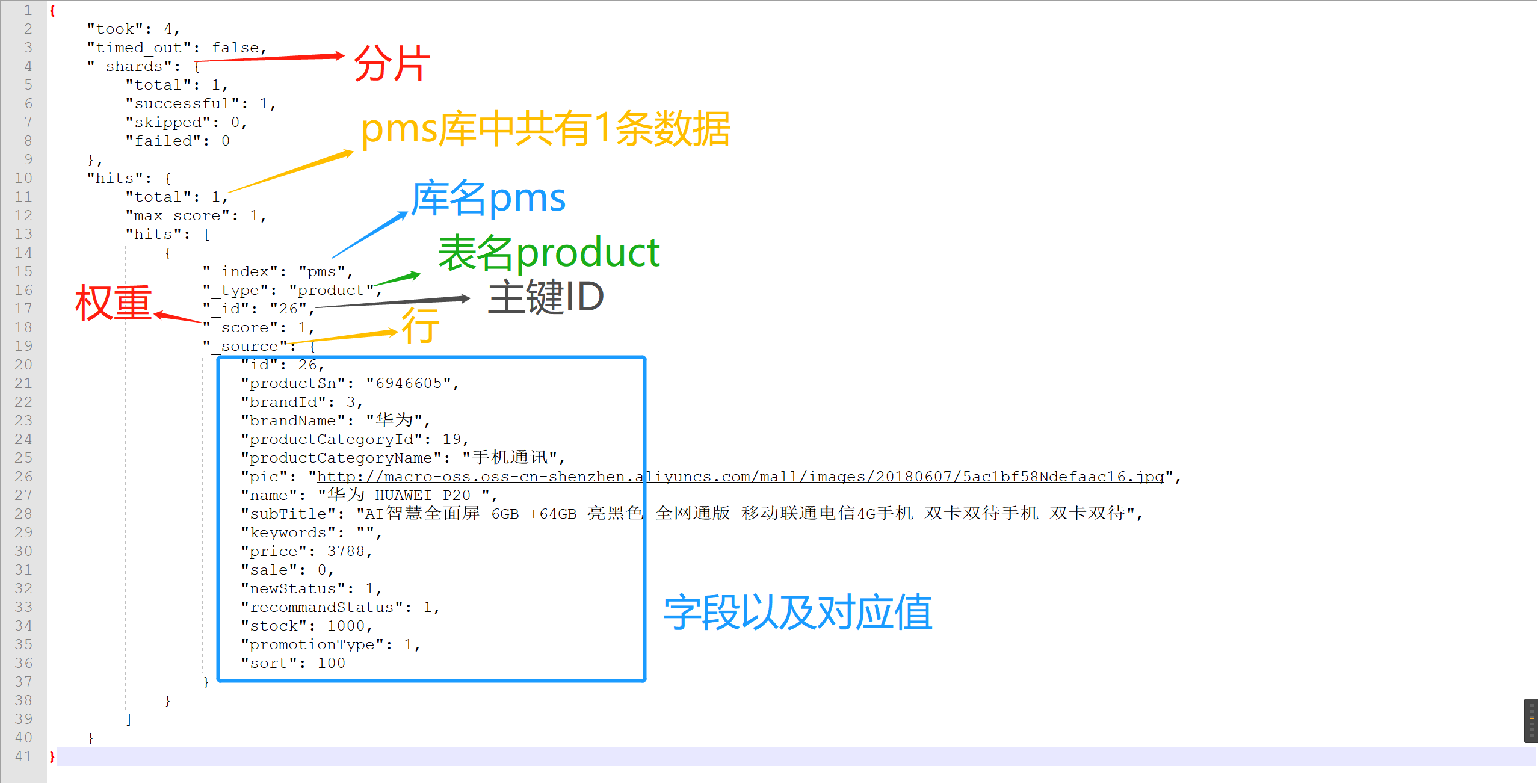
ElasticSearch和MySql对比记忆
| ElasticSearch | Mysql |
|---|---|
| Index | 库 |
| Type | 表 |
| Document | 行 |
| Fileds | 字段 |
| 全文都可索引 | Index |
| SQL | DSL |
!>Ps:注意区分两个Index分别的意思
Cluster集群:多个elasticsearch服务的集合就是集群。目的是防止某台服务器发生事故,导致系统不能正常运行,从而让服务器达到一个稳定、高效的状态。
Node节点:一个节点可代表一个独立服务器。
Shard分片:为了缓解内存压力,把数据分布在多个节点中。
Replia副本:为提高查询吞吐量或实现高可用性,可以使用分片副本,副本
下面是一段es查询结果返回截图
SpringBoot整合ElasticSearch搜索
版本:SpringBoot 2.1.3、JDK8、ElasticSearch 6.22、Maven 3.6
参考mall,很好的一个开源项目,教程详细,极力推荐。
下面用到的EsProduct实体类就是根据mall项目中对应的数据库表编写的。
1、添加依赖
<dependency>
    <groupId>org.springframework.boot</groupId>
    <artifactId>spring-boot-starter-data-elasticsearch</artifactId>
</dependency>
2、修改项目配置文件
data:
  elasticsearch:
    repositories:
      enabled: true
    cluster-nodes: 127.0.0.1:9300 # 本机Es地址和端口号
    cluster-name: elasticsearch # es集群
3、给ES增加操作文档EsProduct实体类,其中要用到几个重要的注解
不需要中文分词的字段设置成@Field(type = FieldType.Keyword)类型,需要中文分词的设置成@Field(analyzer = "ik_max_word",type = FieldType.Text)类型。
shards代表分片,replicas副本备份,防止宕机数据丢失。
type = FieldType.Nested代表嵌套对象类型,比如用于保存文章评论相关信息(评论数,评论用户,评论内容等等),不懂可以看这篇博客
@Document(indexName = "pms", type = "product",shards = 1,replicas = 0)
public class EsProduct implements Serializable {
    private static final long serialVersionUID = -1L;
    //表示是文档的id,文档可以认为是mysql中表行的概念
    @Id
    private Long id;
    //type = FieldType.Keyword代表不会进行分词建立索引的类型
    @Field(type = FieldType.Keyword)
    private String productSn;
    private Long brandId;
    @Field(type = FieldType.Keyword)
    private String brandName;
    private Long productCategoryId;
    @Field(type = FieldType.Keyword)
    private String productCategoryName;
    private String pic;
    //analyzer = "ik_max_word",type = FieldType.Text代表会进行分词操作
    @Field(analyzer = "ik_max_word",type = FieldType.Text)
    private String name;
    @Field(analyzer = "ik_max_word",type = FieldType.Text)
    private String subTitle;
    @Field(analyzer = "ik_max_word",type = FieldType.Text)
    private String keywords;
    private BigDecimal price;
    private Integer sale;
    private Integer newStatus;
    private Integer recommandStatus;
    private Integer stock;
    private Integer promotionType;
    private Integer sort;
//  type =FieldType.Nested代表嵌套对象类型
    @Field(type =FieldType.Nested)
    private List<EsProductAttributeValue> attrValueList;
    //...省略get、set
4、添加继承ElasticsearchRepository<T,ID>类的接口EsProductRepository
EsProductRepository继承了ElasticsearchRepository<T,ID>接口,ID理解为实体类ID的主键,可自定义一个查询(衍生查询),格式findBy...,可根据命名来自动识别你要查询哪些字段,而不用写实现类。
 */ public interface EsProductRepository extends ElasticsearchRepository<EsProduct, Long> {
    /**
 * 搜索查询
  *
 * @param name 商品名称
  * @param subTitle 商品标题
  * @param keywords 商品关键字
  * @param page 分页信息
  * @return
  */
  Page<EsProduct> findByNameOrSubTitleOrKeywords(String name, String subTitle, String keywords, Pageable page);

}
5、添加Service层接口EsProductService
public interface EsProductService {
    /**
 * 从数据库中导入所有商品到ES
 */  int importAll();

    /**
 * 根据id删除商品
  */
  void delete(Long id);

    /**
 * 根据id创建商品
  */
  EsProduct create(Long id);

    /**
 * 批量删除商品
  */
  void delete(List<Long> ids);

    /**
 * 根据关键字搜索名称或者副标题
  */
  Page<EsProduct> search(String keyword, Integer pageNum, Integer pageSize);

}
6、添加EsProductService接口的实现类EsProductServiceImpl
@Service public class EsProductServiceImpl implements EsProductService {
    private static final Logger LOGGER = LoggerFactory.getLogger(EsProductServiceImpl.class);
    @Autowired
  private EsProductDao productDao;
    @Autowired
  private EsProductRepository productRepository;

    @Override
  public int importAll() {
        List<EsProduct> esProductList = productDao.getAllEsProductList(null);
        Iterable<EsProduct> esProductIterable = productRepository.saveAll(esProductList);
        Iterator<EsProduct> iterator = esProductIterable.iterator();
        int result = 0;
        while (iterator.hasNext()) {
            result++;
            iterator.next();
        }
        return result;
    }

    @Override
  public void delete(Long id) {
        productRepository.deleteById(id);
    }

    @Override
  public EsProduct create(Long id) {
        EsProduct result = null;
        List<EsProduct> esProductList = productDao.getAllEsProductList(id);
        if (esProductList.size() > 0) {
            EsProduct esProduct = esProductList.get(0);
            result = productRepository.save(esProduct);
        }
        return result;
    }

    @Override
  public void delete(List<Long> ids) {
        if (!CollectionUtils.isEmpty(ids)) {
            List<EsProduct> esProductList = new ArrayList<>();
            for (Long id : ids) {
                EsProduct esProduct = new EsProduct();
                esProduct.setId(id);
                esProductList.add(esProduct);
            }
            productRepository.deleteAll(esProductList);
        }
    }

    @Override
  public Page<EsProduct> search(String keyword, Integer pageNum, Integer pageSize) {
        Pageable pageable = PageRequest.of(pageNum, pageSize);
        return productRepository.findByNameOrSubTitleOrKeywords(keyword, keyword, keyword, pageable);
    }

}
7、Controller层CRUD方法
@Controller @Api(tags = "EsProductController", description = "搜索商品管理")
@RequestMapping("/esProduct")
public class EsProductController {
    @Autowired
  private EsProductService esProductService;

    @ApiOperation(value = "导入所有数据库中商品到ES")
    @RequestMapping(value = "/importAll", method = RequestMethod.POST)
    @ResponseBody
  public CommonResult<Integer> importAllList() {
        int count = esProductService.importAll();
        return CommonResult.success(count);
    }

    @ApiOperation(value = "根据id删除商品")
    @RequestMapping(value = "/delete/{id}", method = RequestMethod.GET)
    @ResponseBody
  public CommonResult<Object> delete(@PathVariable Long id) {
        esProductService.delete(id);
        return CommonResult.success(null);
    }

    @ApiOperation(value = "根据id批量删除商品")
    @RequestMapping(value = "/delete/batch", method = RequestMethod.POST)
    @ResponseBody
  public CommonResult<Object> delete(@RequestParam("ids") List<Long> ids) {
        esProductService.delete(ids);
        return CommonResult.success(null);
    }

    @ApiOperation(value = "根据id创建商品")
    @RequestMapping(value = "/create/{id}", method = RequestMethod.POST)
    @ResponseBody
  public CommonResult<EsProduct> create(@PathVariable Long id) {
        EsProduct esProduct = esProductService.create(id);
        if (esProduct != null) {
            return CommonResult.success(esProduct);
        } else {
            return CommonResult.failed();
        }
    }

    @ApiOperation(value = "简单搜索")
    @RequestMapping(value = "/search/simple", method = RequestMethod.GET)
    @ResponseBody
  public CommonResult<CommonPage<EsProduct>> search(@RequestParam(required = false) String keyword,
                                                      @RequestParam(required = false, defaultValue = "0") Integer pageNum,
                                                      @RequestParam(required = false, defaultValue = "5") Integer pageSize) {
        Page<EsProduct> esProductPage = esProductService.search(keyword, pageNum, pageSize);
        return CommonResult.success(CommonPage.restPage(esProductPage));
    }

}
7、测试
- 刚开始ES中是没有数据的,所以我们调importAllList接口导入数据,会得到下图的pms索引

- search接口最终会调用实现类中的衍生方法findByNameOrSubTitleOrKeywords,根据name或者subtitle或者keywords来分词,得到下图
subTitle字段
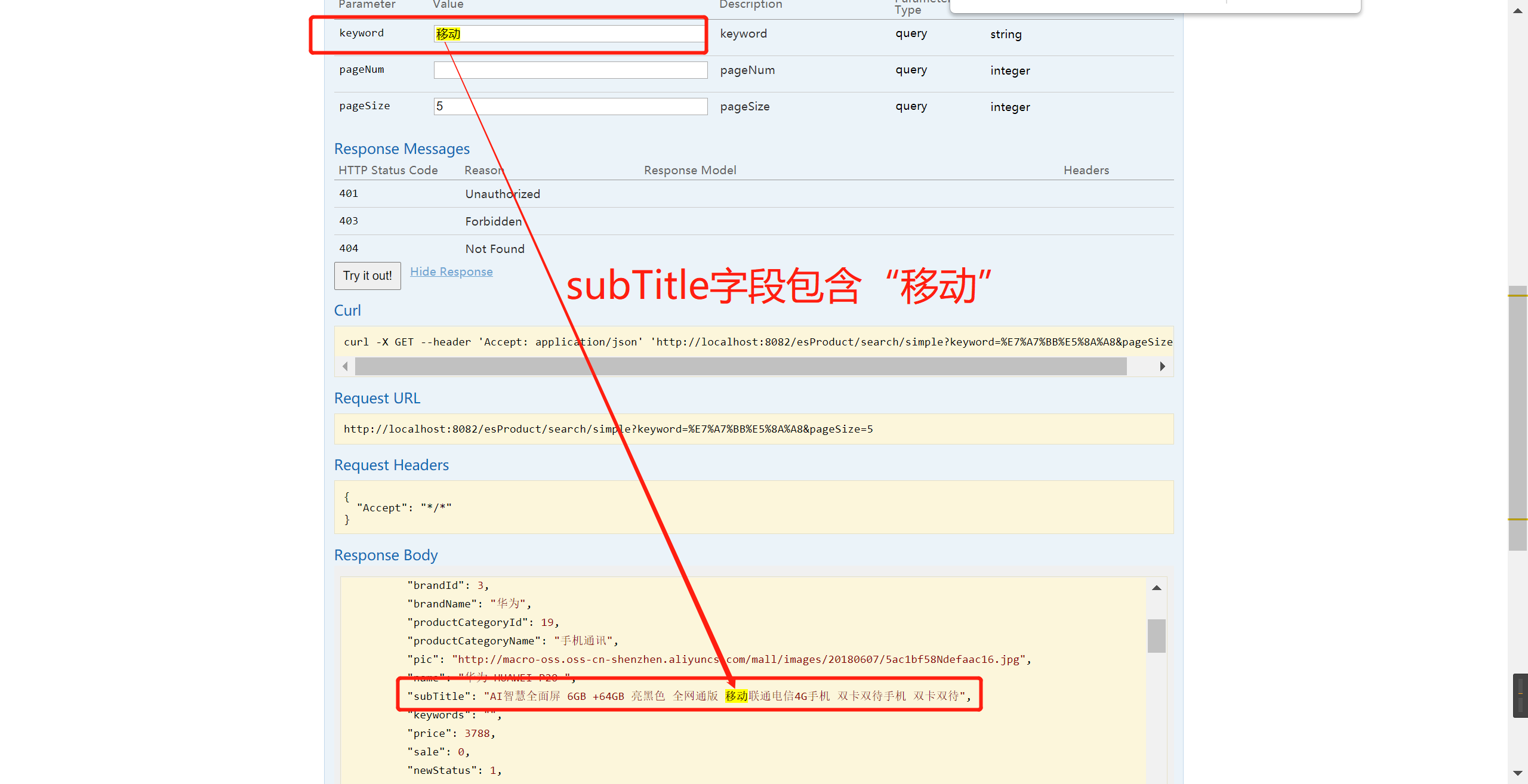
name字段

如要扩展分词字段
1.
在EsProduct类的字段中添加@Field(analyzer = "ik_max_word",type = FieldType.Text)注解分词
2.
在继承ElasticsearchRepository类的接口中的衍生方法findByNameOrSubTitleOrKeywords按照规则自行拼接字段,注意参数互相对应,和实体类中的字段名保持一致(大小写)
3.
先删除原来的索引pms再启动,不然会报错,启动完成后再重新运行importAll方法重新导入数据到Es中去。
4.
自行完成测试新加的分词字段

 浙公网安备 33010602011771号