
树莓派+CentOS 扩展分区大小
1. 查看磁盘存储情况
# 查看硬盘使用信息
df -h

# 查看硬盘分区信息
fdisk -l
2. 查看磁盘信息
# 查看硬盘分区信息
fdisk -l
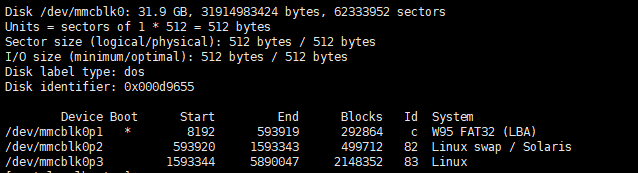
总大小31.9GB, 实际使用2G(2148352b), 根据盘符
/dev/mmcblk0p3
2.1 重新分区
# 进入磁盘分区工具
fdisk /dev/mmcblk0

# 输入 p 查看分区情况
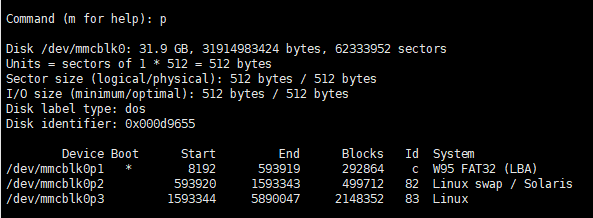
# 删除第三个分区 /dev/mmcblk0p3
# 步骤如下

# 输入 d 回车, 进行删除分区操作
Command (m for help): d

# 输入需要删除的分区号 3
Partition number (1-3, default 3): 3
Partition 3 is deleted

# 输入 n 添加新的主分区(p)
Command (m for help): n
Partition type:
   p   primary (2 primary, 0 extended, 2 free)
   e   extended

# 分区类型输入 p
Select (default p): p

# 序号输入3
Partition number (3,4, default 3): 3

# 起始位置输入 1593344, 此处需要注意 卷3 原起始位置就是1593344,若是默认的话就尴尬了
First sector (2048-62333951, default 2048): 1593344

# 结束位置默认, 若想指定大小请手动输入, 默认将是最大值
Last sector, +sectors or +size{K,M,G} (1593344-62333951, default 62333951):
Using default value 62333951
Partition 3 of type Linux and of size 29 GiB is set

# 输入 w 保存配置
Command (m for help): w
The partition table has been altered!

Calling ioctl() to re-read partition table.

WARNING: Re-reading the partition table failed with error 16: Device or resource busy.
The kernel still uses the old table. The new table will be used at
the next reboot or after you run partprobe(8) or kpartx(8)
Syncing disks.
# 输入 q 退出分区软件(这一步并没有经历, 在保存配置时就给我自动退出了)
2.2 重启树莓派
# 重启
reboot
2.3 刷新分区(注意)
# 刷新分区, 要是没刷新的话它还是老样子
resize2fs /dev/mmcblk0p3
3. 附: 完整执行流程
[root@localhost ~]# fdisk /dev/mmcblk0
Welcome to fdisk (util-linux 2.23.2).

Changes will remain in memory only, until you decide to write them.
Be careful before using the write command.


Command (m for help): p

Disk /dev/mmcblk0: 31.9 GB, 31914983424 bytes, 62333952 sectors
Units = sectors of 1 * 512 = 512 bytes
Sector size (logical/physical): 512 bytes / 512 bytes
I/O size (minimum/optimal): 512 bytes / 512 bytes
Disk label type: dos
Disk identifier: 0x000d9655

        Device Boot      Start         End      Blocks   Id  System
/dev/mmcblk0p1   *        8192      593919      292864    c  W95 FAT32 (LBA)
/dev/mmcblk0p2          593920     1593343      499712   82  Linux swap / Solaris
/dev/mmcblk0p3         1593344     5890047     2148352   83  Linux

Command (m for help): d
Partition number (1-3, default 3): 3
Partition 3 is deleted

Command (m for help): n
Partition type:
   p   primary (2 primary, 0 extended, 2 free)
   e   extended
Select (default p): p
Partition number (3,4, default 3): 3
First sector (2048-62333951, default 2048): 1593344
Last sector, +sectors or +size{K,M,G} (1593344-62333951, default 62333951):
Using default value 62333951
Partition 3 of type Linux and of size 29 GiB is set

Command (m for help): w
The partition table has been altered!

Calling ioctl() to re-read partition table.

WARNING: Re-reading the partition table failed with error 16: Device or resource busy.
The kernel still uses the old table. The new table will be used at
the next reboot or after you run partprobe(8) or kpartx(8)
Syncing disks.
[root@localhost ~]# reboot
Connection closing...Socket close.

Connection closed by foreign host.

Disconnected from remote host(树莓派(CJ)) at 14:02:59.

Type `help' to learn how to use Xshell prompt.
[E:\~]$

Connecting to 192.168.3.15:22...
Connection established.
To escape to local shell, press 'Ctrl+Alt+]'.

WARNING! The remote SSH server rejected X11 forwarding request.
Last login: Sun Sep 27 06:00:53 2020 from 192.168.3.8
[root@localhost ~]#
[root@localhost ~]#
[root@localhost ~]# df -h
Filesystem      Size  Used Avail Use% Mounted on
/dev/root       2.0G  1.3G  667M  67% /
devtmpfs        3.8G     0  3.8G   0% /dev
tmpfs           3.9G     0  3.9G   0% /dev/shm
tmpfs           3.9G   17M  3.9G   1% /run
tmpfs           3.9G     0  3.9G   0% /sys/fs/cgroup
/dev/mmcblk0p1  286M   54M  232M  19% /boot
tmpfs           782M     0  782M   0% /run/user/0
[root@localhost ~]# resize2fs /dev/mmcblk0p3
resize2fs 1.42.9 (28-Dec-2013)
Filesystem at /dev/mmcblk0p3 is mounted on /; on-line resizing required
old_desc_blocks = 1, new_desc_blocks = 4
The filesystem on /dev/mmcblk0p3 is now 7592576 blocks long.

[root@localhost ~]# df -h
Filesystem      Size  Used Avail Use% Mounted on
/dev/root        29G  1.4G   28G   5% /
devtmpfs        3.8G     0  3.8G   0% /dev
tmpfs           3.9G     0  3.9G   0% /dev/shm
tmpfs           3.9G   17M  3.9G   1% /run
tmpfs           3.9G     0  3.9G   0% /sys/fs/cgroup
/dev/mmcblk0p1  286M   54M  232M  19% /boot
tmpfs           782M     0  782M   0% /run/user/0

 浙公网安备 33010602011771号