

vs Setup项目默认不带卸载功能,通常的做法是 http://www.cnblogs.com/michaelxu/archive/2009/12/26/1632972.html
此方式不便之处在于一旦Setup的项目的版本号升级,IDE会自动生成新的ProductCode,因此需要手动更新msiexec的参数。本人向来不喜欢这种琐碎的事情,因此寻求可以避免手动更新的方法,经过一番google,在借鉴老外思路的基础上,摸索出一个自认为较好的解决方案,步骤如下:
1. 新建一个空的文本文件,更名为UnInstall.bat,之所以是空的,因为我们只需要这个文件实体,以便添加到安装项目中,bat的内容是在CustomAction中由程序填写。
2. 将1建立的UnInstall.bat添加到安装项目中
3. 在CustomActions中设置ProductCode参数,如图: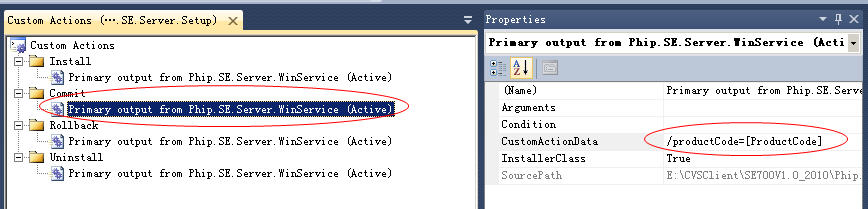
4. Override Installer的Commit函数(本文的应用场景是由Windows Service承载wcf服务,直接由winservice生成一个installer, 如果没有这个installer,则需要手动新建一个, 我的做法是新建一个Class Library项目,然后添加个Installer Class, 接着在安装项目中添加这个类库项目的主输出(primary out..)), 在Commit函数里调用下面的函数,CreateUnInstallBat用于填写Uninstall.bat的内容,实质就是将ProductCode自动填入批处理文件
 代码
代码

protected string GetTargetDir()
{
string dir = Path.GetDirectoryName(base.Context.Parameters["assemblypath"].ToString());
if (dir[dir.Length - 1] != '\\')
{
dir += "\\";
}
return dir;
}
protected void CreateUnInstallBat()
{
string dir = GetTargetDir();
FileStream fs = new FileStream(dir + "UnInstall.bat", FileMode.Create);
StreamWriter sw = new StreamWriter(fs);
sw.WriteLine("@echo off");
sw.WriteLine(string.Format("start /normal %windir%\\system32\\msiexec /x {0}", base.Context.Parameters["productCode"].ToString()));
sw.WriteLine("exit");
sw.Flush();
sw.Close();
fs.Close();
}
{
string dir = Path.GetDirectoryName(base.Context.Parameters["assemblypath"].ToString());
if (dir[dir.Length - 1] != '\\')
{
dir += "\\";
}
return dir;
}
protected void CreateUnInstallBat()
{
string dir = GetTargetDir();
FileStream fs = new FileStream(dir + "UnInstall.bat", FileMode.Create);
StreamWriter sw = new StreamWriter(fs);
sw.WriteLine("@echo off");
sw.WriteLine(string.Format("start /normal %windir%\\system32\\msiexec /x {0}", base.Context.Parameters["productCode"].ToString()));
sw.WriteLine("exit");
sw.Flush();
sw.Close();
fs.Close();
}
5. 新建快捷方式指向Uninstall.bat

 浙公网安备 33010602011771号