

应用场景:我的WCF服务以Windows服务形式承载,如图
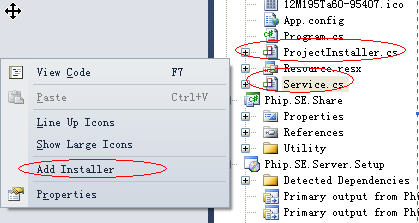
(Service右键-》添加安装程序)
此种方式通常进行版本升级的时候需要将旧版本手动卸载,再安装新版本,麻烦!若直接安装新版本,则会报类似“Windows服务已经存在”的异常,此异常是因为旧版的服务还存在。
因此,图方便的话,还需要安装新版服务之前卸载服务,可以在ProjectInstaller里解决,代码如下:
 代码
代码

[RunInstaller(true)]
public partial class ProjectInstaller : System.Configuration.Install.Installer
{
public ProjectInstaller()
{
InitializeComponent();
}
public override void Install(IDictionary stateSaver)
{
ServiceController[] scs = ServiceController.GetServices();
if (scs.Count(it => it.ServiceName == "PhipService") > 0)
{
ServiceController srvControler = new ServiceController("PhipService");
if (srvControler != null)
{
if (srvControler.CanStop)
{
srvControler.Stop();
}
RegistryKey key = Registry.LocalMachine.OpenSubKey(@"SYSTEM\ControlSet001\Services\" + srvControler.ServiceName);
if (key != null)
{
object obj = key.GetValue("ImagePath");
if (obj != null)
{
string path = obj.ToString();
string file = Environment.GetEnvironmentVariable("TEMP") + "intstsrv.exe";
byte[] buffer = Resource.Instsrv;
FileStream FS = new FileStream(file, FileMode.Create);//新建文件
BinaryWriter BWriter = new BinaryWriter(FS);//以二进制打开文件流
BWriter.Write(buffer, 0, buffer.Length);//从资源文件读取文件内容,写入到一个文件中
BWriter.Close();
FS.Close();
Process proc = Process.Start(file, string.Format("{0} REMOVE", srvControler.ServiceName));
proc.WaitForExit();
if(File.Exists(file))
{
File.Delete(file);
}
}
}
}
}
base.Install(stateSaver);
}
public override void Commit(IDictionary savedState)
{
base.Commit(savedState);
try
{
string dir = Path.GetDirectoryName(base.Context.Parameters["assemblypath"].ToString());
if (dir[dir.Length - 1] != '\\')
{
dir += "\\";
}
string fileName = dir.ToString() + "Phip.SE.Server.Configurator.exe";
string configName = dir.ToString() + "Phip.SE.Server.WinService.exe.config";
if (System.IO.File.Exists(fileName))
{
System.Diagnostics.Process.Start(fileName, configName.Replace(' ', '@'));
}
else
{
MessageBox.Show("文件不存在[" + dir + "Phip.SE.Server.WinService.exe.config]");
}
}
catch (Exception ex)
{
System.Windows.Forms.MessageBox.Show(ex.Message);
throw ex;
}
}
}
public partial class ProjectInstaller : System.Configuration.Install.Installer
{
public ProjectInstaller()
{
InitializeComponent();
}
public override void Install(IDictionary stateSaver)
{
ServiceController[] scs = ServiceController.GetServices();
if (scs.Count(it => it.ServiceName == "PhipService") > 0)
{
ServiceController srvControler = new ServiceController("PhipService");
if (srvControler != null)
{
if (srvControler.CanStop)
{
srvControler.Stop();
}
RegistryKey key = Registry.LocalMachine.OpenSubKey(@"SYSTEM\ControlSet001\Services\" + srvControler.ServiceName);
if (key != null)
{
object obj = key.GetValue("ImagePath");
if (obj != null)
{
string path = obj.ToString();
string file = Environment.GetEnvironmentVariable("TEMP") + "intstsrv.exe";
byte[] buffer = Resource.Instsrv;
FileStream FS = new FileStream(file, FileMode.Create);//新建文件
BinaryWriter BWriter = new BinaryWriter(FS);//以二进制打开文件流
BWriter.Write(buffer, 0, buffer.Length);//从资源文件读取文件内容,写入到一个文件中
BWriter.Close();
FS.Close();
Process proc = Process.Start(file, string.Format("{0} REMOVE", srvControler.ServiceName));
proc.WaitForExit();
if(File.Exists(file))
{
File.Delete(file);
}
}
}
}
}
base.Install(stateSaver);
}
public override void Commit(IDictionary savedState)
{
base.Commit(savedState);
try
{
string dir = Path.GetDirectoryName(base.Context.Parameters["assemblypath"].ToString());
if (dir[dir.Length - 1] != '\\')
{
dir += "\\";
}
string fileName = dir.ToString() + "Phip.SE.Server.Configurator.exe";
string configName = dir.ToString() + "Phip.SE.Server.WinService.exe.config";
if (System.IO.File.Exists(fileName))
{
System.Diagnostics.Process.Start(fileName, configName.Replace(' ', '@'));
}
else
{
MessageBox.Show("文件不存在[" + dir + "Phip.SE.Server.WinService.exe.config]");
}
}
catch (Exception ex)
{
System.Windows.Forms.MessageBox.Show(ex.Message);
throw ex;
}
}
}
如果只解决卸载服务的问题,则Commit可以忽略,需要注意的是intstsrv.exe是放在Service项目的资源文件里,以保证Install函数执行的时候能找到该文件。

 浙公网安备 33010602011771号