

Luffy之注册认证(容联云通讯短信验证)
用户的注册认证
前端显示注册页面并调整首页头部和登陆页面的注册按钮的链接。
注册页面Register,主要是通过登录页面进行改成而成.
先构造前端页面


<template>
    <div class="box">
        <img src="https://www.luffycity.com/static/img/Loginbg.3377d0c.jpg" alt="">
        <div class="register">
            <div class="register_box">
        <div class="register-title">注册路飞学城</div>
                <div class="inp">
          <!--<el-select v-model="region">-->
            <!--<el-option v-for="item in region_list" :label="item.nation_name+'('+item.nation_code+')'" :value="item.nation_code"></el-option>-->
          <!--</el-select>-->
                    <input v-model = "mobile" type="text" placeholder="手机号码" class="user">
                    <input v-model = "password" type="password" placeholder="密码" class="user">
                    <input v-model = "password2" type="password" placeholder="确认密码" class="user">
          <div id="embed-captcha"></div>
                    <div class="sms">
            <input v-model="sms_code" maxlength="16" type="text" placeholder="输入验证码" class="user">
            <span class="get_sms" @click="send_sms">{{get_sms_text}}</span>
          </div>
                    <button class="register_btn">注册</button>
                    <p class="go_login" >已有账号 <router-link to="/login">直接登录</router-link></p>
                </div>
            </div>
        </div>
    </div>
</template>

<script>
export default {
  name: 'Register',
  data(){
    return {
        sms_code:"",
        password:"",
        password2:"",
        mobile:"",
        validateResult:false,
        get_sms_text:"获取验证码",

          }
    },

</script>

<style scoped>
.box{
    width: 100%;
  height: 100%;
    position: relative;
  overflow: hidden;
}
.el-select{
  width:100%;
  margin-bottom: 15px;
}
.box img{
    width: 100%;
  min-height: 100%;
}
.box .register {
    position: absolute;
    width: 500px;
    height: 400px;
    top: 0;
    left: 0;
  margin: auto;
  right: 0;
  bottom: 0;
  top: -338px;
}
.register .register-title{
    width: 100%;
    font-size: 24px;
    text-align: center;
    padding-top: 30px;
    padding-bottom: 30px;
    color: #4a4a4a;
    letter-spacing: .39px;
}
.register-title img{
    width: 190px;
    height: auto;
}
.register-title p{
    font-family: PingFangSC-Regular;
    font-size: 18px;
    color: #fff;
    letter-spacing: .29px;
    padding-top: 10px;
    padding-bottom: 50px;
}
.sms{
  margin-top: 15px;
  position: relative;
}
.sms .get_sms{
  position: absolute;
  right: 15px;
  top: 14px;
  font-size: 14px;
  color: #ffc210;
  cursor: pointer;
  border-left: 1px solid #979797;
  padding-left: 20px;
}

.register_box{
    width: 400px;
    height: auto;
    background: #fff;
    box-shadow: 0 2px 4px 0 rgba(0,0,0,.5);
    border-radius: 4px;
    margin: 0 auto;
    padding-bottom: 40px;
}
.register_box .title{
    font-size: 20px;
    color: #9b9b9b;
    letter-spacing: .32px;
    border-bottom: 1px solid #e6e6e6;
     display: flex;
        justify-content: space-around;
        padding: 50px 60px 0 60px;
        margin-bottom: 20px;
        cursor: pointer;
}
.register_box .title span:nth-of-type(1){
    color: #4a4a4a;
        border-bottom: 2px solid #84cc39;
}

.inp{
    width: 350px;
    margin: 0 auto;
}
.inp input{
    border: 0;
    outline: 0;
    width: 100%;
    height: 45px;
    border-radius: 4px;
    border: 1px solid #d9d9d9;
    text-indent: 20px;
    font-size: 14px;
    background: #fff !important;
}
.inp input.user{
    margin-bottom: 16px;
}
.inp .rember{
     display: flex;
    justify-content: space-between;
    align-items: center;
    position: relative;
    margin-top: 10px;
}
.inp .rember p:first-of-type{
    font-size: 12px;
    color: #4a4a4a;
    letter-spacing: .19px;
    margin-left: 22px;
    display: -ms-flexbox;
    display: flex;
    -ms-flex-align: center;
    align-items: center;
    /*position: relative;*/
}
.inp .rember p:nth-of-type(2){
    font-size: 14px;
    color: #9b9b9b;
    letter-spacing: .19px;
    cursor: pointer;
}

.inp .rember input{
    outline: 0;
    width: 30px;
    height: 45px;
    border-radius: 4px;
    border: 1px solid #d9d9d9;
    text-indent: 20px;
    font-size: 14px;
    background: #fff !important;
}

.inp .rember p span{
    display: inline-block;
  font-size: 12px;
  width: 100px;
  /*position: absolute;*/
/*left: 20px;*/

}
#geetest{
    margin-top: 20px;
}
.register_btn{
     width: 100%;
    height: 45px;
    background: #84cc39;
    border-radius: 5px;
    font-size: 16px;
    color: #fff;
    letter-spacing: .26px;
    margin-top: 30px;
}
.inp .go_login{
    text-align: center;
    font-size: 14px;
    color: #9b9b9b;
    letter-spacing: .26px;
    padding-top: 20px;
}
.inp .go_login span{
    color: #84cc39;
    cursor: pointer;
}
</style>
前端路由注册:
import Register from "../components/Register"

// 配置路由列表
export default new Router({
  mode:"history",
  routes:[
    // 路由列表
    ...
    {
      name:"Register",
      path: "/register",
      component:Register,
    }
  ]
})
修改首页的跳转按钮链接
# Header.vue
<span class="header-register"><router-link to="/register">注册</router-link></span>
#Login.vue
<p class="go_login" >没有账号 <router-link to="/register">立即注册</router-link></p>
注册功能的实现
接下来,我们把注册过程中一些注册信息(例如:短信验证码)和session缓存到redis数据库中。
安装django-redis。
pip install django-redis
在settings.py配置中添加一下代码:
# 设置redis缓存
CACHES = {
    # 默认缓存
    "default": {
        "BACKEND": "django_redis.cache.RedisCache",
        # 项目上线时,需要调整这里的路径
        "LOCATION": "redis://127.0.0.1:6379/0",

        "OPTIONS": {
            "CLIENT_CLASS": "django_redis.client.DefaultClient",
        }
    },
    # 提供给xadmin或者admin的session存储
    "session": {
        "BACKEND": "django_redis.cache.RedisCache",
        "LOCATION": "redis://127.0.0.1:6379/1",
        "OPTIONS": {
            "CLIENT_CLASS": "django_redis.client.DefaultClient",
        }
    },
    # 提供存储短信验证码
    "sms_code":{
        "BACKEND": "django_redis.cache.RedisCache",
        "LOCATION": "redis://127.0.0.1:6379/2",
        "OPTIONS": {
            "CLIENT_CLASS": "django_redis.client.DefaultClient",
        }
    }
}

# 设置xadmin用户登录时,登录信息session保存到redis
SESSION_ENGINE = "django.contrib.sessions.backends.cache"
SESSION_CACHE_ALIAS = "session"
关于django-redis 的使用,说明文档可见http://django-redis-chs.readthedocs.io/zh_CN/latest/
django-redis提供了get_redis_connection的方法,通过调用get_redis_connection方法传递redis的配置名称可获取到redis的连接对象,通过redis连接对象可以执行redis命令
https://redis-py.readthedocs.io/en/latest/
使用范例:
from django_redis import get_redis_connection
// 链接redis数据库
redis_conn = get_redis_connection("default")
使用云通讯发送短信
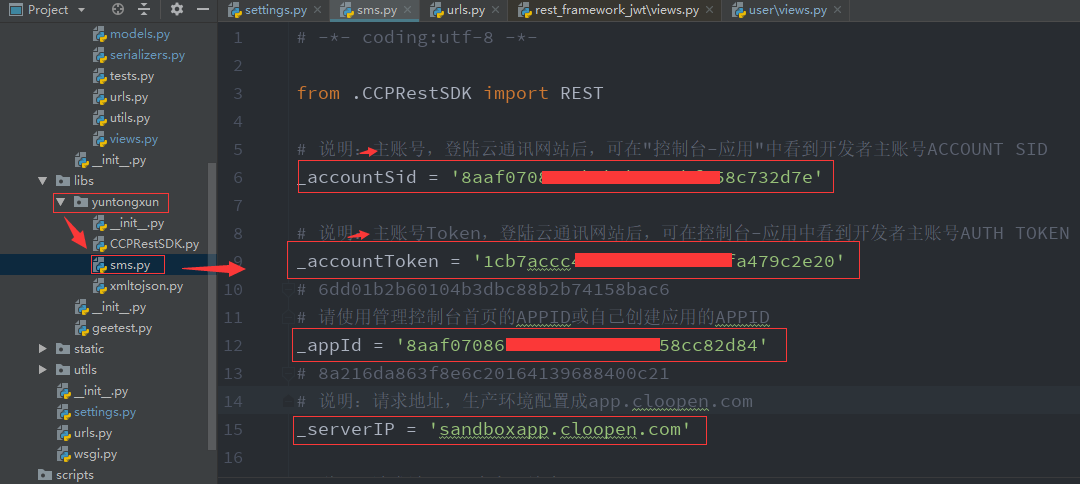
1.在登录后的平台上面获取一下信息:
ACCOUNT SID:8aaf070*****eb01699f4442911776
AUTH TOKEN : b4dea24*****4e0f90e557f0a99c70fa
AppID(默认):8aaf0708697****b01699f4442e3177c
Rest URL(生产): app.cloopen.com:8883         [项目上线时使用真实短信发送服务器]
Rest URL(开发): sandboxapp.cloopen.com:8883  [项目开发时使用沙箱短信发送服务器]
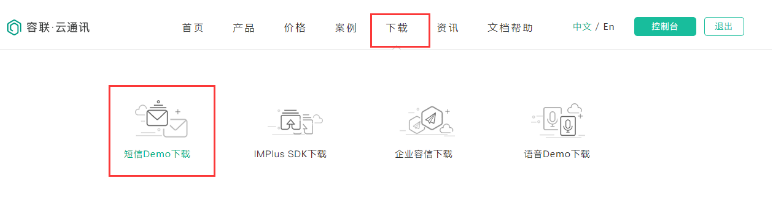
2.找到相应的sdkdemo进行下载:
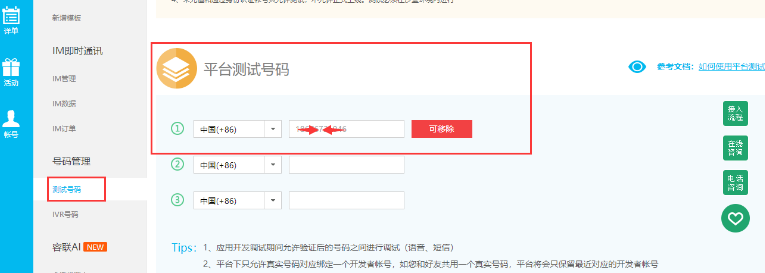
在开发过程中,为了节约发送短信的成本,可以把自己的或者同事的手机加入到测试号码中.
from .yuntongxun.sms import CCP
class SMSCodeAPIView(APIView):
    """
    短信验证码
    """
    def get(self, request, mobile):
        """
        短信验证码
        """
        # 生成短信验证码
        sms_code = "%06d" % random.randint(0, 999999)

        # 保存短信验证码与发送记录
        redis_conn = get_redis_connection('verify_codes')
        # 使用redis提供的管道操作可以一次性执行多条redis命令
        pl = redis_conn.pipeline()
        pl.multi()
        pl.setex("sms_%s" % mobile, 300, sms_code) # 设置短信有效期为300s
        pl.setex("sms_time_%s" % mobile, 60, 1)    # 设置发送短信间隔为60s
        pl.execute()

        # 发送短信验证码
        ccp = CCP()
        ccp.send_template_sms(mobile, [code, "5"], 1)

        return Response({"message": "OK"}, status.HTTP_200_OK)
5.后端保存用户注册信息
创建序列化器对象
from django_redis import get_redis_connection
from rest_framework import serializers
from .models import User
import re
class UserModelSerializer(serializers.ModelSerializer):
    """用户信息序列化器"""
    sms_code = serializers.CharField(label='手机验证码', required=True, allow_null=False, allow_blank=False, write_only=True)
    password2 = serializers.CharField(label='确认密码', required=True, allow_null=False, allow_blank=False, write_only=True)

    class Meta:
        model = User
        fields = ('id','sms_code', 'mobile', 'password', 'password2')
        extra_kwargs = {
            "password": {
                "write_only": True
            },
            "id":{
                "read_only": True
            }
        }

    def validate_mobile(self, value):
        """验证手机号"""
        if not re.match(r'^1[345789]\d{9}$', value):
            raise serializers.ValidationError('手机号格式错误')

        # 上面验证手机号是否存在的代码[优化版]
        try:
            User.objects.get(mobile=value)
            # 如果有获取到用户信息,则下面的代码不会被执行,如果没有获取到用户信息,则表示手机号没有注册过,可以直接pass
            raise serializers.ValidationError('当前手机号已经被注册')
        except:
            pass

        return value

    def validate(self, data):
        # 验证密码
        password = data.get("password")
        password2 = data.get("password2")
        if len(password) < 6:
            raise serializers.ValidationError('密码太短不安全~')

        if password != password2:
            raise serializers.ValidationError('密码和确认必须一致~')


        """验证短信验证码"""

        mobile = data.get("mobile")
        sms_code = data.get("sms_code")

        # 从redis中提取短信验证码
        redis = get_redis_connection("sms_code")
        # 注意,在redis中保存数据的格式,最终都是bytes类型的字符串,所以提取数据时,要转下编码
        redis_sms_code = redis.get("sms_%s" % mobile).decode()
        # 把redis中的短信验证码和客户端提交的验证码进行匹配
        if not (redis_sms_code and redis_sms_code == sms_code):
            raise serializers.ValidationError('手机验证码无效~')

        return data

    def create(self, validated_data):
        # 删除一些不需要保存到数据库里面的字段
        del validated_data['password2']
        del validated_data['sms_code']

        # 因为数据库中默认用户名是唯一的,所以我们把用户手机号码作为用户名
        validated_data["username"] = validated_data["mobile"]

        # 继续调用ModelSerializer内置的添加数据功能
        user = super().create(validated_data)

        # 针对密码要加密
        user.set_password(user.password)
        # 修改密码等用于更新了密码,所以需要保存
        user.save()


        # 一旦注册成功以后,则默认表示当前用户已经登录了
        # 所以后端要生成一个jwt提供给客户端
        from rest_framework_jwt.settings import api_settings
        jwt_payload_handler = api_settings.JWT_PAYLOAD_HANDLER
        jwt_encode_handler = api_settings.JWT_ENCODE_HANDLER

        payload = jwt_payload_handler(user)
        # 把jwt生成的token作为user模型的字段
        user.token = jwt_encode_handler(payload)

        return user
6.前端添加axios请求短信验证等script完整代码(包括极验和容联云短信)
<template>
    <div class="box">
        <img src="https://www.luffycity.com/static/img/Loginbg.3377d0c.jpg" alt="">
        <div class="register">
            <div class="register_box">
        <div class="register-title">注册路飞学城</div>
                <div class="inp">
          <!--<el-select v-model="region">-->
            <!--<el-option v-for="item in region_list" :label="item.nation_name+'('+item.nation_code+')'" :value="item.nation_code"></el-option>-->
          <!--</el-select>-->
                    <input v-model = "mobile" type="text" placeholder="手机号码" class="user">
                    <input v-model = "password" type="password" placeholder="密码" class="user">
                    <input v-model = "password2" type="password" placeholder="确认密码" class="user">
          <div id="embed-captcha"></div>
                    <div class="sms">
            <input v-model="sms_code" maxlength="16" type="text" placeholder="输入验证码" class="user">
            <span class="get_sms" @click="send_sms">{{get_sms_text}}</span>
          </div>
                    <button class="register_btn" @click="registerHander">注册</button>
                    <p class="go_login" >已有账号 <router-link to="/login">直接登录</router-link></p>
                </div>
            </div>
        </div>
    </div>
</template>

<script>
export default {
  name: 'Register',
  data(){
    return {
        sms_code:"",
        password:"",
        password2:"",
        mobile:"",
        validateResult:false,
        get_sms_text:"获取验证码",

          }
    },
     methods:{
    send_sms(){
      let reg = /1[1-9]{2}\d{8}/;
      if( !reg.test(this.mobile) ){
        alert("还未填写手机号码")
        return false;
      }


      // 如果get_sms_text 不是文本,而是数字,则表示当前手机号码还在60秒的发送短信间隔内
      if(this.get_sms_text != "获取验证码"){
        return false;
      }

      // 发送短信
      let _this = this;
      this.$axios.get("http://127.0.0.1:8000/users/sms?mobile="+this.mobile).then(response=>{
        console.log(response);
        // 显示发送短信以后的文本倒计时
        let time = 60;
        let timer = setInterval(()=>{
          --time;

          if(time <=1){
            // 如果倒计时为0,则关闭当前定时器
             _this.get_sms_text = "获取验证码";
            clearInterval(timer);
          }else{
              console.log(time)
              _this.get_sms_text = time;
          }
        },1000)
      }).catch(error=>{
        console.log(error);
      })

    },
     registerHander(){
        if(this.validateResult!='success'){
           alert('滑动码验证失败')
            return false;
        }
      // 注册信息提交
      this.$axios.post("http://127.0.0.1:8000/users/user",{
          "mobile":this.mobile,
          "password":this.password,
          "password2":this.password2,
          "sms_code":this.sms_code,
        },{
          responseType:"json",
        }).
          then(response=>{
            // 请求成功,保存登陆状态
            localStorage.removeItem("token");
            let data = response.data;
            sessionStorage.token = data.token;
            sessionStorage.id = data.id;
            sessionStorage.username = data.mobile;
            // 注册成功以后默认表示已经登录了,跳转用户中心的页面
            this.$router.push("/home");
            alert("注册成功!");
        }).catch(error=>{
            alert("注册失败!");
            // error 就是一个对象,里面会保存在错误响应时的http状态码以及后端抛出的错误信息
        })
      },
          handlerEmbed(captchaObj) {
        // 成功的回调
        let _this = this;
        captchaObj.onSuccess(function () {
          var validate = captchaObj.getValidate();
          _this.$axios.post("http://127.0.0.1:8000/users/verify", {
            geetest_challenge: validate.geetest_challenge,
            geetest_validate: validate.geetest_validate,
            geetest_seccode: validate.geetest_seccode
          }, {
            responseType: "json",
          },).then(response => {
            // 请求成功
            _this.validateResult = response.data.status
            console.log('response.data',_this.this.validateResult);  // 获取验证结果
          }).catch(error => {
            // 请求失败
            console.log(error)
          })
        });
        captchaObj.appendTo("#embed-captcha");

      },

       },
       created() {
      this.$axios.get('http://127.0.0.1:8000/users/verify',).then(resopnse => {
        var data = JSON.parse(resopnse.data);
        initGeetest({
          gt: data.gt,
          challenge: data.challenge,
          width: "350px",
          product: "embed", // 产品形式,包括:float,embed,popup。注意只对PC版验证码有效
          offline: !data.success // 表示用户后台检测极验服务器是否宕机,一般不需要关注
          // 更多配置参数请参见:http://www.geetest.com/install/sections/idx-client-sdk.html#config
        }, this.handlerEmbed)
      }).catch(err => {
        console.log(err)
      })
    }

};
</script>

<style scoped>
.box{
    width: 100%;
  height: 100%;
    position: relative;
  overflow: hidden;
}
.el-select{
  width:100%;
  margin-bottom: 15px;
}
.box img{
    width: 100%;
  min-height: 100%;
}
.box .register {
    position: absolute;
    width: 500px;
    height: 400px;
    top: 0;
    left: 0;
  margin: auto;
  right: 0;
  bottom: 0;
  top: -338px;
}
.register .register-title{
    width: 100%;
    font-size: 24px;
    text-align: center;
    padding-top: 30px;
    padding-bottom: 30px;
    color: #4a4a4a;
    letter-spacing: .39px;
}
.register-title img{
    width: 190px;
    height: auto;
}
.register-title p{
    font-family: PingFangSC-Regular;
    font-size: 18px;
    color: #fff;
    letter-spacing: .29px;
    padding-top: 10px;
    padding-bottom: 50px;
}
.sms{
  margin-top: 15px;
  position: relative;
}
.sms .get_sms{
  position: absolute;
  right: 15px;
  top: 14px;
  font-size: 14px;
  color: #ffc210;
  cursor: pointer;
  border-left: 1px solid #979797;
  padding-left: 20px;
}

.register_box{
    width: 400px;
    height: auto;
    background: #fff;
    box-shadow: 0 2px 4px 0 rgba(0,0,0,.5);
    border-radius: 4px;
    margin: 0 auto;
    padding-bottom: 40px;
}
.register_box .title{
    font-size: 20px;
    color: #9b9b9b;
    letter-spacing: .32px;
    border-bottom: 1px solid #e6e6e6;
     display: flex;
        justify-content: space-around;
        padding: 50px 60px 0 60px;
        margin-bottom: 20px;
        cursor: pointer;
}
.register_box .title span:nth-of-type(1){
    color: #4a4a4a;
        border-bottom: 2px solid #84cc39;
}

.inp{
    width: 350px;
    margin: 0 auto;
}
.inp input{
    border: 0;
    outline: 0;
    width: 100%;
    height: 45px;
    border-radius: 4px;
    border: 1px solid #d9d9d9;
    text-indent: 20px;
    font-size: 14px;
    background: #fff !important;
}
.inp input.user{
    margin-bottom: 16px;
}
.inp .rember{
     display: flex;
    justify-content: space-between;
    align-items: center;
    position: relative;
    margin-top: 10px;
}
.inp .rember p:first-of-type{
    font-size: 12px;
    color: #4a4a4a;
    letter-spacing: .19px;
    margin-left: 22px;
    display: -ms-flexbox;
    display: flex;
    -ms-flex-align: center;
    align-items: center;
    /*position: relative;*/
}
.inp .rember p:nth-of-type(2){
    font-size: 14px;
    color: #9b9b9b;
    letter-spacing: .19px;
    cursor: pointer;
}

.inp .rember input{
    outline: 0;
    width: 30px;
    height: 45px;
    border-radius: 4px;
    border: 1px solid #d9d9d9;
    text-indent: 20px;
    font-size: 14px;
    background: #fff !important;
}

.inp .rember p span{
    display: inline-block;
  font-size: 12px;
  width: 100px;
  /*position: absolute;*/
/*left: 20px;*/

}
#geetest{
    margin-top: 20px;
}
.register_btn{
     width: 100%;
    height: 45px;
    background: #84cc39;
    border-radius: 5px;
    font-size: 16px;
    color: #fff;
    letter-spacing: .26px;
    margin-top: 30px;
}
.inp .go_login{
    text-align: center;
    font-size: 14px;
    color: #9b9b9b;
    letter-spacing: .26px;
    padding-top: 20px;
}
.inp .go_login span{
    color: #84cc39;
    cursor: pointer;
}
</style>

 浙公网安备 33010602011771号