
[ Netty ] 通过Netty聊天业务来加深理解Netty运行以及网络编程.
引言
这几天在学习Netty网络编程的过程当中对Netty的运作原理及流程有一定的了解,通过Netty实现聊天业务来加深对Netty的理解.这里用一张图概括运行流程
这里我在Github上面找到一位大神总结的尚硅谷的学习笔记,里面有写Netty的运作原理(但是因为前面一直在讲原理我自己身原因容易听不进去所以先去看的黑马的Netty直接从代码层面开始学习,运行原理倒是听尚硅谷的讲解,将挺好的)
Netty学习手册
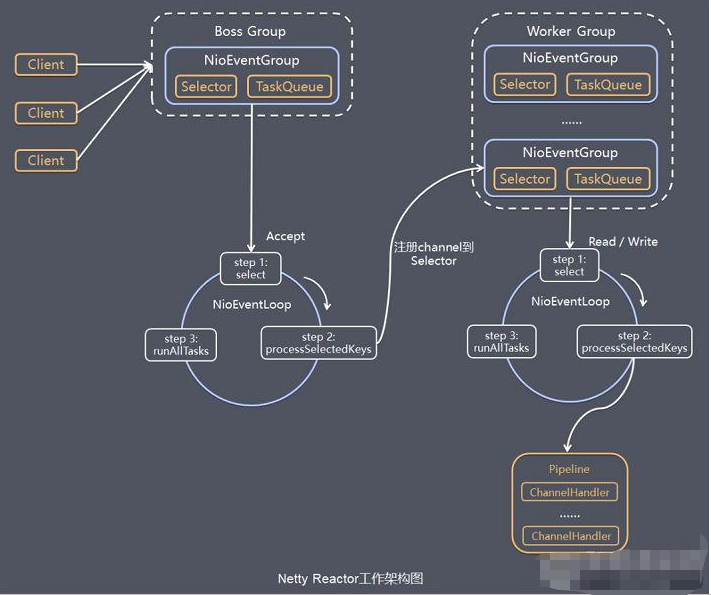
这张图基本就讲解了Netty运行的流程,bossGroup负责建立连接,workerGroup负责处理业务,而NioEventLoopGroup负责IO业务还能传给DefaultEventLoopGroup来提高并发,这里就不过多赘述了.
聊天业务
前期准备工作其实不是很值得讲,大概原理基本都清除所以这里就不讲了直接跳到我学习过程中需要思考理解一会的地方记录
单聊业务
-
相关代码
客户端
public class ChatClient {
	public static void main(String[] args) {
		NioEventLoopGroup group = new NioEventLoopGroup();
		LoggingHandler LOGGING_HANDLER = new LoggingHandler(LogLevel.DEBUG);
		MessageCodecSharable MESSAGECODEC_SHARABLE = new MessageCodecSharable();
		CountDownLatch WAIT_FOR_LOGIN = new CountDownLatch(1);
		AtomicBoolean LOGIN = new AtomicBoolean(false);
		try {
			Channel channel = new Bootstrap()
					.group(group)
					.channel(NioSocketChannel.class)
					.handler(new ChannelInitializer<NioSocketChannel>() {
						@Override
						protected void initChannel(NioSocketChannel ch) throws Exception {
							ch.pipeline().addLast(new ProcotolFrameDecoder());
//                            ch.pipeline().addLast(LOGGING_HANDLER);
							ch.pipeline().addLast(MESSAGECODEC_SHARABLE);
							ch.pipeline().addLast("clientHandler", new ChannelInboundHandlerAdapter() {

								@Override
								public void channelRead(ChannelHandlerContext ctx, Object msg) throws Exception {
									log.info("message: {}", msg);
									if (msg instanceof LoginResponseMessage) {
										LoginResponseMessage response = (LoginResponseMessage) msg;
										if (response.isSuccess()) {
											LOGIN.set(true);
										}
										WAIT_FOR_LOGIN.countDown();
									}

								}

								@Override
								public void channelActive(ChannelHandlerContext ctx) throws Exception {
//                                    在连接建立后触发 active 事件
//                                    负责用户在控制台的输入,负责向服务器发送各种消息
									new Thread(() -> {
										Scanner scanner = new Scanner(System.in);
										System.out.println("请输入用户名: ");
										String userName = scanner.nextLine();
										System.out.println("请输入密码: ");
										String password = scanner.nextLine();
//                                        构造消息对象
										LoginRequestMessage loginRequestMessage = new LoginRequestMessage(userName, password);
										ctx.writeAndFlush(loginRequestMessage);

										System.out.println("wait...");
										try {
											WAIT_FOR_LOGIN.await();
										} catch (InterruptedException e) {
											throw new RuntimeException(e);
										}
										if (!LOGIN.get()) {
											ctx.channel().close();
											return;
										}
										while (true) {
											System.out.println("======================================");
											System.out.println("send [userName] [content]");
											System.out.println("gsend [group name] [content]");
											System.out.println("gcreate [group name] [m1,m2,m3...]");
											System.out.println("gmembers [group name]");
											System.out.println("gjoin [group name]");
											System.out.println("gquit [group name]");
											System.out.println("quit");
											System.out.println("======================================");
											String command = scanner.nextLine();
											String[] split = command.split(" ");
											switch (split[0]) {
												case "send":
													ctx.writeAndFlush(new ChatRequestMessage(userName, split[1], split[2]));
													break;
												case "gsend":
													ctx.writeAndFlush(new GroupChatRequestMessage(userName, split[1], split[2]));
													break;
												case "gcreate":
													Set<String> collect = Arrays.stream(split[2].split(",")).collect(Collectors.toSet());
													ctx.writeAndFlush(new GroupCreateRequestMessage(split[1], collect));
													break;
												case "gmembers":
													ctx.writeAndFlush(new GroupMembersRequestMessage(split[1]));
													break;
												case "gjoin":
													ctx.writeAndFlush(new GroupJoinRequestMessage(split[1], userName));
													break;
												case "gquit":
													ctx.writeAndFlush(new GroupQuitRequestMessage(split[1], userName));
													break;
												case "quit":
													ctx.channel().close();
													break;
											}
										}
									}, "System in").start();
								}
							});
						}
					})
					.connect("localhost", 8080)
					.sync()
					.channel();
			channel.closeFuture().sync();
		} catch (InterruptedException e) {
			throw new RuntimeException(e);
		} finally {
			group.shutdownGracefully();
		}
	}
}
服务端
public class ChatServer { public static void main(String[] args) { NioEventLoopGroup bossGroup = new NioEventLoopGroup(1); NioEventLoopGroup workerGroup = new NioEventLoopGroup(); LoggingHandler LOGGING_HANDLER = new LoggingHandler(LogLevel.DEBUG); MessageCodecSharable MESSAGECODEC_SHARABLE = new MessageCodecSharable(); LoginRequestMessageHandler LOGIN_HANDLER = new LoginRequestMessageHandler(); ChatRequestMessageHandler CHAT_HANDLER = new ChatRequestMessageHandler(); try { Channel channel = new ServerBootstrap() .group(bossGroup, workerGroup) .channel(NioServerSocketChannel.class) .childHandler(new ChannelInitializer<NioSocketChannel>() { @Override protected void initChannel(NioSocketChannel ch) throws Exception { ch.pipeline().addLast(new ProcotolFrameDecoder()); ch.pipeline().addLast(LOGGING_HANDLER); ch.pipeline().addLast(MESSAGECODEC_SHARABLE); ch.pipeline().addLast(LOGIN_HANDLER); ch.pipeline().addLast(CHAT_HANDLER); } }) .bind(8080) .sync() .channel(); channel.closeFuture().sync(); } catch (InterruptedException e) { throw new RuntimeException(e); } finally { bossGroup.shutdownGracefully(); workerGroup.shutdownGracefully(); } } } -
业务流程
在发送消息之前,先登录服务器,这里通过简易的一个Map来当数据库校验存储,在登录成功过后将userName绑定到服务器的Session当中- 登录业务
@ChannelHandler.Sharable public class LoginRequestMessageHandler extends SimpleChannelInboundHandler<LoginRequestMessage> { @Override protected void channelRead0(ChannelHandlerContext ctx, LoginRequestMessage msg) throws Exception { String username = msg.getUsername(); String password = msg.getPassword(); boolean login = UserServiceFactory.getUserService().login(username, password); LoginResponseMessage message; if (login) { SessionFactory.getSession().bind(ctx.channel(), username); message = new LoginResponseMessage(true, "登录成功"); } else { message = new LoginResponseMessage(false, "登录失败,账号或密码错误"); } ctx.writeAndFlush(message); } }- Session
public class SessionMemoryImpl implements Session { private final Map<String, Channel> usernameChannelMap = new ConcurrentHashMap<>(); private final Map<Channel, String> channelUsernameMap = new ConcurrentHashMap<>(); private final Map<Channel,Map<String,Object>> channelAttributesMap = new ConcurrentHashMap<>(); @Override public void bind(Channel channel, String username) { usernameChannelMap.put(username, channel); channelUsernameMap.put(channel, username); channelAttributesMap.put(channel, new ConcurrentHashMap<>()); } @Override public void unbind(Channel channel) { String username = channelUsernameMap.remove(channel); usernameChannelMap.remove(username); channelAttributesMap.remove(channel); } @Override public Object getAttribute(Channel channel, String name) { return channelAttributesMap.get(channel).get(name); } @Override public void setAttribute(Channel channel, String name, Object value) { channelAttributesMap.get(channel).put(name, value); } @Override public Channel getChannel(String username) { return usernameChannelMap.get(username); } @Override public String toString() { return usernameChannelMap.toString(); } } - 发送消息
客户端通过判断命令来发送对应消息的Request类,chatServer pipline再通过对应的SimpleChannelInboundHandler来处理对应的业务
这里的一个流程就是用户在启动client的时候在服务器bossworker建立连接,在workerGroup上处理登录和发送消息的业务,发送消息就是将消息发送给对应的SimpleChannelInboundHandler来处理对应的事件,随后再通过Session获取对应user绑定的channel,对应的channel最后再writeandflush给client@ChannelHandler.Sharable public class ChatRequestMessageHandler extends SimpleChannelInboundHandler<ChatRequestMessage> { @Override protected void channelRead0(ChannelHandlerContext ctx, ChatRequestMessage msg) throws Exception { String to = msg.getTo(); Channel channel = SessionFactory.getSession().getChannel(to); if (Objects.nonNull(channel)) { channel.writeAndFlush(new ChatResponseMessage(msg.getFrom(), msg.getContent())); } else { ctx.writeAndFlush(new ChatResponseMessage(false, "发送失败: 对方用户不在线")); } } }在 Netty 中,childHandler 里的 ChannelInitializer 中,channel 指定的是之前在 .channel(NioSocketChannel.class) 中定义的 Channel 类型。通过这个 Channel,服务器与客户端之间建立连接并进行通信。
接下来,在 Server 类中创建一个 Session 类,其中包含一个 Map 来存储每个客户端连接的 Channel,并通过 username 来索引和获取对应的 Channel。这样,服务器可以通过 username 获取到指定的 Channel,实现与特定客户端的通信。
当客户端断开连接时,Map 中存储的 Channel 会被移除。因此,当尝试根据 username 从 Map 获取 Channel 时,如果客户端已经断开连接,Map 会返回 null,表示该连接已失效。
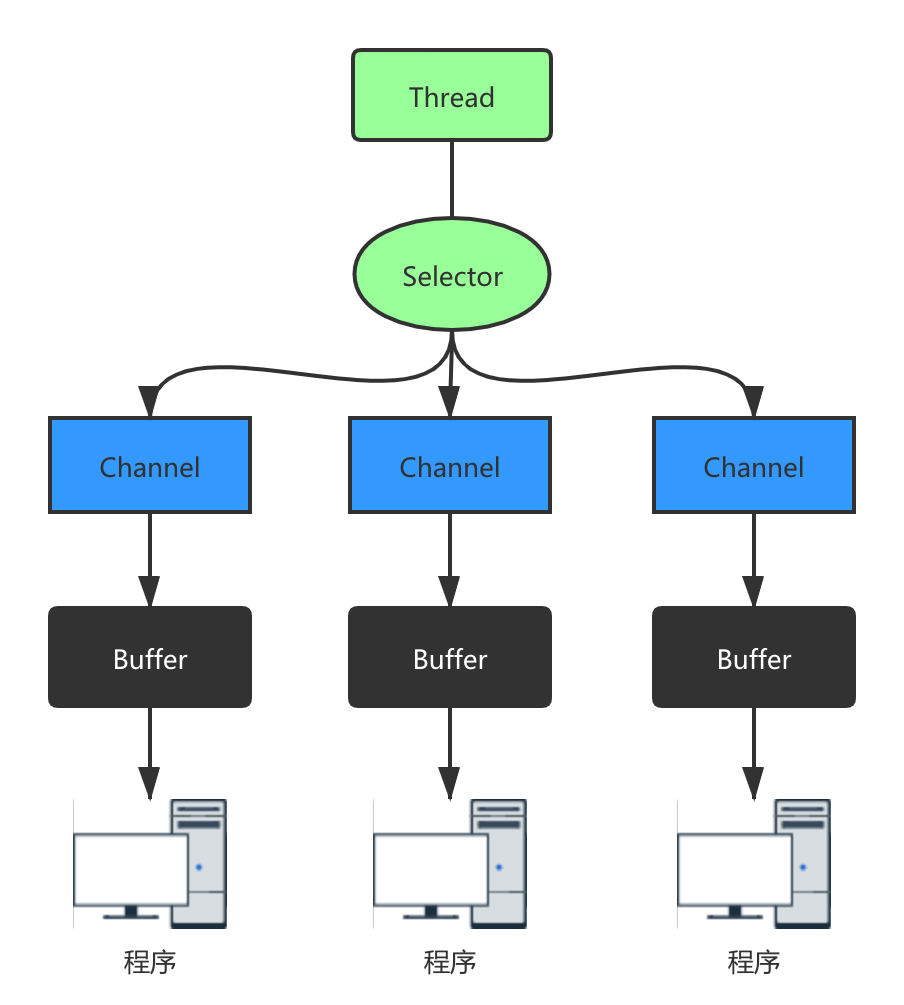
之后的有什么值得记录的再写吧....其实这个也不是很难只是我捋清楚了想写下来加深印象,到时候还可以自己看看思考过程XD
- 登录业务

 浙公网安备 33010602011771号