
【Python】Python format() 、format_map()
format()
1.通过位置来填充字符串
print('hello {0} i am {1}'.format('world','python'))    # 输入结果:hello world i am python
print('hello {} i am {}'.format('world','python') ) #输入结果:hello world i am python
print('hello {0} i am {1} . a now language-- {1}'.format('world','python')
# 输出结果:hello world i am python . a now language-- python
foramt会把参数按位置顺序来填充到字符串中,第一个参数是0,然后1 ……
也可以不输入数字,这样也会按顺序来填充
同一个参数可以填充多次,这个是format比%先进的地方
2.通过key来填充
obj = 'world'
name = 'python'
print('hello, {obj} ,i am {name}'.format(obj = obj,name = name))
# 输入结果:hello, world ,i am python
3.通过列表填充
list=['world','python']
print('hello {names[0]}  i am {names[1]}'.format(names=list))# 输出结果:hello world  i am python
print('hello {0[0]}  i am {0[1]}'.format(list)) #输出结果:hello world  i am python
4.通过字典填充
dict={‘obj’:’world’,’name’:’python’}
print(‘hello {names[obj]} i am {names[name]}’.format(names=dict)) # hello world i am python
注意访问字典的key,不用引号的
5.通过类的属性填充
class Names():
    obj='world'
    name='python'

print('hello {names.obj} i am {names.name}'.format(names=Names))#输入结果hello world i am python
6.使用魔法参数
args = [‘,’,’inx’]
kwargs = {‘obj’: ‘world’, ‘name’: ‘python’}
print(‘hello {obj} {} i am {name}’.format(*args, **kwargs))#输入结果:hello world , i am python
注意:魔法参数跟你函数中使用的性质是一样的:这里format(*args, **kwargs)) 等价于:format(‘,’,’inx’,obj = ‘world’,name = ‘python’)
format 格式转换
| 数字 | 格式 | 输出 | 描述 |
|---|---|---|---|
| 3.1415926 | {:.2f} | 3.14 | 保留小数点后两位 |
| 3.1415926 | {:+.2f} | +3.14 | 带符号保留小数点后两位 |
| -1 | {:+.2f} | -1.00 | 带符号保留小数点后两位 |
| 2.71828 | {:.0f} | 3 | 不带小数 |
| 5 | {:0>2d} | 05 | 数字补零 (填充左边, 宽度为2) |
| 5 | {:x<4d} | 5xxx | 数字补x (填充右边, 宽度为4) |
| 10 | {:x<4d} | 10xx | 数字补x (填充右边, 宽度为4) |
| 1000000 | {:,} | 1,000,000 | 以逗号分隔的数字格式 |
| 0.25 | {:.2%} | 25.00% | 百分比格式 |
| 1000000000 | {:.2e} | 1.00e+09 | 指数记法 |
| 13 | {:>10d} | 13 | 右对齐 (默认, 宽度为10) |
| 13 | {:<10d} | 13 | 左对齐 (宽度为10) |
| 13 | {:^10d} | 13 | 中间对齐 (宽度为10) |
|
13 |
|
|
右对齐 (默认, 宽度为10) |
|
13 |
|
|
左对齐 (宽度为10) |
|
13 |
|
|
中间对齐 (宽度为10) |
| 11 |
|
|
进制 |
b、d、o、x分别是二进制、十进制、八进制、十六进制。
format的其它用法
1.转义“{}”
print('{{hello}} {{{0}}}'.format('world')) #输出结果:{hello} {world}
跟%中%%转义%一样,format中用 { 来转义{ ,用 } 来转义 }
2.format作为函数变量
name = 'InX'
hello = 'hello,{} welcome to python world!!!'.format #定义一个问候函数
hello(name) #输入结果:hello,inx welcome to python world!!!
3.格式化datetime
from datetime import datetime
now=datetime.now()
print ('{:%Y-%m-%d %X}'.format(now)) # 输出结果:2017-07-24 16:51:42
4.{}内嵌{}
print('hello {0:>{1}} '.format('world',10)) ##输出结果:hello world
最内层的{}开始格式化
5.叹号的用法
print(‘{!s}国’.format(‘中’)) #输出结果:中国
print(‘{!a}国’.format(‘中’)) #输出结果:’\u4e2d’国
print(‘{!s}国’.format(‘中’)) #输出结果:’中’国
!后面可以加s r a 分别对应str() repr() ascii() 作用是在填充前先用对应的函数来处理参数
差别就是repr带有引号,str()是面向用户的,目的是可读性,repr()是面向Python解析器的,返回值表示在python内部的含义,ascii (),返回ascii编码
"{0!r:20}".format("Hello")

"{greeting!r:20}".format(greeting="Hello")
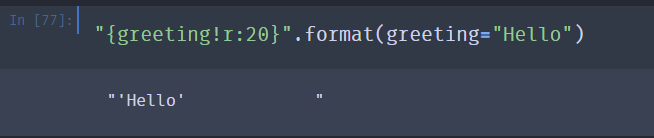
r直接反应对象本体。
!符号,这个只在fromat中有用,要注意方法。但是效果类似
>>> b = 'hello, %r' % '123'
>>> b
"hello, '123'"
>>> b = 'hello, {!r}'.format( '123')
>>> b
"hello, '123'"
format_map()
类似 str.format(*args, **kwargs) ,不同的是 mapping 是一个字典对象。
format_map(mapping)
|
参数 |
描述 |
|
mapping |
必需的参数,mapping 是一个包含命名索引占位符属性名的字典对象。 |
p={"fname":"John","age":36}
txt1 = "My name is {fname}, I'm {age}".format_map(p)
print(txt1)
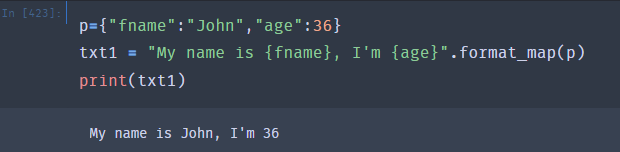
格式化类型
| 数字 | 格式 | 输出 | 描述 |
|---|---|---|---|
| 3.1415926 | {:.2f} | 3.14 | 保留小数点后两位 |
| 3.1415926 | {:+.2f} | +3.14 | 带符号保留小数点后两位 |
| -1 | {:+.2f} | -1.00 | 带符号保留小数点后两位 |
| 2.71828 | {:.0f} | 3 | 不带小数 |
| 5 | {:0>2d} | 05 | 数字补零 (填充左边, 宽度为2) |
| 5 | {:x<4d} | 5xxx | 数字补x (填充右边, 宽度为4) |
| 10 | {:x<4d} | 10xx | 数字补x (填充右边, 宽度为4) |
| 1000000 | {:,} | 1,000,000 | 以逗号分隔的数字格式 |
| 0.25 | {:.2%} | 25.00% | 百分比格式 |
| 1000000000 | {:.2e} | 1.00e+09 | 指数记法 |
| 13 | {:>10d} | 13 | 右对齐 (默认, 宽度为10) |
| 13 | {:<10d} | 13 | 左对齐 (宽度为10) |
| 13 | {:^10d} | 13 | 中间对齐 (宽度为10) |
| 11 |
|
|
进制 |
^, <, > 分别是居中、左对齐、右对齐,后面带宽度, : 号后面带填充的字符,只能是一个字符,不指定则默认是用空格填充。
+ 表示在正数前显示 +,负数前显示 -; (空格)表示在正数前加空格
b、d、o、x 分别是二进制、十进制、八进制、十六进制。

 浙公网安备 33010602011771号