HIbernate入门实例HelloWorld(一)
HIbernate-1:HelloWorld的编写操作步骤
在编写代码前务必已经先建好了数据库hibernate5,并在里面创建了数据表news和相应的字段id,title,author,date
Field   Type          Collation  Null    Key     Default  Extra           Privileges                       Comment
------  ------------  ---------  ------  ------  -------  --------------  -------------------------------  ---------
id      int(10)       (NULL)     NO      PRI     (NULL)   auto_increment  select,insert,update,references
title   varchar(255)  utf8_bin   YES             (NULL)                   select,insert,update,references
author  varchar(255)  utf8_bin   YES             (NULL)                   select,insert,update,references
date    date          (NULL)     YES             (NULL)                   select,insert,update,references

/*索引信息*/--------------
步骤
一.导入jar包
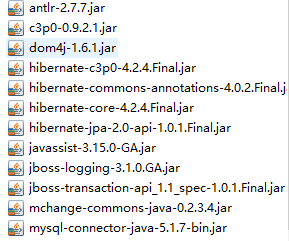
二.编写hibernate.cfg.xml全局配置文件
<?xml version="1.0" encoding="UTF-8"?>
<!DOCTYPE hibernate-configuration PUBLIC
        "-//Hibernate/Hibernate Configuration DTD 3.0//EN"
        "http://hibernate.sourceforge.net/hibernate-configuration-3.0.dtd">
<hibernate-configuration>
    <session-factory>

        <!-- 配置连接数据库的基本信息 -->
        <property name="connection.username">root</property>
        <property name="connection.password">1230</property>
        <property name="connection.driver_class">com.mysql.jdbc.Driver</property>
        <property name="connection.url">jdbc:mysql:///hibernate5</property>

        <!-- 配置 hibernate 的基本信息 -->
        <!-- hibernate 所使用的数据库方言 -->
        <property name="dialect">org.hibernate.dialect.MySQLInnoDBDialect</property>

        <!-- 执行操作时是否在控制台打印 SQL -->
        <property name="show_sql">true</property>

        <!-- 是否对 SQL 进行格式化 -->
        <property name="format_sql">true</property>

        <!-- 指定自动生成数据表的策略 -->
        <property name="hbm2ddl.auto">update</property>

        <!-- 指定关联的 .hbm.xml 文件 -->
        <mapping resource="com/atguigu/hibernate/helloworld/News.hbm.xml"/>

    </session-factory>

</hibernate-configuration>
三.写实体类(与数据库里面的字段相对应)
News.java
package com.yuyi.hibernate.helloworld;

import java.util.Date;

public class News {

    private Integer id;
    private String title;
    private String author;

    private Date date;

    public Integer getId() {
        return id;
    }

    public void setId(Integer id) {
        this.id = id;
    }

    public String getTitle() {
        return title;
    }

    public void setTitle(String title) {
        this.title = title;
    }

    public String getAuthor() {
        return author;
    }

    public void setAuthor(String author) {
        this.author = author;
    }

    public Date getDate() {
        return date;
    }

    public void setDate(Date date) {
        this.date = date;
    }

    public News(String title, String author, Date date2) {
        super();
        this.title = title;
        this.author = author;
        this.date =  date2;
    }

    public News() {
        // TODO Auto-generated constructor stub
    }

    @Override
    public String toString() {
        return "News [id=" + id + ", title=" + title + ", author=" + author + ", date=" + date + "]";
    }


}
四.编写对应的hbm.xml配置文件
<?xml version="1.0"?>
<!DOCTYPE hibernate-mapping PUBLIC "-//Hibernate/Hibernate Mapping DTD 3.0//EN"
"http://hibernate.sourceforge.net/hibernate-mapping-3.0.dtd">
<!-- Generated 2018-11-14 21:27:11 by Hibernate Tools 3.5.0.Final -->
<hibernate-mapping>
    <class name="com.yuyi.hibernate.helloworld.News" table="NEWS">
        <id name="id" type="java.lang.Integer">
            <column name="ID" />
            <generator class="native" />
        </id>
        <property name="title" type="java.lang.String">
            <column name="TITLE" />
        </property>
        <property name="author" type="java.lang.String">
            <column name="AUTHOR" />
        </property>
        <property name="date" type="java.sql.Date">
            <column name="DATE" />
        </property>
    </class>
</hibernate-mapping>
五.测试代码
HibernateTest.java
package com.atguigu.hibernate.helloworld;

import java.sql.Date;

import org.hibernate.Session;
import org.hibernate.SessionFactory;
import org.hibernate.Transaction;
import org.hibernate.cfg.Configuration;
import org.hibernate.service.ServiceRegistry;
import org.hibernate.service.ServiceRegistryBuilder;
import org.junit.Test;

public class HibernateTest {

    @Test
    public void test() {

        System.out.println("test...");

        //1. 创建一个 SessionFactory 对象
        SessionFactory sessionFactory = null;

        //1). 创建 Configuration 对象: 对应 hibernate 的基本配置信息和 对象关系映射信息
        Configuration configuration = new Configuration().configure();

        //4.0 之前这样创建
//        sessionFactory = configuration.buildSessionFactory();

        //2). 创建一个 ServiceRegistry 对象: hibernate 4.x 新添加的对象
        //hibernate 的任何配置和服务都需要在该对象中注册后才能有效.
        ServiceRegistry serviceRegistry =
                new ServiceRegistryBuilder().applySettings(configuration.getProperties())
                                            .buildServiceRegistry();

        //3).
        sessionFactory = configuration.buildSessionFactory(serviceRegistry);

        //2. 创建一个 Session 对象
        Session session = sessionFactory.openSession();

        //3. 开启事务
        Transaction transaction = session.beginTransaction();

        //4. 执行保存操作
        News news = new News("Java12345", "ATGUIGU", new Date(new java.util.Date().getTime()));
        session.save(news);

        //5. 提交事务
        transaction.commit();

        //6. 关闭 Session
        session.close();

        //7. 关闭 SessionFactory 对象
        sessionFactory.close();
    }

}
查看测试结果
Hibernate:
insert
into
NEWS
(TITLE, AUTHOR, DATE)
values
(?, ?, ?)


 浙公网安备 33010602011771号