
Bandit Level 20 → Level 21
Level Goal
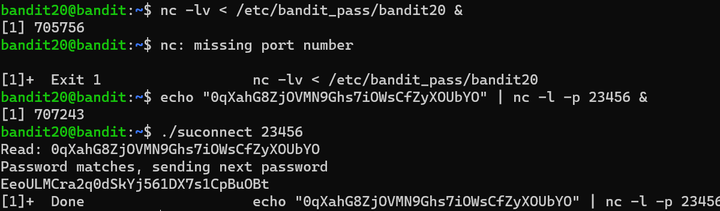
There is a setuid binary in the homedirectory that does the following: it makes a connection to localhost on the port you specify as a commandline argument. It then reads a line of text from the connection and compares it to the password in the previous level (bandit20). If the password is correct, it will transmit the password for the next level (bandit21).
第二十一关,根据题目提示,将二十关的密码发送至随机端口,随后执行setuid脚本。获得密码EeoULMCra2q0dSkYj561DX7s1CpBuOBt
Bandit Level 21 → Level 22
Level Goal
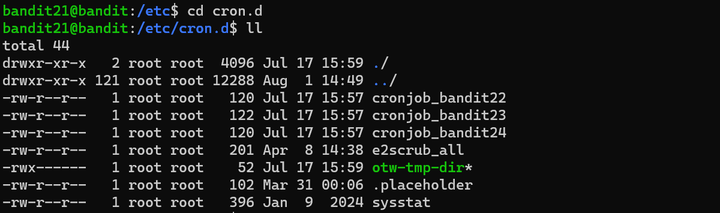
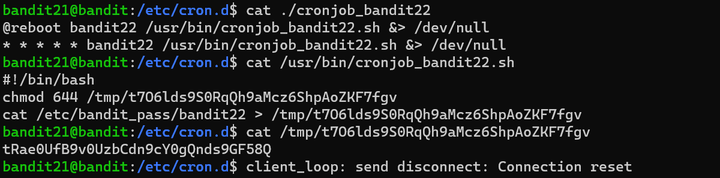
A program is running automatically at regular intervals from cron, the time-based job scheduler. Look in /etc/cron.d/ for the configuration and see what command is being executed.
第二十二关,题目已知存在一个正在运行的脚本定时运行,文件存储在/etc/cron.d/下。查看bandit22的定时任务的执行内容,即可发现脚本是将密码写入了tmp文件夹下的一个文件,查看文件。获得密码tRae0UfB9v0UzbCdn9cY0gQnds9GF58Q
Bandit Level 22 → Level 23
Level Goal
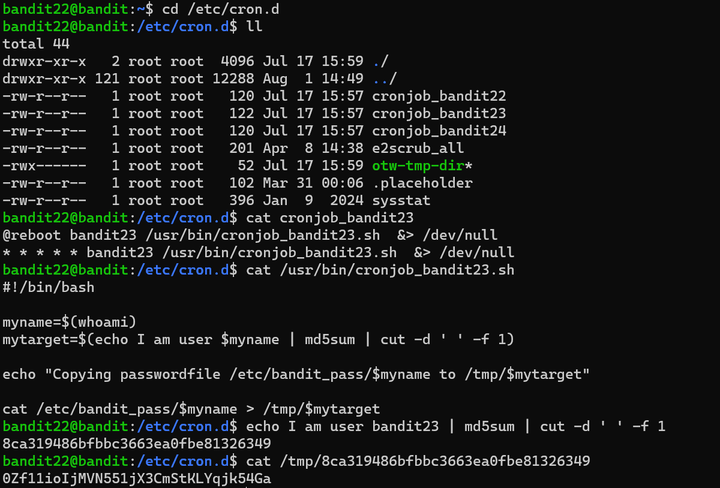
A program is running automatically at regular intervals from cron, the time-based job scheduler. Look in /etc/cron.d/ for the configuration and see what command is being executed.
第二十三关,在/etc/cron.d/cronjob_bandit23中查看到脚本程序为/usr/bin/cronjob_bandit23.sh,查看后,执行命令。获得密码0Zf11ioIjMVN551jX3CmStKLYqjk54Ga
Bandit Level 23 → Level 24
Level Goal
A program is running automatically at regular intervals from cron, the time-based job scheduler. Look in /etc/cron.d/ for the configuration and see what command is being executed.
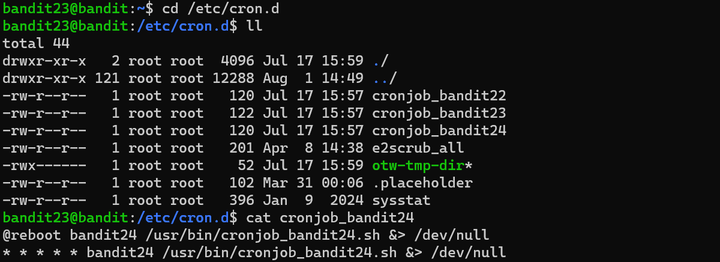
第二十四关,查看/etc/cron.d文件下的bandit24定时任务。定时任务脚本的主要目的是执行/var/spool/bandit24下的所有脚本,若脚本的拥有者为bandit23,在脚本执行后将其删除。
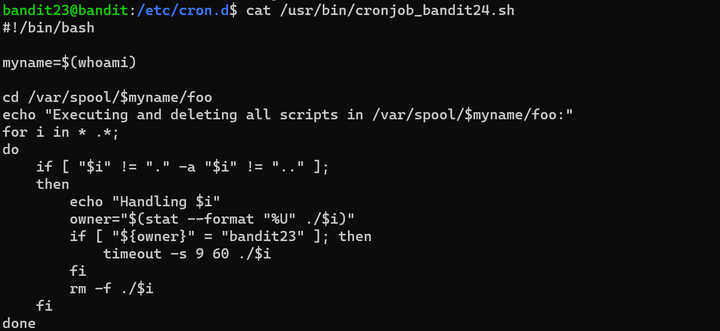
编写查看密码的脚本,将/etc/bandit_pass/bandit24中的密码重定向输出至/tmp/bandit24_passwd中。获得密码gb8KRRCsshuZXI0tUuR6ypOFjiZbf3G8


Bandit Level 24 → Level 25
Level Goal
A daemon is listening on port 30002 and will give you the password for bandit25 if given the password for bandit24 and a secret numeric 4-digit pincode. There is no way to retrieve the pincode except by going through all of the 10000 combinations, called brute-forcing.
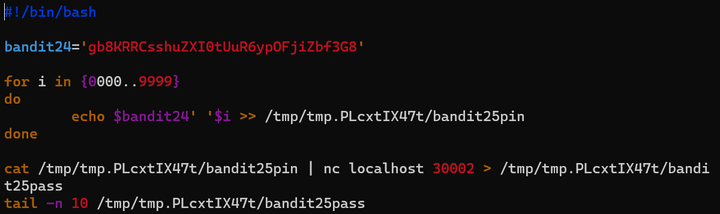
第二十五关,首先利用nc工具扫描30002端口,端口返回信息输入规则,由bandit24密码+一个四位的密码,两个密码输入时需要用一个space隔开。

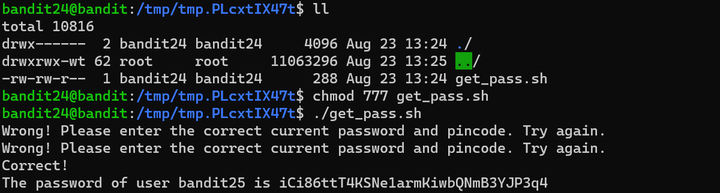
利用暴力破解,将bandit24密码+pincode的组合放入bandit25pin文件,将所有pincode挨个输入至端口30002,获得密码iCi86ttT4KSNe1armKiwbQNmB3YJP3q4
Bandit Level 25 → Level 26
Level Goal
Logging in to bandit26 from bandit25 should be fairly easy… The shell for user bandit26 is not /bin/bash, but something else. Find out what it is, how it works and how to break out of it.
第二十六关,题目提示bandit26用户的shell不是/bin/bash,需要在系统中探索。登录bandit25用户后,在home目录下发现私钥,尝试登录。提示连接被关闭
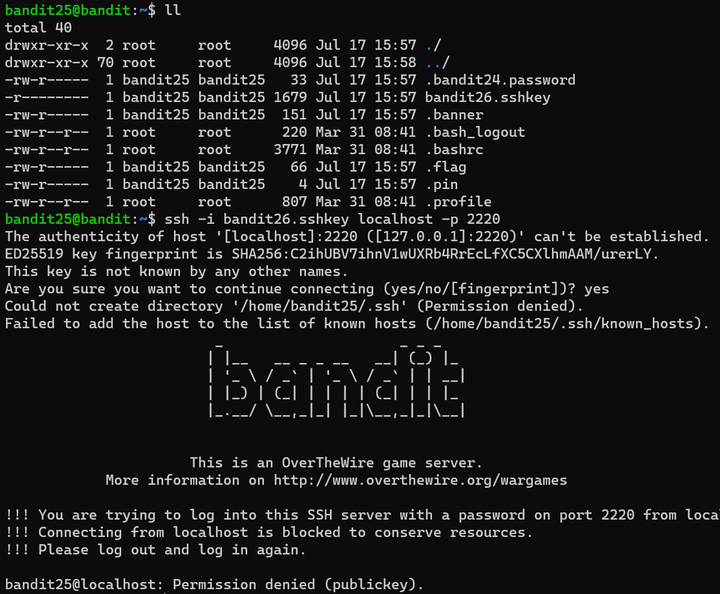
题目提示shell存在问题,先查看用户数据文件。用户数据文件一般存放在几个关键位置,这些文件不仅存储用户的基本信息,还涉及用户的配置、偏好设置以及个人文件。位置分别是/etc/passwd、/etc/shadow、/home/用户名、/etc/skel等。
/etc/passwd存储用户账号的基本信息,包括用户名、密码标志、用户ID(UID)、组ID(GID)、用户信息、家目录路径和默认shell。查看/etc/passwd,获得信息。
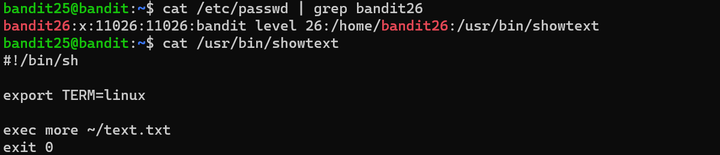
打开/usr/bin/showtext后,发现脚本执行了more命令后,执行exit0退出,这就是连接失败的原因。所以需要在more命令执行后停下。
more命令有特性,当显示的内容多于终端行数,需要进行手动翻页。将终端行数缩小,使用ssh命令连接。

显示 --More--(66%) 时,按v键使用vim编辑器,将shell设置为/bin/bash,然后执行:shell。得到一个可以输入命令的终端,查看bandit26密码文件。获得密码s0773xxkk0MXfdqOfPRVr9L3jJBUOgCZ


Bandit Level 26 → Level 27
Level Goal
Good job getting a shell! Now hurry and grab the password for bandit27!
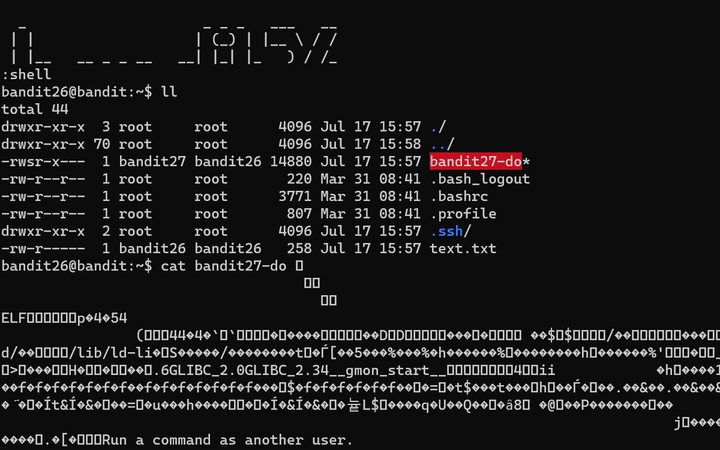
第二十七关,利用上一关学习到的手段,再次利用vim编辑器获得bandit26的shell。打开bandit27-do文件,发现文件乱码。
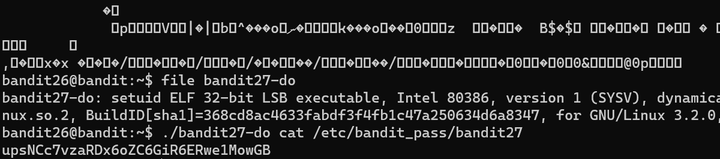
利用file命令查看bandit27-do文件的属性,发现其为setuid文件,可以利用该文件进行临时提权,查看bandit27的密码文件。获得密码upsNCc7vzaRDx6oZC6GiR6ERwe1MowGB
Bandit Level 27 → Level 28
Level Goal
There is a git repository at ssh://bandit27-git@localhost/home/bandit27-git/repo via the port 2220. The password for the user bandit27-git is the same as for the user bandit27.
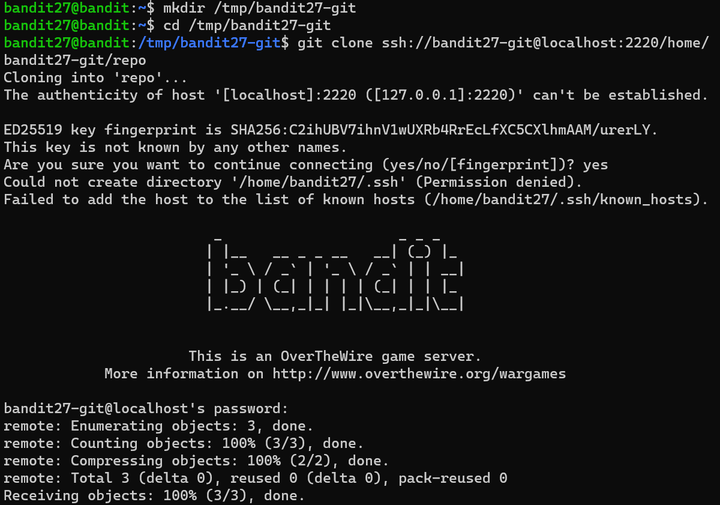
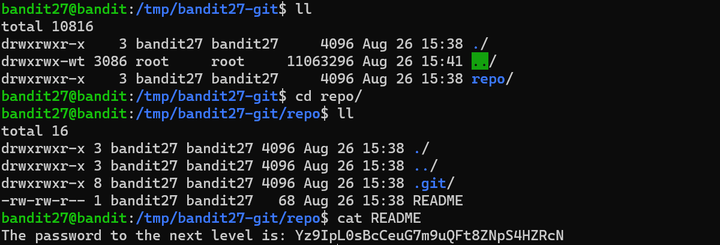
第二十八关,密码存放至git仓库,bandit27-git密码与用户bandit27密码相同。建立本地仓库后,利用git clone命令将远程仓库克隆至本地,查看README文件。获得密码Yz9IpL0sBcCeuG7m9uQFt8ZNpS4HZRcN
Bandit Level 28 → Level 29
Level Goal
There is a git repository at ssh://bandit28-git@localhost/home/bandit28-git/repo via the port 2220. The password for the user bandit28-git is the same as for the user bandit28.
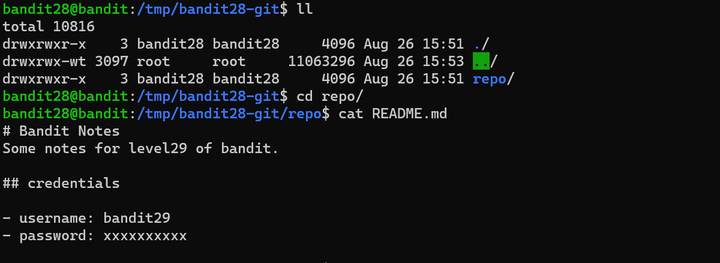
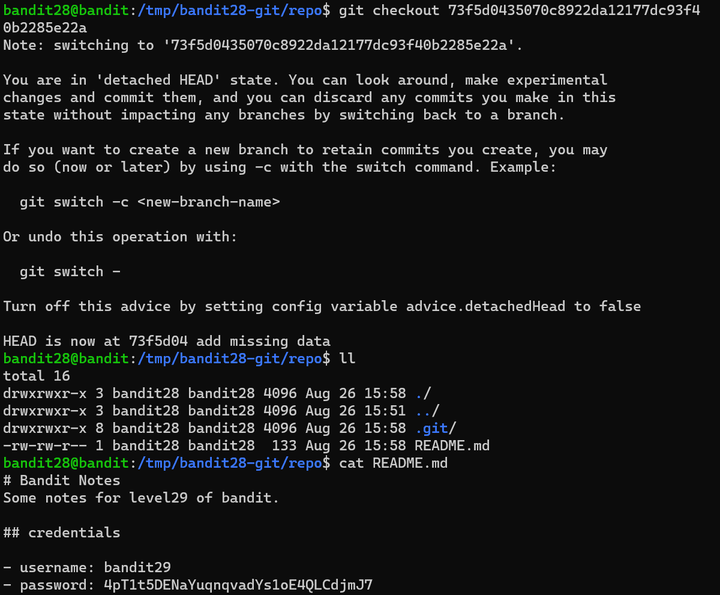
第二十九关,利用上一关的git知识,克隆远程仓库至本地,README文件中有关bandit28用户密码的部分被替换为了xxxxxxxx。查看git提交记录,发现提交记录中存在备注add missing data。
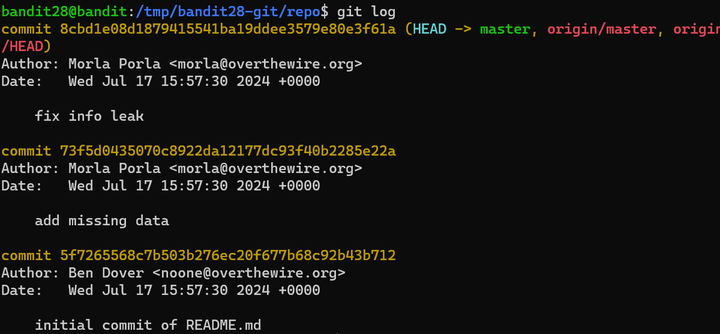
利用git checkout命令将仓库回退到上一次提交时,在73f5d0435070c8922da12177dc93f40b2285e22a的提交记录中,找到未更新的README文件并查看。获得密码4pT1t5DENaYuqnqvadYs1oE40LCdjmJ7
Bandit Level 29 → Level 30
Level Goal
There is a git repository at ssh://bandit29-git@localhost/home/bandit29-git/repo via the port 2220. The password for the user bandit29-git is the same as for the user bandit29.
第三十关,上一关中查看git记录的方法指定是没法用了,得寻找其他出路了。查看当前仓库的README文件后,密码并未出现,历史提交记录也并未发现痕迹。查看分支时,发现当前仓库存在四个分支,尝试切换其他分支。
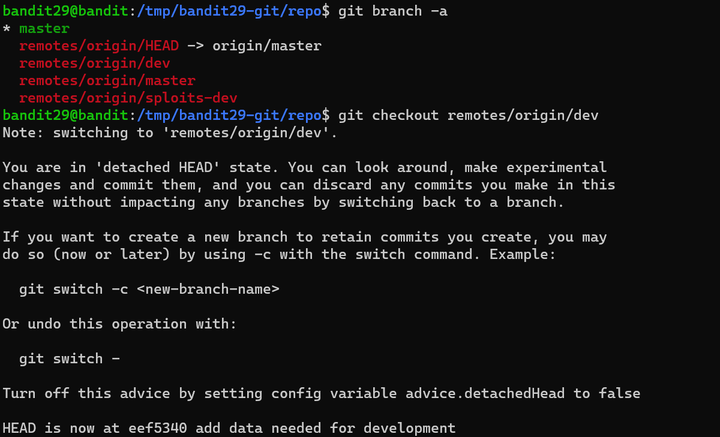
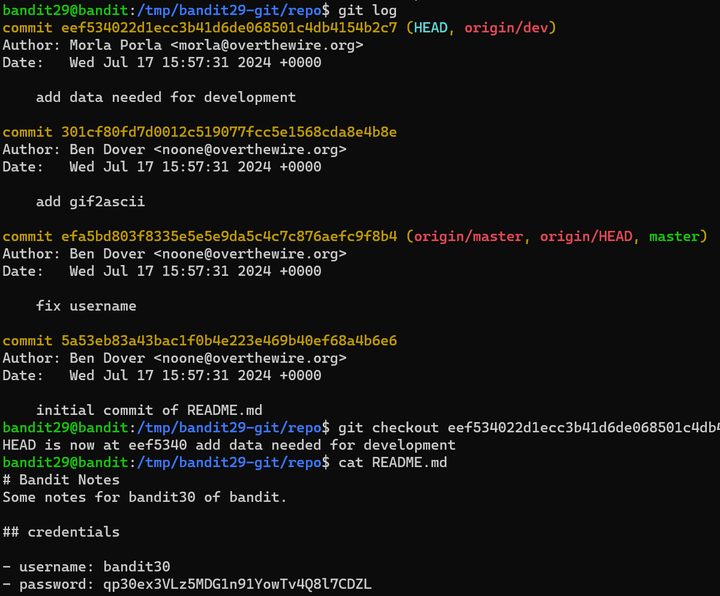
切换至dev分支,查看提交记录后发现当前eef534022d1ecc3b41d6de068501c4db4154b2c7提交记录的备注为增加了数据,查看README文件。获得密码qp30ex3VLz5MDG1n91YowTv4Q8l7CDZL
Bandit Level 30 → Level 31
Level Goal
There is a git repository at ssh://bandit30-git@localhost/home/bandit30-git/repo via the port 2220. The password for the user bandit30-git is the same as for the user bandit30.
第三十一关,前两关的方法均不能奏效,可以查看git标签。获得密码fb5S2xb7bRyFmAvQYQGEqsbhVyJqhnDy

Bandit Level 31 → Level 32
Level Goal
There is a git repository at ssh://bandit31-git@localhost/home/bandit31-git/repo via the port 2220. The password for the user bandit31-git is the same as for the user bandit31.
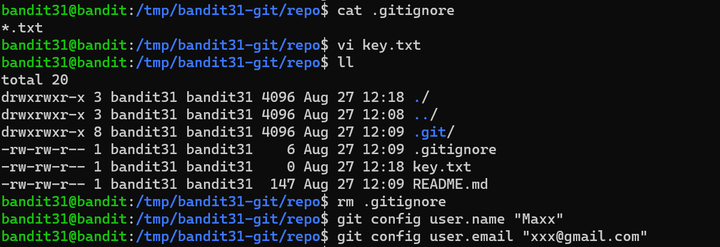
第三十二关,克隆到本地的仓库中有一份README文件,提示本关需要上传文件至远端仓库,文件名必须为key.txt,文件内容为May I come in?
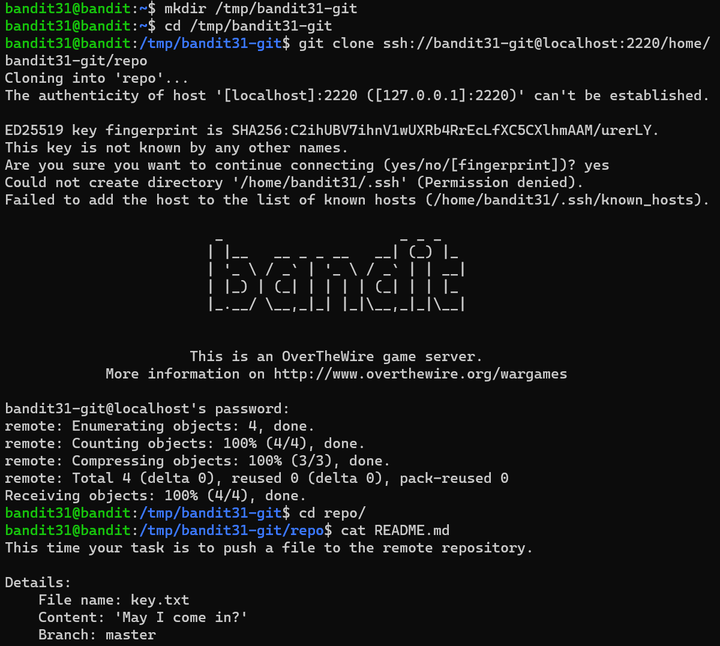
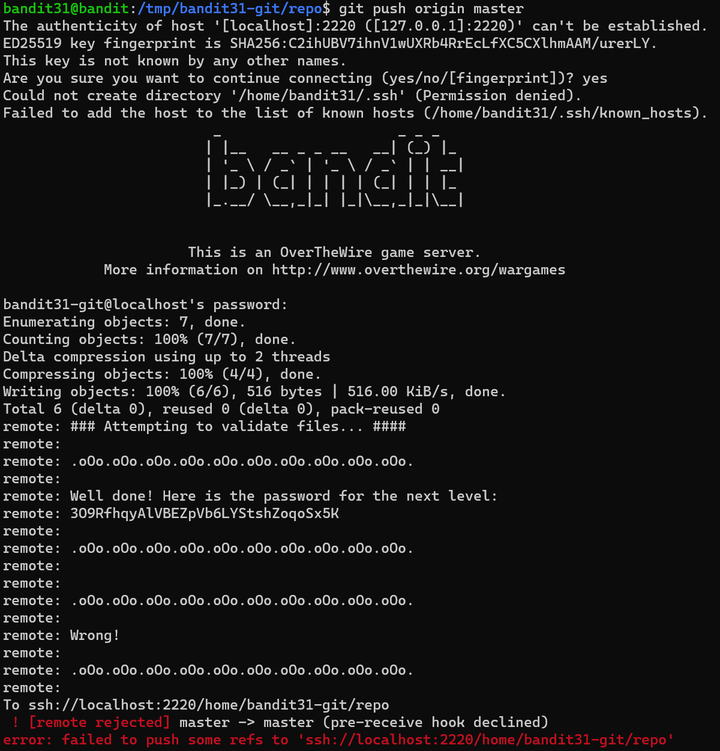
.gitignore文件中设置仓库自动忽略txt格式的文件,删掉.gitignore文件,将key.txt文件提交至远程仓库。获得密码3O9RfhqyAlVBEZpVb6LYStshZoqoSx5K

Bandit Level 32 → Level 33
Level Goal
After all this git stuff, it’s time for another escape. Good luck!
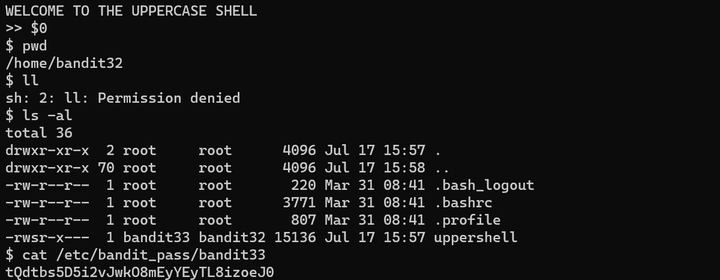
第三十三关,运行bash $0,这个命令会创建一个新的shell。获得密码tQdtbs5D5i2vJwkO8mEyYEyTL8izoeJ0

 浙公网安备 33010602011771号