C# 实现磁性窗口(附源码和程序)
实现并封装了磁性窗口类MagneticMagnager,实现磁性窗口仅仅需要调用一行代码:
MagneticMagnager test2 = new MagneticMagnager(this, fm2, MagneticPosition.Top);
插图:
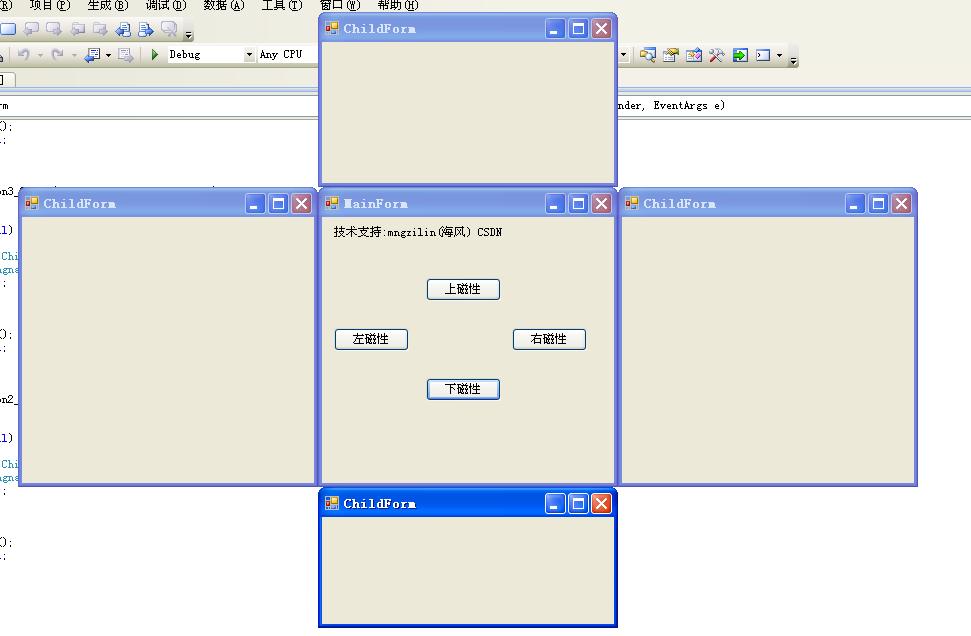
具体操作:
1.新建winform项目MagneticForm,并添加磁性窗口操作类MagneticMagnager:
using System;
using System.Drawing;

namespace System.Windows.Forms
{
    public class MagneticMagnager
    {
        MagneticPosition Pos;//位置属性
        Form MainForm, ChildForm;
        bool IsFirstPos;//是否第一次定位ChildForm子窗体
        public int step;//磁性子窗体ChildForm移动步长
        public Point LocationPt;//定位点
        delegate void LocationDel();//移动子窗体的委托
        public MagneticMagnager(Form _MainForm, Form _ChildForm, MagneticPosition _pos)
        {
            IsFirstPos = false;
            step = 20;
            MainForm = _MainForm;
            ChildForm = _ChildForm;
            Pos = _pos;
            MainForm.LocationChanged += new EventHandler(MainForm_LocationChanged);
            ChildForm.LocationChanged += new EventHandler(ChildForm_LocationChanged);
            MainForm.SizeChanged += new EventHandler(MainForm_SizeChanged);
            ChildForm.SizeChanged += new EventHandler(ChildForm_SizeChanged);
            ChildForm.Load+=new EventHandler(ChildForm_Load);
            MainForm.Load+=new EventHandler(MainForm_Load);
        }
        void ChildForm_Load(object sender, EventArgs e)
        {
            GetLocation();
        }
        void MainForm_Load(object sender, EventArgs e)
        {
            GetLocation();
        }
        void MainForm_LocationChanged(object sender, EventArgs e)
        {
            GetLocation();
        }
        void MainForm_SizeChanged(object sender, EventArgs e)
        {
            GetLocation();
        }
        void ChildForm_SizeChanged(object sender, EventArgs e)
        {
            GetLocation();
        }
        void GetLocation()//定位子窗体
        {
            if (ChildForm == null)
                return;
            if (Pos == MagneticPosition.Left)
                LocationPt = new Point(MainForm.Left - ChildForm.Width, MainForm.Top);
            else if (Pos == MagneticPosition.Top)
                LocationPt = new Point(MainForm.Left, MainForm.Top - ChildForm.Height);
            else if (Pos == MagneticPosition.Right)
                LocationPt = new Point(MainForm.Right, MainForm.Top);
            else if (Pos == MagneticPosition.Bottom)
                LocationPt = new Point(MainForm.Left, MainForm.Bottom);
            ChildForm.Location = LocationPt;
        }
        void ChildForm_LocationChanged(object sender, EventArgs e)//当窗体位置移动后
        {
            if (!IsFirstPos)
            {
                IsFirstPos = true;
                return;
            }
            LocationDel del = new LocationDel(OnMove);//委托
            MainForm.BeginInvoke(del);//调用
        }

        void OnMove()//移动子窗体
        {
            if (ChildForm.Left > LocationPt.X)
                if (ChildForm.Left - LocationPt.X > step)
                    ChildForm.Left -= step;
                else
                    ChildForm.Left = LocationPt.X;
            else if (ChildForm.Left < LocationPt.X)
                if (ChildForm.Left - LocationPt.X < -step)
                    ChildForm.Left += step;
                else
                    ChildForm.Left = LocationPt.X;
            if (ChildForm.Top > LocationPt.Y)
                if (ChildForm.Top - LocationPt.Y > step)
                    ChildForm.Top -= step;
                else
                    ChildForm.Top = LocationPt.Y;

            else if (ChildForm.Top < LocationPt.Y)
                if (ChildForm.Top - LocationPt.Y < -step)
                    ChildForm.Top += step;
                else
                    ChildForm.Top = LocationPt.Y;
        }
    }
    public enum MagneticPosition//磁性窗体的位置属性
    {
        Left = 0,
        Top = 1,
        Right = 2,
        Bottom = 3
    }
}
2.添加MainForm主窗体,打开Program.cs文件,修改为如下 :
        static void Main()
        {
            Application.EnableVisualStyles();
            Application.SetCompatibleTextRenderingDefault(false);
            Application.Run(new MainForm());
        }
3.添加ChildForm子窗体,不用写任何代码,当然实际中根据你自己的设计决定
4.在MainForm中添加四个button,分别设置text属性为:"左磁性" "上磁性" "右磁性" 下磁性" ,并分别添加按钮点击事件,具体代码如下:
using System;
using System.Collections.Generic;
using System.ComponentModel;
using System.Data;
using System.Drawing;
using System.Linq;
using System.Text;
using System.Windows.Forms;

namespace WindowsFormsApplication1
{
    public partial class MainForm : Form
    {
        public MainForm()
        {
            InitializeComponent();
        }
        ChildForm fm1, fm2, fm3, fm4;
        private void button1_Click(object sender, EventArgs e)
        {
            //左磁性
            if (fm1 == null)
            {
                fm1 = new ChildForm();
                MagneticMagnager test1 = new MagneticMagnager(this, fm1, MagneticPosition.Left);
                fm1.Show();
            }
            else
            {
                fm1.Close();
                fm1 = null;
            }
        }

        private void button4_Click(object sender, EventArgs e)
        {
            //上磁性
            if (fm2 == null)
            {
                fm2 = new ChildForm();
                MagneticMagnager test2 = new MagneticMagnager(this, fm2, MagneticPosition.Top);
                fm2.Show();
            }
            else
            {
                fm2.Close();
                fm2 = null;
            }
        }

        private void button3_Click(object sender, EventArgs e)
        {
            //右磁性
            if (fm3 == null)
            {
                fm3 = new ChildForm();
                MagneticMagnager test3 = new MagneticMagnager(this, fm3, MagneticPosition.Right);
                fm3.Show();
            }
            else
            {
                fm3.Close();
                fm3 = null;
            }
        }

        private void button2_Click(object sender, EventArgs e)
        {
            //下磁性
            if (fm4 == null)
            {
                fm4 = new ChildForm();
                MagneticMagnager test4 = new MagneticMagnager(this, fm4, MagneticPosition.Bottom);
                fm4.Show();
            }
            else
            {
                fm4.Close();
                fm4 = null;
            }
        }
    }
}

 浙公网安备 33010602011771号