
用户授权并获取经纬度
 1   getSet:function (e) {
 2     var that = this;
 3     wx.getSetting({
 4       success (res) {
 5         var Auth = res.authSetting;
 6         if(Auth['scope.userLocation']){
 7           that.getLocation()
 8         }else if(Auth['scope.userLocation'] === undefined){
 9           // 用户首次登录且未授权,需要调取用户授权地理位置弹框授权
10           that.getLocation();  // 开启位置信息会自动检测是否开启授权地理位置的弹框,这块就不需要wx.authorize()开启授权弹框了
11           // wx.authorize({
12           //   scope: 'scope.userLocation',
13           //   success:function(resA) {
14           //     console.log("授权成功",resA);
15           //   },
16           //   fail:function(errA) {
17           //     console.log("授权失败",errA);
18           //   }
19           // })
20         }else if(Auth['scope.userLocation'] === false){
21           // 用户已经开启位置信息,但未授权
22           wx.showModal({
23             title: '操作提示',
24             content: '当前操作需获取您的地理位置,请确认授权,否则该功能将无法使用!',
25             success: (tip) => {
26               if (tip.confirm) {
27                 wx.openSetting({
28                   success: (data) => {
29                     if (data.authSetting["scope.userLocation"] === true) {
30                       that.getLocation()
31                     } else {
32                       wx.showToast({
33                         title: '授权失败',
34                         icon: 'error',
35                         duration: 1000
36                       })
37                     }
38                   },
39                   fail: () => {},
40                   complete: () => {}
41                 });
42               }else{
43                 wx.showToast({
44                   title: '取消授权',
45                   icon:'none',
46                   duration:3000
47                 })
48               }
49             }
50           })
51         }else{
52           wx.showToast({
53             title: '授权失败',
54             icon:'error',
55             duration:3000
56           })
57         }
58       },
59       fail:function (err) {
60         console.log(err);
61       }
62   })
63   },
64   getLocation:function () {
65     wx.showLoading({
66       title: '获取位置',
67     })
68     wx.startLocationUpdate({
69       success: (res) => {
70         wx.onLocationChange((result) => {
71           wx.hideLoading();
72           console.log('获取获取经纬度',result)
73           wx.showModal({
74             content: 'latitude:'+result.latitude+'\nlongitude:'+result.longitude,
75             showCancel:false
76           })
77           wx.offLocationChange(); //关闭实时定位
78           wx.stopLocationUpdate(); //关闭监听
79         })
80       },
81       fail:(err)=>{
82         wx.showToast({
83           title: '已拒绝位置授权',
84           icon:'error',
85           duration:3000
86         })
87       }
88     })
89   }
<button bindtap="getSet">用户点击判断是否授权</button>
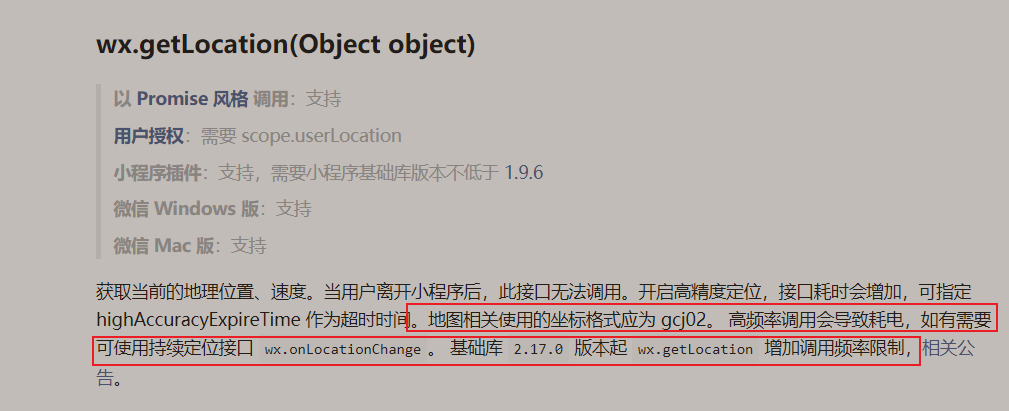
获取经纬度定位之前用的wx.getLocation(Object object) 现在官方有了限制,就换了实时定位。
boolean scope.userInfo
是否授权用户信息
对应接口->wx.getUserInfo
boolean scope.userLocation
是否授权地理位置
对应接口->wx.getLocation
boolean scope.werun
是否授权微信运动步数
对应接口->wx.getWeRunData
boolean scope.writePhotosAlbum
是否授权保存到相册
对应接口->wx.saveImageToPhotosAlbum

 浙公网安备 33010602011771号