软件开发第二次作业
[实验目的]
1.掌握软件开发的基本流程
2.掌握常用的软件开发方式和工具。
[实验内容]
1.设计一个包含登录界面的计算器软件,该软件可以实现第一次作业中的全部功能,同时可以保存用户的历史计算记录
一.设计一个登陆页面
当设计一个登录页面时,一般需要考虑以下几个方面:
1. 布局与视觉设计:登录页面的布局应该简洁明了,易于导航。使用清晰可读的字体和颜色对比,确保登录表单易于找到和填写。
2. 登录表单:登录表单是登录页面的核心部分,需要明确标识其用途(如“登录”或“登录账户”)。提供清晰的输入字段,如用户名和密码,并使用适当的图标或标签指示每个输入字段的用途。考虑添加密码显示/隐藏选项以提高安全性。同时,添加“记住我”或“自动登录”选项,以便用户可以方便地登录。提供明确的“登录”按钮,使其突出显示。
3. 错误消息:当用户输入无效的凭据时,显示清晰且易于理解的错误消息。提供具体的错误信息,如“用户名或密码错误”,以帮助用户解决问题。
4. 安全考虑:确保登录页面使用安全的连接(HTTPS)。不要在登录页面上存储或显示敏感信息。考虑添加验证码或其他安全措施来防止恶意攻击。
5. 社交登录选项:如果支持,提供社交媒体平台的登录选项,如 Facebook、Google 或 Twitter。明确说明社交登录的好处和安全性。
6. 帮助与支持:提供明确的帮助链接或联系信息,以帮助用户解决登录问题。
7. 移动响应性:确保登录页面在不同的设备和屏幕尺寸上具有良好的响应性和可读性。
二.程序流程图
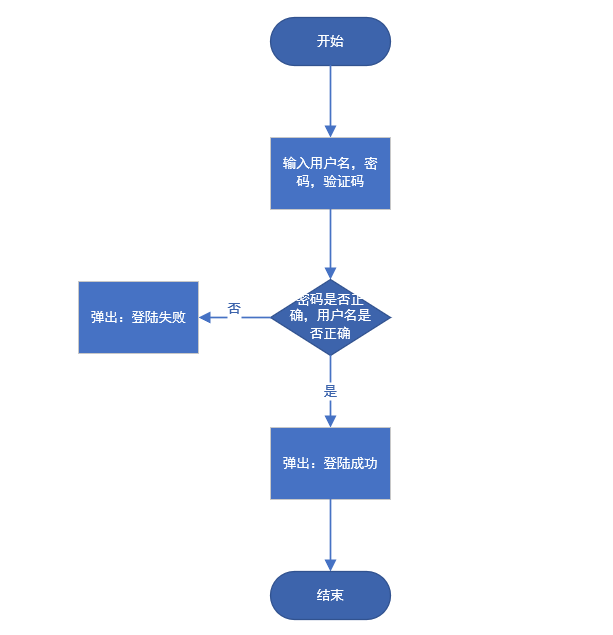
三.登录页面代码
<!DOCTYPE html>
<html lang="zh-CN">
    <!-- <html lang="zh-CN"> 向搜索引擎表示该页面是html语言,并且语言为中文网站,其"lang"的意思就是“language”,语言的意思,而“zh”即表示中文 -->
    <head>
        <meta charset="utf-8">
		<!--声明文档兼容模式,表示使用IE浏览器的最新模式,告诉IE浏览器,无论是否用DTD声明文档标准,IE8/9都会以IE8引擎来渲染页面。-->
		<meta http-equiv="X-UA-Compatible" content="IE=edge,chrome=1">
		<!--设置视口的宽度(值为设备的理想宽度),页面初始缩放值<理想宽度/可见宽度>-->
		<meta name="viewport" content="width=device-width, initial-scale=1">
		<!-- 上述3个meta标签*必须*放在最前面,任何其他内容都*必须*跟随其后! -->
		<title>登陆</title>
        <!-- 引入jQuery核心js文件 -->
		<script src="js/jquery-1.11.3.min.js"></script>
				<!-- 引入BootStrap核心js文件 -->
		<script src="js/bootstrap.min.js"></script>

		<!-- 引入Bootstrap核心样式文件 -->
		<link href="css/bootstrap.css" rel="stylesheet">
    <style type="text/css">
      body{
        background: url("img/background.jpg") no-repeat center center fixed;
                    /*兼容浏览器版本*/
                    -webkit-background-size: cover;
                    -o-background-size: cover;
                    background-size: cover;
      } /*背景图*/

      .test {
        margin-top: 100px;
      }
    </style>
	</head>
	<body>

      <div class="row" >
        <div class="col-md-4"></div>
        <div class="col-md-4"   style="background-color: #aaaaaa; opacity:0.8;margin-top: 250px;" >
          <h1 class="text-center"   style="padding-top:50px;  " >用户登录</h1>
          <form class="form-horizontal " role="form"  action="/WebLog/login" method="post"  >
            <div class="form-group  ">
              <label for="" class="col-sm-2 control-label">账号</label>
              <div class="col-sm-10">
                <input type="text" class="form-control" name="username" id=""      placeholder="请输入账号">
              </div>
            </div>
            <div class="form-group">
              <label for="lastname" class="col-sm-2 control-label">密码</label>
              <div class="col-sm-10">
                <input type="password" class="form-control" id="lastname" name="password" placeholder="请输入密码">
              </div>
            </div>
            <div class="form-group">
              <div class="col-sm-offset-2 col-sm-10">
                <div class="checkbox">
                  <label>
                    <input type="checkbox">记住密码
                  </label>
                  <label class="col-sm-offset-1"  >
                    <input type="checkbox">自动登录
                  </label>
                  <a  class="col-sm-offset-1" href="">忘记密码</a>
                </div>
              </div>
            </div>
            <div class="form-group">
              <div class="col-sm-offset-2 col-sm-10">
                <button type="submit" class="btn btn-default">登录</button>
                <a type="submit" class="btn btn-default col-sm-offset-4 " href="register.jsp" >注册</a>
              </div>

            </div>
          </form>
        </div>
        <div class="col-md-4"></div>

    </div>
  </body>
</html>
四.实现如下
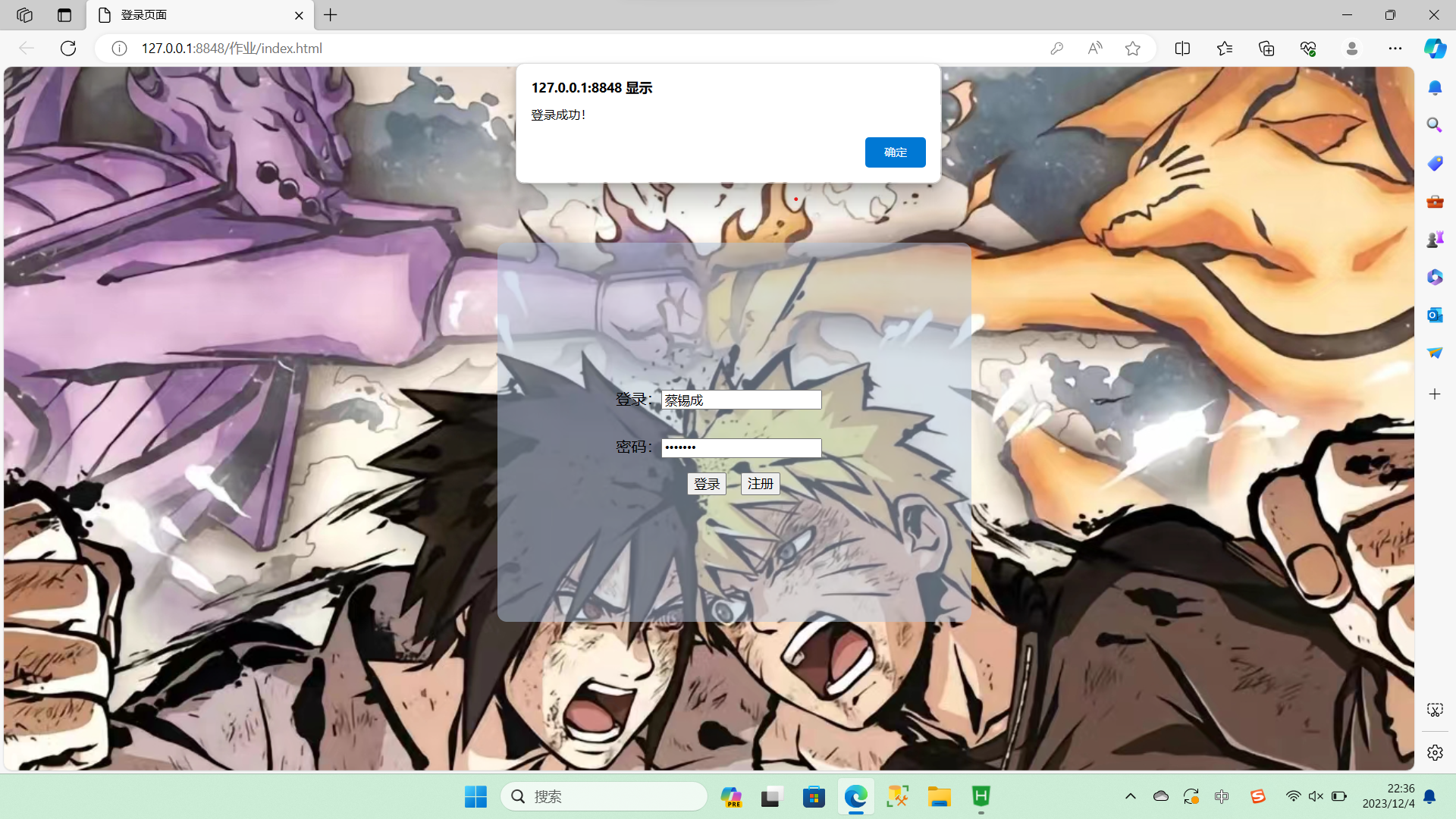
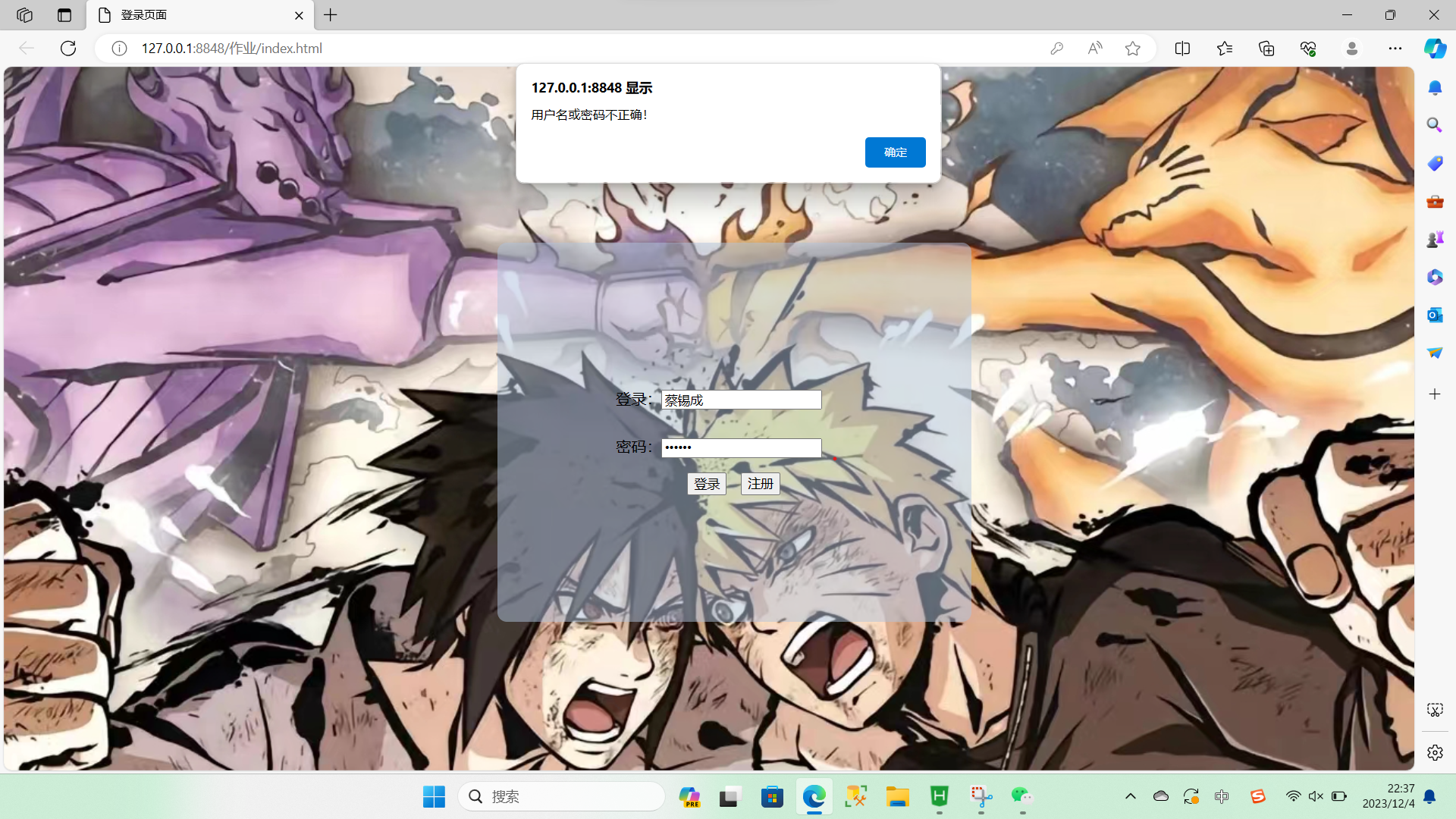
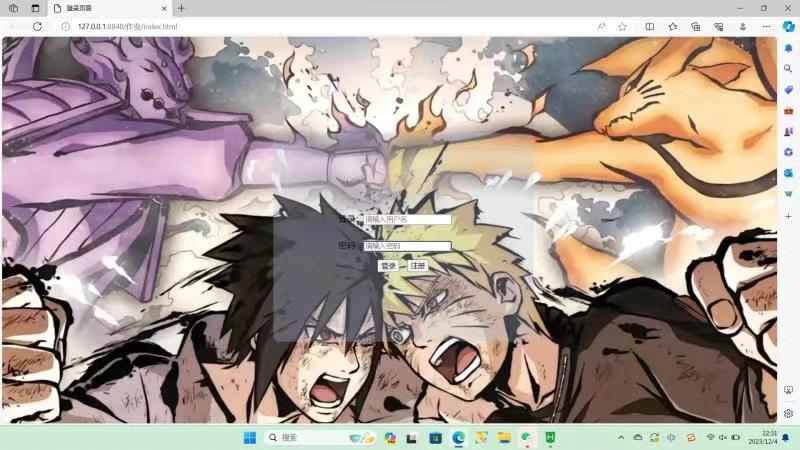
五.用java写计算器(包括保存记录到文件和计算行列式功能)
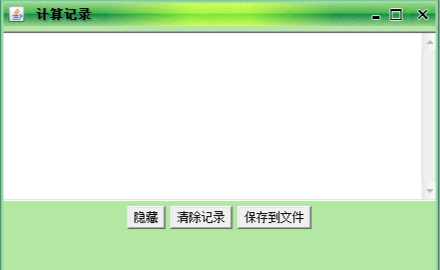
主要有两个界面,主界面是A类,保存计算记录是B类
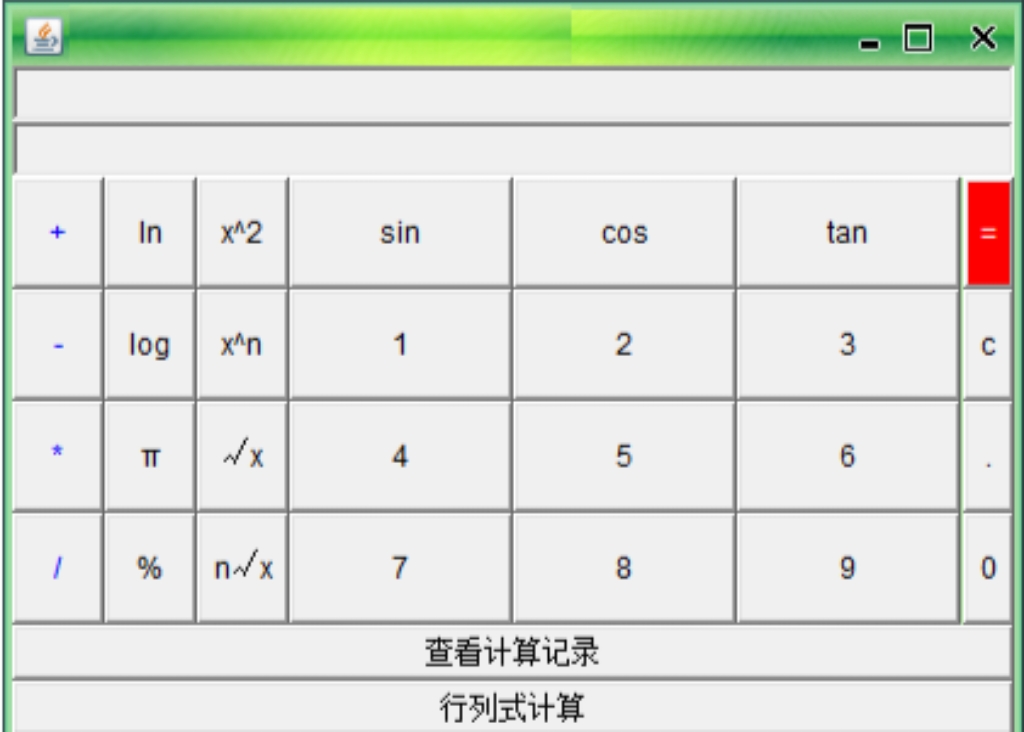
A类代码及界面图(主界面)
package yuxiaoye;

import java.awt.*;

import yuxiaoye.B;
import yuxiaoye.C;

import java.awt.Button;
import java.awt.Color;
import java.awt.GridLayout;
import java.awt.Panel;
import java.awt.TextField;
import  java.awt.event.*;
import java.math.BigDecimal;

import javax.swing.*;

import org.jvnet.substance.SubstanceButtonUI;
import org.jvnet.substance.SubstanceLookAndFeel;
import org.jvnet.substance.border.StandardBorderPainter;
import org.jvnet.substance.button.BaseButtonShaper;
import org.jvnet.substance.button.ClassicButtonShaper;
import org.jvnet.substance.button.StandardButtonShaper;
import org.jvnet.substance.button.SubstanceButtonShaper;
import org.jvnet.substance.painter.StandardGradientPainter;
import org.jvnet.substance.skin.GreenMagicSkin;
import org.jvnet.substance.theme.SubstanceOliveTheme;
import org.jvnet.substance.title.Glass3DTitlePainter;
import org.jvnet.substance.watermark.SubstanceBinaryWatermark;
import org.jvnet.substance.watermark.SubstanceLatchWatermark;
@SuppressWarnings("serial")
public class A extends JFrame implements ActionListener{

	private Panel p1=new Panel();
	private Panel p2=new Panel();
	private Panel p3=new Panel();
	private Panel p4=new Panel();
	private Panel p5=new Panel();

	private TextField t1;
	private TextField t2;
	private Label l1;
	StringBuffer str;
	double x,y,z,m,d;
   static String c;
	int h,i;
	private Button b1,b2,b3,b4,b5,b6,b7,b8,b9;
	private Button a1,a2,a3,a4,a5;
	private Button c1,c2,c3,c4;
	private Button d1,d2,d3;
	private Button e1,e2,e3,e4,e5,e6,e7;
	private Button Y,X;

	public A(){
		super("你的姓名 你的学号");
		java.awt.Container c=getContentPane();
		t1=new TextField(34);
		t1.setEditable(false);
		p2.add(t1);
		t2=new TextField(34);
		t2.setEditable(false);
		p2.add(t2);
		l1=new Label("欢迎使用简易计算器!",Label.CENTER);
		l1.setForeground(Color.blue);
		//l1.setBackground(Color.blue);


		Y=new Button("查看计算记录");
		X=new Button("行列式计算");
		d1=new Button("sin");
	    d2=new Button("cos");
	    d3=new Button("tan");

			b1=new Button("1");
		    b2=new Button("2");
		    b3=new Button("3");
		    b4=new Button("4");
		    b5=new Button("5");
		    b6=new Button("6");
		    b7=new Button("7");
		    b8=new Button("8");
		    b9=new Button("9");

	    a1=new Button("+");
	    a2=new Button("-");
	    a3=new Button("*");
	    a4=new Button("/");
	    a5=new Button("%");
	    c1=new Button("c");
	    c2=new Button("=");
	    c3=new Button(".");
	    c4=new Button("0");
	    e1=new Button("x^2");
	    e2=new Button("x^n");
	    e3=new Button("√x");
	    e4=new Button("n√x");
	    e5=new Button("ln");
	    e6=new Button("log");
	    e7=new Button("π");


	    p1.add(d1);
	    p1.add(d2);
	    p1.add(d3);
	      p1.add(b1);
			p1.add(b2);
		    p1.add(b3);
		    p1.add(b4);
		    p1.add(b5);
		    p1.add(b6);
		    p1.add(b7);
		    p1.add(b8);
		    p1.add(b9);
	    p3.add(a1);
	    p3.add(e5);
	    p3.add(e1);
	    p3.add(a2);
	    p3.add(e6);
	    p3.add(e2);
	    p3.add(a3);
	    p3.add(e7);
	    p3.add(e3);
	    p3.add(a4);
	    p3.add(a5);
	    p4.add(c2);
	    p4.add(c1);
	    p4.add(c3);
	    p4.add(c4);
	    p5.add(Y);
	    p5.add(X);
	    p3.add(e4);
	    p5.add(l1);

		p1.setLayout(new GridLayout(4,3));
		p2.setLayout(new GridLayout(2,1));
	    p3.setLayout(new GridLayout(4,3));
		p4.setLayout(new GridLayout(4,1));
		p5.setLayout(new GridLayout(3,1));

		c.add("Center",p1);
		c.add("North",p2);
		c.add("West",p3);
		c.add("East",p4);
		c.add("South",p5);

		setSize(420,330);
		c2.setForeground(Color.white);
	    c2.setBackground(Color.red);
	    a1.setForeground(Color.blue);
	    a2.setForeground(Color.blue);
	    a3.setForeground(Color.blue);
	    a4.setForeground(Color.blue);
	    //a5.setForeground(Color.blue);
		setVisible(true);


		b1.addActionListener(this);
		b2.addActionListener(this);
		b3.addActionListener(this);
		b4.addActionListener(this);
		b5.addActionListener(this);
		b6.addActionListener(this);
		b7.addActionListener(this);
		b8.addActionListener(this);
		b9.addActionListener(this);
		a1.addActionListener(this);
		a2.addActionListener(this);
		a3.addActionListener(this);
		a4.addActionListener(this);
		a5.addActionListener(this);
		c1.addActionListener(this);
		c2.addActionListener(this);
		c3.addActionListener(this);
		c4.addActionListener(this);
		e1.addActionListener(this);
		e2.addActionListener(this);
		e3.addActionListener(this);
		e4.addActionListener(this);
		e5.addActionListener(this);
		e6.addActionListener(this);
		e7.addActionListener(this);


	    d1.addActionListener(this);
		d2.addActionListener(this);
		d3.addActionListener(this);
		Y.addActionListener(this);
		X.addActionListener(this);
		str=new StringBuffer();


	}

	public void B()
	{BigDecimal b=new BigDecimal(x);
	double f1=b.setScale(2,BigDecimal.ROUND_HALF_UP).doubleValue();
	x=f1;}


	public static void main(String[] args) {


		 // 装载可选择的主题
		        try {
	            //设置外观
		        	UIManager.setLookAndFeel(new SubstanceLookAndFeel());
		            JFrame.setDefaultLookAndFeelDecorated(true);
		         //设置主题   .边框
		           SubstanceLookAndFeel.setCurrentTheme(new SubstanceOliveTheme());
		            //设置按钮外观
	        //  SubstanceLookAndFeel.setCurrentButtonShaper((SubstanceButtonShaper) new SubstanceButtonUI());
		            //设置水印
		            //SubstanceLookAndFeel.setCurrentWatermark(new SubstanceLatchWatermark());
		            //设置边框
		            SubstanceLookAndFeel.setCurrentBorderPainter(new StandardBorderPainter());
		            //设置渐变渲染
	          //SubstanceLookAndFeel.setCurrentGradientPainter(new StandardGradientPainter());
		           //设置标题
		            SubstanceLookAndFeel.setCurrentTitlePainter(new Glass3DTitlePainter());
		            //皮肤
		           SubstanceLookAndFeel.setSkin(new GreenMagicSkin());
		        } catch (Exception e) {
		            System.out.println(e.getMessage());
	        }


		@SuppressWarnings("unused")
		A a=new A();

	}


	@Override
	public void actionPerformed(ActionEvent e) {
		// TODO Auto-generated method stub
		if(e.getSource()==b1){

			t1.setText(t1.getText()+"1");
			x=Double.parseDouble(t1.getText());
		}

		else if
		(e.getSource()==b2){

			t1.setText(t1.getText()+"2");
			x=Double.parseDouble(t1.getText());
		}
		else if
		(e.getSource()==b3){

			t1.setText(t1.getText()+"3");
			x=Double.parseDouble(t1.getText());
		}
		else if
		(e.getSource()==b4){

			t1.setText(t1.getText()+"4");
			x=Double.parseDouble(t1.getText());
		}
		else if
		(e.getSource()==b5){

			t1.setText(t1.getText()+"5");
			x=Double.parseDouble(t1.getText());
		}
		else if
		(e.getSource()==b6){

			t1.setText(t1.getText()+"6");
			x=Double.parseDouble(t1.getText());
		}
		else if
		(e.getSource()==b7){

			t1.setText(t1.getText()+"7");
			x=Double.parseDouble(t1.getText());
		}
		else if
		(e.getSource()==b8){

			t1.setText(t1.getText()+"8");
			x=Double.parseDouble(t1.getText());
		}
		else if
		(e.getSource()==b9){

			t1.setText(t1.getText()+"9");
			 x=Double.parseDouble(t1.getText());
		}
		else if
		(e.getSource()==c4){
			t1.setText(t1.getText()+"0");
			x=Double.parseDouble(t1.getText());
		}
		else if
		(e.getSource()==c3){

			t1.setText(t1.getText().trim()+".");

		}else if
		(e.getSource()==a5){
			t1.setText(t1.getText());
			 x=Double.parseDouble(t1.getText());
		}
		else if
		(e.getSource()==d1){
			t2.setText("sin");
			// x=Double.parseDouble(t1.getText());
			h=5;
		}
		else if
		(e.getSource()==d2){
			t2.setText("cos");
			// x=Double.parseDouble(t1.getText());

			h=6;
		}
		else if
		(e.getSource()==d3){
			t2.setText("tan");
			// x=Double.parseDouble(t1.getText());
			h=7;
		}
		 if
		(e.getSource()==a1){
			t1.setText("");
			y=x;
			t2.setText(y+"+");//加号
			h=0;
		}
		 if
			(e.getSource()==a2){
			          y=x;
				t1.setText("");
				t2.setText(y+"-");                        //减号
				h=1;
				}
		 if
			(e.getSource()==a3){
				t1.setText("");
				y=x;
				t2.setText(y+"*");   //乘号
				h=2;
			}
			 if
				(e.getSource()==a4){
					t1.setText("");
					y=x;
					t2.setText(y+"/");
				//除号

					h=3;}
			 if
				(e.getSource()==a5){
					t1.setText("");
					t2.setText(x+"%"+"");
				//百分号

					h=4;}
			 if
				(e.getSource()==e1){
					t1.setText("");
					t2.setText(x+"^2"+"");
				//平方

					h=8;}
			 if
				(e.getSource()==e2){
					t1.setText("");
					y=x;
					t2.setText(y+"^y");
				//n次方

					h=9;}
			 if
				(e.getSource()==e3){
					t1.setText(""+x);
					t2.setText("√"+x);
				//平方根

					h=10;}
			 if
				(e.getSource()==e4){
				 y=x;
					t1.setText("");
					t2.setText("y√"+y);
				//开n次根号

					h=11;}
			 if
				(e.getSource()==e5){
					t1.setText("");
					t2.setText("ln"+x);
				//求ln
					h=12;}
			 if
				(e.getSource()==e6){
				 y=x;
					t1.setText("");
					t2.setText("log"+x+"请输入对数");
				//求log
					h=13;}
			 if
				(e.getSource()==e7){
				 x=Math.PI;
				 B();
				 t1.setText(""+x);

			 }
			 if
				(e.getSource()==Y){

             B bb=new B();                                               //查看计算记录
		 if
			(e.getSource()==c1){
			 str.setLength(0);

				t1.setText("");
	             t2.setText(""); //清零
	             str.setLength(0);
			}
		 if
			(e.getSource()==c2){
				if(h==0){
					t2.setText(y+"+"+x+"=");
					z=x+y;
					x=z;
					t1.setText(x+"");                       //等号
				}
				if(h==1){
					t2.setText(y+"-"+x+"=");
					z=y-x;
					x=z;
					B();
					t1.setText(x+"");
				}
				if(h==2){
					t2.setText(y+"*"+x+"=");
					z=x*y;
					x=z;
					B();
					t1.setText(x+"");
				}
				if(h==3){
					t2.setText(y+"/"+x+"=");
					z=y/x;
					x=z;
					B();
					t1.setText(x+"");
				}
				if(h==4){
					m=x;
					z=x*0.01;
					x=z;
					t1.setText(x+"");

					t2.setText(m+"%"+"=");
				}
				if(h==5){
					m=x;
					z=Math.sin(x);
					x=z;

					t1.setText(""+x);
					t2.setText("sin"+m+"=");
				}
                if(h==6){
                	m=x;
					z=Math.cos(x);
					x=z;

					t1.setText(""+x);
					t2.setText("cos"+m+"=");
				}
               if(h==7){
					m=x;
					z=Math.tan(x);
					x=z;

					t1.setText(""+x);
					t2.setText("tan"+m+"=");
				}
               if(h==8){
					m=x;
					z=x*x;
					x=z;

					t1.setText(x+"");

					t2.setText(m+"^2"+"=");
				}
               if(h==9){
            	   m=y;
            	   d=x;
					for(i=1;i<x;i++){

						y=y*m;
					}
					z=y;
					x=y;
					B();
					t1.setText(""+x);
					t2.setText(m+"^"+d+"=");
				}
               if(h==10){
					m=x;
					y=Math.sqrt(x);
					x=y;
					//B();
					t1.setText(""+x);
					t2.setText("√"+m+"=");
					}
               if(h==11){

					m=x;
					z=Math.pow(y,1/x);
					x=z;
					B();
					t1.setText(""+x);
					t2.setText(m+"√"+y+"=");
					}
               if(h==12){
					m=x;
					z = Math.log(x);
					x=z;
					B();
					t1.setText(""+x);
					t2.setText("ln"+m+"=");
					}
               if(h==13){
            	   m=x;
   				z =Math.log(x) / Math.log(y);
   				x=z;
   				B();
   				t1.setText(""+x);
   				t2.setText("log"+y+" "+m+"=");
   				}
               c=t2.getText()+t1.getText();
              B bb=new B();
               bb.D();
			}

	}
}
B类代码及界面(保存记录到文件)
package yuxiaoye;

import java.awt.Button;


import java.awt.Panel;
import java.awt.TextArea;
import java.awt.event.ActionEvent;
import java.awt.event.ActionListener;
import java.io.FileInputStream;
import java.io.FileOutputStream;
import java.io.IOException;
import javax.swing.JFrame;
import yuxiaoye.A;

@SuppressWarnings("serial")
public class B extends JFrame implements ActionListener{
     /**

     */

    static JFrame jf=new JFrame("计算记录");
     static Panel panel1=new Panel();
     static Panel panel2=new Panel();
     static TextArea area=new TextArea();
     static Button button=new Button("隐藏");
     static Button button1=new Button("清除记录");
     static Button button2=new Button("保存到文件");

    public static void main(String[] args)throws IOException {

    }


 public void D(){

     jf.add(area);

        jf.setSize(500,300);
        jf.setVisible(false);
        jf.setDefaultCloseOperation(JFrame.EXIT_ON_CLOSE);

area.setText(area.getText());

area.append(A.c+"\n");

        }

public void E(){

     jf.add(panel1);
     jf.add(panel2);
     panel2.add(area);
        area.setVisible(true);
     panel2.add(button);
     panel2.add(button1);
     panel2.add(button2);
        jf.setSize(440,300);
        jf.setVisible(true);
        jf.setDefaultCloseOperation(JFrame.EXIT_ON_CLOSE);
        button.addActionListener(this);
        button1.addActionListener(this);
        button2.addActionListener(this);
area.setText(area.getText());

        }

@Override
public void actionPerformed(ActionEvent e) {
    // TODO Auto-generated method stub
     if
        (e.getSource()==button){
         jf.setVisible(false);

            }
     if
        (e.getSource()==button1){
         area.setText("");
            }

     if
        (e.getSource()==button2){

         try{

                 FileInputStream f2 = null;
                    f2 = new FileInputStream("abc.txt");
                byte input[]=new byte[1000];
                f2.read(input);

                 FileOutputStream f3 = null;
                    f3 = new FileOutputStream("abc.txt");

                    String a=area.getText();
                    byte output[]=a.getBytes("GB2312");
                    f3.write(output);
                    f3.write(input);

                f2.close();
                f3.close();}
         catch(IOException e1)
         {e1.printStackTrace();}

        }
}

}

 浙公网安备 33010602011771号