
UniRx与Rx.Net操作符
1.Interval
创建一个 Observable,它发出一个按给定时间间隔间隔的整数序列
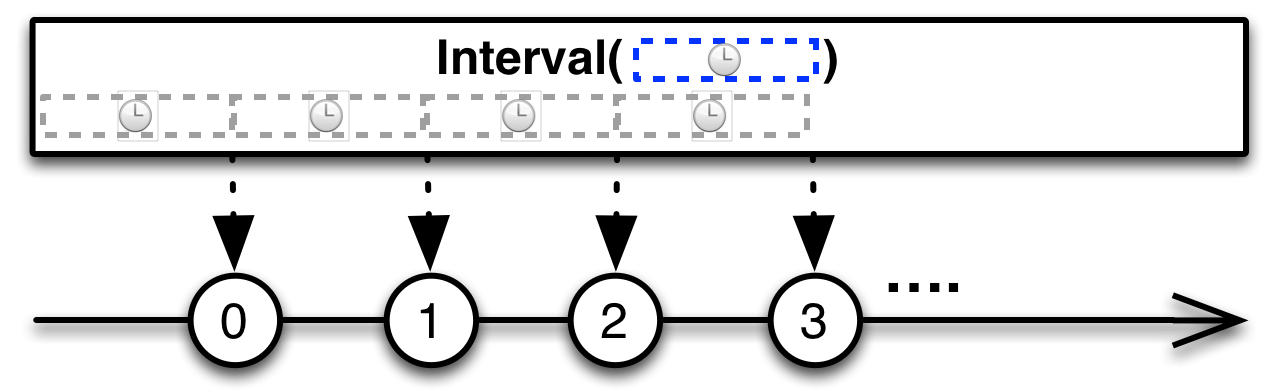
Interval运算符返回一个 Observable ,它发出无限的递增整数序列,您可以在发射之间选择一个恒定的时间间隔。
using System;
using UniRx;
using UnityEngine;
public class IntervalExample : MonoBehaviour
{
    void Start()
    {
        Observable.Interval(TimeSpan.FromSeconds(1)).Subscribe(seconds =>
        {
            Debug.LogFormat("当前时间:{0} s", seconds);
        }).AddTo(this);
    }
}
2.TakeUntil
当第⼆个 Observable 发射了⼀项数据或者终⽌时,丢弃原始Observable发射的任何数据
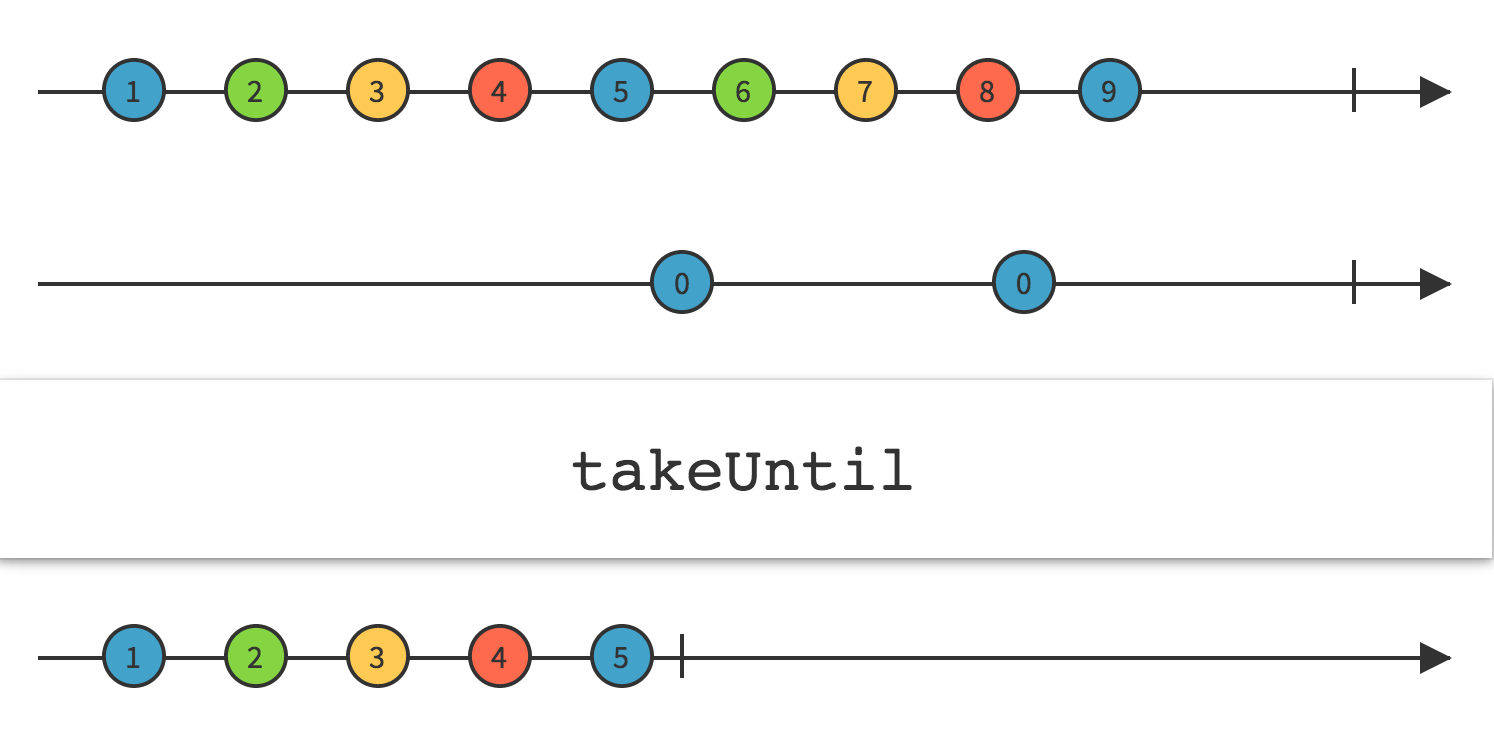
TakeUntil 订阅并开始发射原始Observable,它还监视你提供的第⼆个 Observable。如果第⼆个Observable 发射了⼀项数据或者发射了⼀个终⽌通知,TakeUntil 返回的Observable会停⽌发射原始Observable并终⽌。
using UniRx;
using UniRx.Triggers;
using UnityEngine;
public class TakeUntilExample : MonoBehaviour
{
    void Start()
    {
        this.UpdateAsObservable()
            .TakeUntil(Observable.EveryUpdate()
            .Where(_ => Input.GetMouseButtonDown(0)))
            .Subscribe(_ =>
            {
                Debug.Log(123);
            });
    }
}
//输出结果为,运行之后持续输出 123,当点击鼠标左键后,停止输出 123
3.SkipUntil
丢弃一个可观察对象发出的项,直到第二个可观察对象发出一个项为止。
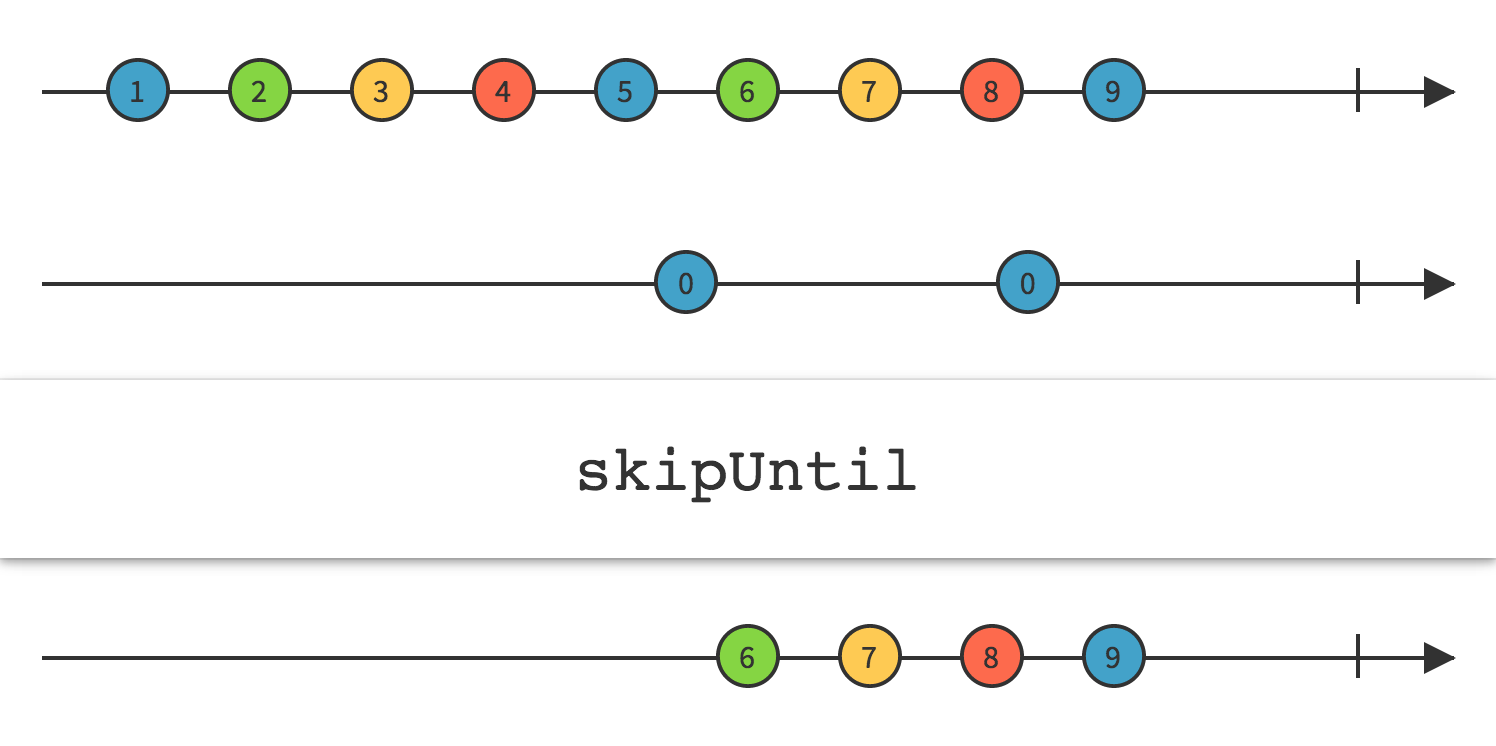
SkipUntil订阅源Observable,但是忽略它的发射,直到第二个Observable发出一个条目,这时SkipUntil开始镜像源Observable。
using UniRx;
using UniRx.Triggers;
using UnityEngine;
public class SkipUntilExample : MonoBehaviour
{
    void Start()
    {
        // 条件
        var clickStream = this.UpdateAsObservable().
            Where(_ =>Input.GetMouseButtonDown(0));
        // 监听
        this.UpdateAsObservable()
            .SkipUntil(clickStream)
            .Subscribe(_ => Debug.Log("鼠标按过了"));
    }
}
输出结果为,点击鼠标左键之后就开始持续输出 “鼠标按过了”
4.Buffer(缓冲)
定期将 Observable 发出的项目收集到包中并发出这些包,而不是一次发出一个项目
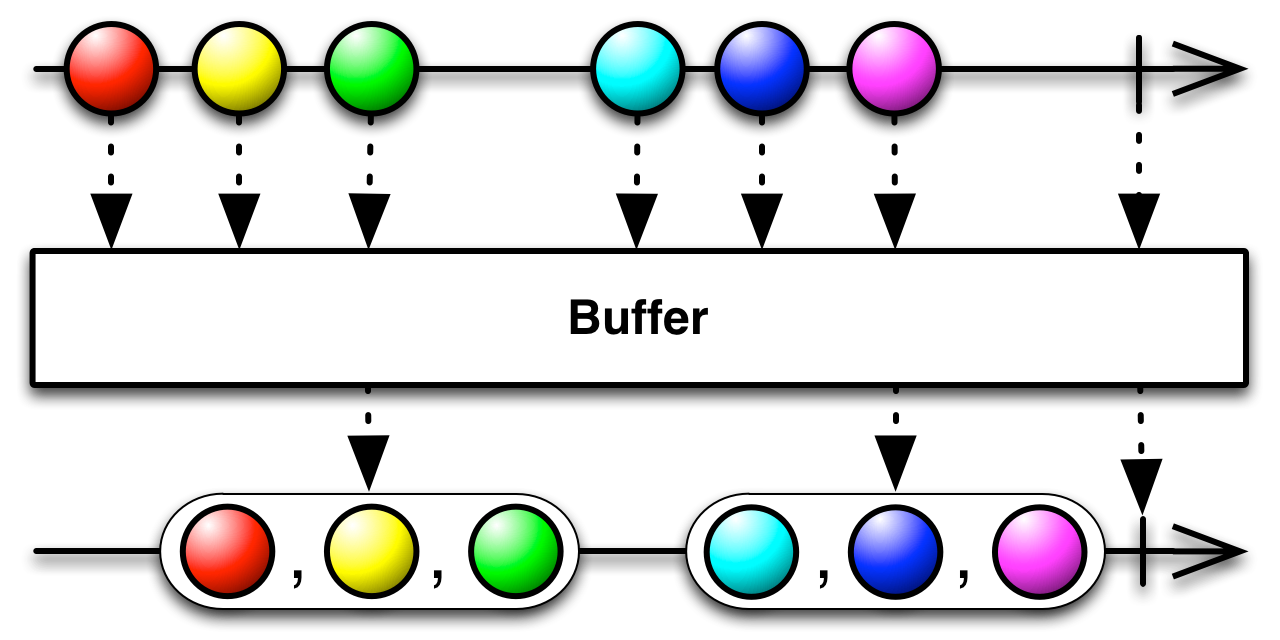
Buffer运算符 将发出项目的 Observable 转换为发出这些项目的缓冲集合的 Observable。在Buffer的各种特定语言实现中存在许多变体,它们在选择哪些项目进入哪些缓冲区方面有所不同。 请注意,如果源 Observable 发出onError通知, 则Buffer将立即传递此通知,而不会首先发出它正在组装的缓冲区,即使该缓冲区包含源 Observable 在发出错误通知之前发出的项目。
using System;
using UniRx;
using UnityEngine;
public class BufferExample : MonoBehaviour
{
    void Start()
    {
        Observable.Interval(TimeSpan.FromSeconds(1.0f))
            .Buffer(TimeSpan.FromSeconds(3.0f))
            .Subscribe(_ =>{Debug.LogFormat("currentTime:{0}",DateTime.Now.Second);})
            .AddTo(this);
    }
}
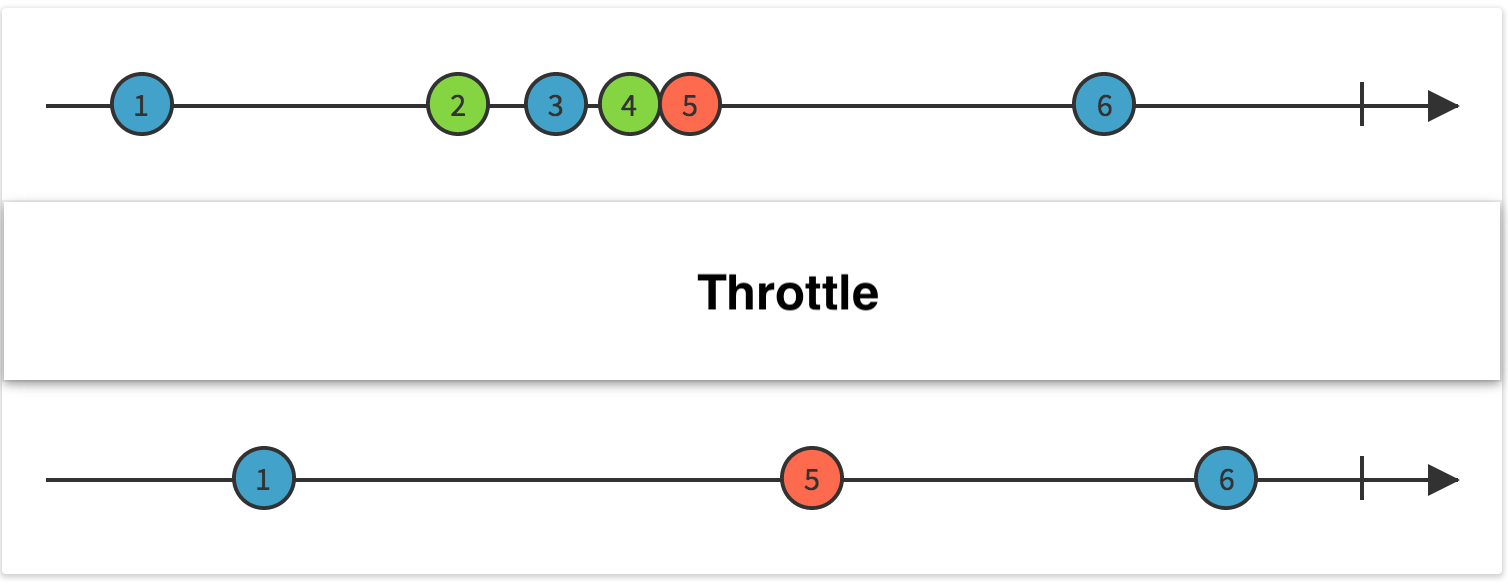
5.Throttle(节流阀)
只有在特定的时间跨度没有发出其他项的情况下,才会从Observable中发出一个项
using System;
using UniRx;
using UnityEngine;
public class ThrottleExample : MonoBehaviour
{
    void Start()
    {
        Observable.EveryUpdate()
            .Where(_ => Input.GetMouseButtonDown(0))
            .Throttle(TimeSpan.FromSeconds(1))
            .Subscribe(_ => Debug.Log("一秒过后"));
    }
}
//输出结果为,点击鼠标后 1 秒内不再点击则输出,如果有点击则重新计时 1 秒再输出。
6.Delay
延迟⼀段指定的时间再发射来⾃Observable的发射物
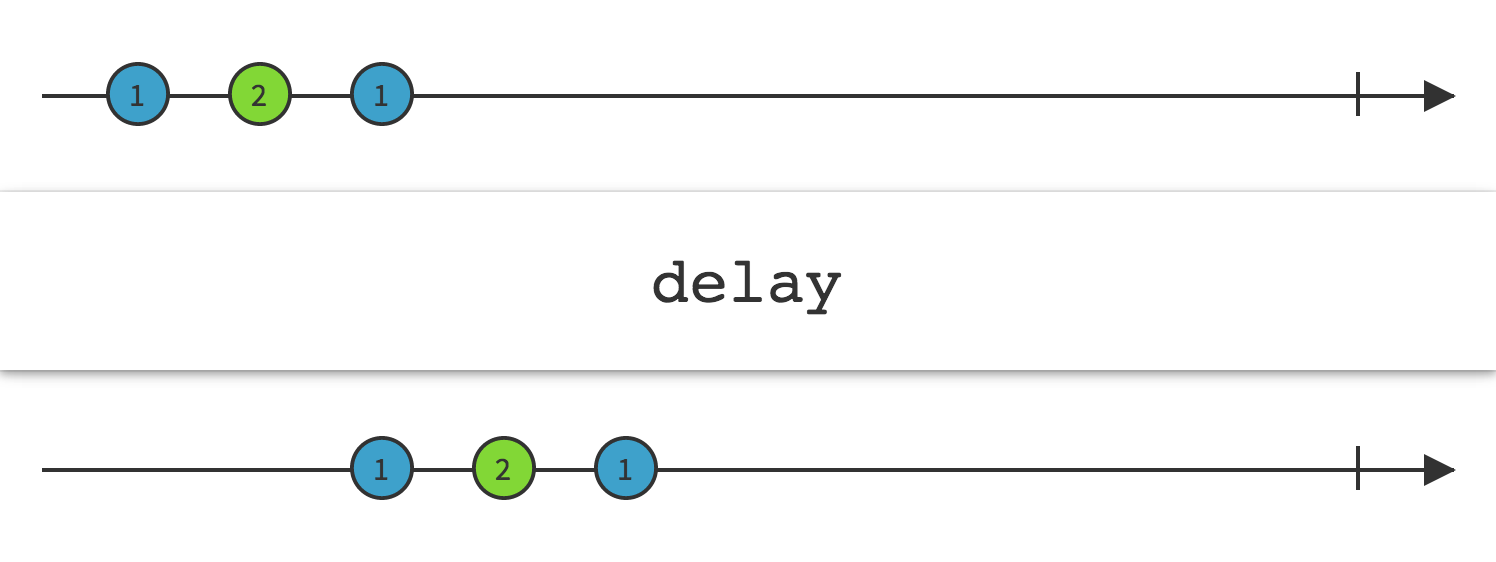
通过指定的增量,将Observable发出的整个条目序列在时间上向前移动。
using System;
using UniRx;
using UnityEngine;
public class DelayExample : MonoBehaviour
{
    void Start()
    {
        Observable.EveryUpdate()
            .Where(_ => Input.GetMouseButtonDown(0))
            .Delay(TimeSpan.FromSeconds(1.0f))
            .Subscribe(_ => { Debug.Log("mouse clicked"); })
            .AddTo(this);
    }
}
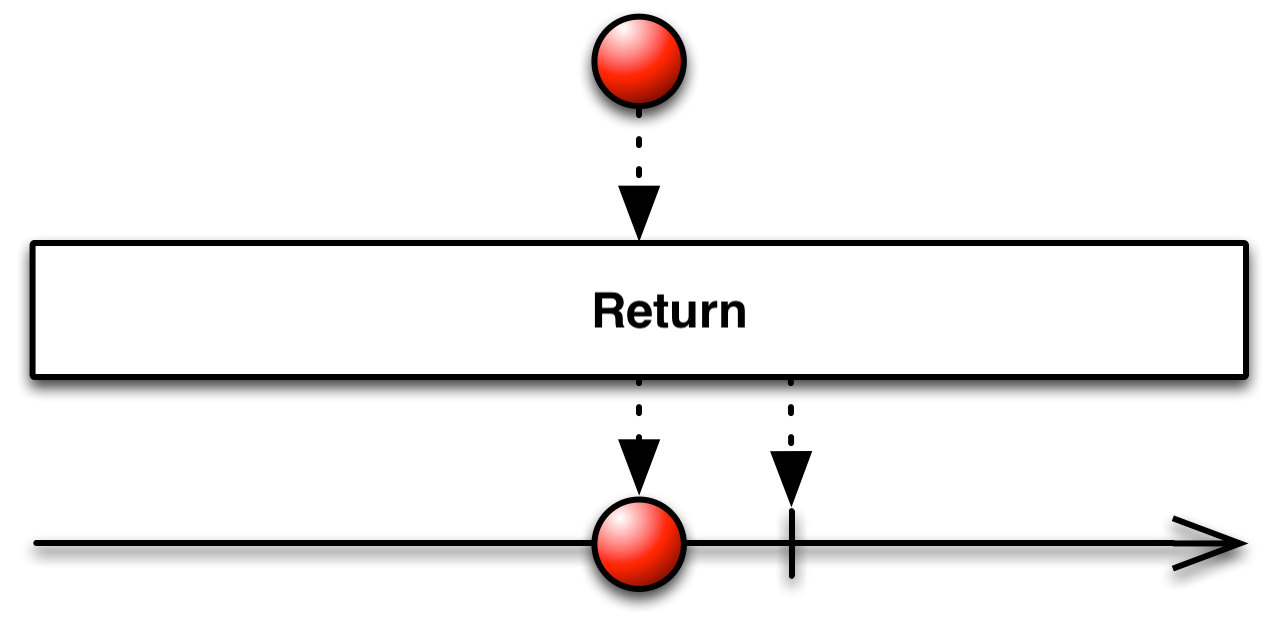
7.Return
创建一个发出特定项目的 Observable
using UniRx;
using UnityEngine;
public class ReturnSample : MonoBehaviour
{
     private void Start()
     {
         Observable.Return(100)
            .Subscribe(
                 x => Debug.Log("OnNext:" + x),
                 ex => Debug.LogError("OnError:" + ex.Message),
                 () => Debug.Log("OnCompleted")
             );
     }
}
//OnNext:100  OnCompleted
8.Timer
创建⼀个Observable,它在⼀个给定的延迟后发射⼀个特殊的值。
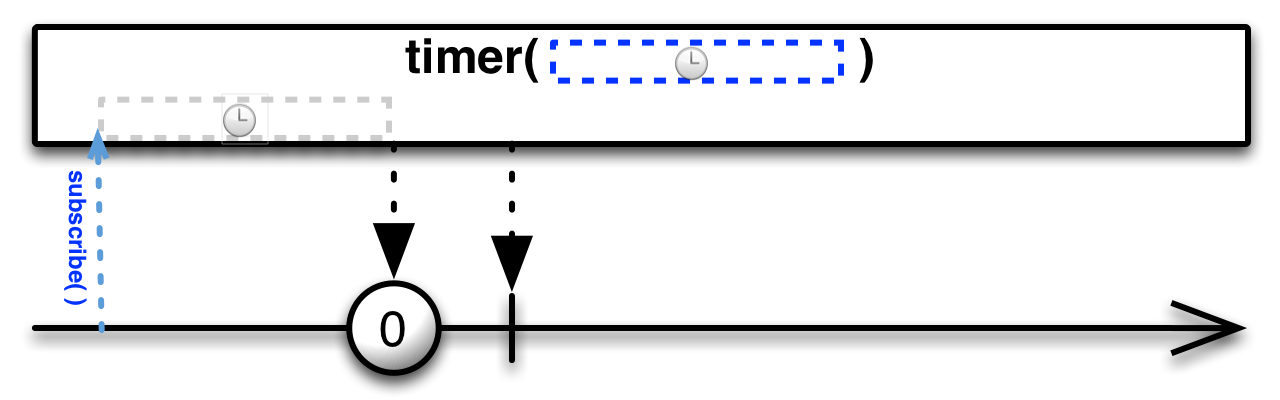
Timer运算符创建一个 Observable,它会在您指定的时间跨度后发出一个特定的项目。
using System;
using UniRx;
using UnityEngine;
public class TimerExample : MonoBehaviour
{
    void Start()
    {
        Observable.Timer(TimeSpan.FromSeconds(5.0f))
            .Subscribe(_ => { Debug.Log("after 5 seconds"); })
            .AddTo(this);
    }
}
9.Sample
对一个基础流进行采样,定期发送离当前事件最近的数据(事件)
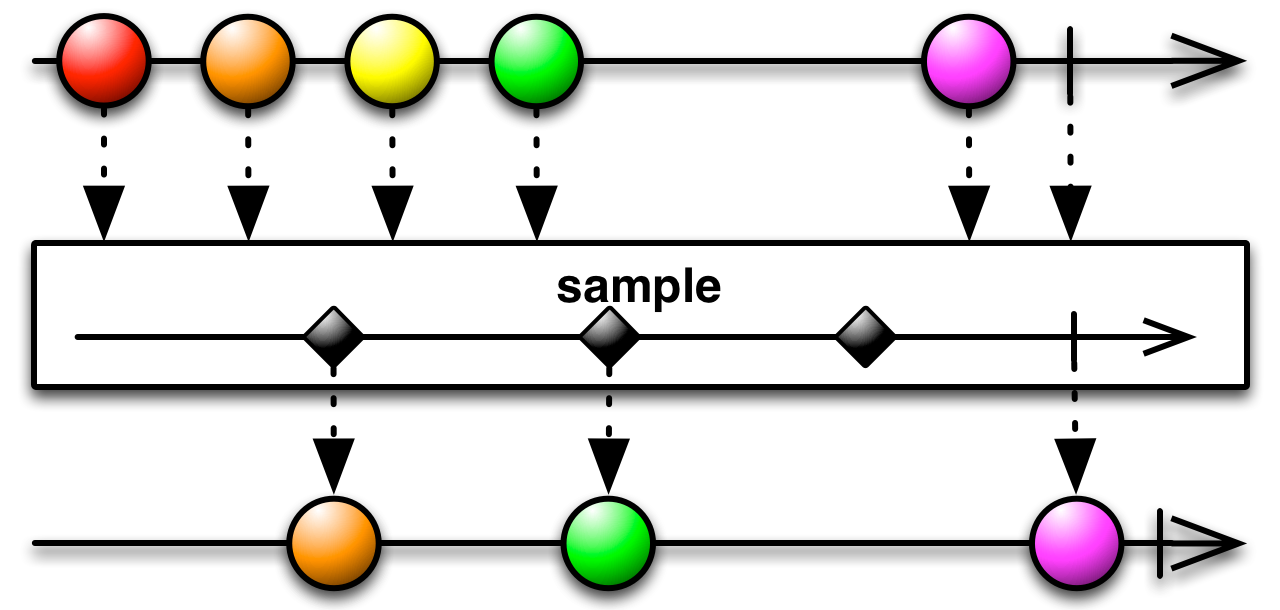
Sample 操作符定时查看⼀个Observable,然后发射⾃上次采样以来它最近发射的数据。
注意:如果⾃上次采样以来,原始Observable没有发射任何数据,这个操作返回的Observable在那段时间内也不会发射任何数据。
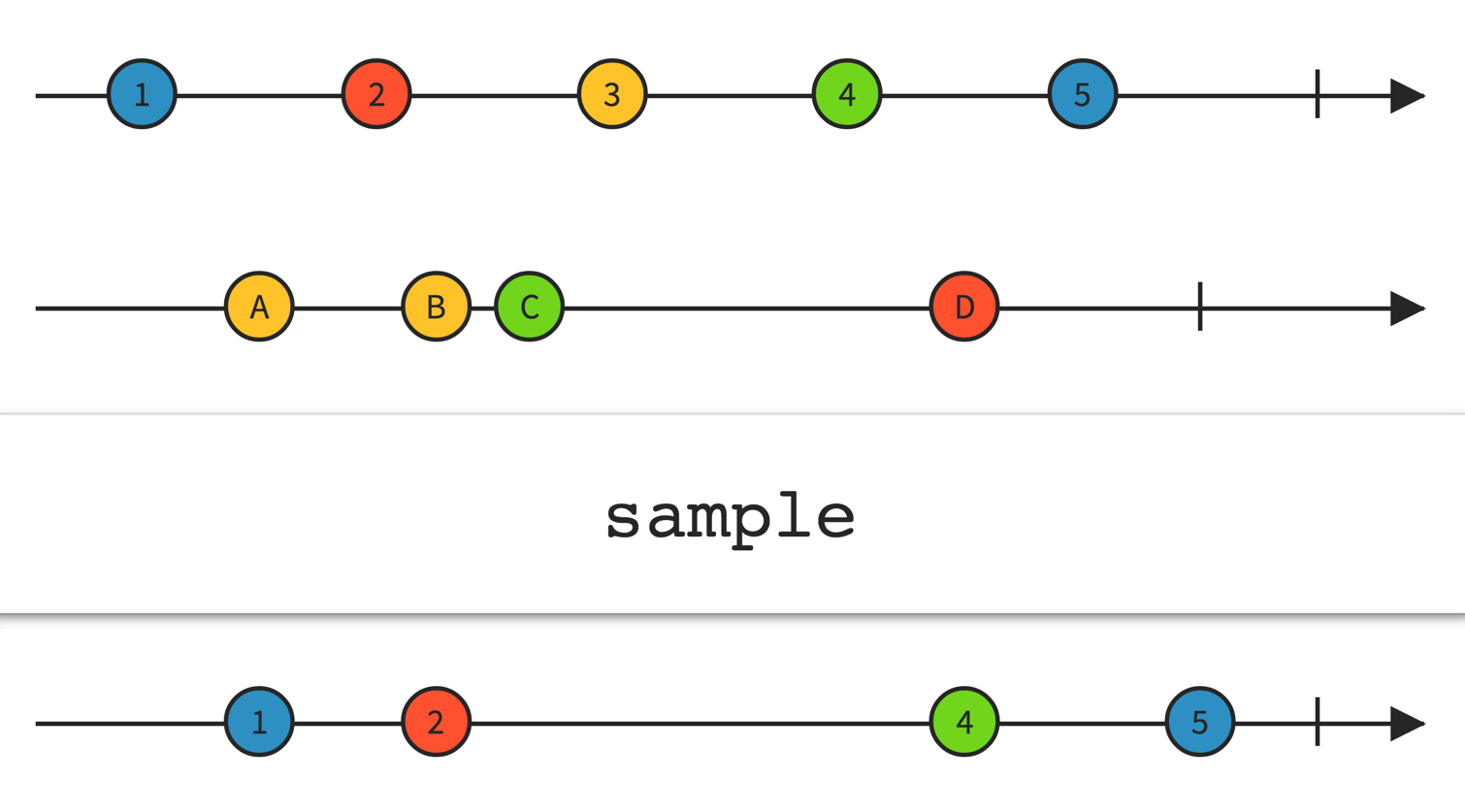
第一条线是基础流在输出数据
第二条线是一个Sample的流在进行采样
A采样输出1,他最近可取的数据为1;B同理,C采样不到数据,因为C最近的数据已经被Sample了;
为什么C采样不到3,因为3没有被输出,C不知道有3的存在
结束采样输出了5,因为采样结束,基础流在输出,所以输出了5
using System;
using UniRx;
using UnityEngine;
public class SampleExample : MonoBehaviour
{
    void Start()
    {
        var sample = Observable.EveryUpdate().Sample(TimeSpan.FromMilliseconds(200));
        sample.Subscribe(Next, Error, Complete);
    }

    void Next(long frame)
    {
        Debug.LogFormat("Sample的帧:{0}", frame);
    }

    void Error(Exception ex)
    {
        Debug.LogException(ex);
    }

    void Complete()
    {
        Debug.LogFormat("Complete");
    }
}
10.Timestamp
给 Observable 发射的数据项附加⼀个时间戳
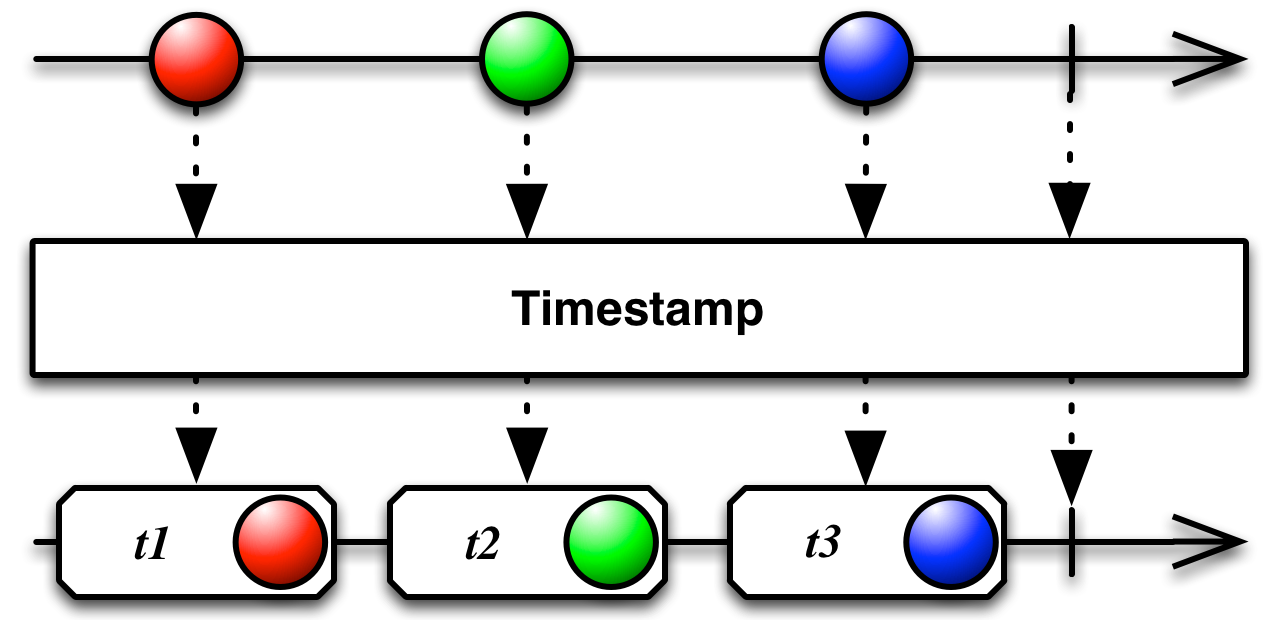
Timestamp操作符在源 Observable 发出的每个项目上附加一个时间戳,然后按自己的顺序重新发射该项目 。时间戳表示项目是在什么时间发出的。
using System;
using UniRx;
using UnityEngine;
public class Timestamp : MonoBehaviour
{
    void Start()
    {
        Observable.Interval(TimeSpan.FromSeconds(1.0f))
            .Timestamp()
            .Subscribe(timestamp => { Debug.Log(timestamp); })
            .AddTo(this);
    }
}
11.ThrottleFirst
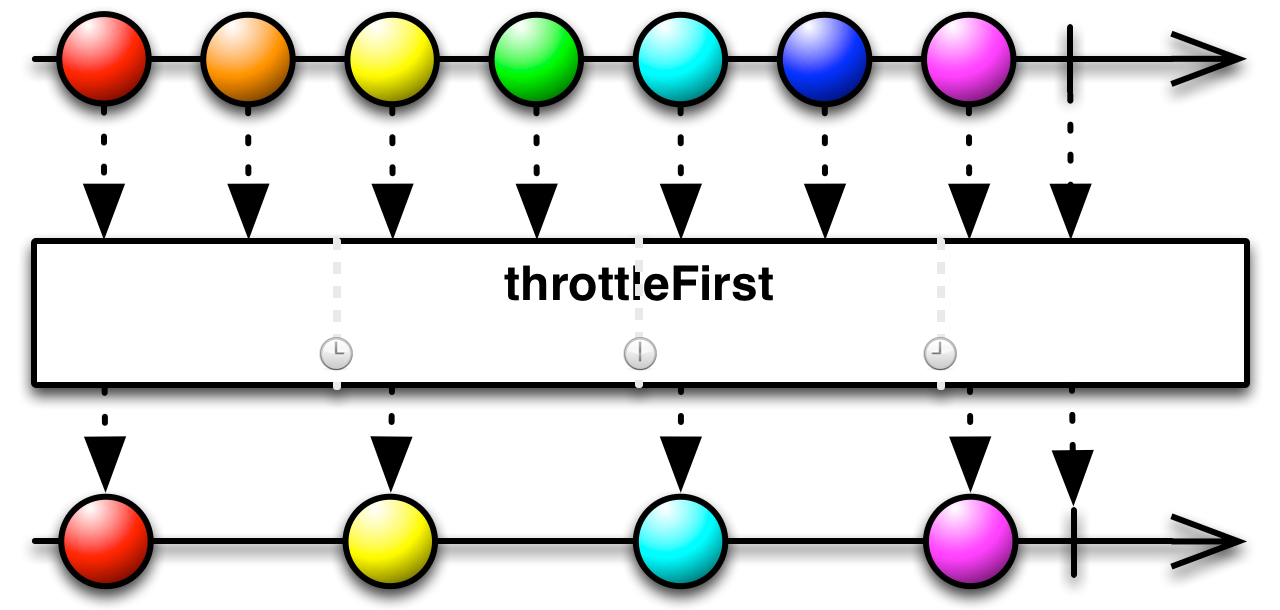
每隔一段时间内,发送第一个数据(事件)
using System;
using UniRx;
using UniRx.Triggers;
using UnityEngine;
public class ThrottleFirstExample : MonoBehaviour
{
    void Start()
    {
        this.UpdateAsObservable()
            .Where(_ => Input.GetMouseButtonDown(0))
            .ThrottleFirst(TimeSpan.FromSeconds(5))
            .Subscribe(x => Debug.Log("Clicked!"));
    }
}
//鼠标点击之后,立即输出 “Clicked”,输出之后的 5 秒内点击无效。
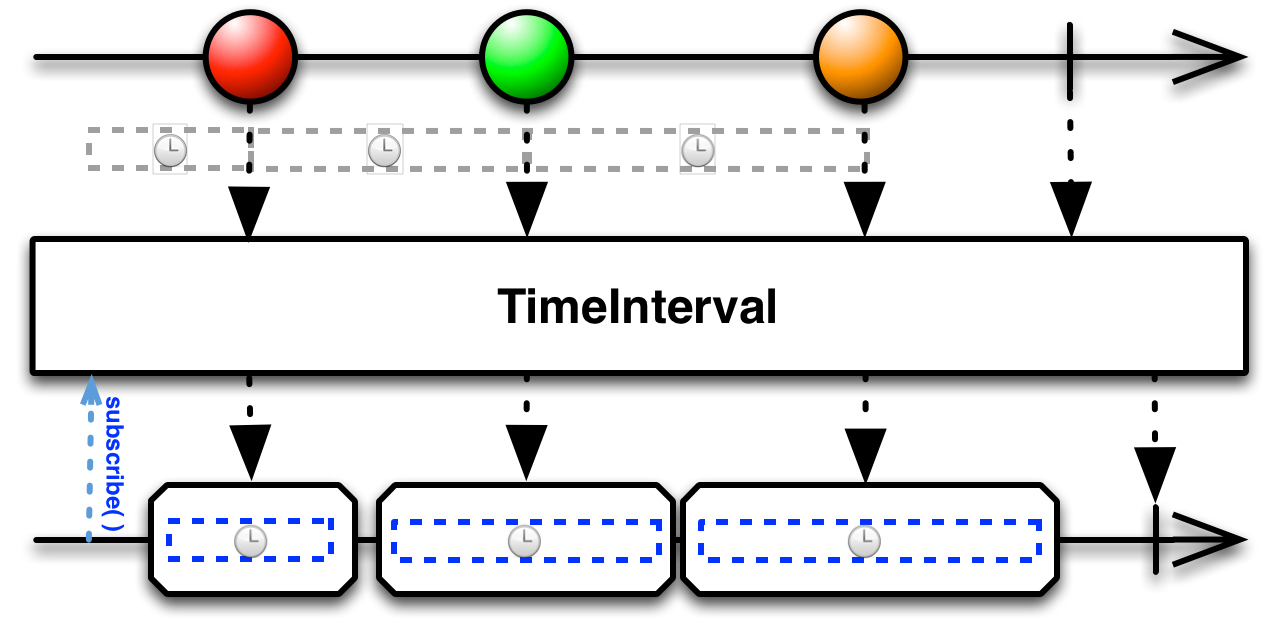
12.TimeInterval
计算当前的事件与上一个事件的事件间隔,并发送
将一个Observable转换成一个TimeInterval实体,TimeInterval不能作为基础流,只能是辅助二次转换
using System;
using UniRx;
using UnityEngine;
public class TimeIntervalExample : MonoBehaviour
{
     void Start()
    {
        Observable.Interval(TimeSpan.FromMilliseconds(750))
            .TimeInterval()
            .Subscribe(timeInterval => Debug.LogFormat("{0}: {1}",timeInterval.Value, timeInterval.Interval));
    }
}
13.Defer
直到有观察者订阅时才创建 Observable,并且为每个观察者创建一个新的 Observable
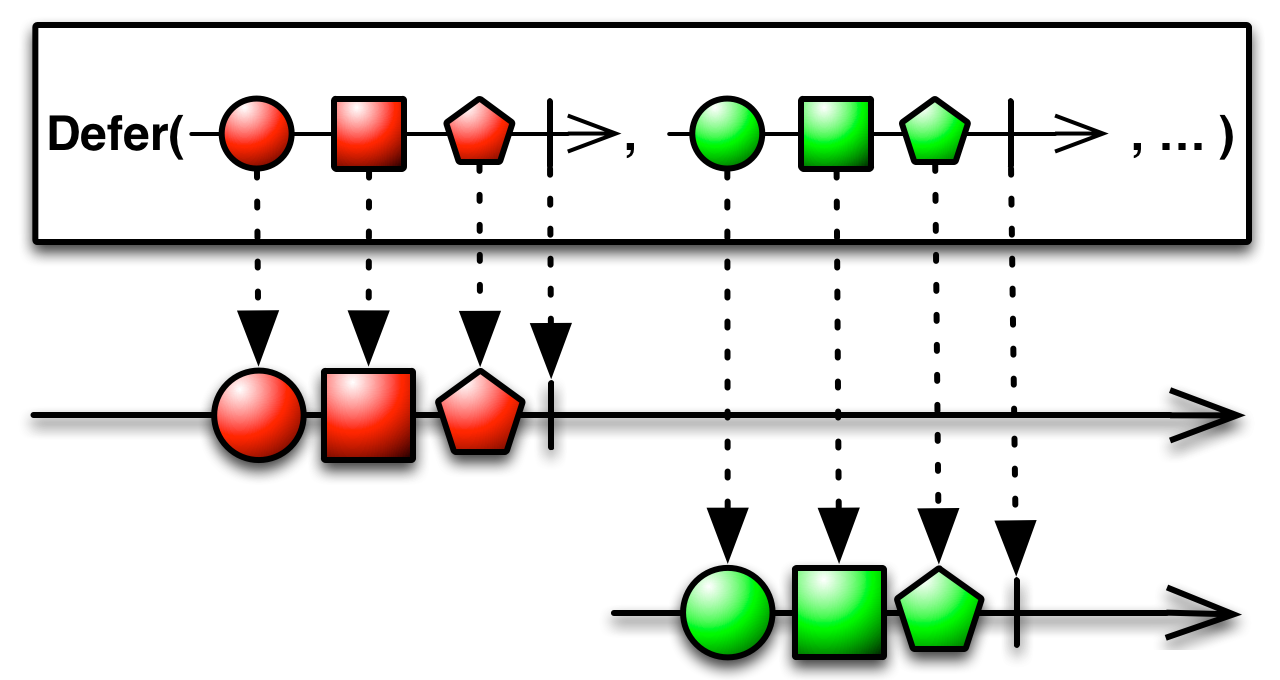
Defer 操作符会一直等待直到有观察者订阅它,然后它使用 Observable 工厂方法生成一个Observable。它对每个观察者都这样做,因此尽管每个订阅者都以为自己订阅的是同一个Observable,事实上每个订阅者获取的是它们自己的单独的数据序列。
using System;
using UniRx;
using UnityEngine;
public class DeferExample : MonoBehaviour
{
    void Start()
    {
        var random = new System.Random();
        Observable.Defer(() => Observable.Start(() => random.Next()))
            .Delay(TimeSpan.FromMilliseconds(1000))
            .Repeat()
            .Subscribe(randomNumber => Debug.Log(randomNumber));
    }
}
14.Never
创建一个不发射数据也不终止的Observable
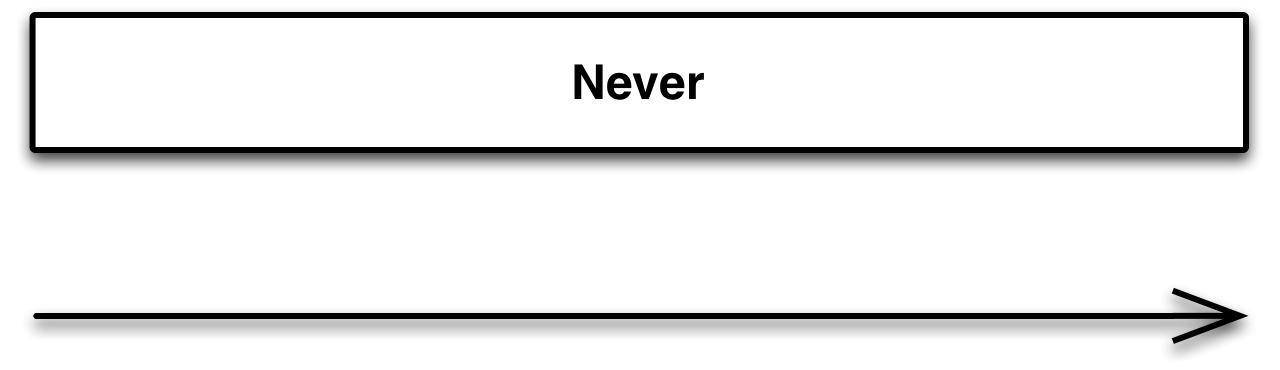
Never一般用于占位,等待以后有功能的时候来替补位置。
using UniRx;
using UnityEngine;
public class NeverExample : MonoBehaviour
{
    void Start()
    {
        Observable.Never<int>()
                .Subscribe(
                    x => Debug.Log("OnNext:" + x),
                    ex => Debug.LogError("OnError:" + ex.Message),
                    () => Debug.Log("OnCompleted")
                );
    }
}
15.Scan
连续地对数据序列的每一项应用一个函数,然后连续发射结果
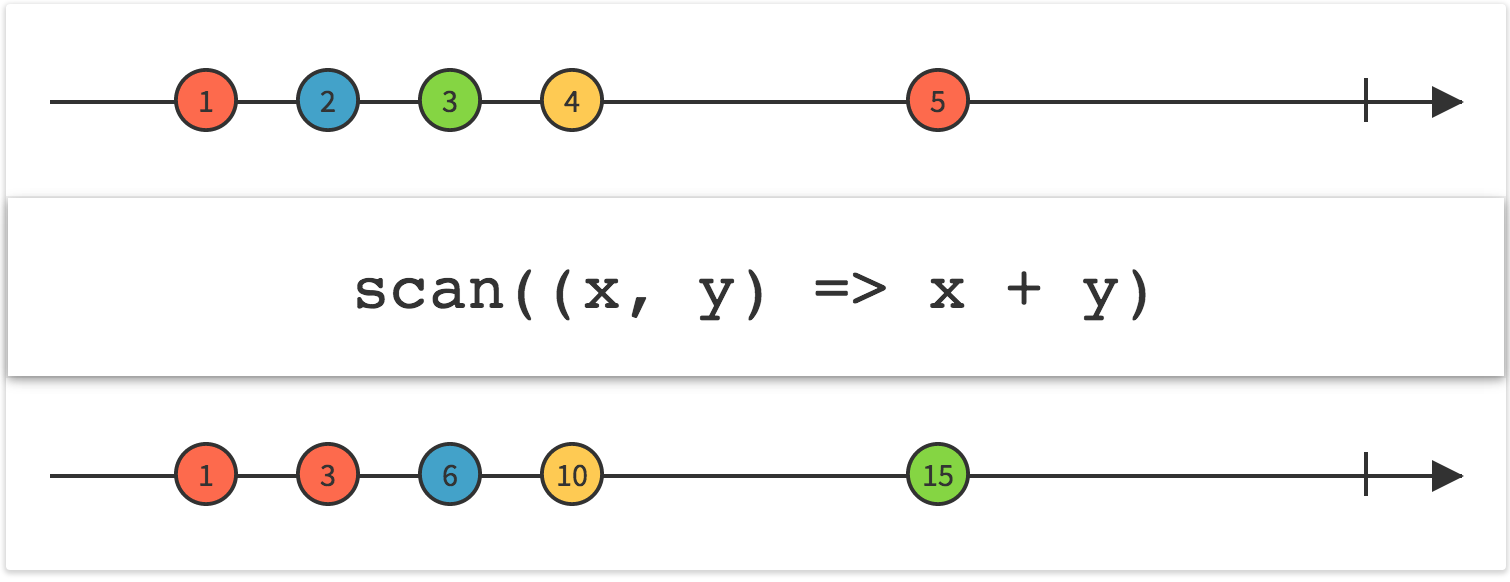
对流发出的数据进行扫描,将处理的结果返回到输出,操作和内聚差不多。
Scan操作符对原始Observable发射的第一项数据应用一个函数,然后将那个函数的结果作为自己的第一项数据发射。它将函数的结果同第二项数据一起填充给这个函数来产生它自己的第二项数据。它持续进行这个过程来产生剩余的数据序列。这个操作符在某些情况下被叫做accumulator。
using UniRx;
using UnityEngine;
public class ScanExample : MonoBehaviour
{
    void Start()
    {
        Observable.Range(0, 8)
            .Scan(0, (acc, currentValue) => acc + 5)
            .Subscribe(xx =>{Debug.Log(xx);});
        //=================================================
        var scan = Observable.Range(1, 3).Scan(ScanMethod);
        scan.Subscribe(Next, Error, Complete);
    }

    private int ScanMethod(int pre, int next)
    {
        return pre + next;
    }
    void Next(int result)
    {
        Debug.LogFormat("Scan之后的结果:{0}", result);
    }
    void Error(Exception ex)
    {
        Debug.LogException(ex);
    }
    void Complete()
    {
        Debug.LogFormat("Complete");
    }
}
16.Switch
将一个发射多个 Observables 的 Observable 转换成另一个单独的 Observable,后者发射那些Observables 最近发射的数据项
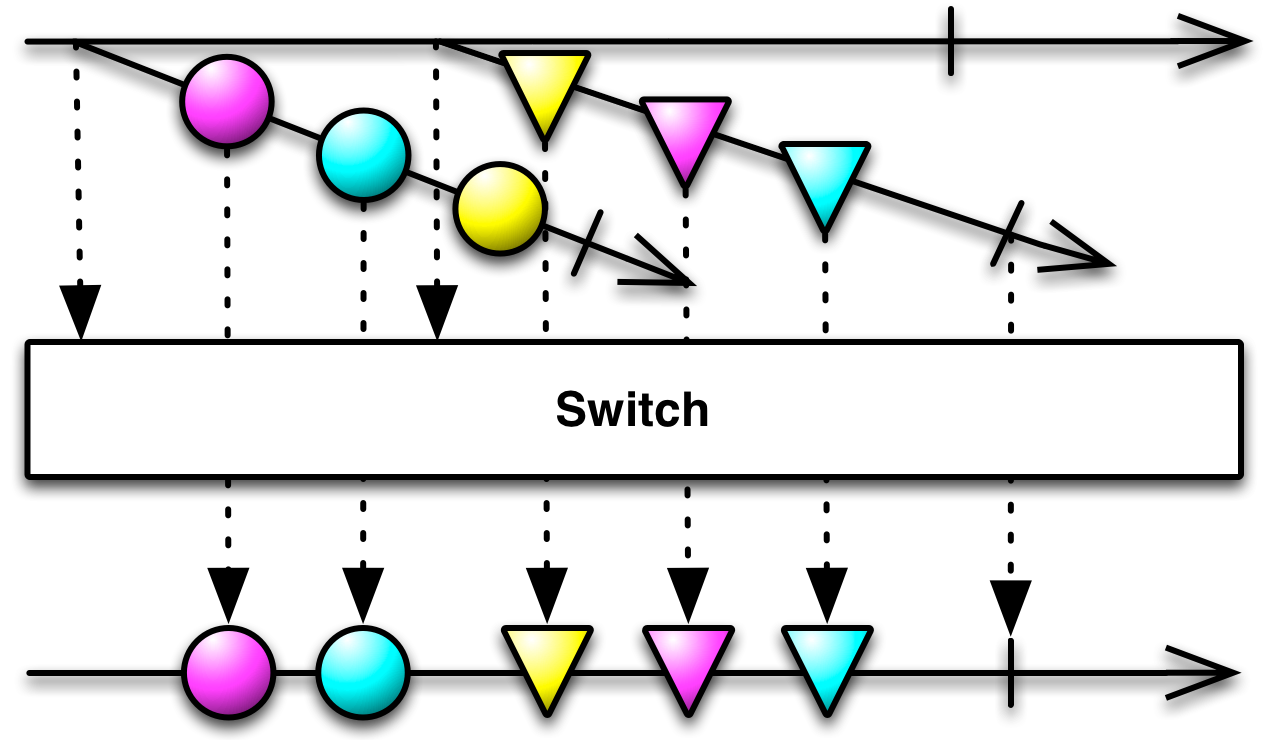
Switch 订阅⼀个发射多个 Observables 的 Observable。它每次观察那些 Observables 中的⼀个,Switch 返回的这个 Observable 取消订阅前⼀个发射数据的 Observable,开始发射最近的Observable 发射的数据。注意:当原始 Observable 发射了⼀个新的 Observable 时(不是这个新的Observable 发射了⼀条数据时),它将取消订阅之前的那Observable。这意味着,在后来那个Observable 产⽣之后到它开始发射数据之前的这段时间⾥,前⼀个 Observable 发射的数据将被丢弃(就像图例上的那个⻩⾊圆圈⼀样)。
using UniRx;
using UnityEngine;
public class SwitchExample : MonoBehaviour
{
    void Start()
    {
        var buttonDownStream = Observable.EveryUpdate()
            .Where(_ => Input.GetMouseButtonDown(0));
        var buttonStream = Observable.EveryUpdate()
            .Where(_ =>Input.GetMouseButtonUp(0));
        buttonDownStream.Select(_ =>
        {
            Debug.Log("mouse button down");
            return buttonStream;
        })
            .Switch()
            .Subscribe(_ => { Debug.Log("mouse button up"); });
    }
}
//执行结果为,当按下鼠标时输出 “mouse button down” 抬起之后输出 “mouse button up”
17.StartWith
在开始从源 Observable 发射项目之前发射指定的项目序列
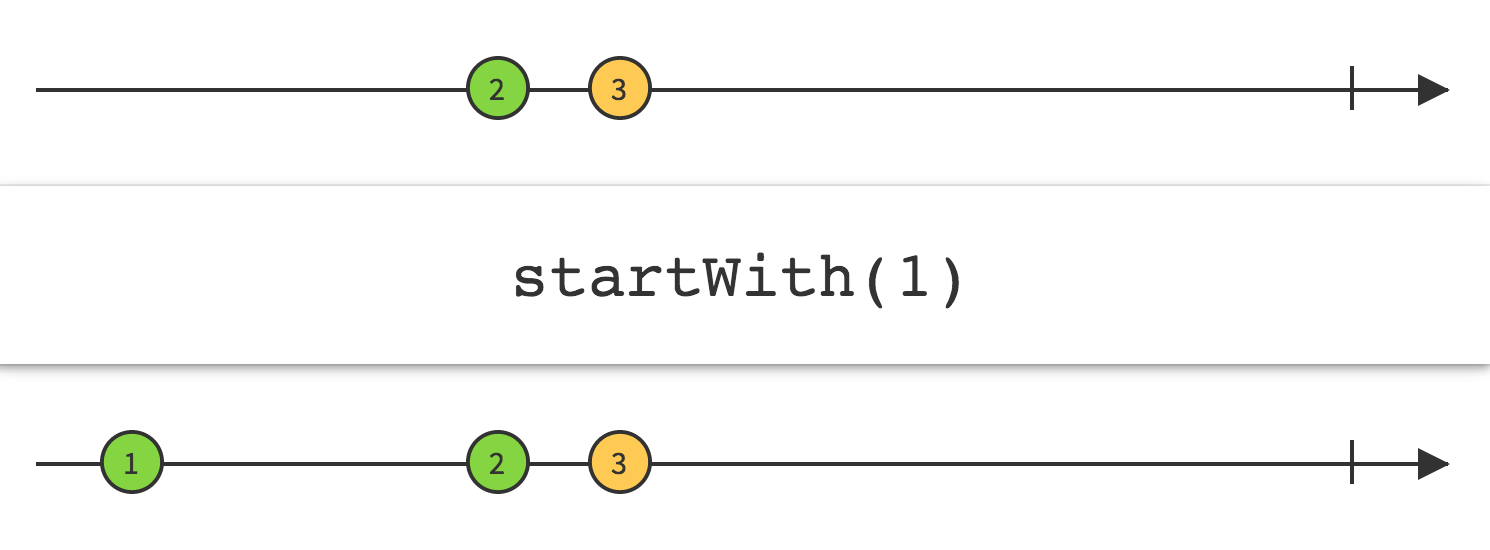
如果你想要一个 Observable 在发射数据之前先发射一个指定的数据序列,可以使用StartWith 操作符。(如果你想⼀个Observable发射的数据末尾追加一个数据序列可以使用 Concat 操作符。)
using UniRx;
using UnityEngine;
public class StartWithExample : MonoBehaviour
{
    void Start()
    {
        Observable.Return("sikiedu.com")
            .StartWith("http://")
            .Aggregate((current, next) => current + next)
            .Subscribe(Debug.Log);
    }
}
//http://sikiedu.com
18.CombineLatest
当两个 Observables 中的任何⼀个发射了数据时,使⽤⼀个函数结合每个 Observable 发射的最近数据项,并且基于这个函数的结果发射数据。
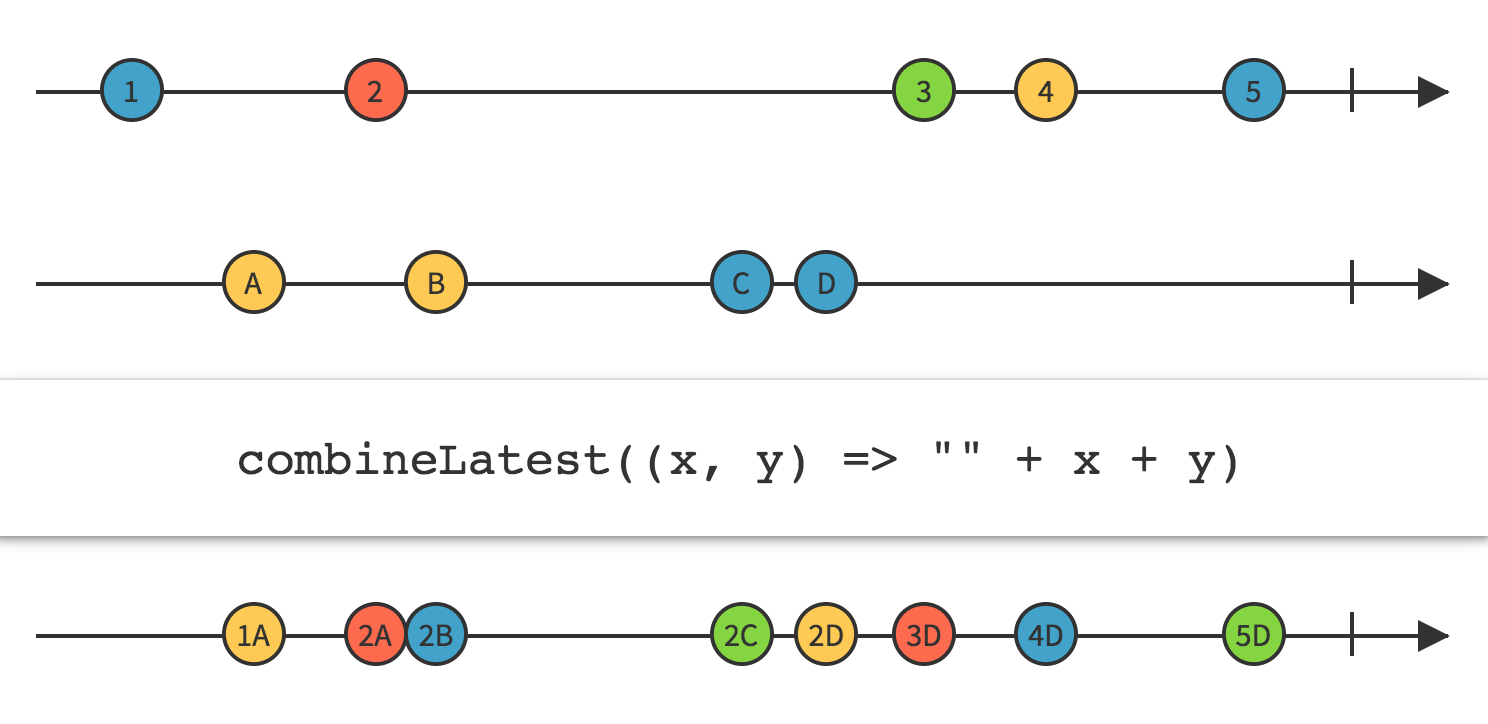
CombineLatest 操作符行为类似于 zip,但是只有当原始的 Observable 中的每一个都发射了一条数据时 zip 才发射数据。CombineLatest 则在原始的 Observable 中任意一个发射了数据时发射⼀一条数据。当原始 Observables 的任何一个发射了一条数据时,CombineLatest 使用一个函数结合它们最近发射的数据,然后发射这个函数的返回值。
public class Person
{
    public ReactiveProperty<string> GivenName { get; private set; }
    public ReactiveProperty<string> FamilyName { get; private set; }
    public ReadOnlyReactiveProperty<string> FullName { get; private set; }

    public Person(string givenName, string familyName)
    {
        GivenName = new ReactiveProperty<string>(givenName);
        FamilyName = new ReactiveProperty<string>(familyName);
        // If change the givenName or familyName, notify with fullName!
        FullName = GivenName.CombineLatest(FamilyName, (x, y) => x + " " + y).ToReadOnlyReactiveProperty();
    }
}
19.Do
对基础流的数据进行二次包装,包括基础流里面的所有数据,包装的过程在Next,Error,Complete方法里面进行。
基础的Next数据在对应的Next里面包装,Error数据在Error里面包装,Complete在Do的Complete方法里面执行,图解
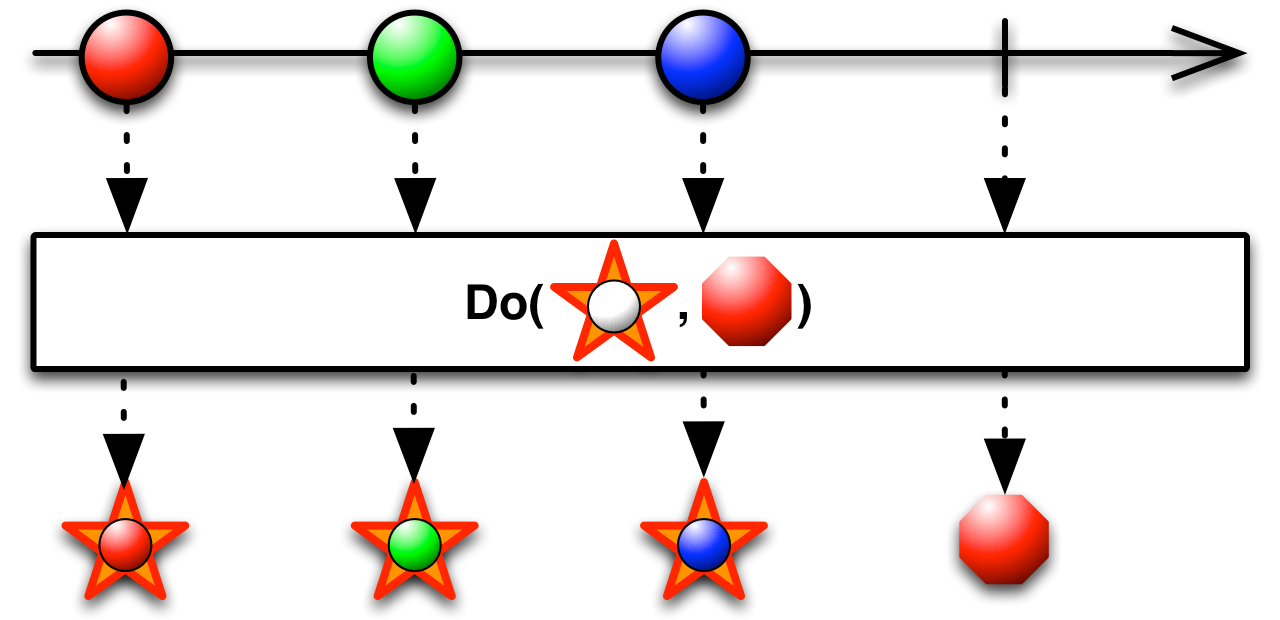
五角星表示对Next数据进行包装,八边形表示对Complete或Error进行包装
public class No06_Do : MonoBehaviour
{
    void Start()
    {
        var mouseDownStream = Observable.EveryUpdate().Where(IsLeftMouse);
        var doStream = mouseDownStream.Do(DoNext, DoError, DoComplete);
        doStream.Subscribe(Next, Error, Complete);
    }

    bool IsLeftMouse(long frame)
    {
        var isDown = Input.GetMouseButtonDown((int) MouseButton.LeftMouse);
        return isDown;
    }

    void DoNext(long frame)
    {
        if (frame % 5 == 0) Debug.LogFormat("正在处理第{0}帧", frame);

    }

    void DoError(Exception ex)
    {
        Debug.LogException(ex);
    }

    void DoComplete()
    {
        Debug.LogFormat("Complete");
    }

    void Next(long frame)
    {
        Debug.LogFormat("点击事件发生在{0}帧", frame);
    }

    void Error(Exception ex)
    {
        Debug.LogException(ex);
    }

    void Complete()
    {
        Debug.LogFormat("Complete");
    }
}
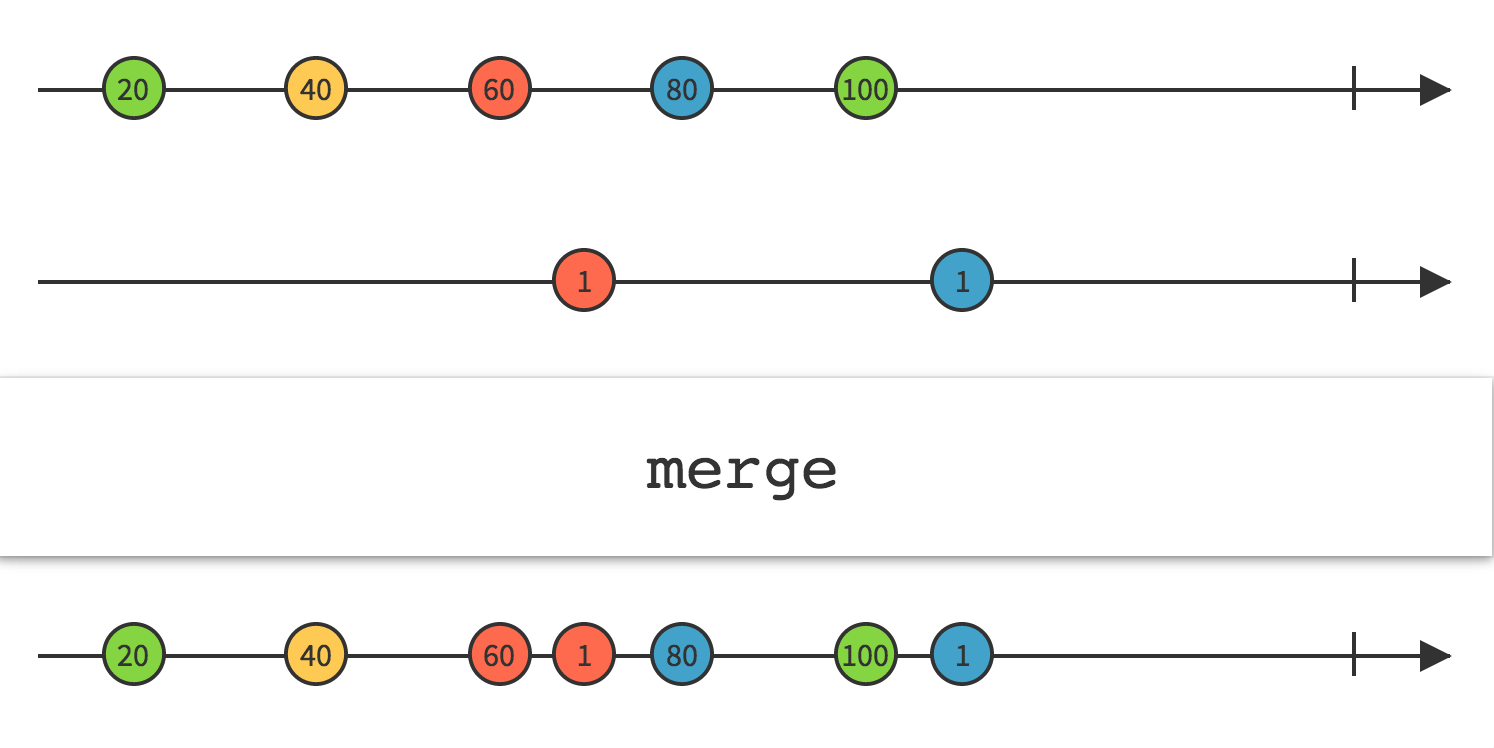
20.Merge
将多个输出流的数据合并到一起,简单暴力的进行合并
using UniRx;
using UniRx.Triggers;
using UnityEngine;
public class MergeExample : MonoBehaviour
{
    void Start()
    {
        var aStream = this.UpdateAsObservable()
            .Where(_ =>Input.GetMouseButtonDown(0))
            .Select(_ => "A");
        var bStream = this.UpdateAsObservable()
            .Where(_ =>Input.GetMouseButtonDown(1))
            .Select(_ => "B");
        aStream.Merge(bStream).Subscribe(Debug.Log);
    }
}
//点击鼠标左键则输出 “A”,点击鼠标右键则输出”B”。
21.Materialize/Dematerialize
Materialize 将数据项和事件通知都当做数据项发射
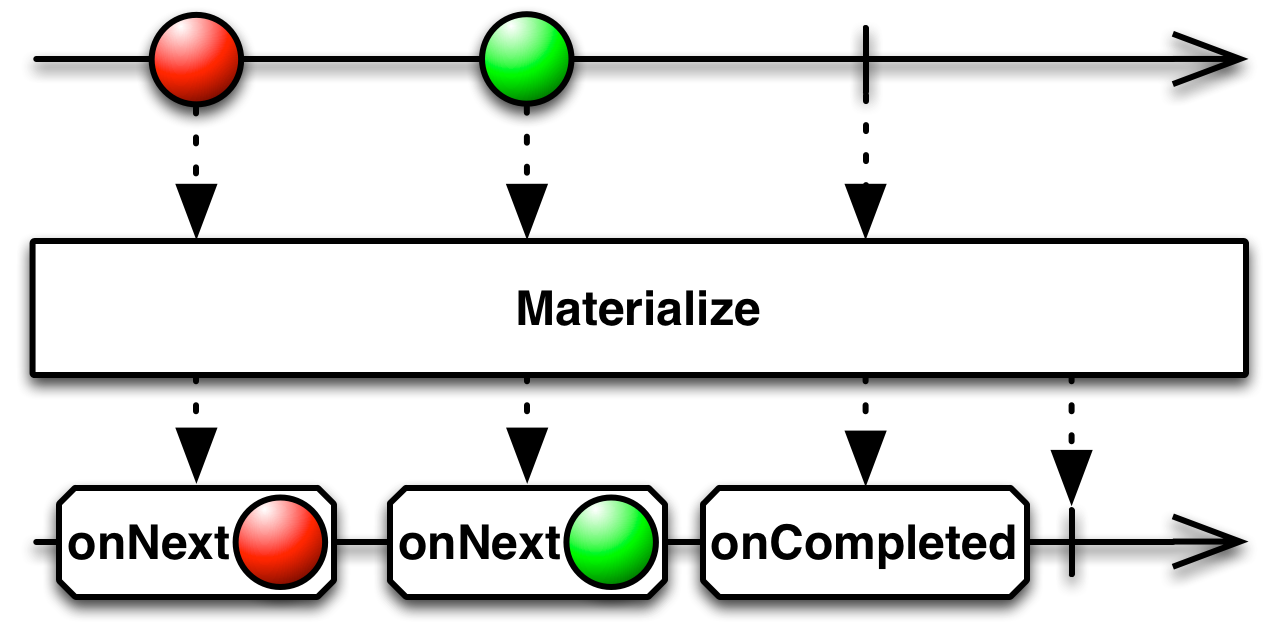
一个合法的有限的Obversable将调用它的观察者的 onNext 方法零次或多次,然后调用观察者的onCompleted 或 onError 正好一次。Materialize 操作符将这一系列调用,包括原来的 onNext 通知和终止通知 onCompleted 或 onError 都转换为一个Observable发射的数据序列。
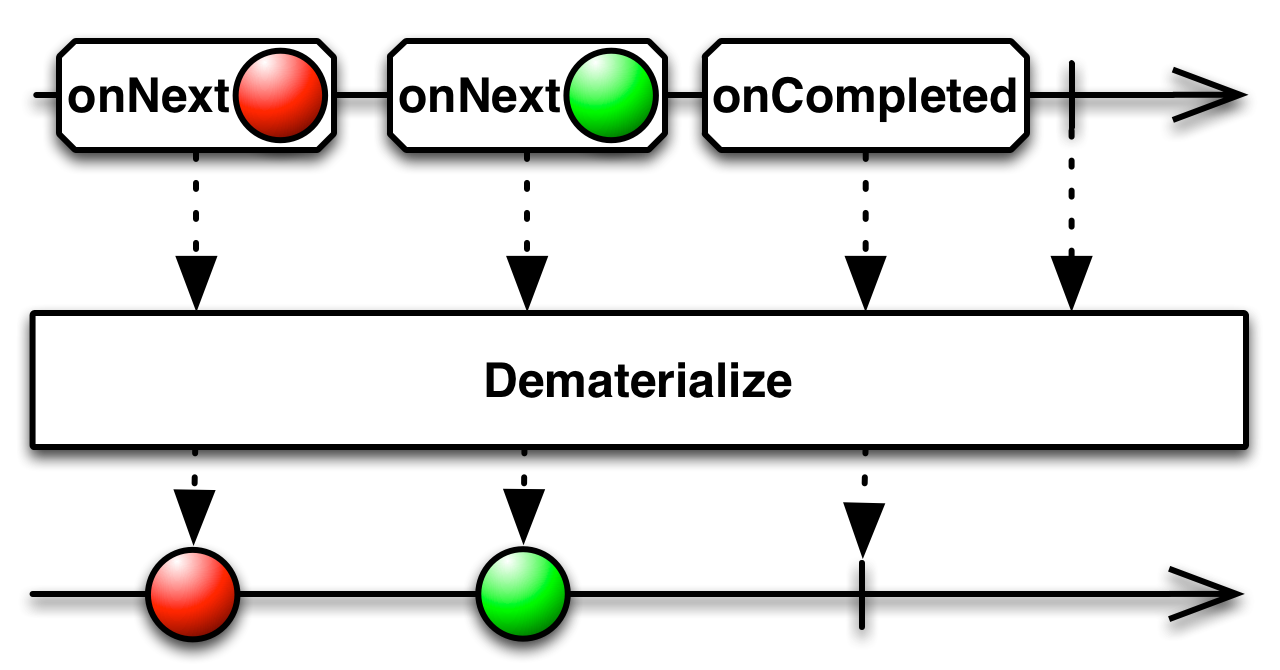
Dematerialize 操作符是Materialize的逆向过程,它将Materialize转换的结果还原成它原本的形式。
dematerialize反转这个过程,将原始Observable发射的Notification对象还原成Observable的通知。
using System;
using UniRx;
using UnityEngine;
public class MaterializeExample : MonoBehaviour
{
    void Start()
    {
        var subject = new Subject<int>();
        var onlyExceptions = subject.Materialize()
            .Where(n => n.Exception != null)
            .Dematerialize();
        subject.Subscribe(i => Debug.LogFormat("Subscriber 1: {0}", i),ex => Debug.LogFormat("Subscriber 1 exception: {0}", ex.Message));
        onlyExceptions.Subscribe(i => Debug.LogFormat("Subscriber 2: {0}", i),ex => Debug.LogFormat("Subscriber 2 exception: {0}", ex.Message));
        subject.OnNext(123);
        subject.OnError(new Exception("Test Exception"));
    }
}
/*
Subscriber 1: 123
Subscriber 1 exception: Test Exception
Subscriber 2 exception: Test Exception
*/
22.IgnoreElements
不发射任何数据,只发射Observable的终⽌通知
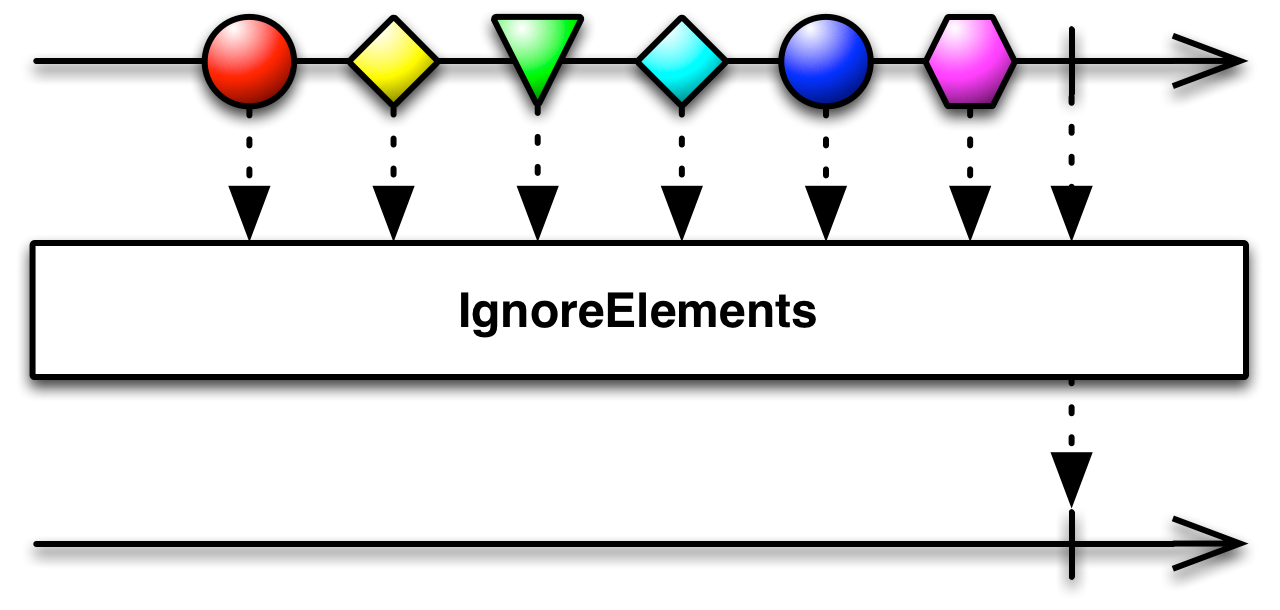
IgnoreElements操作符抑制原始Observable发射的所有数据,只允许它的终⽌通知(onError或onCompleted)通过。
如果你不关⼼⼀个Observable发射的数据,但是希望在它完成时或遇到错误终⽌时收到通知,你可以对Observable使⽤ignoreElements操作符,它会确保永远不会调⽤观察者的onNext()⽅法。
using UniRx;
using UnityEngine;
public class IgnoreElementsExample : MonoBehaviour
{
    void Start()
    {
        var subject = new Subject<int>();
        //Could use subject.Where(_=>false);
        var noElements = subject.IgnoreElements();
        subject.Subscribe(i => Debug.LogFormat("subject.OnNext({0})", i),() => Debug.LogFormat("subject.OnCompleted()"));
        noElements.Subscribe(i => Debug.LogFormat("noElements.OnNext({0})", i),() => Debug.LogFormat("noElements.OnCompleted()"));
        subject.OnNext(1);
        subject.OnNext(2);
        subject.OnNext(3);
        subject.OnCompleted();
    }
}
23.DistinctUntilChanged
监控数据源有没有变化,一旦有变化则通知订阅者进行处理
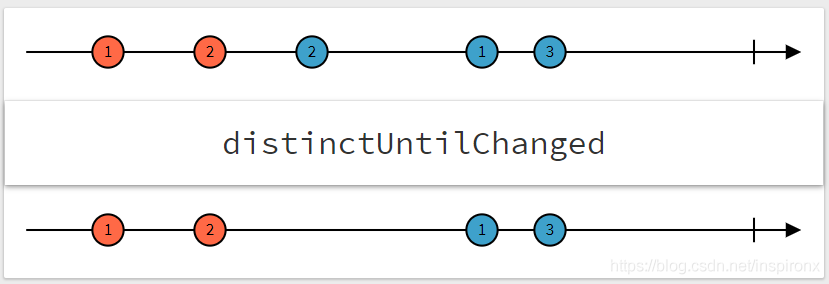
public class No04_Until : MonoBehaviour
{
    void Start()
    {
        var updateStream = Observable.EveryUpdate();
        var distinctUntilChanged = updateStream.DistinctUntilChanged(Condition);
        distinctUntilChanged.Subscribe(Next, Error, Complete);
    }

    bool Condition(long frame)
    {
        // down & up
        var isDown = Input.GetMouseButton((int) MouseButton.LeftMouse);
        return isDown;
    }

    void Next(long frame)
    {
        Debug.LogFormat("变化的事件发生在{0}帧", frame);
    }

    void Error(Exception ex)
    {
        Debug.LogException(ex);
    }

    void Complete()
    {
        Debug.LogFormat("Complete");
    }
}
24.Create
使⽤⼀个函数从头开始创建⼀个Observable
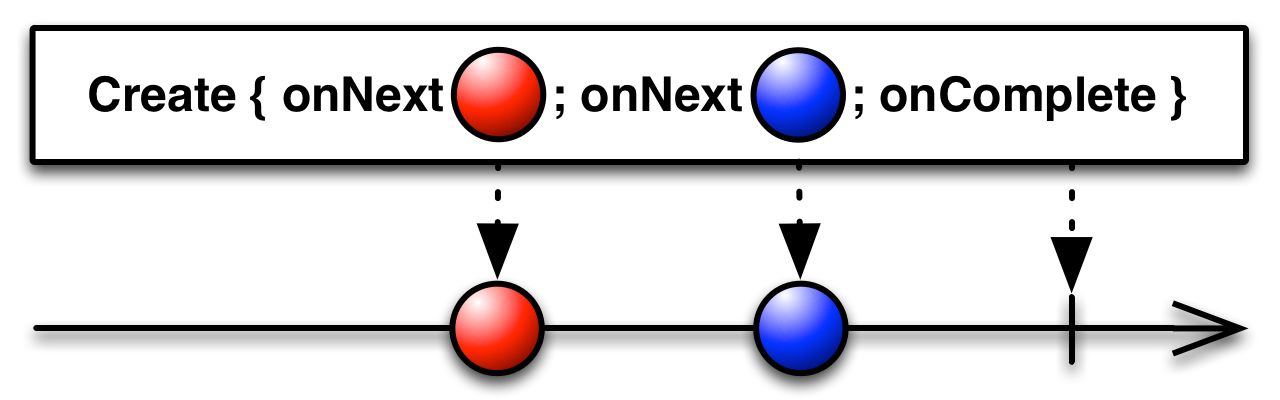
Create在使用的时候必须指定一个类型,Create既是基础流,也是功能流;创建一个新流,流的数据需要自行填充,有点和Subject类似,相比之下,要比Subject轻度很多。
using UniRx;
using UnityEngine;
public class CreateExample : MonoBehaviour
{
    void Start()
    {
        Observable.Create<int>(o =>
        {
            o.OnNext(1);
            o.OnNext(2);
            o.OnCompleted();
            return Disposable.Create(() => Debug.Log("观察者已取消订阅"));
        }).Subscribe(xx => { Debug.Log(xx); });
    }
}
public class CreateSample : MonoBehaviour
{
private void Start()
{
var observable = Observable.Create<char>(observer =>
{
var disposable = new CancellationDisposable();
Task.Run(async () =>
{
for (var i = 0; i < 26; i++)
{
await Task.Delay(TimeSpan.FromSeconds(1), disposable.Token);
observer.OnNext((char) ('A' + i));
}
observer.OnCompleted();
}, disposable.Token);
return disposable;
});
observable.Subscribe(
x => Debug.Log("OnNext:" + x),
ex => Debug.LogError("OnError:" + ex.Message),
() => Debug.Log("OnCompleted")
).AddTo(this);
}
}
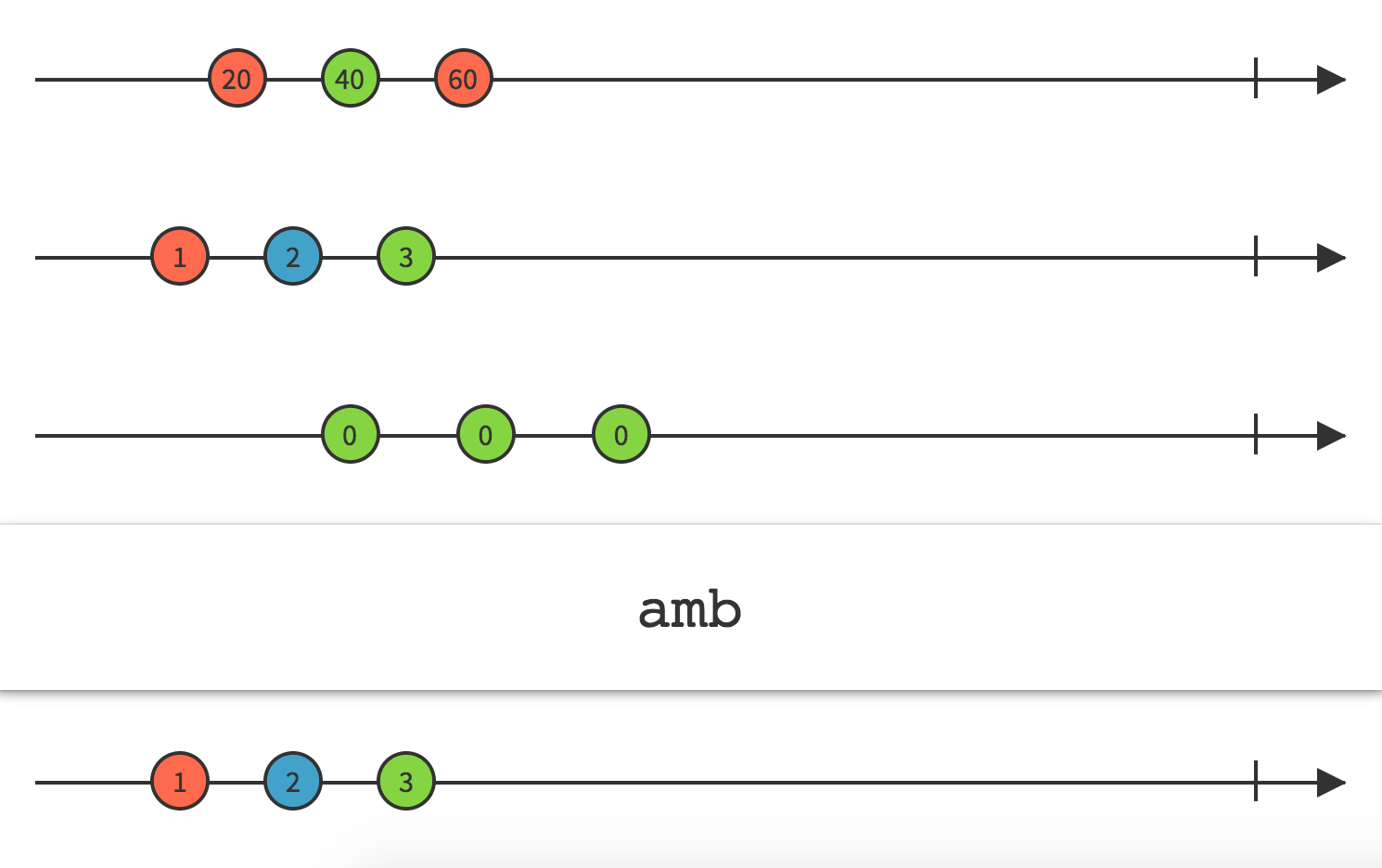
25.Amb
给定两个或多个 Observable,它只发射最先发射数据或通知的那个 Observable 的所有数据
using System;
using UniRx;
using UnityEngine;
public class AmbExample : MonoBehaviour
{
    void Start()
    {
        Observable.Amb(
        Observable.Timer(TimeSpan.FromSeconds(3)).Select(_ => "3 sec"),
        Observable.Timer(TimeSpan.FromSeconds(10)).Select(_ => "10 sec"),
        Observable.Timer(TimeSpan.FromSeconds(2)).Select(_ => "2 sec"),
        Observable.Timer(TimeSpan.FromSeconds(22)).Select(_ => "30 sec"),
        Observable.Timer(TimeSpan.FromSeconds(6)).Select(_ => "5 sec"))
            .Subscribe(s => Debug.LogFormat("OnNext: {0}", s),() => Debug.Log("OnCompleted"));
    }
}
/* OnNext: 2 sec
OnCompleted */
26.Timeout
当基础流一段时间内有没数据输出,则判定为Timeout超时
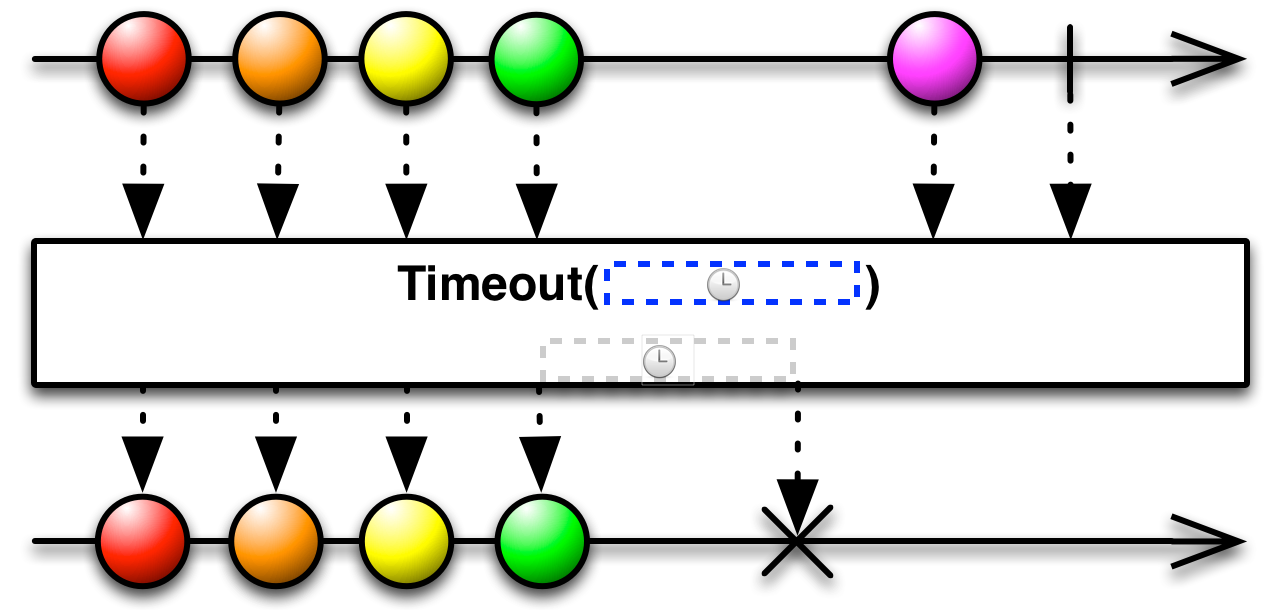
如果原始Observable过了指定的一段时长没有发射任何数据,Timeout 操作符会以一个 onError 通知终止这个 Observable。
using System;
using UniRx;
using UnityEngine;
public class UniRxTimeoutExample : MonoBehaviour
{
    void Start()
    {
        Observable.EveryUpdate()
            .Where(_ => Input.GetMouseButtonDown(1))
            .Timeout(TimeSpan.FromSeconds(1.0))
            .Subscribe(_ => Debug.Log("clicked"));
 //一直监控鼠标左击,如果超过1000毫秒没有点击左击,则超时异常。
        ObservableWWW.Get("http://baidu.com")
            .Timeout(TimeSpan.FromSeconds(0.1f))
            .Subscribe(_ => { }, e => { Debug.LogErrorFormat("发生了异常:{0}", e.Message); });
    }
}
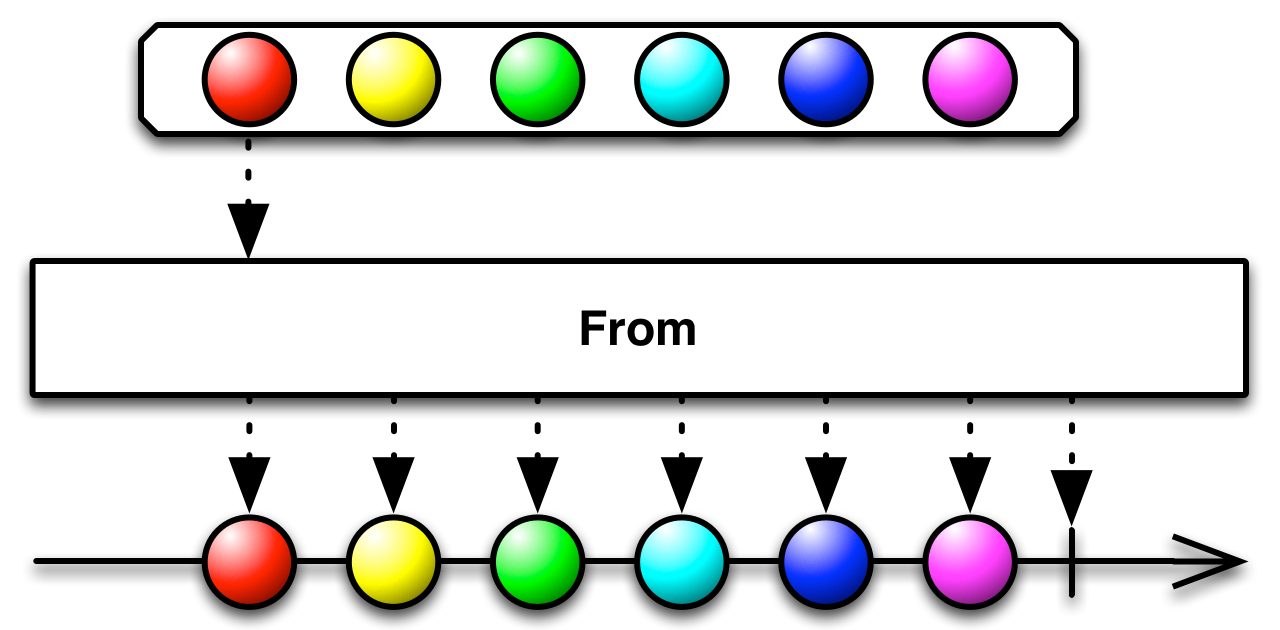
27.FromEvent
将其它种类的对象和数据类型转换为Observable
using System;
using UniRx;
using UnityEngine;
using UnityEngine.Events;
using UnityEngine.UI;
public class UniRxFromEventExample : MonoBehaviour
{
    event Action OnClickEvent;
    void Start()
    {
        transform.Find("Button").GetComponent<Button>().onClick.AddListener(() => OnClickEvent());
        Observable.FromEvent(action => OnClickEvent += action, action => OnClickEvent-= action)
            .Subscribe(_ => Debug.Log("button clicked"));
    }
}
28.Publish
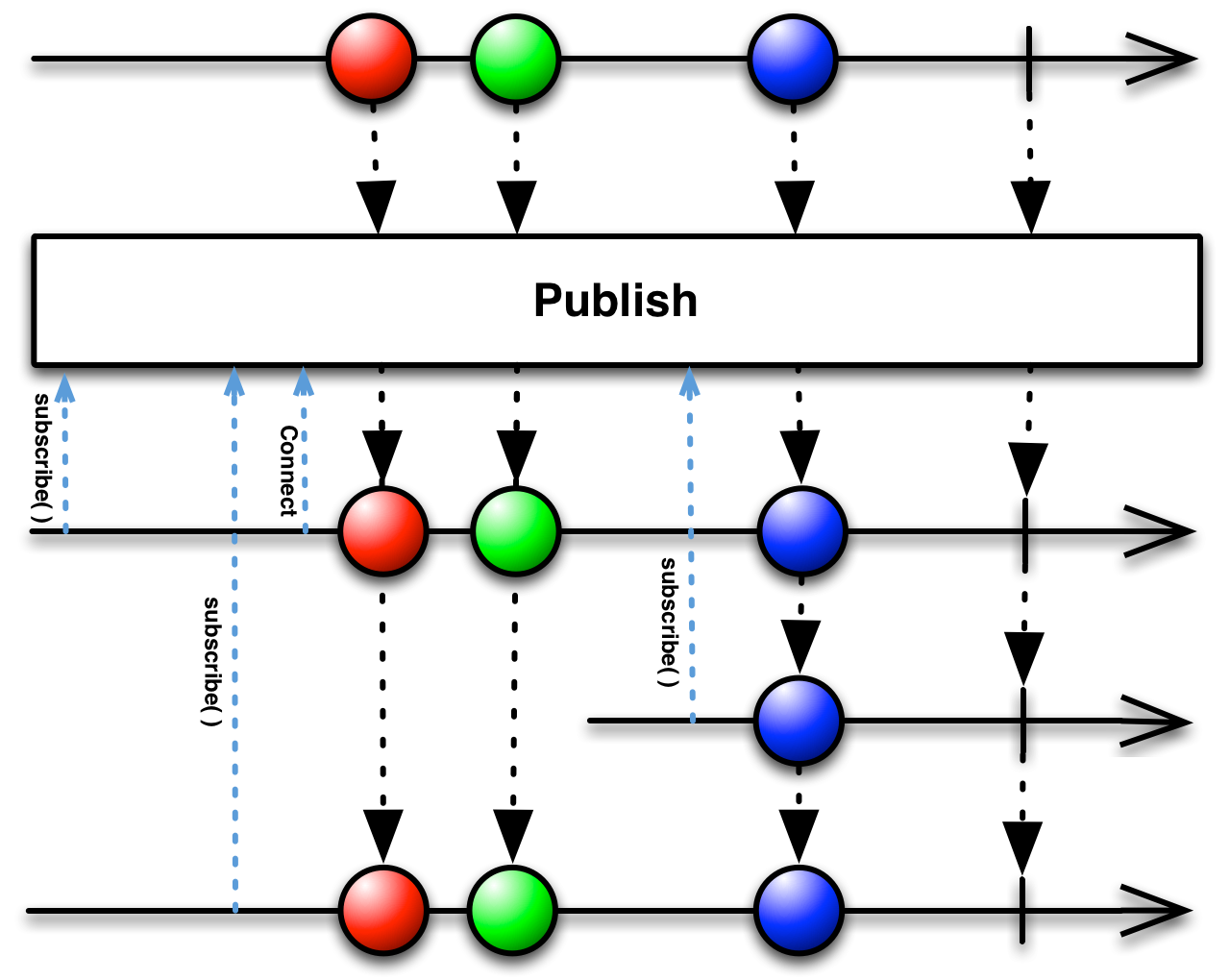
将普通的 Observable 转换为可连接的 Observable
可连接的 Observable (connectable Observable)与普通的 Observable 差不多,不过它并不会在被订阅时开始发射数据,⽽是直到使⽤了Connect操作符时才会开始。⽤这种⽅法,你可以在任何时候让⼀Observable 开始发射数据
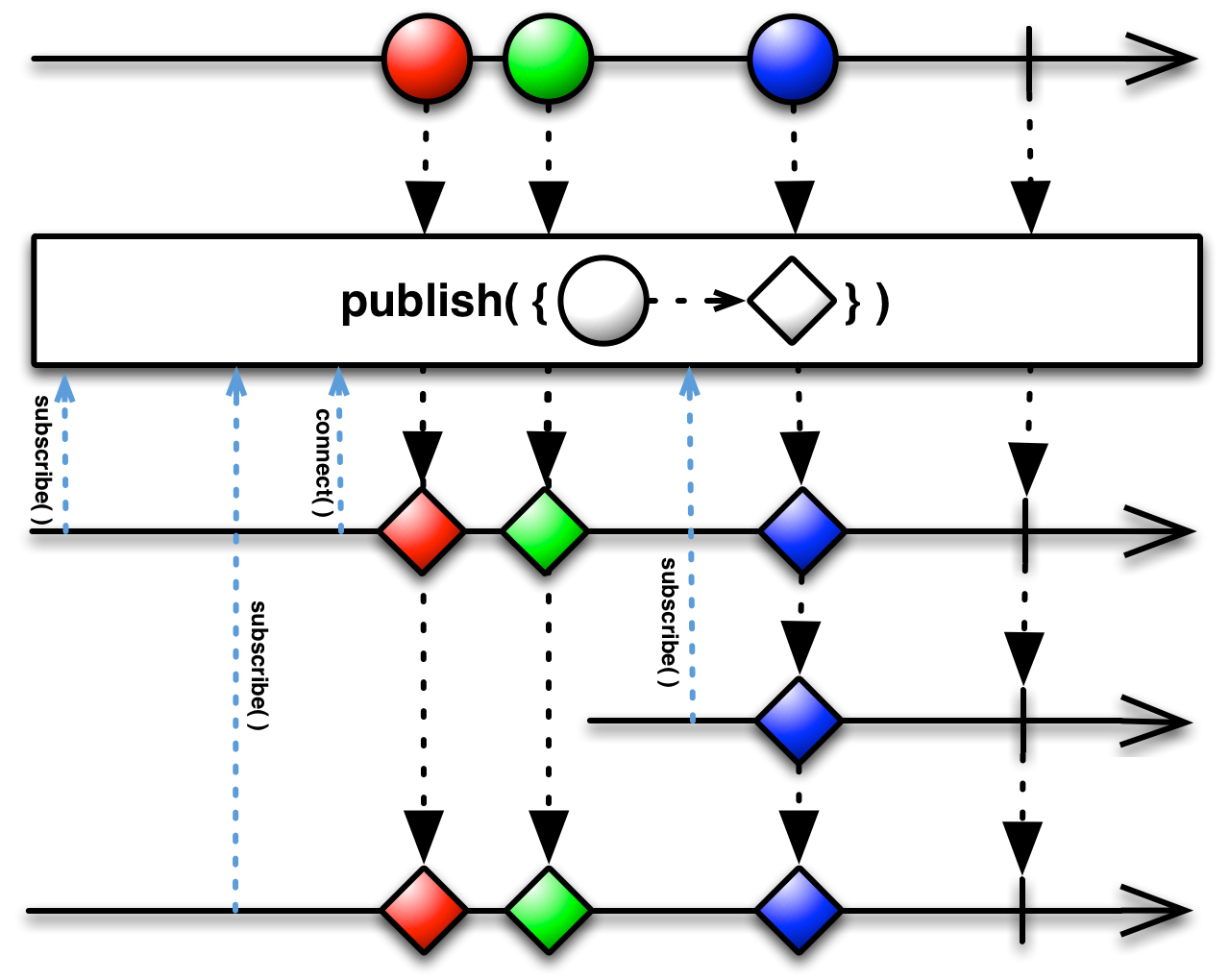
接受一个函数作为参数。这个函数用原始Observable发射的数据作为参数,产生一个新的数据作为ConnectableObservable给发射,替换原位置的数据项。实质是在添加一个Select操作。
using UniRx;
using UnityEngine;
public class UniRxPublishExample : MonoBehaviour
{
    void Start()
    {
        var unshared = Observable.Range(1, 4);
        // Each subscription starts a new sequence
        unshared.Subscribe(i => Debug.Log("Unshared Subscription #1: " + i));
        unshared.Subscribe(i => Debug.Log("Unshared Subscription #2: " + i));
        // By using publish the subscriptions are shared, but the sequence doesn't start until Connect() is called.
        var shared = unshared.Publish();
        shared.Subscribe(i => Debug.Log("Shared Subscription #1: " + i));
        shared.Subscribe(i => Debug.Log("Shared Subscription #2: " + i));
        Observable.Timer(TimeSpan.FromSeconds(3.0f))
                .Subscribe(_ => shared.Connect());
    }
}
29.RefCount
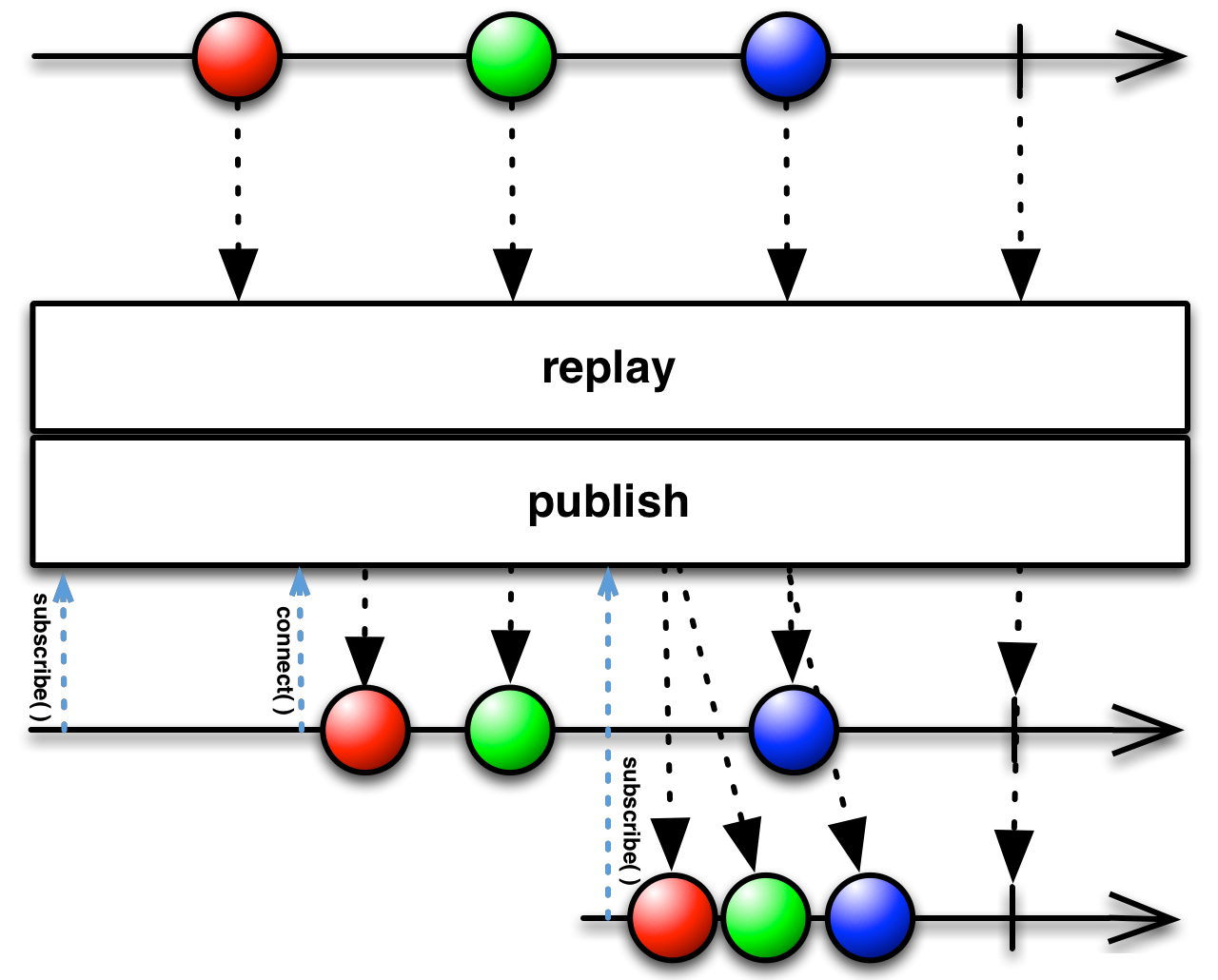
30.Replay
保证所有的观察者收到相同的数据序列,即使它们在Observable开始发射数据之后才订阅
31.Connect
让⼀个可连接的Observable开始发射数据给订阅者
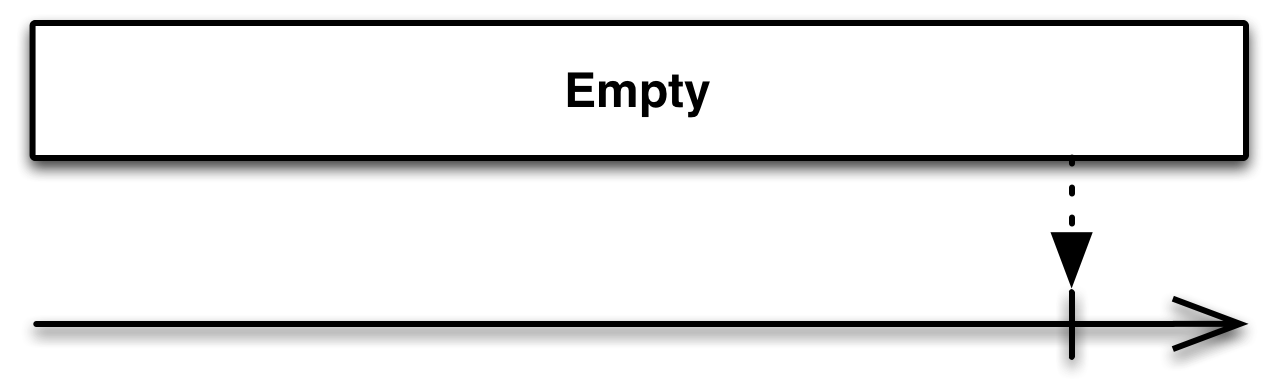
32.Throw
创建⼀个不发射数据以⼀个错误终⽌的 Observable
using System;
using UniRx;
using UnityEngine;
public class UniRxThrowExample : MonoBehaviour
{
    void Start()
    {
        Observable.Throw<string>(new Exception("error"))
            .Subscribe(_ => Debug.Log("不会输出"), e => Debug.LogFormat("发现异常:{ 0}", e.Message));
    }
}
33.Catch
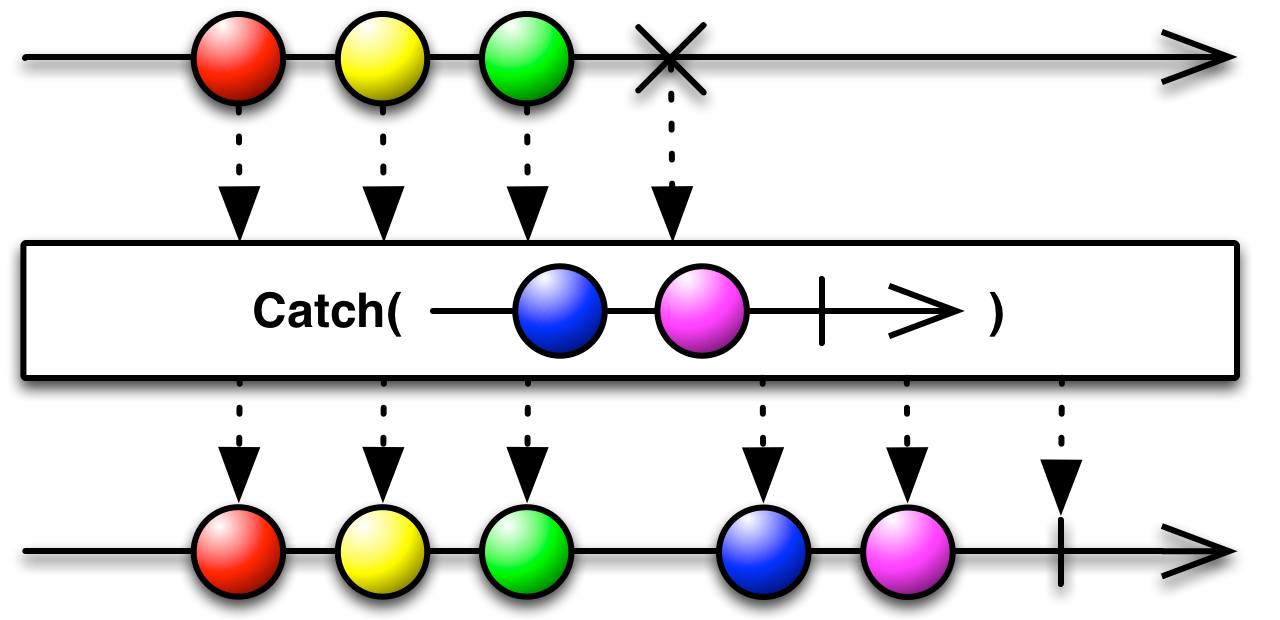
对一个流进行包装,专门处理流执行过程中发生的异常信息,逮到异常信息以后进行处理,纠正以后让流继续执行
using System;
using UniRx;
using UnityEngine;

public class UniRxCatchExample : MonoBehaviour
{
    void Start()
    {
        Observable.Throw<string>(new Exception("error")).Catch<string, Exception>(e =>
        {
            Debug.LogFormat("catched exception:{0}", e.Message);
            return Observable.Timer(TimeSpan.FromSeconds(1.0f)).Select(_ => "timer called");
        })
            .Subscribe(result => Debug.Log(result));
    }
}
/* catched exception:error
// 1 秒后
timer called */
34.Finally
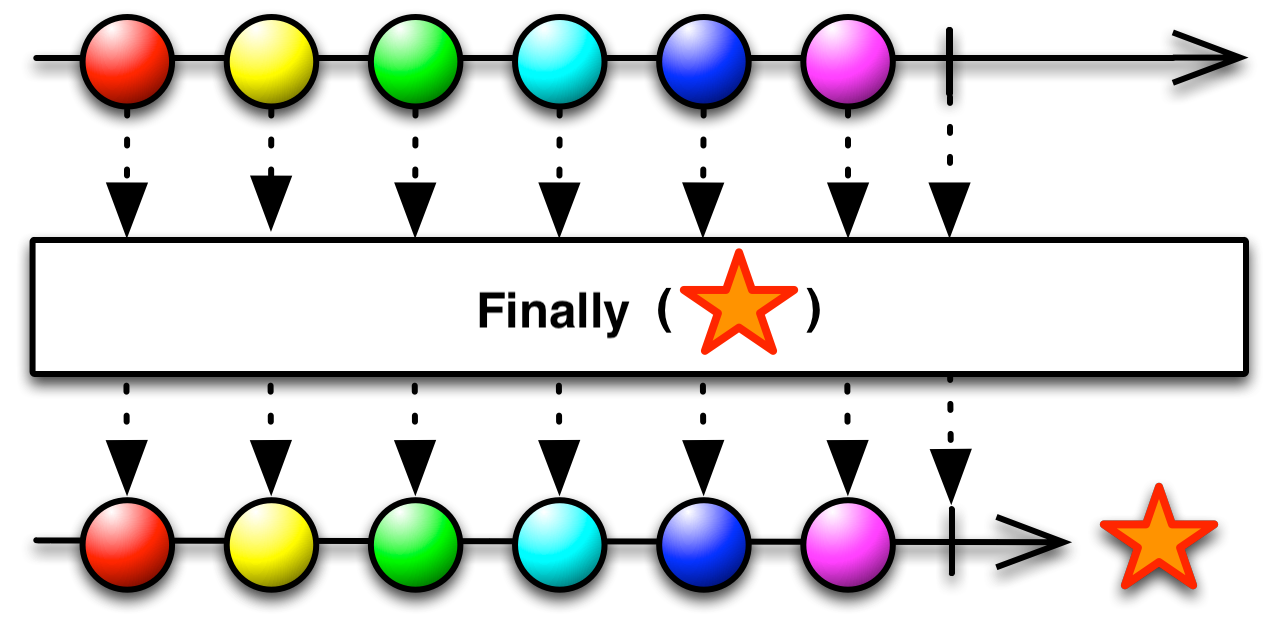
注册⼀个动作,当它产⽣的Observable终⽌之后会被调⽤,⽆论是正常还是异常终⽌。
using UniRx;
using UnityEngine;
public class UniRxFinallyExample : MonoBehaviour
{
    void Start()
    {
        var source = new Subject<int>();
        var result = source.Finally(() => Debug.Log("Finally action ran"));
        result.Subscribe(number => Debug.LogFormat("OnNext({0})", number), () => Debug.Log("OnCompleted()"));
        source.OnNext(1);
        source.OnNext(2);
        source.OnNext(3);
        //source.OnError(new Exception());
        source.OnCompleted();
    }
}
35.DelaySubscription
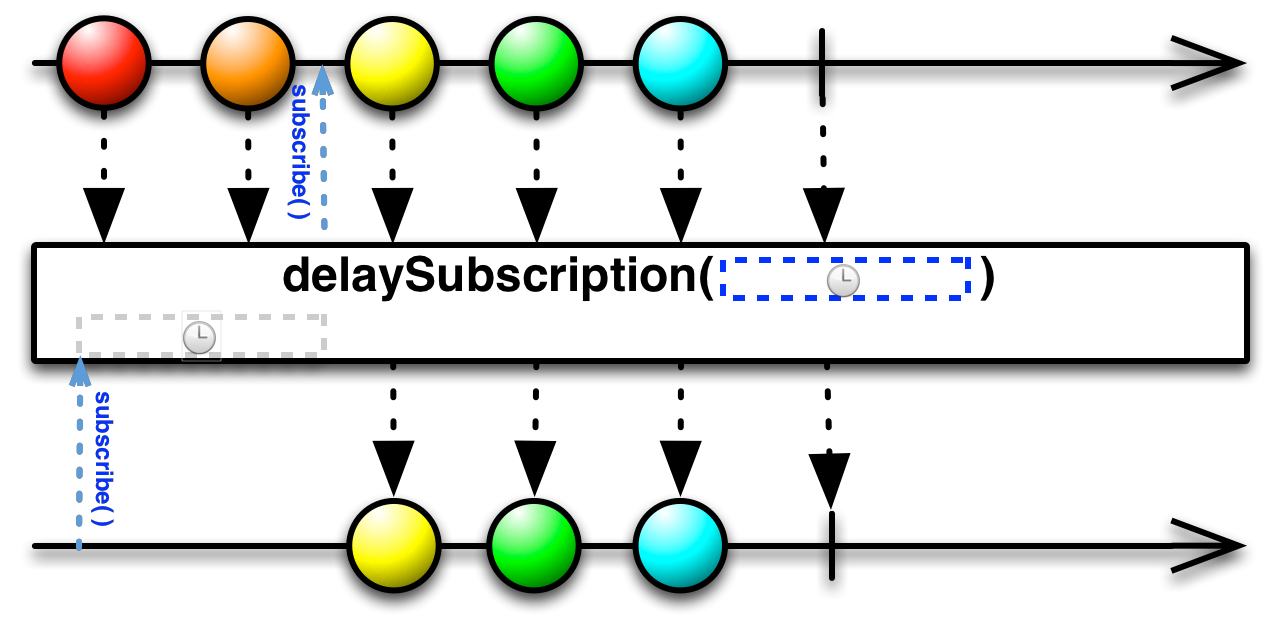
延迟一定时间给订阅者订阅
36.PairWise
Pairwise处理成对的数据,如果数据少于2个,则不处理
等同于Buffer(count:2,skip:1)
using UniRx;
using UnityEngine;
public class UniRxPairWiseExample : MonoBehaviour
{
    void Start()
    {
        Observable.Range(0, 10)
            .Pairwise()
            .Subscribe(pair => Debug.Log(pair.Current + ":" + pair.Previous));
    }
}

 浙公网安备 33010602011771号