flutter GridView 圆角图片带文字
直接上代码:
    var leiAndTuWidget = <Widget>[];
    (SnacksMes.leiJiTu as List<dynamic>).forEach((map) {
      var tmp = map as Map<String, dynamic>;
      leiAndTuWidget.add(new GestureDetector(
        child: new Container(
          margin: const EdgeInsets.fromLTRB(0.5, 0.5, 0.5, 0.5),
          color: new Color.fromRGBO(255, 255, 255, 80.00),
          child: Stack(
            alignment: const Alignment(0.0, 0.7),
            children: [
              CircleAvatar(
                backgroundImage: NetworkImage(tmp["pics"]),
                radius: 100.0,
              ),
              Container(
                decoration: BoxDecoration(
                  color: Colors.black45,
                ),
                child: Text(
                  tmp["category"],
                  style: TextStyle(
                    fontSize: 20.0,
                    fontWeight: FontWeight.bold,
                    color: Colors.white,
                  ),
                ),
              ),
            ],
          )
        ),
        onTap: () {
          print(tmp["category"]);
          getMesAndDealMes(context, tmp["category"]);
        },
      ));
    });
child: new GridView.count(
                        crossAxisCount: 2,
                        padding: const EdgeInsets.all(2.0),
                        mainAxisSpacing: 2.0,
                        crossAxisSpacing: 2.0,
                        children: leiAndTuWidget,
                      )
效果:
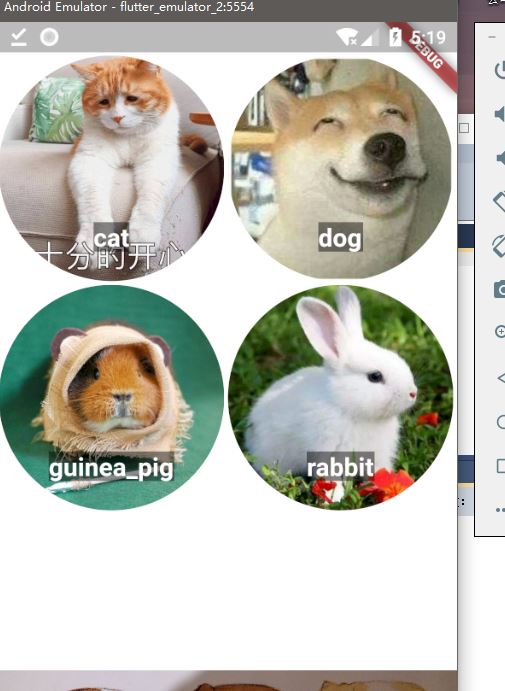
网上找来的这种:源(https://www.jianshu.com/p/b4085a1a5129)
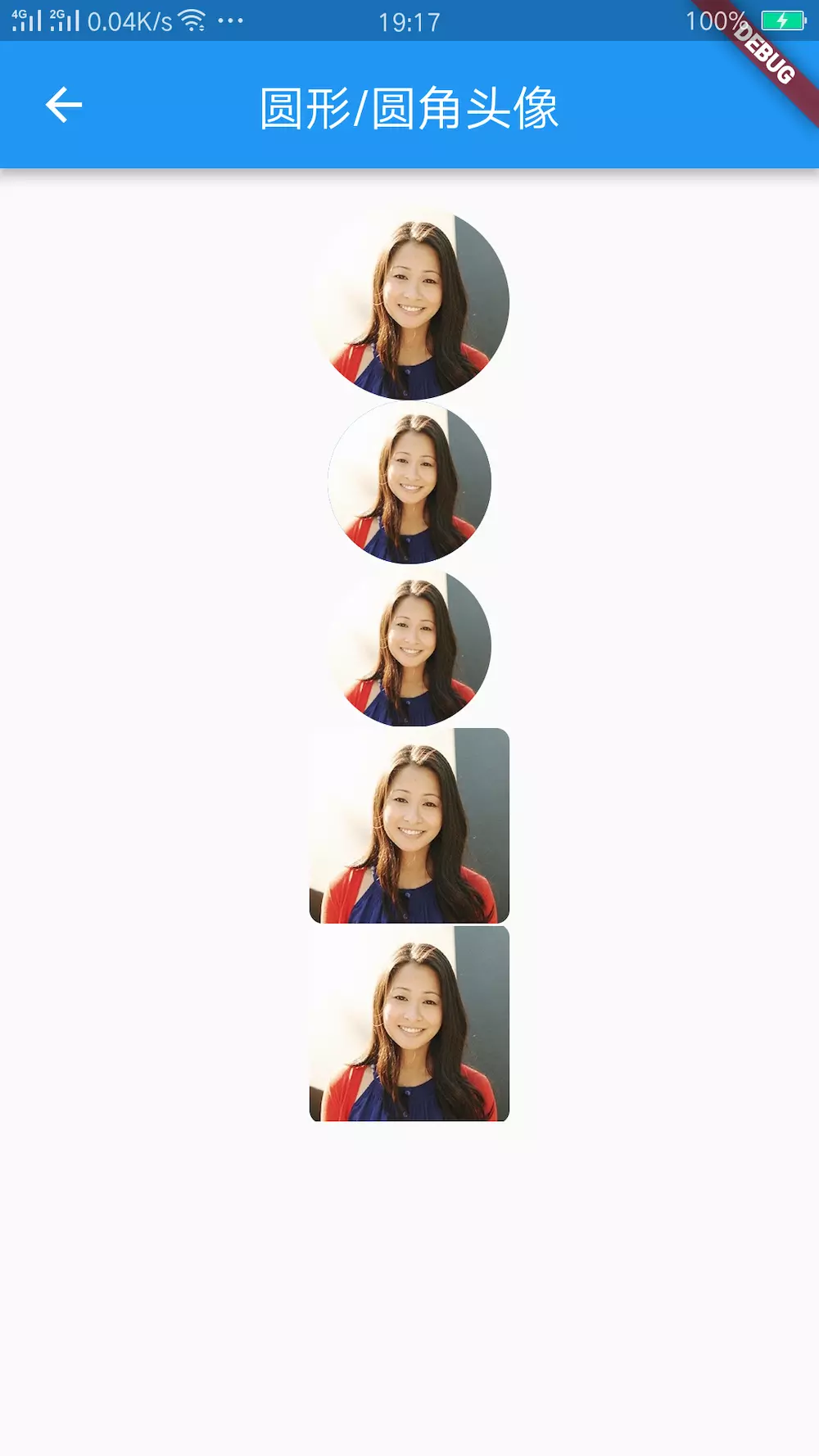
圆形头像
① ClipOval
new ClipOval(
    child: new Image.asset(Utils.getImgPath('ali_connors')),
  )
② CircleAvatar
new CircleAvatar(
    radius: 36.0,
    backgroundImage: AssetImage(
      Utils.getImgPath('ali_connors'),
    ),
  )
③ BoxDecoration BoxShape.circle
 new Container(
    width: 72.0,
    height: 72.0,
    decoration: BoxDecoration(
      shape: BoxShape.circle,
      image: DecorationImage(
        image: AssetImage(
          Utils.getImgPath('ali_connors'),
        ),
      ),
    ),
  )
圆角头像
① ClipRRect
new ClipRRect(
    borderRadius: BorderRadius.circular(6.0),
    child: new Image.asset(Utils.getImgPath('ali_connors')),
  )
② BoxDecoration BoxShape.rectangle
new Container(
    width: 88.0,
    height: 88.0,
    decoration: BoxDecoration(
      shape: BoxShape.rectangle,
      borderRadius: BorderRadius.circular(6.0),
      image: DecorationImage(
        image: AssetImage(
          Utils.getImgPath('ali_connors'),
        ),
      ),
    ),

 浙公网安备 33010602011771号