
day 16
day 16 笔记
每日命令
| data -s "时间" br />timedatectl set-time "时间" |
修改时间日期的命令,写2个 |
|---|---|
| systemctl restart sshd | 重启ssh服务命令 |
| systemctl reload nginx | 重新加载nginx服务 |
| du -sh /var/log | 统计/var/log目录总大小 |
| scp 本地文件 root@ip:对方目录 scp root@ip:对方文件 本地目录 |
远程传输文件命令 |
| chmod u=rw,g=rx,o=r | 修改文件权限为654的字符表达法 |
| chgrp devops file.txt | 修改文件属组为devops |
| tree -N 目录 | 以树状图显示文件目录 |
| mv | 文件剪切命令 |
| sort -rn 倒序排序 | 文件排序,倒序 |
每日单词
| command | 命令、指令 |
|---|---|
| command not found | 未找到 |
| no such file | 没这个文件 |
| out of memory | 内存溢出 |
| device busy | 设备 繁忙 |
| file exists | 文件以存在 |
| not a directory | 不是一个目录 |
| too many file | 太多的文件 |
| only read | 只读的 |
| success | 成功的 |
Firewalld防火墙
什么是防火墙及其作用
防火墙:防范一些网络攻击。有软件防火墙、硬件防火墙之分。

软件防火墙 —— '安全策略'
比如: firewalld  iptables   系统提供的,性能低,成本低
硬件防火墙
在硬件级别实现部分防火墙功能		性能高,成本高

Linux设置 iptables 规则
1.直接使用 iptables 命令  (centos6/7)
2.使用 firewalld-cmd 命令 提供新的服务。  (centos7)
查找防火墙服务名的技巧

#忘记防火墙的服务名
[root@yuanlai0224 ~]# systemctl  list-units | grep   fire
firewalld.service                                                                   loaded active running   firewalld - dynamic firewall daemon
[root@yuanlai0224 ~]#

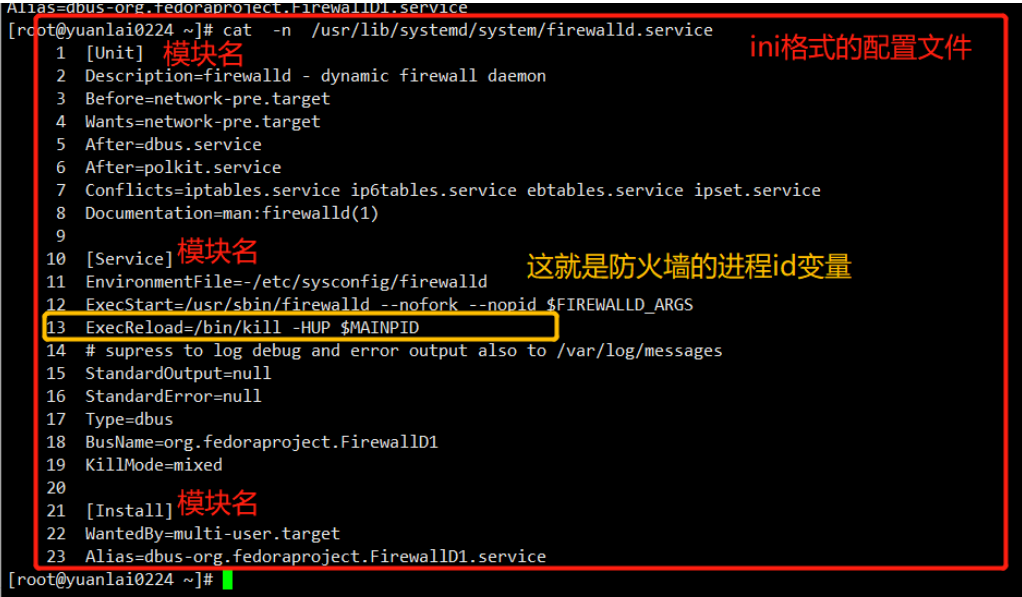
#这个命令其实就是找到一个脚本文件
[root@yuanlai0224 ~]# systemctl status  firewalld.service
/usr/lib/systemd/system/firewalld.service
解释服务器管理脚本的作用
其实就是帮你执行了软件提供的二进制命令
firewalld 如此 /usr/sbin/firewalld
nginx 也是如此 /usr/sbin/nginx
其他软件也是这样
firewalld提供的区域的概念
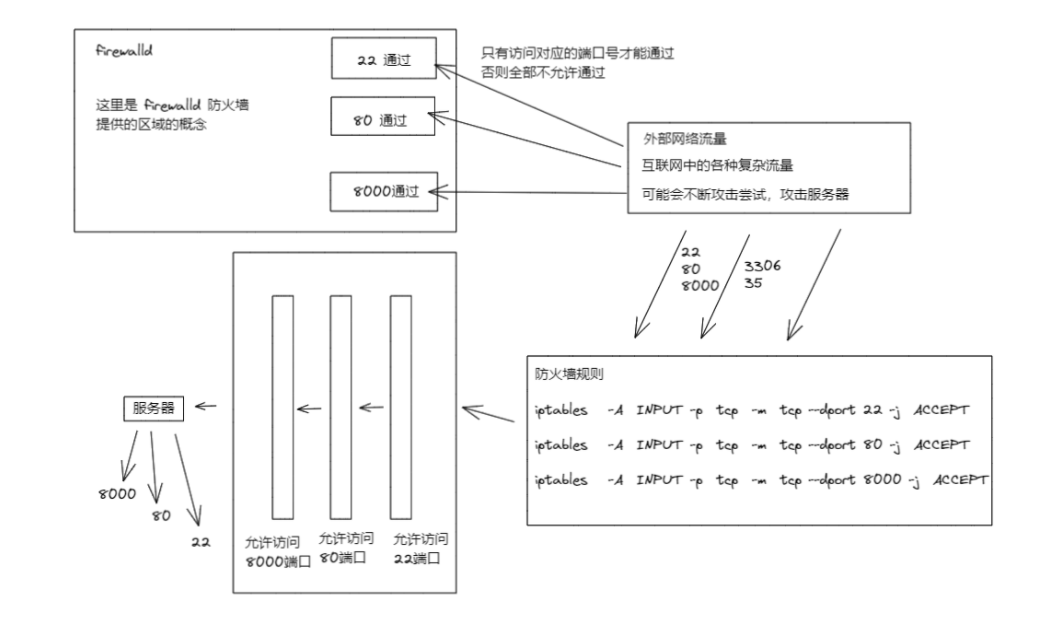
使用防火墙命令,查看系统提供了哪些模板
1.列出所有的区域模板
[root@yuanlai0224 ~]# firewall-cmd  --get-zones
block dmz drop external home internal public trusted work

2.列出所有的区域模块和具体信息
[root@yuanlai0224 ~]# firewall-cmd  --list-all-zones

3.列出当前使用的模块名字
[root@yuanlai0224 ~]# firewall-cmd  --get-default-zone
public

4.列出当前使用的模板和详细信息
[root@yuanlai0224 ~]# firewall-cmd  --list-all
public
  target: default
  icmp-block-inversion: no
  interfaces:
  sources:
  services: ssh dhcpv6-client http ntp
  ports:
  protocols:
  masquerade: no
  forward-ports:
  source-ports:
  icmp-blocks:
  rich rules:

5.先运行一个80端口的服务
python  -m  SimpleHTTPServer 80			#python脚本

6.给当前的防火墙区域,添加一个策略,允许80端口通过
[root@yuanlai0224 ~]# firewall-cmd  --add-port=80/tcp
success


在添加一个8000端口的规则(端口号都是  /tcp)
[root@yuanlai0224 ~]# firewall-cmd  --add-port=8000/tcp
success

7.删除添加的端口规则
[root@yuanlai0224 ~]# firewall-cmd  --remove-port=80/tcp
success
[root@yuanlai0224 ~]# firewall-cmd  --list-all
public
  target: default
  icmp-block-inversion: no
  interfaces:
  sources:
  services: ssh dhcpv6-client
  ports: 8000/tcp
  protocols:
  masquerade: no
  forward-ports:
  source-ports:
  icmp-blocks:
  rich rules:


8.针对服务名添加,比如 ntp 服务
[root@yuanlai0224 ~]# firewall-cmd  --add-service=ntp
success

9.查看当前pubilc 区域使用了那些规则
[root@yuanlai0224 ~]# firewall-cmd --list-all
public
  target: default
  icmp-block-inversion: no
  interfaces:
  sources:
  services: ssh dhcpv6-client ntp
  ports: 8000/tcp
  protocols:
  masquerade: no
  forward-ports:
  source-ports:
  icmp-blocks:
  rich rules:

10.firewalld,作用其实就是添加 iptables 的规则

iptales   -L

tcp  是一个安全可靠的连接,需要双向确认,客户端和服务端,都要确认对方以及连接上

udp  是一个不可靠的连接协议,客户端可以随便给服务端发,不需要对方确认

如何理解 udp:

比如一个很差的网络环境下,网页无法访问,无法做dns解析(网络服务,网站服务,用的都是tcp协议)
但是qq可以收发消息(qq用的是udp协议,以及ntp用的也是udp协议)

查看firewalld命令添加的防火墙规则如下
[root@yuanlai0224 ~]# iptables  -L |grep ntp
ACCEPT     udp  --  anywhere             anywhere             udp dpt:ntp ctstate NEW


11.指明查看 home 区域的详细信息
[root@yuanlai0224 ~]# firewall-cmd  --zone=home  --list-all
home
  target: default
  icmp-block-inversion: no
  interfaces:
  sources:
  services: ssh mdns samba-client dhcpv6-client
  ports:
  protocols:
  masquerade: no
  forward-ports:
  source-ports:
  icmp-blocks:
  rich rules:

12.设置区域模块
firewalld-cmd  --zone=public
永久性添加服务
配置文件在  /etc/firewalld/zones/   每次重启firewalld 服务都会加载这个文件

永久增加	firewall-cmd  --permanent  --add-port=8000/tcp

永久删除	firewall-cmd  --permanent  --remove-port=8000/tcp


1.永久添加 8000/tcp 的策略
##下边的添加方式不会立即生效
[root@yuanlai0224 ~]# firewall-cmd  --permanent  --add-port=8000/tcp
success

2.需要重新加载firewalld服务
[root@yuanlai0224 ~]#firewall-cmd --reload

3.重新加载后,规则自动生成
[root@yuanlai0224 ~]# firewall-cmd  --list-all
public
  target: default
  icmp-block-inversion: no
  interfaces:
  sources:
  services: ssh dhcpv6-client http ntp
  ports: 8000/tcp
  protocols:
  masquerade: no
  forward-ports:
  source-ports:
  icmp-blocks:
  rich rules:
如何添加nginx网站服务
来源 ip 客户端
目标 ip 客户端
目标端口服务器上那个端口的程序:
可以改为服务的名字
sshd服务端口  22
mysql服务端口  3306
常见网站服务 httpd nginx 默认端口是 80

#######################################################################################################

1.查询支持的所有服务名字有哪些
[root@yuanlai0224 ~]# firewall-cmd --get-service

在这里面 nginx,httpd统一被改为了 http 服务,并且放行80端口

2.查询当前区域,所用的服务名有哪些
[root@yuanlai0224 ~]# firewall-cmd  --list-service
ssh dhcpv6-client http ntp

3.添加http服务放行80端口即可

[root@yuanlai0224 ~]# firewall-cmd  --add-service=http

4.移除该服务,禁用80端口的请求
[root@yuanlai0224 ~]#firewall-cmd --remove-service=http

5.建议最好还是直接针对端口号,协议号,添加规则
定时任务 crontab命令
语法

crontab
-l		列出当前用户有哪些计划任务
-e		编辑当前用户的计划任务
-r		删除当前用户的计划任务
-u		指定用户(比如 以 root 身份 给bob用户添加一个定时任务)
定时任务语法学习
先来看看系统默认的定时任务配置文件,语法长什么样
[root@yuanlai0224 ~]# cat /etc/crontab
SHELL=/bin/bash
PATH=/sbin:/bin:/usr/sbin:/usr/bin
MAILTO=root

# For details see man 4 crontabs

# Example of job definition:
# .---------------- minute (0 - 59)
# |  .------------- hour (0 - 23)
# |  |  .---------- day of month (1 - 31)
# |  |  |  .------- month (1 - 12) OR jan,feb,mar,apr ...
# |  |  |  |  .---- day of week (0 - 6) (Sunday=0 or 7) OR sun,mon,tue,wed,thu,fri,sat
# |  |  |  |  |
# *  *  *  *  * user-name  command to be executed

[root@yuanlai0224 ~]#


1.定时任务,是帮我们去执行shell语句的,因此必须得有bash解释器
2.注意   crontab自己定义了 PATH 变量
注意写在定时任务里面的命令,必须是绝对路径,不容易出错


取值范围
分	0-59
时	0-59
日	1-31	(注意日期和星期是不能同时写的)
月	1-12
周	0-7		(0,7都代表了周天)
定时任务编写流程
1.crontab -e 编辑定时任务

[root@yuanlai0224 ~]# crontab -e
crontab: installing new crontab
*  *   *  *  *  /usr/bin/echo  'hello,i am your superman' >> /tmp/man.txt

2.查看定时任务
[root@yuanlai0224 ~]#crontab -l
*  *   *  *  *  /usr/bin/echo  'hello,i am your superman' >> /tmp/man.txt

3.验证文件是否存在
[root@yuanlai0224 ~]# tail -f /tmp/man.txt
hello,i am your superman

4.定时任务写入后,会自动记录到一个文件中,文件路径在如下,以用户名区分不同的定时任务

[root@yuanlai0224 ~]# ls /var/spool/cron/
jerry01  root
[root@yuchao-linux01 ~]# cat /var/spool/cron/jerry01
* * * * * /usr/bin/echo 'i am jack' >> /tmp/jack.txt


5.黑洞文件
再写定时任务不想输出可以把他丢进黑洞文件
& > /dev/null
禁止哪些用户创建定时任务
该文件在
/etc/cron.deny 黑名单文件 (将系统中,所有uid大于1000的用户,全部写入黑名单)


/etc/cron.allow 白名单 ,优先级高于黑名单
定时任务,默认存放的路径
[root@yuanlai0224 ~]# ls /var/spool/cron/
jerry01  root
定时任务,服务端的运行日志,可以用于给运维,进行故障排查
/var/log/cron
最后,定时任务,crontab会在系统中,生成大量的邮件日志,会占用磁盘,因此我们都会关闭邮件服务即可
[root@yuanlai0224 ~]# find / -type f  -name 'post*.service'
/usr/lib/systemd/system/postfix.service


systemctl服务管理命令
[root@yuanlai0224 ~]# systemctl list-units |grep post
postfix.service                                                                                                  loaded active running   Postfix Mail Transport Agent


systemctl status postfix

systemctl stop postfix

禁止开机自启
systemctl disable postfix

 浙公网安备 33010602011771号