

QML中定位元素
在QtQuick模块中提供了Row,Column,Grid,Flow作为定位容器,以下是我自己参考QML BOOK写的Demo。
首先是创建一个组件ColorSquare.qml以便后续重复使用。
//RedSquare.qml
import QtQuick 2.0

Rectangle{
    width: 48
    height: 48
    color: "#ee0000"
    border.color: Qt.lighter(color)
}
之后就是我们的测试PositioningElementDemo.qml了,直接上代码
 1 //PositioningElementDemo.qml
 2 import QtQuick 2.0
 3 ColorSquare{
 4     id:root
 5     width: 500
 6     height: 500
 7
 8     //列排列
 9     Column{
10         id:column
11         //列居中
12         anchors.verticalCenter: parent.verticalCenter
13         //全居中
14         //anchors.centerIn: parent
15         spacing: 8
16         ColorSquare{color:"green"}
17         ColorSquare{width: 96;color:"yellow"}
18         ColorSquare{color:"blue"}
19
20     }
21
22     //行排列
23     Row{
24         y:10
25         id:row
26         //行居中
27         anchors.horizontalCenter: parent.horizontalCenter
28         spacing: 20
29         ColorSquare{color:"green"}
30         ColorSquare{color:"yellow"}
31         ColorSquare{color:"blue"}
32     }
33
34     //栅格元素,可以通过设置rows和colums设置排列的行数和列数
35     Grid{
36        id:grid
37        rows:2
38        columns: 2
39        anchors.centerIn: parent
40        spacing: 8
41        ColorSquare{color:"green"}
42        ColorSquare{color:"yellow"}
43        ColorSquare{color:"blue"}
44        ColorSquare{color:"black"}
45     }
46
47     Flow{
48         anchors.fill:parent
49         anchors.margins: 70  //所有进行边缘对齐的偏移量,优先级比上行低
50         spacing: 20
51         ColorSquare{color:"green"}
52         ColorSquare{color:"yellow"}
53         ColorSquare{color:"blue"}
54         ColorSquare{color:"black"}
55     }
56 }
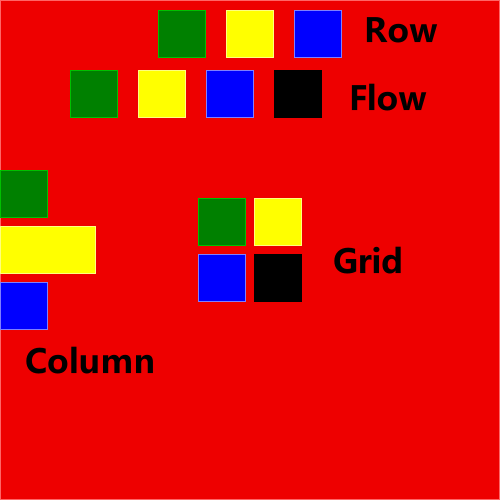
以下为上述代码效果图,由于偷懒就只写了一个Demo。

 浙公网安备 33010602011771号