


react开发环境跨域发送请求
以脚手架创建react项目后,在src目录下新建setupProxy.js文件,需要安装http-proxy-middleware, 命令"yarn add http-proxy-middleware"
const {createProxyMiddleware } = require('http-proxy-middleware');

module.exports = function (app) {
    app.use('/api', createProxyMiddleware (
      {
          target: 'http://localhost:8080',
          changeOrigin: true,
          pathRewrite: {
            "^/api": ""
          }
        }
    ))
}
该代码表示会将带有/api的请求代理发送到http://localhost:8080。
页面内容
class App extends Component {

  getStudentData = ()=>{
    axios.get('http://localhost:3000/api/hello/list').then(
      response => {
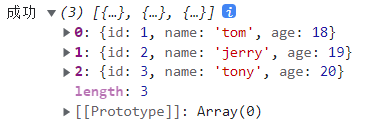
        console.log('成功', response.data);
      },
      error => {
        console.log('失败了', error.data);
      }
    )
  }

  render(){
    return (
      <div className="App">
        <button onClick={this.getStudentData}>点击获得学生数据</button>
      </div>
    );
  }
}
服务器端使用springboot搭建,代码如下:
@Controller
@RequestMapping("/hello")
public class HelloController {
    @GetMapping("list")
    public ResponseEntity<List<Student>> hello(){
        List<Student> list = new ArrayList<>();
        Student student1 = new Student(1, "tom", 18);
        Student student2 = new Student(2, "jerry", 19);
        Student student3 = new Student(3, "tony", 20);
        list.add(student1);
        list.add(student2);
        list.add(student3);

        return ResponseEntity.ok(list);
    }

}
@Data
@AllArgsConstructor
@NoArgsConstructor
public class Student {
    private Integer id;
    private String name;
    private Integer age;
}
结果展示:

 浙公网安备 33010602011771号