
iOS oc与js交互详解 之 WKWebView
Xcode8发布以后,编译器开始不支持iOS7,所以很多应用在适配iOS10之后都不在适配iOS7了,其中包括了很多大公司,网易新闻,滴滴出行等。
支持到iOS8,第一个要改的自然是用WKWebView替换原来的UIWebView。WKWebView有很多明显优势:
1、更多的支持HTML5的特性
2、官方宣称的高达60fps的滚动刷新率以及内置手势
3、将UIWebViewDelegate与UIWebView拆分成了14类与3个协议,以前很多不方便实现的功能得以实现。文档
4、Safari相同的JavaScript引进
5、占用更少的内存
UIWebView

WKWebView
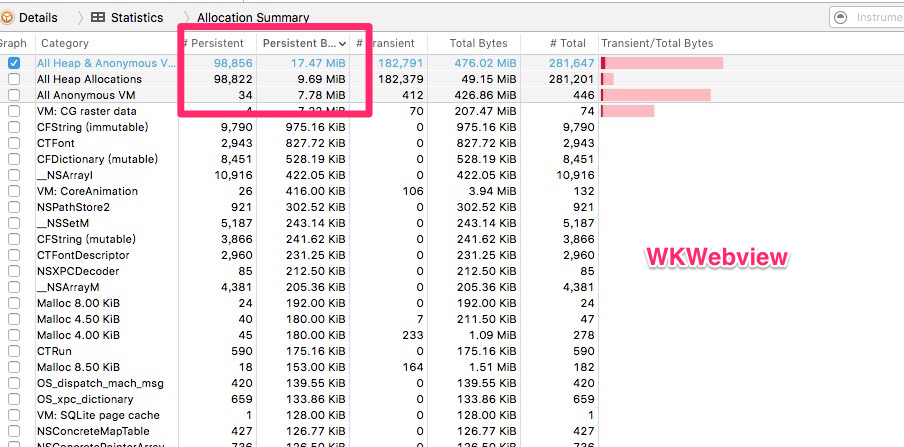
因此,使用WkWebview替换UIWebView还是很有必要的。
基本使用方法
WKWebView有两个delegate, WKUIDelegate 和 WKNavigationDelegate。WKNavigationDelegate主要处理一些跳转、加载处理操作,WKUIDelegate主要处理JS脚本,确认框,警告框等。因此 WKNavigationDelegate 更加常用。
比较常用的方法:
#pragma mark - lifeCircle- (void)viewDidLoad { [super viewDidLoad]; webView = [[WKWebView alloc]init]; [self.view addSubview:webView]; [webView mas_makeConstraints:^(MASConstraintMaker *make) { make.left.equalTo(self.view); make.right.equalTo(self.view); make.top.equalTo(self.view); make.bottom.equalTo(self.view); }]; webView.UIDelegate = self; webView.navigationDelegate = self;}#pragma mark - WKNavigationDelegate// 页面开始加载时调用- (void)webView:(WKWebView *)webView didStartProvisionalNavigation:(WKNavigation *)navigation{}// 当内容开始返回时调用- (void)webView:(WKWebView *)webView didCommitNavigation:(WKNavigation *)navigation{}// 页面加载完成之后调用- (void)webView:(WKWebView *)webView didFinishNavigation:(WKNavigation *)navigation{}// 页面加载失败时调用- (void)webView:(WKWebView *)webView didFailProvisionalNavigation:(WKNavigation *)navigation{}// 接收到服务器跳转请求之后调用- (void)webView:(WKWebView *)webView didReceiveServerRedirectForProvisionalNavigation:(WKNavigation *)navigation{}// 在收到响应后,决定是否跳转- (void)webView:(WKWebView *)webView decidePolicyForNavigationResponse:(WKNavigationResponse *)navigationResponse decisionHandler:(void (^)(WKNavigationResponsePolicy))decisionHandler{ NSLog(@"%@",navigationResponse.response.URL.absoluteString); //允许跳转 decisionHandler(WKNavigationResponsePolicyAllow); //不允许跳转 //decisionHandler(WKNavigationResponsePolicyCancel);}
// 在发送请求之前,决定是否跳转- (void)webView:(WKWebView *)webView decidePolicyForNavigationAction:(WKNavigationAction *)navigationAction decisionHandler:(void (^)(WKNavigationActionPolicy))decisionHandler{ NSLog(@"%@",navigationAction.request.URL.absoluteString); //允许跳转 decisionHandler(WKNavigationActionPolicyAllow); //不允许跳转 //decisionHandler(WKNavigationActionPolicyCancel);}#pragma mark - WKUIDelegate// 创建一个新的WebView- (WKWebView *)webView:(WKWebView *)webView createWebViewWithConfiguration:(WKWebViewConfiguration *)configuration forNavigationAction:(WKNavigationAction *)navigationAction windowFeatures:(WKWindowFeatures *)windowFeatures{ return [[WKWebView alloc]init];}// 输入框- (void)webView:(WKWebView *)webView runJavaScriptTextInputPanelWithPrompt:(NSString *)prompt defaultText:(nullable NSString *)defaultText initiatedByFrame:(WKFrameInfo *)frame completionHandler:(void (^)(NSString * __nullable result))completionHandler{ completionHandler(@"http");}// 确认框- (void)webView:(WKWebView *)webView runJavaScriptConfirmPanelWithMessage:(NSString *)message initiatedByFrame:(WKFrameInfo *)frame completionHandler:(void (^)(BOOL result))completionHandler{ completionHandler(YES);}// 警告框- (void)webView:(WKWebView *)webView runJavaScriptAlertPanelWithMessage:(NSString *)message initiatedByFrame:(WKFrameInfo *)frame completionHandler:(void (^)(void))completionHandler{ NSLog(@"%@",message); completionHandler();}OC与JS交互
WKWebview提供了API实现js交互,不需要借助JavaScriptCore或者webJavaScriptBridge。使用WKUserContentController实现js native 交互。简单的说就是先注册约定好的方法,然后再调用。
js调用oc方法
oc代码(有误,内存不释放):
@interface ViewController (){
    WKWebView * webView;
    WKUserContentController* userContentController;
}

@end

@implementation ViewController

#pragma mark - lifeCircle
- (void)viewDidLoad {
    [super viewDidLoad];
    //配置环境
    WKWebViewConfiguration * configuration = [[WKWebViewConfiguration alloc]init];
    userContentController =[[WKUserContentController alloc]init];
    configuration.userContentController = userContentController;
    webView = [[WKWebView alloc]initWithFrame:CGRectMake(0, 0, 100, 100) configuration:configuration];
    //注册方法
    [userContentController addScriptMessageHandler:self  name:@"sayhello"];//注册一个name为sayhello的js方法

    [self.view addSubview:webView];
    [webView mas_makeConstraints:^(MASConstraintMaker *make) {
        make.left.equalTo(self.view);
        make.right.equalTo(self.view);
        make.top.equalTo(self.view);
        make.bottom.equalTo(self.view);
    }];
    webView.UIDelegate = self;
    webView.navigationDelegate = self;
    [webView loadRequest:[NSURLRequest requestWithURL:[NSURL URLWithString:@"http://www.test.com"]]];
}
- (void)dealloc{
    //这里需要注意,前面增加过的方法一定要remove掉。
    [userContentController removeScriptMessageHandlerForName:@"sayhello"];
}
#pragma mark - WKScriptMessageHandler
- (void)userContentController:(WKUserContentController *)userContentController didReceiveScriptMessage:(WKScriptMessage *)message{
    NSLog(@"name:%@\\\\n body:%@\\\\n frameInfo:%@\\\\n",message.name,message.body,message.frameInfo);
}
@end


上面的oc代码如果认证测试一下就会发现dealloc并不会执行,这样肯定是不行的,会造成内存泄漏。原因是
[userContentController addScriptMessageHandler:self  name:@"sayhello"];  这句代码造成无法释放内存。(ps:试了下用weak指针还是不能释放,不知道是什么原因。)因此还需要进一步改进,正确的写法是用一个新的controller来处理,新的controller再绕用delegate绕回来。

oc(代码正确写法):
@interface ViewController (){ WKWebView * webView; WKUserContentController* userContentController;}@end@implementation ViewController#pragma mark - lifeCircle- (void)viewDidLoad { [super viewDidLoad]; //配置环境 WKWebViewConfiguration * configuration = [[WKWebViewConfiguration alloc]init]; userContentController =[[WKUserContentController alloc]init]; configuration.userContentController = userContentController; webView = [[WKWebView alloc]initWithFrame:CGRectMake(0, 0, 100, 100) configuration:configuration]; //注册方法 WKDelegateController * delegateController = [[WKDelegateController alloc]init]; delegateController.delegate = self; [userContentController addScriptMessageHandler:delegateController name:@"sayhello"]; [self.view addSubview:webView]; [webView mas_makeConstraints:^(MASConstraintMaker *make) { make.left.equalTo(self.view); make.right.equalTo(self.view); make.top.equalTo(self.view); make.bottom.equalTo(self.view); }]; webView.UIDelegate = self; webView.navigationDelegate = self;}- (void)dealloc{ //这里需要注意,前面增加过的方法一定要remove掉。 [userContentController removeScriptMessageHandlerForName:@"sayhello"];}#pragma mark - WKScriptMessageHandler- (void)userContentController:(WKUserContentController *)userContentController didReceiveScriptMessage:(WKScriptMessage *)message{ NSLog(@"name:%@\\\\n body:%@\\\\n frameInfo:%@\\\\n",message.name,message.body,message.frameInfo);}@end#import #import @protocol WKDelegate - (void)userContentController:(WKUserContentController *)userContentController didReceiveScriptMessage:(WKScriptMessage *)message;@end@interface WKDelegateController : UIViewController @property (weak , nonatomic) id delegate;@end
.m代码:
#import "WKDelegateController.h"@interface WKDelegateController ()@end@implementation WKDelegateController- (void)viewDidLoad { [super viewDidLoad];}- (void)userContentController:(WKUserContentController *)userContentController didReceiveScriptMessage:(WKScriptMessage *)message{ if ([self.delegate respondsToSelector:@selector(userContentController:didReceiveScriptMessage:)]) { [self.delegate userContentController:userContentController didReceiveScriptMessage:message]; }}@end
h5代码:
function say(){//前端需要用 window.webkit.messageHandlers.注册的方法名.postMessage({body:传输的数据} 来给native发送消息 window.webkit.messageHandlers.sayhello.postMessage({body: 'hello world!'});} hello world say hello
打印出的log:
name:sayhellobody:{ body = "hello world!";} frameInfo:<wkframeinfo: 0x7f872060ce20; ismainframe = yes; request = { url: http: www.test.com="" }=""></wkframeinfo: 0x7f872060ce20; ismainframe = yes; request = { url: http:>
|
注意点:
1、addScriptMessageHandler 要和 removeScriptMessageHandlerForName 配套出现,否则会造成内存泄漏。
2、h5只能传一个参数,如果需要多个参数就需要用字典或者json组装。

oc调用js方法
代码如下:
- (void)webView:(WKWebView *)tmpWebView didFinishNavigation:(WKNavigation *)navigation{ //say()是JS方法名,completionHandler是异步回调block [webView evaluateJavaScript:@"say()" completionHandler:^(id _Nullable result, NSError * _Nullable error) { NSLog(@"%@",result); }];}
|
h5代码同上。
WebViewJavascriptBridge
一般来说,一个好的UI总有一个大神会开发出一个好的第三方封装框架。WebViewJavascriptBridge的作者也做了一套支持WKWebView与JS交互的第三方框架:WKWebViewJavascriptBridge。
-
cocoaPods: pod 'WebViewJavascriptBridge', '~> 5.0.5'
-
github地址:https://github.com/marcuswestin/WebViewJavascriptBridge
主要方法如下:
//初始化方法
+ (instancetype)bridgeForWebView:(WKWebView*)webView;+ (void)enableLogging;//注册函数名- (void)registerHandler:(NSString*)handlerName handler:(WVJBHandler)handler;//调用函数名- (void)callHandler:(NSString*)handlerName;- (void)callHandler:(NSString*)handlerName data:(id)data;- (void)callHandler:(NSString*)handlerName data:(id)data responseCallback:(WVJBResponseCallback)responseCallback;//重置- (void)reset;//设置WKNavigationDelegate- (void)setWebViewDelegate:(id)webViewDelegate;补充
前不久把项目中的 UIWebView 更新到 WkWebView,解决了一大堆问题,但是也遗留了一大堆问题,比方说cookie。
以前 UIWebView 会自动去 NSHTTPCookieStorage 中读取 cookie,但是 WKWebView 并不会去读取,因此导致 cookie 丢失以及一系列问题,解决方式就是在 request 中手动帮其添加上。
mainWebView.UIDelegate = self;mainWebView.navigationDelegate = self;NSMutableURLRequest *request = [NSMutableURLRequest requestWithURL:[NSURL URLWithString:@"http://www.test.com"]];[request addValue:[self readCurrentCookieWithDomain:@"http://www.test.com/"] forHTTPHeaderField:@"Cookie"];[mainWebView loadRequest:request];- (NSString *)readCurrentCookieWithDomain:(NSString *)domainStr{ NSHTTPCookieStorage*cookieJar = [NSHTTPCookieStorage sharedHTTPCookieStorage]; NSMutableString * cookieString = [[NSMutableString alloc]init]; for (NSHTTPCookie*cookie in [cookieJar cookies]) { [cookieString appendFormat:@"%@=%@;",cookie.name,cookie.value]; }//删除最后一个“;” [cookieString deleteCharactersInRange:NSMakeRange(cookieString.length - 1, 1)]; return cookieString;}
- (void)webView:(WKWebView *)webView didFinishNavigation:(WKNavigation *)navigation { //取出cookie NSHTTPCookieStorage *cookieStorage = [NSHTTPCookieStorage sharedHTTPCookieStorage]; //js函数 NSString *JSFuncString =@"function setCookie(name,value,expires)\ {\ var oDate=new Date();\ oDate.setDate(oDate.getDate()+expires);\document.cookie=name+'='+value+';expires='+oDate+';path=/'\ }\ function getCookie(name)\ {\ var arr = document.cookie.match(new RegExp('(^| )'+name+'=({FNXX==XXFN}*)(;|$)'));\ if(arr != null) return unescape(arr[2]); return null;\ }\ function delCookie(name)\ {\ var exp = new Date();\ exp.setTime(exp.getTime() - 1);\ var cval=getCookie(name);\ if(cval!=null) document.cookie= name + '='+cval+';expires='+exp.toGMTString();\ }"; //拼凑js字符串 NSMutableString *JSCookieString = JSFuncString.mutableCopy; for (NSHTTPCookie *cookie in cookieStorage.cookies) { NSString *excuteJSString = [NSString stringWithFormat:@"setCookie('%@', '%@', 1);", cookie.name, cookie.value]; [JSCookieString appendString:excuteJSString]; } //执行js [webView evaluateJavaScript:JSCookieString completionHandler:nil];}
|

 浙公网安备 33010602011771号