 1 import pandas as pd
 2
 3 datafile= 'D://CourseAssignment//AI//air_data.csv'  # 航空原始数据,第一行为属性标签
 4 resultfile = 'D://CourseAssignment//AI//explore.csv'  # 数据探索结果表
 5
 6 # 读取原始数据,指定UTF-8编码(需要用文本编辑器将数据装换为UTF-8编码)
 7 data = pd.read_csv(datafile, encoding = 'utf-8')
 8
 9 # 包括对数据的基本描述,percentiles参数是指定计算多少的分位数表(如1/4分位数、中位数等)
10 explore = data.describe(percentiles = [], include = 'all').T  # T是转置,转置后更方便查阅
11 explore['null'] = len(data)-explore['count']  # describe()函数自动计算非空值数,需要手动计算空值数
12
13 explore = explore[['null', 'max', 'min']]
14 explore.columns = ['空值数', '最大值', '最小值']  # 表头重命名
15 '''
16 这里只选取部分探索结果。
17 describe()函数自动计算的字段有count(非空值数)、unique(唯一值数)、top(频数最高者)、
18 freq(最高频数)、mean(平均值)、std(方差)、min(最小值)、50%(中位数)、max(最大值)
19 '''
20
21 explore.to_csv(resultfile)  # 导出结果
 1 import pandas as pd
 2 import matplotlib.pyplot as plt
 3
 4 datafile= 'D://CourseAssignment//AI//air_data.csv'  # 航空原始数据,第一行为属性标签
 5
 6 # 读取原始数据,指定UTF-8编码(需要用文本编辑器将数据装换为UTF-8编码)
 7 data = pd.read_csv(datafile, encoding = 'utf-8')
 8
 9 # 客户信息类别
10 # 提取会员入会年份
11 from datetime import datetime
12 ffp = data['FFP_DATE'].apply(lambda x:datetime.strptime(x,'%Y/%m/%d'))
13 ffp_year = ffp.map(lambda x : x.year)
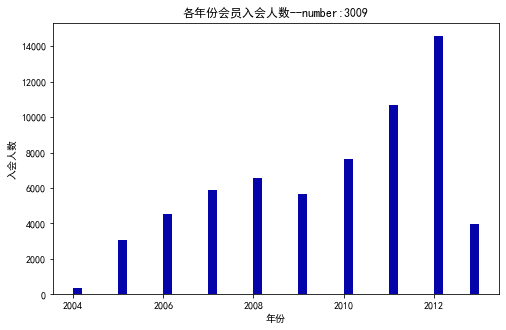
14 # 绘制各年份会员入会人数直方图
15 fig = plt.figure(figsize = (8 ,5))  # 设置画布大小
16 plt.rcParams['font.sans-serif'] = 'SimHei'  # 设置中文显示
17 plt.rcParams['axes.unicode_minus'] = False
18 plt.hist(ffp_year, bins='auto', color='#0504aa')
19 plt.xlabel('年份')
20 plt.ylabel('入会人数')
21 plt.title('各年份会员入会人数--number:3009')
22 plt.show()
23 plt.close
![]()
1 male = pd.value_counts(data['GENDER'])['男']
2 female = pd.value_counts(data['GENDER'])['女']
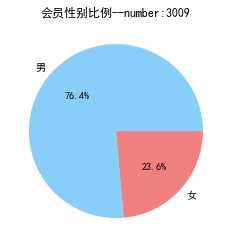
3 # 绘制会员性别比例饼图
4 fig = plt.figure(figsize = (7 ,4))  # 设置画布大小
5 plt.pie([ male, female], labels=['男','女'], colors=['lightskyblue', 'lightcoral'],
6        autopct='%1.1f%%')
7 plt.title('会员性别比例--number:3009')
8 plt.show()
9 plt.close
![]()
 1 # 提取不同级别会员的人数
 2 lv_four = pd.value_counts(data['FFP_TIER'])[4]
 3 lv_five = pd.value_counts(data['FFP_TIER'])[5]
 4 lv_six = pd.value_counts(data['FFP_TIER'])[6]
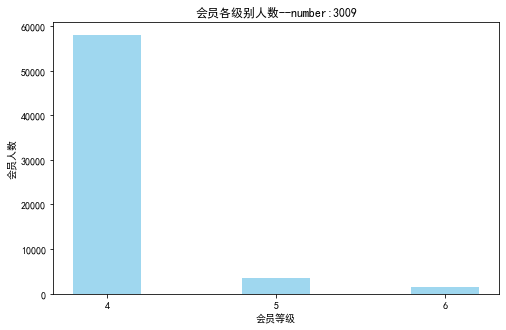
 5 # 绘制会员各级别人数条形图
 6 fig = plt.figure(figsize = (8 ,5))  # 设置画布大小
 7 plt.bar(x=range(3), height=[lv_four,lv_five,lv_six], width=0.4, alpha=0.8, color='skyblue')
 8 plt.xticks([index for index in range(3)], ['4','5','6'])
 9 plt.xlabel('会员等级')
10 plt.ylabel('会员人数')
11 plt.title('会员各级别人数--number:3009')
12 plt.show()
13 plt.close()
![]()
 1 # 提取会员年龄
 2 age = data['AGE'].dropna()
 3 age = age.astype('int64')
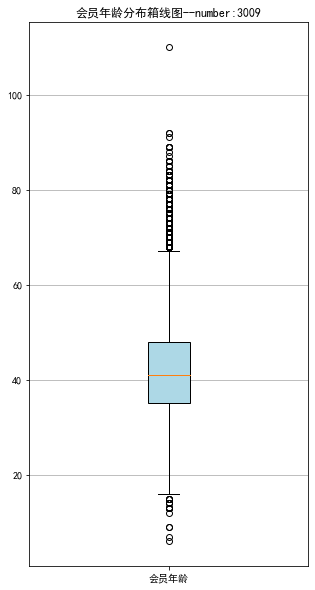
 4 # 绘制会员年龄分布箱型图
 5 fig = plt.figure(figsize = (5 ,10))
 6 plt.boxplot(age,
 7             patch_artist=True,
 8             labels = ['会员年龄'],  # 设置x轴标题
 9             boxprops = {'facecolor':'lightblue'})  # 设置填充颜色
10 plt.title('会员年龄分布箱线图--number:3009')
11 # 显示y坐标轴的底线
12 plt.grid(axis='y')
13 plt.show()
14 plt.close
![]()
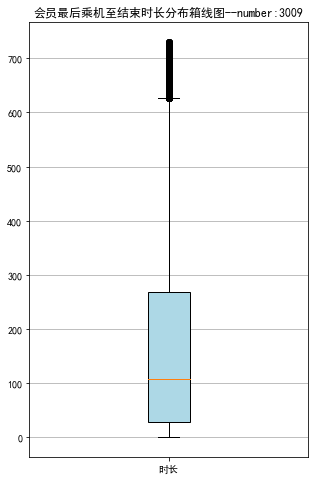
# 乘机信息类别
lte = data['LAST_TO_END']
fc = data['FLIGHT_COUNT']
sks = data['SEG_KM_SUM']

# 绘制最后乘机至结束时长箱线图
fig = plt.figure(figsize = (5 ,8))
plt.boxplot(lte,
            patch_artist=True,
            labels = ['时长'],  # 设置x轴标题
            boxprops = {'facecolor':'lightblue'})  # 设置填充颜色
plt.title('会员最后乘机至结束时长分布箱线图--number:3009')
# 显示y坐标轴的底线
plt.grid(axis='y')
plt.show()
plt.close
![]()
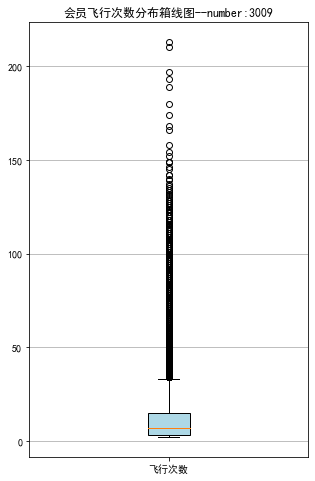
 1 # 绘制客户飞行次数箱线图
 2 fig = plt.figure(figsize = (5 ,8))
 3 plt.boxplot(fc,
 4             patch_artist=True,
 5             labels = ['飞行次数'],  # 设置x轴标题
 6             boxprops = {'facecolor':'lightblue'})  # 设置填充颜色
 7 plt.title('会员飞行次数分布箱线图--number:3009')
 8 # 显示y坐标轴的底线
 9 plt.grid(axis='y')
10 plt.show()
11 plt.close
![]()
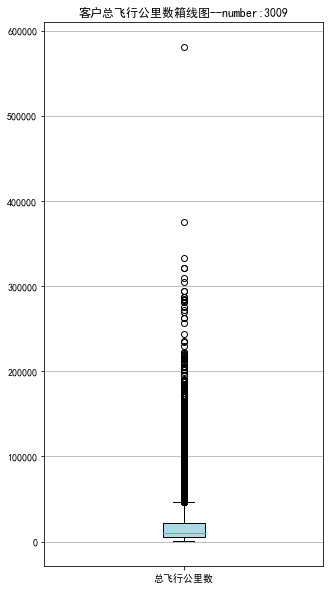
 1 # 绘制客户总飞行公里数箱线图
 2 fig = plt.figure(figsize = (5 ,10))
 3 plt.boxplot(sks,
 4             patch_artist=True,
 5             labels = ['总飞行公里数'],  # 设置x轴标题
 6             boxprops = {'facecolor':'lightblue'})  # 设置填充颜色
 7 plt.title('客户总飞行公里数箱线图--number:3009')
 8 # 显示y坐标轴的底线
 9 plt.grid(axis='y')
10 plt.show()
11 plt.close
![]()
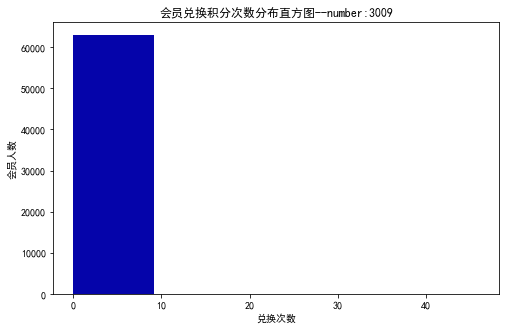
 1 # 积分信息类别
 2 # 提取会员积分兑换次数
 3 ec = data['EXCHANGE_COUNT']
 4 # 绘制会员兑换积分次数直方图
 5 fig = plt.figure(figsize = (8 ,5))  # 设置画布大小
 6 plt.hist(ec, bins=5, color='#0504aa')
 7 plt.xlabel('兑换次数')
 8 plt.ylabel('会员人数')
 9 plt.title('会员兑换积分次数分布直方图--number:3009')
10 plt.show()
11 plt.close
![]()
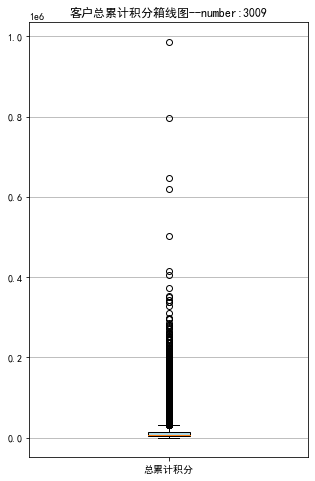
 1 # 提取会员总累计积分
 2 ps = data['Points_Sum']
 3 # 绘制会员总累计积分箱线图
 4 fig = plt.figure(figsize = (5 ,8))
 5 plt.boxplot(ps,
 6             patch_artist=True,
 7             labels = ['总累计积分'],  # 设置x轴标题
 8             boxprops = {'facecolor':'lightblue'})  # 设置填充颜色
 9 plt.title('客户总累计积分箱线图--number:3009')
10 # 显示y坐标轴的底线
11 plt.grid(axis='y')
12 plt.show()
13 plt.close
![]()
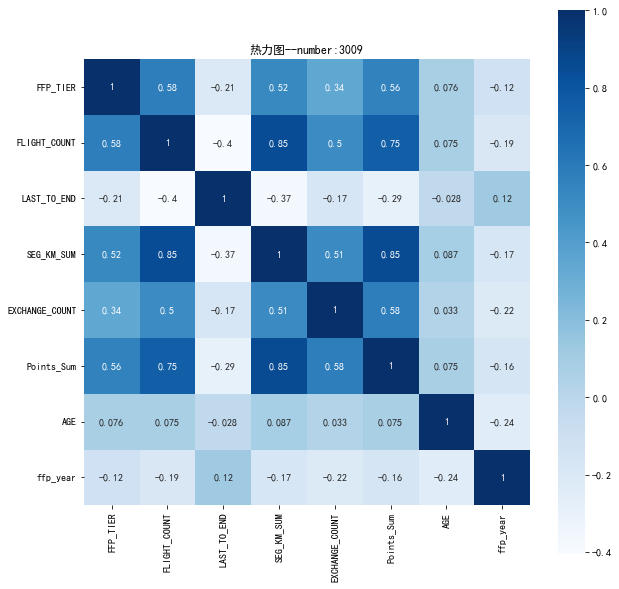
 1 # 提取属性并合并为新数据集
 2 data_corr = data[['FFP_TIER','FLIGHT_COUNT','LAST_TO_END',
 3                   'SEG_KM_SUM','EXCHANGE_COUNT','Points_Sum']]
 4 age1 = data['AGE'].fillna(0)
 5 data_corr['AGE'] = age1.astype('int64')
 6 data_corr['ffp_year'] = ffp_year
 7
 8 # 计算相关性矩阵
 9 dt_corr = data_corr.corr(method = 'pearson')
10 print('相关性矩阵为:\n',dt_corr)
11
12 # 绘制热力图
13 import seaborn as sns
14 plt.subplots(figsize=(10, 10)) # 设置画面大小
15 sns.heatmap(dt_corr, annot=True, vmax=1, square=True, cmap='Blues')
16 plt.title('热力图--number:3009')
17 plt.show()
18 plt.close
![]()
 1 import numpy as np
 2 import pandas as pd
 3
 4 datafile = 'D://CourseAssignment//AI//air_data.csv'  # 航空原始数据路径
 5 cleanedfile = 'D://CourseAssignment//AI//data_cleaned.csv'  # 数据清洗后保存的文件路径
 6
 7 # 读取数据
 8 airline_data = pd.read_csv(datafile,encoding = 'utf-8')
 9 print('原始数据的形状为:',airline_data.shape)
10
11 # 去除票价为空的记录
12 airline_notnull = airline_data.loc[airline_data['SUM_YR_1'].notnull() &
13                                    airline_data['SUM_YR_2'].notnull(),:]
14 print('删除缺失记录后数据的形状为:',airline_notnull.shape)
15
16 # 只保留票价非零的,或者平均折扣率不为0且总飞行公里数大于0的记录。
17 index1 = airline_notnull['SUM_YR_1'] != 0
18 index2 = airline_notnull['SUM_YR_2'] != 0
19 index3 = (airline_notnull['SEG_KM_SUM']> 0) & (airline_notnull['avg_discount'] != 0)
20 index4 = airline_notnull['AGE'] > 100  # 去除年龄大于100的记录
21 airline = airline_notnull[(index1 | index2) & index3 & ~index4]
22 print('数据清洗后数据的形状为:',airline.shape)
23
24 airline.to_csv(cleanedfile)  # 保存清洗后的数据
 1 import pandas as pd
 2 import numpy as np
 3
 4 # 读取数据清洗后的数据
 5 cleanedfile = 'D://CourseAssignment//AI//data_cleaned.csv'  # 数据清洗后保存的文件路径
 6 airline = pd.read_csv(cleanedfile, encoding = 'utf-8')
 7 # 选取需求属性
 8 airline_selection = airline[['FFP_DATE','LOAD_TIME','LAST_TO_END',
 9                                      'FLIGHT_COUNT','SEG_KM_SUM','avg_discount']]
10 print('筛选的属性前5行为:\n',airline_selection.head())
11
12
13
14 # 代码7-8
15
16 # 构造属性L
17 L = pd.to_datetime(airline_selection['LOAD_TIME']) - \
18 pd.to_datetime(airline_selection['FFP_DATE'])
19 L = L.astype('str').str.split().str[0]
20 L = L.astype('int')/30
21
22 # 合并属性
23 airline_features = pd.concat([L,airline_selection.iloc[:,2:]],axis = 1)
24 airline_features.columns = ['L','R','F','M','C']
25 print('构建的LRFMC属性前5行为:\n',airline_features.head())
26
27 # 数据标准化
28 from sklearn.preprocessing import StandardScaler
29 data = StandardScaler().fit_transform(airline_features)
30 np.savez('D://CourseAssignment//AI//airline_scale.npz',data)
31 print('标准化后LRFMC五个属性为:\n',data[:5,:])
 1 import pandas as pd
 2 import numpy as np
 3 from sklearn.cluster import KMeans  # 导入kmeans算法
 4
 5 # 读取标准化后的数据
 6 airline_scale = np.load('D://CourseAssignment//AI//airline_scale.npz')['arr_0']
 7 k = 5  # 确定聚类中心数
 8
 9 # 构建模型,随机种子设为123
10 kmeans_model = KMeans(n_clusters = k,random_state=123)
11 fit_kmeans = kmeans_model.fit(airline_scale)  # 模型训练
12
13 # 查看聚类结果
14 kmeans_cc = kmeans_model.cluster_centers_  # 聚类中心
15 print('各类聚类中心为:\n',kmeans_cc)
16 kmeans_labels = kmeans_model.labels_  # 样本的类别标签
17 print('各样本的类别标签为:\n',kmeans_labels)
18 r1 = pd.Series(kmeans_model.labels_).value_counts()  # 统计不同类别样本的数目
19 print('最终每个类别的数目为:\n',r1)
20 # 输出聚类分群的结果
21 cluster_center = pd.DataFrame(kmeans_model.cluster_centers_,\
22              columns = ['ZL','ZR','ZF','ZM','ZC'])   # 将聚类中心放在数据框中
23 cluster_center.index = pd.DataFrame(kmeans_model.labels_ ).\
24                   drop_duplicates().iloc[:,0]  # 将样本类别作为数据框索引
25 print(cluster_center)
26
27
28 # 代码7-10
29
30 #%matplotlib inline
31 import matplotlib.pyplot as plt
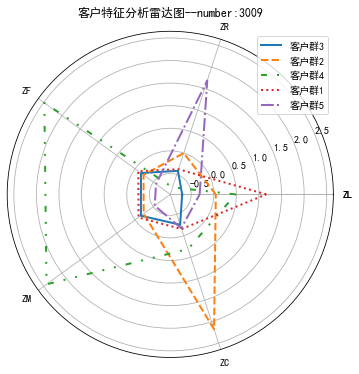
32 # 客户分群雷达图
33 labels = ['ZL','ZR','ZF','ZM','ZC']
34 legen = ['客户群' + str(i + 1) for i in cluster_center.index]  # 客户群命名,作为雷达图的图例
35 lstype = ['-','--',(0, (3, 5, 1, 5, 1, 5)),':','-.']
36 kinds = list(cluster_center.iloc[:, 0])
37 # 由于雷达图要保证数据闭合,因此再添加L列,并转换为 np.ndarray
38 cluster_center = pd.concat([cluster_center, cluster_center[['ZL']]], axis=1)
39 centers = np.array(cluster_center.iloc[:, 0:])
40
41 # 分割圆周长,并让其闭合
42 n = len(labels)
43 angle = np.linspace(0, 2 * np.pi, n, endpoint=False)
44 angle = np.concatenate((angle, [angle[0]]))
45 labels = np.concatenate((labels, [labels[0]]))
46 # 绘图
47 fig = plt.figure(figsize = (8,6))
48 ax = fig.add_subplot(111, polar=True)  # 以极坐标的形式绘制图形
49 plt.rcParams['font.sans-serif'] = ['SimHei']  # 用来正常显示中文标签
50 plt.rcParams['axes.unicode_minus'] = False  # 用来正常显示负号
51 # 画线
52 for i in range(len(kinds)):
53     ax.p
![]()

 浙公网安备 33010602011771号