

Android软件框架的搭建_笔记总录
一、接触到的两种布局
RelativeLayout 绝对布局
LinearLayout 线性布局
目前还未可以说出对这两种布局的感受
但要说出一点的话,就是在这个框架的
搭建中,启动页面的布局中嵌套一个图
标,或者嵌套一个线性布局,这样方便
部分内容居中(基于整个父屏幕)
二、设置进度条显示的颜色【ProgressBar】
5.0 后 Material Design 支持快速修改progressBar颜色
<ProgressBar
    android:id="@+id/pg"
    style="@style/WrapWrap"
    android:layout_centerInParent="true"
    android:indeterminateTintMode="src_atop"
    android:indeterminateTint="@color/colorPrimary"/>
关键在于修改以下两句代码
    android:indeterminateTintMode="src_atop"
    android:indeterminateTint="@color/colorPrimary"
三、启动场景中触击屏幕加载程序主场景_疑难解答
    /*当用户触击屏幕后,启动主场景*/
    @Override
    public boolean onTouchEvent(MotionEvent event) {
        Log.e(TAG,"主场景被第 "+event.getAction()+" 次发射启动");
        /*发射*/
        launcherMainActivity();
        return super.onTouchEvent(event);
    }
用户触击屏幕,导致Activity被启动多次
原因是因为在启动场景Activity的Java类中的onCreate方法中,
创建了一个Handler对象,在启动场景加载了2秒后,也调用了一次定义好的启动程序主场景的函数
所以按照代码的顺序,启动了3次Activity
其中的2次,是触击屏幕的时候,触击的一次,离开屏幕的一次
解决方法1
在程序配置清单文件中,设置程序的主场景Activity为单例模式
        <activity
            android:name=".MainActivity"
            android:launchMode="singleTask"/>
关键在于加入以下的配置参数
android:launchMode="singleTask"
这其实还隐含了一个Bug,当用户触击屏幕进入主场景后,立即点击了返回键/桌面键,这个时候又去到了onCreate方法中
执行了onCreate函数,又再次启动了一次程序主场景
解决方法
使用定义全局的Handler对象,调用onDestroy函数,
使用onDestroy函数中调用全局Handler对象的removeCallbacksAndMessages移除Handler对象
    private Handler splashHandler = new Handler();

    @Override
    protected void onDestroy() {
        super.onDestroy();
        splashHandler.removeCallbacksAndMessages(null);
    }
解决方法2【可选,学会一种就很牛逼了】
从源头上控制
取消MainActivity的单例模式
不设置 android:launchMode=“singleTask”
取消以上这个设置
设置一个布尔类型的全局属性
    /*定义isLaunch属性,判断是否已经启动*/
    private boolean isLaunchMain = false;
判断是否已经启动,取反让程序执行一次
当进入后,就设置为true
下次再进去那就条件不成立了
那就也是实现了同样的效果
    private void launcherMainActivity() {
        if(!isLaunchMain) {
            /*进入后就设置为true,下次if判断条件不成立就不会再次执行到这里*/
            isLaunchMain = true;
            /*创建启动主场景的意图对象*/
            Intent mainPageIntent = new Intent(this, MainActivity.class);
            /*启动*/
            startActivity(mainPageIntent);
            /*关闭当前场景*/
            finish();
        }
    }
四、沉浸式状态栏的实现
自从Android 5.0发行后,沉浸式状态栏笋干兴起,笋干爆炸。
实现步骤:
android系统5.0之前是不可修改状态栏的背景色的,为了兼容之前的版本,需要创建三个资源文件
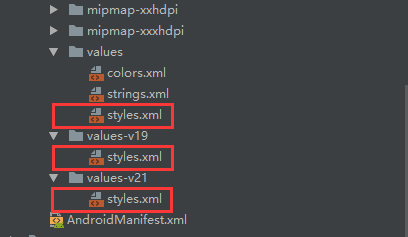
    <!--  沉浸式的实现 -->
    <!--在Android 4.4之前的版本上运行,直接跟随系统主题-->
    <style name="TranslucentTheme" parent="AppTheme" />
<?xml version="1.0" encoding="utf-8"?>
<resources>
    <style name="TranslucentTheme" parent="Theme.AppCompat.Light.NoActionBar">
        //设置为true,意味着xml布局延伸到状态栏
        <item name="android:windowTranslucentStatus">true</item>
        <item name="android:windowTranslucentNavigation">false</item>
    </style>
</resources>
<?xml version="1.0" encoding="utf-8"?>
<resources>

    <style name="TranslucentTheme" parent="Theme.AppCompat.Light.NoActionBar">
        <!--//设置为false,意味着布局不会延伸到状态栏-->
        <item name="android:windowTranslucentStatus">false</item>
        <item name="android:windowTranslucentNavigation">false</item>
        <!--Android 5.x开始需要把颜色设置为程序的主题色白色,否则导航栏会呈现系统默认的浅灰色-->
        <item name="android:statusBarColor">@android:color/white</item>
    </style>

</resources>
创建BaseImmersive类
package com.ljf.atguigu.ui;

import android.annotation.TargetApi;
import android.app.Activity;
import android.graphics.Color;
import android.os.Build;
import android.view.View;
import android.view.Window;
import android.view.WindowManager;

import java.lang.reflect.Field;

public class BaseImmersive {

    private Activity activity;

    public BaseImmersive (Activity content){
        this.activity = content;
    }

    /**
     * 设置状态栏背景颜色
     *
     * 遇到的问题:7.0(含)以上的系统,状态栏修改为透明色无效
     *
     * 解决办法:在Activity的onCreate方法中,调用setContentView()之前需调用以下方法
     */
    public void statusBarColor() {
        if (Build.VERSION.SDK_INT >= Build.VERSION_CODES.N) {
            try {
                Class decorViewClazz = Class.forName("com.android.internal.policy.DecorView");
                Field field = decorViewClazz.getDeclaredField("mSemiTransparentStatusBarColor");
                field.setAccessible(true);
                field.setInt(activity.getWindow().getDecorView(), Color.TRANSPARENT);  //改为透明
            } catch (Exception e) {
            }
        }
    }

    /**
     * 设置字体和图标颜色
     *
     * 修改状态栏中的文字及图标的颜色--android系统6.0以上可修改
     *
     * 在Activity的onCreate方法中加入代码
     */
    public void setStatusBarTextAndIconsColor() {
        /*状态栏中的文字颜色和图标颜色,需要android系统6.0以上,而且目前只有一种可以修改(一种是深色,一种是浅色即白色)*/
        if (android.os.Build.VERSION.SDK_INT >= Build.VERSION_CODES.M) {
            /*修改为深色,因为我们把状态栏的背景色修改为主题色白色,默认的文字及图标颜色为白色,导致看不到了。*/
            activity.getWindow().getDecorView().setSystemUiVisibility(View.SYSTEM_UI_FLAG_LIGHT_STATUS_BAR);
        }
    }

    /**
     * 设置背景颜色和标题栏背景颜色一致
     */
    public void setStatusBarColorIsTitleBarColor(int colorCode) {
        if (Build.VERSION.SDK_INT >= Build.VERSION_CODES.KITKAT) {
            setTranslucentStatus(true);
            SystemBarTintManager tintManager = new SystemBarTintManager(activity);
            tintManager.setStatusBarTintEnabled(true);
            tintManager.setStatusBarTintResource(colorCode);//状态栏所需颜色

        }
    }

    /**
     * 兼容API版本19
     * @param on
     */
    @TargetApi(19)
    private void setTranslucentStatus(boolean on) {
        Window win = activity.getWindow();
        WindowManager.LayoutParams winParams = win.getAttributes();
        final int bits = WindowManager.LayoutParams.FLAG_TRANSLUCENT_STATUS;
        if (on) {
            winParams.flags |= bits;
        } else {
            winParams.flags &= ~bits;
        }
        win.setAttributes(winParams);
    }

}
实现效果 :

但程序主场景设置了引用了标题栏布局资源,背景色是单独的,所以,为了兼容SDK API版本
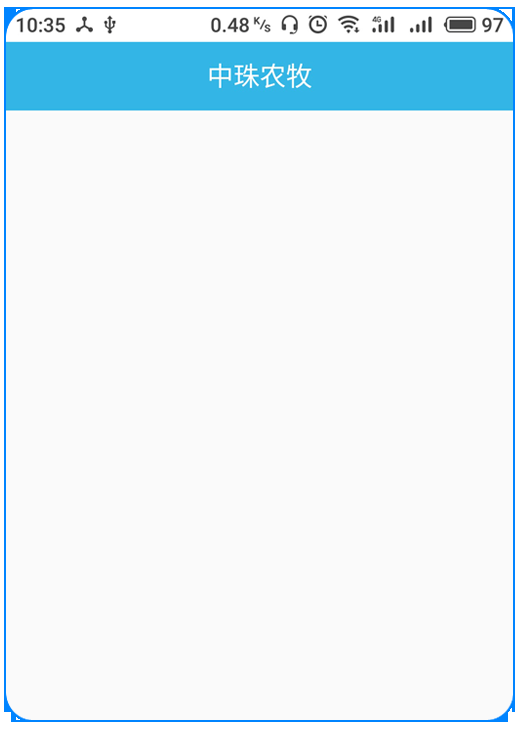
需要一个系统的功能类插件
创建 SystemBarTintManager类,这是系统的。
复制代码到工程中
package com.ljf.atguigu.ui;

import android.annotation.SuppressLint;
import android.annotation.TargetApi;
import android.app.Activity;
import android.content.Context;
import android.content.res.Configuration;
import android.content.res.Resources;
import android.content.res.TypedArray;
import android.graphics.drawable.Drawable;
import android.os.Build;
import android.util.DisplayMetrics;
import android.util.TypedValue;
import android.view.Gravity;
import android.view.View;
import android.view.ViewConfiguration;
import android.view.ViewGroup;
import android.view.Window;
import android.view.WindowManager;
import android.widget.FrameLayout.LayoutParams;

import java.lang.reflect.Method;

/**
 * Class to manage status and navigation bar tint effects when using KitKat
 * translucent system UI modes.
 */
@SuppressWarnings({"rawtypes", "unchecked"})
public class SystemBarTintManager {

    static {
        // Android allows a system property to override the presence of the navigation bar.
        // Used by the emulator.
        // See https://github.com/android/platform_frameworks_base/blob/master/policy/src/com/android/internal/policy/impl/PhoneWindowManager.java#L1076
        if (Build.VERSION.SDK_INT >= Build.VERSION_CODES.KITKAT) {
            try {
                Class c = Class.forName("android.os.SystemProperties");
                Method m = c.getDeclaredMethod("get", String.class);
                m.setAccessible(true);
                sNavBarOverride = (String) m.invoke(null, "qemu.hw.mainkeys");
            } catch (Throwable e) {
                sNavBarOverride = null;
            }
        }
    }


    /**
     * The default system bar tint color value.
     */
    public static final int DEFAULT_TINT_COLOR = 0x99000000;

    private static String sNavBarOverride;

    private final SystemBarConfig mConfig;
    private boolean mStatusBarAvailable;
    private boolean mNavBarAvailable;
    private boolean mStatusBarTintEnabled;
    private boolean mNavBarTintEnabled;
    private View mStatusBarTintView;
    private View mNavBarTintView;

    /**
     * Constructor. Call this in the host activity onCreate method after its
     * content view has been set. You should always create new instances when
     * the host activity is recreated.
     *
     * @param activity The host activity.
     */
    @TargetApi(19)
    public SystemBarTintManager(Activity activity) {

        Window win = activity.getWindow();
        ViewGroup decorViewGroup = (ViewGroup) win.getDecorView();

        if (Build.VERSION.SDK_INT >= Build.VERSION_CODES.KITKAT) {
            // check theme attrs
            int[] attrs = {android.R.attr.windowTranslucentStatus,
                    android.R.attr.windowTranslucentNavigation};
            TypedArray a = activity.obtainStyledAttributes(attrs);
            try {
                mStatusBarAvailable = a.getBoolean(0, false);
                mNavBarAvailable = a.getBoolean(1, false);
            } finally {
                a.recycle();
            }

            // check window flags
            WindowManager.LayoutParams winParams = win.getAttributes();
            int bits = WindowManager.LayoutParams.FLAG_TRANSLUCENT_STATUS;
            if ((winParams.flags & bits) != 0) {
                mStatusBarAvailable = true;
            }
            bits = WindowManager.LayoutParams.FLAG_TRANSLUCENT_NAVIGATION;
            if ((winParams.flags & bits) != 0) {
                mNavBarAvailable = true;
            }
        }

        mConfig = new SystemBarConfig(activity, mStatusBarAvailable, mNavBarAvailable);
        // device might not have virtual navigation keys
        if (!mConfig.hasNavigtionBar()) {
            mNavBarAvailable = false;
        }

        if (mStatusBarAvailable) {
            setupStatusBarView(activity, decorViewGroup);
        }
        if (mNavBarAvailable) {
            setupNavBarView(activity, decorViewGroup);
        }

    }

    /**
     * Enable tinting of the system status bar.
     * <p/>
     * If the platform is running Jelly Bean or earlier, or translucent system
     * UI modes have not been enabled in either the theme or via window flags,
     * then this method does nothing.
     *
     * @param enabled True to enable tinting, false to disable it (default).
     */
    public void setStatusBarTintEnabled(boolean enabled) {
        mStatusBarTintEnabled = enabled;
        if (mStatusBarAvailable) {
            mStatusBarTintView.setVisibility(enabled ? View.VISIBLE : View.GONE);
        }
    }

    /**
     * Enable tinting of the system navigation bar.
     * <p/>
     * If the platform does not have soft navigation keys, is running Jelly Bean
     * or earlier, or translucent system UI modes have not been enabled in either
     * the theme or via window flags, then this method does nothing.
     *
     * @param enabled True to enable tinting, false to disable it (default).
     */
    public void setNavigationBarTintEnabled(boolean enabled) {
        mNavBarTintEnabled = enabled;
        if (mNavBarAvailable) {
            mNavBarTintView.setVisibility(enabled ? View.VISIBLE : View.GONE);
        }
    }

    /**
     * Apply the specified color tint to all system UI bars.
     *
     * @param color The color of the background tint.
     */
    public void setTintColor(int color) {
        setStatusBarTintColor(color);
        setNavigationBarTintColor(color);
    }

    /**
     * Apply the specified drawable or color resource to all system UI bars.
     *
     * @param res The identifier of the resource.
     */
    public void setTintResource(int res) {
        setStatusBarTintResource(res);
        setNavigationBarTintResource(res);
    }

    /**
     * Apply the specified drawable to all system UI bars.
     *
     * @param drawable The drawable to use as the background, or null to remove it.
     */
    public void setTintDrawable(Drawable drawable) {
        setStatusBarTintDrawable(drawable);
        setNavigationBarTintDrawable(drawable);
    }

    /**
     * Apply the specified alpha to all system UI bars.
     *
     * @param alpha The alpha to use
     */
    public void setTintAlpha(float alpha) {
        setStatusBarAlpha(alpha);
        setNavigationBarAlpha(alpha);
    }

    /**
     * Apply the specified color tint to the system status bar.
     *
     * @param color The color of the background tint.
     */
    public void setStatusBarTintColor(int color) {
        if (mStatusBarAvailable) {
            mStatusBarTintView.setBackgroundColor(color);
        }
    }

    /**
     * Apply the specified drawable or color resource to the system status bar.
     *
     * @param res The identifier of the resource.
     */
    public void setStatusBarTintResource(int res) {
        if (mStatusBarAvailable) {
            mStatusBarTintView.setBackgroundResource(res);
        }
    }

    /**
     * Apply the specified drawable to the system status bar.
     *
     * @param drawable The drawable to use as the background, or null to remove it.
     */
    @SuppressWarnings("deprecation")
    public void setStatusBarTintDrawable(Drawable drawable) {
        if (mStatusBarAvailable) {
            mStatusBarTintView.setBackgroundDrawable(drawable);
        }
    }

    /**
     * Apply the specified alpha to the system status bar.
     *
     * @param alpha The alpha to use
     */
    @TargetApi(11)
    public void setStatusBarAlpha(float alpha) {
        if (mStatusBarAvailable && Build.VERSION.SDK_INT >= Build.VERSION_CODES.HONEYCOMB) {
            mStatusBarTintView.setAlpha(alpha);
        }
    }

    /**
     * Apply the specified color tint to the system navigation bar.
     *
     * @param color The color of the background tint.
     */
    public void setNavigationBarTintColor(int color) {
        if (mNavBarAvailable) {
            mNavBarTintView.setBackgroundColor(color);
        }
    }

    /**
     * Apply the specified drawable or color resource to the system navigation bar.
     *
     * @param res The identifier of the resource.
     */
    public void setNavigationBarTintResource(int res) {
        if (mNavBarAvailable) {
            mNavBarTintView.setBackgroundResource(res);
        }
    }

    /**
     * Apply the specified drawable to the system navigation bar.
     *
     * @param drawable The drawable to use as the background, or null to remove it.
     */
    @SuppressWarnings("deprecation")
    public void setNavigationBarTintDrawable(Drawable drawable) {
        if (mNavBarAvailable) {
            mNavBarTintView.setBackgroundDrawable(drawable);
        }
    }

    /**
     * Apply the specified alpha to the system navigation bar.
     *
     * @param alpha The alpha to use
     */
    @TargetApi(11)
    public void setNavigationBarAlpha(float alpha) {
        if (mNavBarAvailable && Build.VERSION.SDK_INT >= Build.VERSION_CODES.HONEYCOMB) {
            mNavBarTintView.setAlpha(alpha);
        }
    }

    /**
     * Get the system bar configuration.
     *
     * @return The system bar configuration for the current device configuration.
     */
    public SystemBarConfig getConfig() {
        return mConfig;
    }

    /**
     * Is tinting enabled for the system status bar?
     *
     * @return True if enabled, False otherwise.
     */
    public boolean isStatusBarTintEnabled() {
        return mStatusBarTintEnabled;
    }

    /**
     * Is tinting enabled for the system navigation bar?
     *
     * @return True if enabled, False otherwise.
     */
    public boolean isNavBarTintEnabled() {
        return mNavBarTintEnabled;
    }

    private void setupStatusBarView(Context context, ViewGroup decorViewGroup) {
        mStatusBarTintView = new View(context);
        LayoutParams params = new LayoutParams(LayoutParams.MATCH_PARENT, mConfig.getStatusBarHeight());
        params.gravity = Gravity.TOP;
        if (mNavBarAvailable && !mConfig.isNavigationAtBottom()) {
            params.rightMargin = mConfig.getNavigationBarWidth();
        }
        mStatusBarTintView.setLayoutParams(params);
        mStatusBarTintView.setBackgroundColor(DEFAULT_TINT_COLOR);
        mStatusBarTintView.setVisibility(View.GONE);
        decorViewGroup.addView(mStatusBarTintView);
    }

    private void setupNavBarView(Context context, ViewGroup decorViewGroup) {
        mNavBarTintView = new View(context);
        LayoutParams params;
        if (mConfig.isNavigationAtBottom()) {
            params = new LayoutParams(LayoutParams.MATCH_PARENT, mConfig.getNavigationBarHeight());
            params.gravity = Gravity.BOTTOM;
        } else {
            params = new LayoutParams(mConfig.getNavigationBarWidth(), LayoutParams.MATCH_PARENT);
            params.gravity = Gravity.RIGHT;
        }
        mNavBarTintView.setLayoutParams(params);
        mNavBarTintView.setBackgroundColor(DEFAULT_TINT_COLOR);
        mNavBarTintView.setVisibility(View.GONE);
        decorViewGroup.addView(mNavBarTintView);
    }

    /**
     * Class which describes system bar sizing and other characteristics for the current
     * device configuration.
     */
    public static class SystemBarConfig {

        private static final String STATUS_BAR_HEIGHT_RES_NAME = "status_bar_height";
        private static final String NAV_BAR_HEIGHT_RES_NAME = "navigation_bar_height";
        private static final String NAV_BAR_HEIGHT_LANDSCAPE_RES_NAME = "navigation_bar_height_landscape";
        private static final String NAV_BAR_WIDTH_RES_NAME = "navigation_bar_width";
        private static final String SHOW_NAV_BAR_RES_NAME = "config_showNavigationBar";

        private final boolean mTranslucentStatusBar;
        private final boolean mTranslucentNavBar;
        private final int mStatusBarHeight;
        private final int mActionBarHeight;
        private final boolean mHasNavigationBar;
        private final int mNavigationBarHeight;
        private final int mNavigationBarWidth;
        private final boolean mInPortrait;
        private final float mSmallestWidthDp;

        private SystemBarConfig(Activity activity, boolean translucentStatusBar, boolean traslucentNavBar) {
            Resources res = activity.getResources();
            mInPortrait = (res.getConfiguration().orientation == Configuration.ORIENTATION_PORTRAIT);
            mSmallestWidthDp = getSmallestWidthDp(activity);
            mStatusBarHeight = getInternalDimensionSize(res, STATUS_BAR_HEIGHT_RES_NAME);
            mActionBarHeight = getActionBarHeight(activity);
            mNavigationBarHeight = getNavigationBarHeight(activity);
            mNavigationBarWidth = getNavigationBarWidth(activity);
            mHasNavigationBar = (mNavigationBarHeight > 0);
            mTranslucentStatusBar = translucentStatusBar;
            mTranslucentNavBar = traslucentNavBar;
        }

        @TargetApi(14)
        private int getActionBarHeight(Context context) {
            int result = 0;
            if (Build.VERSION.SDK_INT >= Build.VERSION_CODES.ICE_CREAM_SANDWICH) {
                TypedValue tv = new TypedValue();
                context.getTheme().resolveAttribute(android.R.attr.actionBarSize, tv, true);
                result = TypedValue.complexToDimensionPixelSize(tv.data, context.getResources().getDisplayMetrics());
            }
            return result;
        }

        @TargetApi(14)
        private int getNavigationBarHeight(Context context) {
            Resources res = context.getResources();
            int result = 0;
            if (Build.VERSION.SDK_INT >= Build.VERSION_CODES.ICE_CREAM_SANDWICH) {
                if (hasNavBar(context)) {
                    String key;
                    if (mInPortrait) {
                        key = NAV_BAR_HEIGHT_RES_NAME;
                    } else {
                        key = NAV_BAR_HEIGHT_LANDSCAPE_RES_NAME;
                    }
                    return getInternalDimensionSize(res, key);
                }
            }
            return result;
        }

        @TargetApi(14)
        private int getNavigationBarWidth(Context context) {
            Resources res = context.getResources();
            int result = 0;
            if (Build.VERSION.SDK_INT >= Build.VERSION_CODES.ICE_CREAM_SANDWICH) {
                if (hasNavBar(context)) {
                    return getInternalDimensionSize(res, NAV_BAR_WIDTH_RES_NAME);
                }
            }
            return result;
        }

        @TargetApi(14)
        private boolean hasNavBar(Context context) {
            Resources res = context.getResources();
            int resourceId = res.getIdentifier(SHOW_NAV_BAR_RES_NAME, "bool", "android");
            if (resourceId != 0) {
                boolean hasNav = res.getBoolean(resourceId);
                // check override flag (see static block)
                if ("1".equals(sNavBarOverride)) {
                    hasNav = false;
                } else if ("0".equals(sNavBarOverride)) {
                    hasNav = true;
                }
                return hasNav;
            } else { // fallback
                return !ViewConfiguration.get(context).hasPermanentMenuKey();
            }
        }

        private int getInternalDimensionSize(Resources res, String key) {
            int result = 0;
            int resourceId = res.getIdentifier(key, "dimen", "android");
            if (resourceId > 0) {
                result = res.getDimensionPixelSize(resourceId);
            }
            return result;
        }

        @SuppressLint("NewApi")
        private float getSmallestWidthDp(Activity activity) {
            DisplayMetrics metrics = new DisplayMetrics();
            if (Build.VERSION.SDK_INT >= Build.VERSION_CODES.JELLY_BEAN) {
                activity.getWindowManager().getDefaultDisplay().getRealMetrics(metrics);
            } else {
                // TODO this is not correct, but we don't really care pre-kitkat
                activity.getWindowManager().getDefaultDisplay().getMetrics(metrics);
            }
            float widthDp = metrics.widthPixels / metrics.density;
            float heightDp = metrics.heightPixels / metrics.density;
            return Math.min(widthDp, heightDp);
        }

        /**
         * Should a navigation bar appear at the bottom of the screen in the current
         * device configuration? A navigation bar may appear on the right side of
         * the screen in certain configurations.
         *
         * @return True if navigation should appear at the bottom of the screen, False otherwise.
         */
        public boolean isNavigationAtBottom() {
            return (mSmallestWidthDp >= 600 || mInPortrait);
        }

        /**
         * Get the height of the system status bar.
         *
         * @return The height of the status bar (in pixels).
         */
        public int getStatusBarHeight() {
            return mStatusBarHeight;
        }

        /**
         * Get the height of the action bar.
         *
         * @return The height of the action bar (in pixels).
         */
        public int getActionBarHeight() {
            return mActionBarHeight;
        }

        /**
         * Does this device have a system navigation bar?
         *
         * @return True if this device uses soft key navigation, False otherwise.
         */
        public boolean hasNavigtionBar() {
            return mHasNavigationBar;
        }

        /**
         * Get the height of the system navigation bar.
         *
         * @return The height of the navigation bar (in pixels). If the device does not have
         * soft navigation keys, this will always return 0.
         */
        public int getNavigationBarHeight() {
            return mNavigationBarHeight;
        }

        /**
         * Get the width of the system navigation bar when it is placed vertically on the screen.
         *
         * @return The nbsp;width of the navigation bar (in pixels). If the device does not have
         * soft navigation keys, this will always return 0.
         */
        public int getNavigationBarWidth() {
            return mNavigationBarWidth;
        }

        /**
         * Get the layout inset for any system UI that appears at the top of the screen.
         *
         * @param withActionBar True to include the height of the action bar, False otherwise.
         * @return The layout inset (in pixels).
         */
        public int getPixelInsetTop(boolean withActionBar) {
            return (mTranslucentStatusBar ? mStatusBarHeight : 0) + (withActionBar ? mActionBarHeight : 0);
        }

        /**
         * Get the layout inset for any system UI that appears at the bottom of the screen.
         *
         * @return The layout inset (in pixels).
         */
        public int getPixelInsetBottom() {
            if (mTranslucentNavBar && isNavigationAtBottom()) {
                return mNavigationBarHeight;
            } else {
                return 0;
            }
        }

        /**
         * Get the layout inset for any system UI that appears at the right of the screen.
         *
         * @return The layout inset (in pixels).
         */
        public int getPixelInsetRight() {
            if (mTranslucentNavBar && !isNavigationAtBottom()) {
                return mNavigationBarWidth;
            } else {
                return 0;
            }
        }

    }

}
/*在键值对资源中,定义mainPageStatusBarColor*/
<color name="mainPageStatusBarColor">@android:color/holo_blue_light</color>
调用函数
baseImmersive.setStatusBarColorIsTitleBarColor(R.color.mainPageStatusBarColor);
因为布局的原因,重叠了,代码设置
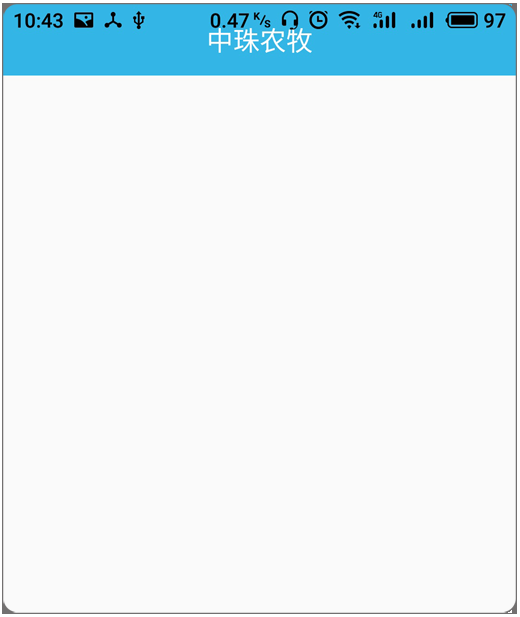
在布局资源的根节点
<LinearLayout
    xmlns:android="http://schemas.android.com/apk/res/android"
    android:orientation="vertical"
    android:layout_width="match_parent"
    android:layout_height="match_parent"
    android:fitsSystemWindows="true">
关键设置
android:fitsSystemWindows="true"
这样,就大功告成了。
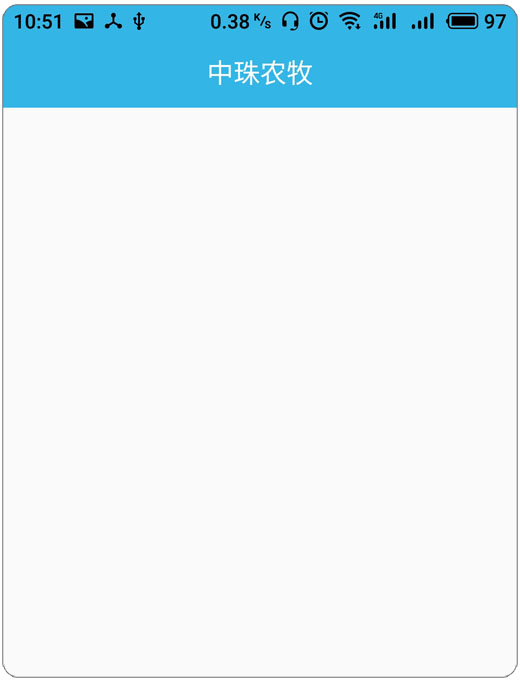
接下来,开始实现布局
大致记录最关键的
五、框架的实现_重点笔记
· 主页面底部按钮RadioGroup -> RadioButton
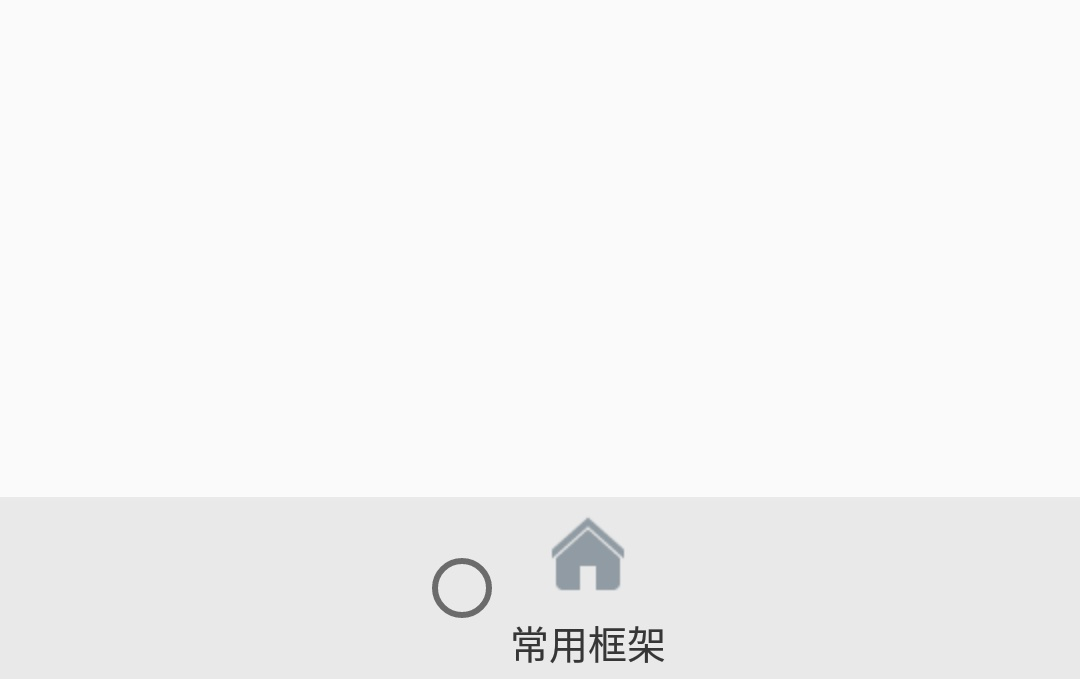
虽然设置了那个安卓原生的按钮,效果为NULL
android:button="null"
当按下按钮,还是会有一层触击效果的,这是安卓原生自带
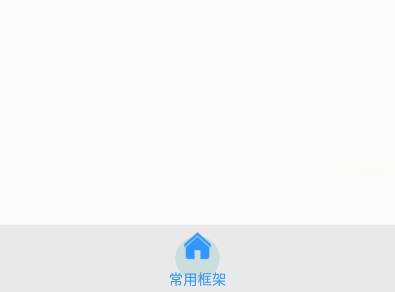
解决方法
设置background的值为NULL
就搞定了,【注意,当把这些可重复利用的样式放到键值对资源后,需要给null值加上@符号,否则程序会报异常】
android:background="null"
设置好,就可以看到,按钮按下就不会有那层圆圈形状的效果层出现
· 处理横竖屏切换导致页面被再次初始化的问题
在程序清单文件中,设置改变时不再次初始化帧布局子页面
        <activity
            android:name=".MainActivity"
            android:configChanges="orientation|keyboard|screenSize"/>
关键为以下这句配置
core -> android:configChanges="orientation|keyboard|screenSize"

@orientation   屏幕方向
@keyboard      键盘弹出收起
@screenSize    屏幕大小改变
· 处理已经显示过的场景再次被切换并再次被初始化的问题
代码
    /*记录备切换掉的Fragment 全局属性 */
    private Fragment mContent;

    private void switchFragment(Fragment from,Fragment to) {
        /*开启一个帧布局场景管理者的事务*/
        FragmentTransaction ft = getSupportFragmentManager().beginTransaction();

        /*如果两者不是同一个*/
        if(from != to){
            mContent = to;/*记录被切换到的*/
            /*才切换*/
            /*判断to是否被添加 第一次返回的是false,把它作为条件取反,让条件成立,
            再次来到这,就是true取反,就不会被再次创建*/
            if(!to.isAdded()){
                /* 首次from、to可能是空指针,需要判空 */
                /*隐藏from*/
                if(from != null) ft.hide(from);
                /*添加to*/
                if(to != null) ft.add(R.id.fl_main_content,to).commit();
            }else {
                /* 首次from、to可能是空指针,需要判空 */
                /*已经被添加*/
                /*隐藏from*/
                if(from != null) ft.hide(from);
                /*显示to*/
                if(to != null) ft.show(to).commit();
            }
        }
    }
六、使用 ListView 来呈现常用框架的名称

 浙公网安备 33010602011771号